






Hey there 👋
Your Taskade Genesis apps aren't just interfaces. They're powered by intelligent automation.
Build complex workflows with branching, looping, and filtering—then watch them power dashboards, forms, and tools in your Taskade Genesis apps.
TL;DR: Taskade Genesis apps now support advanced automations with branching, looping, and filtering — connected to 100+ integrations. Power dashboards, forms, and tools with intelligent workflows that run automatically. Try it free →
Automation powers apps. Apps showcase automation. Everything works together.
🎯 How Advanced Automation Powers Genesis Apps
Automation doesn't just run in the background. It powers your Taskade Genesis apps.
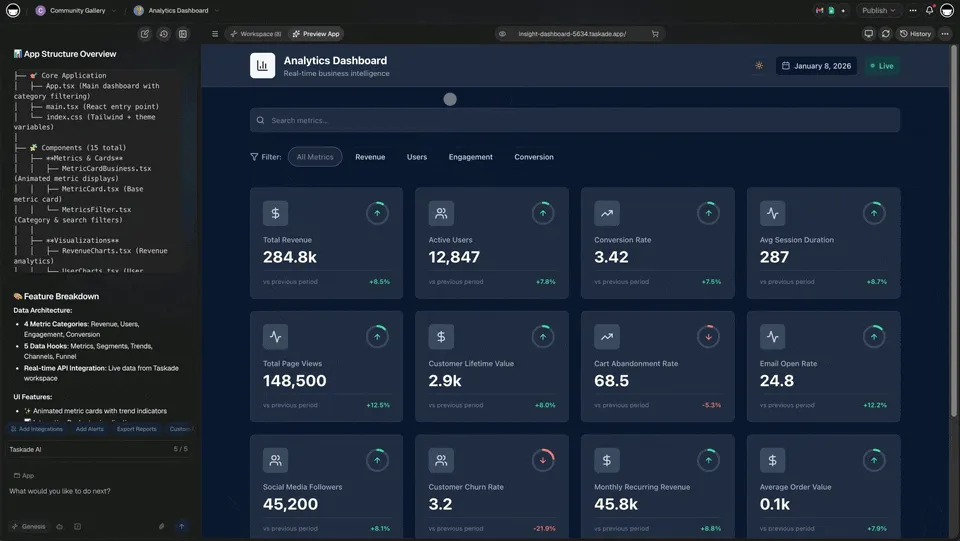
Every dashboard, form, and tool in your Taskade Genesis app can be powered by advanced automation workflows. When you build branching, looping, and filtering workflows, they connect directly to your app's data, updating dashboards in real-time, processing forms intelligently, and powering tools automatically.
The Connection:
- Dashboards → Powered by automation workflows → Update automatically as workflows run
- Forms → Processed by automation workflows → Data flows to dashboards and tools
- Tools → Driven by automation workflows → Handle complex operations automatically
- Genesis Apps → Show automation in action → Real-time updates, intelligent processing
🌟 Example: Build CRM dashboard Genesis app → Add lead qualification automation with branching → Connect to app data → Watch dashboard update automatically as leads are qualified → See different dashboard sections update based on lead source → Complete system powered by automation.
👉 See It Work: Build Genesis app → Add advanced automation → Connect to app → App shows automation in action
🔀 Branching Workflows: Power Dynamic Dashboards & Tools
Route workflows based on conditions. Power dynamic dashboards and tools in your Taskade Genesis apps with intelligent decision-making. Learn more about setting up triggers for your workflows.
What You Can Do:
- Power Dashboards — Branch data flows to update different dashboard sections
- Dynamic Tools — Route user actions to different workflows based on conditions
- Smart Forms — Process form submissions differently based on input
- Conditional UI Updates — Update app interfaces based on workflow results
How It Powers Genesis Apps:
- Dashboard Routing — Branch data to different dashboard views
- Form Processing — Route form submissions to different workflows
- Tool Actions — Branch user actions to appropriate automations
- Real-Time Updates — Update app UI based on workflow branches
🌟 Example: User submits form in Genesis app → Branch checks form type → If "Support" → Create support ticket → Update support dashboard → If "Sales" → Create lead → Update CRM dashboard → Different paths, one app.
Real-World Genesis App Examples:
- CRM Dashboard — Branch leads by source → Update different dashboard sections → Show relevant metrics
- Support Portal — Branch tickets by priority → Route to different queues → Update portal status
- E-Commerce App — Branch orders by type → Process differently → Update inventory dashboard
- Content Manager — Branch content by category → Route to different workflows → Update content dashboard
👉 How to use: Build Genesis app → Add Branch automation → Connect to app data → Watch dashboard update dynamically
🔄 Looping Workflows: Power Bulk Operations in Apps
Process multiple items automatically. Power bulk operations, batch processing, and list management in your Taskade Genesis apps. Combine loops with AI agents for intelligent data processing at scale.
What You Can Do:
- Bulk Dashboard Updates — Loop through data to update dashboard metrics
- Batch Form Processing — Process multiple form submissions automatically
- List Management Tools — Loop through lists to update app data
- Bulk Actions — Perform actions on multiple items in your app
How It Powers Genesis Apps:
- Dashboard Aggregation — Loop through data to calculate dashboard metrics
- Bulk Form Processing — Process multiple form submissions in one workflow
- List Tools — Loop through app data to perform bulk operations
- Real-Time Sync — Loop through changes to sync app data
🌟 Example: Genesis app receives bulk form submissions → Loop through each submission → Process individually → Update dashboard → Send notifications → All submissions handled automatically.
Real-World Genesis App Examples:
- Analytics Dashboard — Loop through events → Calculate metrics → Update dashboard charts
- Bulk Import Tool — Loop through imported data → Validate each row → Update app database → Show progress
- Customer Portal — Loop through customer orders → Generate invoices → Update portal → Send notifications
- Content Manager — Loop through content items → Process each → Update content dashboard → Publish automatically
👉 How to use: Build Genesis app → Add Loop automation → Connect to app data → Watch bulk operations process automatically
🔍 Filtering Workflows: Power Smart Dashboards & Views
Filter data before processing. Power smart dashboards, filtered views, and intelligent data displays in your Taskade Genesis apps. Use filters with projects to show only the data that matters.
What You Can Do:
- Dashboard Filtering — Filter data to show only relevant metrics
- Smart Views — Create filtered views in your app
- Data Validation — Filter invalid data before processing
- Efficient Processing — Only process items that meet criteria
How It Powers Genesis Apps:
- Filtered Dashboards — Show only relevant data in dashboard views
- Smart Tables — Filter table data based on conditions
- Data Validation — Filter invalid submissions before processing
- Performance Optimization — Skip unnecessary data processing
🌟 Example: Genesis app dashboard → Filter data by date range → Filter by status → Show only active items → Update dashboard → Skip irrelevant data.
Real-World Genesis App Examples:
- CRM Dashboard — Filter leads by status → Show only qualified leads → Update dashboard metrics
- Analytics Tool — Filter events by type → Calculate relevant metrics → Update charts
- Content Manager — Filter content by category → Show only published items → Update content dashboard
- Support Portal — Filter tickets by priority → Show only open tickets → Update portal status
👉 How to use: Build Genesis app → Add Filter automation → Connect to app data → Watch dashboard show filtered results
🎯 Combining All Three: Power Complete Genesis App Systems
Combine branching, looping, and filtering to power complete business systems in your Taskade Genesis apps. Explore real examples in the Community Gallery.
Complete Genesis App Example:
CRM Dashboard App Powered by Advanced Automation:
- Genesis App — CRM Dashboard with forms and data tables
- Trigger — New lead submits form in Genesis app
- Branch — Check lead source
- Path A: If "Website" → Route to marketing team → Update marketing dashboard section
- Path B: If "Referral" → Route to sales team → Update sales dashboard section
- Filter — Filter qualified leads (company size > 50 employees)
- Loop — Process each qualified lead
- Create CRM record → Update app database
- Send personalized email
- Schedule follow-up task → Show in app task list
- Notify team via Slack
- Update dashboard metrics
- Branch — Check lead score
- Path A: If score > 80 → Assign to senior sales rep → Update dashboard
- Path B: If score < 80 → Assign to junior sales rep → Update dashboard
🌟 Result: One Genesis app powered by advanced automation handles lead qualification, routing, processing, assignment, and dashboard updates automatically.
How It Powers Genesis Apps:
- Complete Systems — Apps handle entire business processes
- Real-Time Updates — Dashboards update as workflows run
- Intelligent Processing — Apps make decisions based on data
- Scalable Solutions — Handle any volume of data automatically
👉 Build Complete Apps: Create Genesis app → Add Branch + Loop + Filter automations → Connect to app → Watch complete system work automatically
💼 Real-World Genesis App Scenarios
Scenario 1: Customer Support Portal App
Genesis App: Support portal with ticket forms and dashboard
Automation Powering App:
- User submits ticket in Genesis app → Branch checks priority
- High priority → Create urgent task → Update dashboard → Notify team
- Low priority → Add to queue → Update dashboard → Auto-respond
- Loop through attachments → Process each file → Update ticket in app
- Filter resolved tickets → Archive automatically → Update dashboard
Result: Support portal app powered by automation handles tickets, updates dashboard, and routes intelligently.
Scenario 2: E-Commerce Store App
Genesis App: Store dashboard with order forms and inventory tools
Automation Powering App:
- Order received in Genesis app → Branch checks order type
- Digital products → Send download link → Update inventory dashboard → Process automatically
- Physical products → Filter by warehouse → Loop through items → Create shipping labels → Update dashboard
- Branch checks payment → If paid → Process order → Update dashboard → If pending → Send reminder
Result: E-commerce app powered by automation processes orders, updates inventory dashboard, and handles fulfillment.
Scenario 3: Content Marketing Dashboard App
Genesis App: Content dashboard with publishing tools and analytics
Automation Powering App:
- New blog post published → Filter by category → Update dashboard
- Loop through social platforms → Post to each → Update publishing dashboard
- Branch checks engagement → High engagement → Boost post → Update analytics dashboard → Low engagement → Try different time
- Filter top-performing content → Add to newsletter → Update content dashboard
Result: Content dashboard app powered by automation distributes content, tracks engagement, and updates analytics automatically.
🚀 Getting Started with Advanced Automation
Step 1: Start Simple
- Begin with basic branching (if/then)
- Add one condition at a time
- Test each branch path
Step 2: Add Looping
- Start with small lists
- Test with 2-3 items first
- Gradually increase complexity
Step 3: Add Filtering
- Filter before processing
- Reduce unnecessary work
- Improve efficiency
Step 4: Combine All Three
- Build complex workflows
- Handle real business scenarios
- Automate entire processes
🌟 Pro Tip: Start with one advanced feature, master it, then add more. Complex workflows are built step by step.
👉 Start Building: Open automation editor → Add Branch/Loop/Filter → Build your first advanced workflow
🔗 Power Genesis Apps with 100+ Integrations
Advanced automation connects your Taskade Genesis apps to 100+ tools, powering dashboards, forms, and tools with real-time data.
How Integrations Power Genesis Apps:
- Slack — Branch notifications by channel → Update app dashboard → Show team activity
- Gmail — Loop through emails → Filter by sender → Update app inbox → Show relevant messages
- Google Sheets — Filter rows → Loop through data → Branch based on values → Update app tables
- Stripe — Branch by payment status → Loop through transactions → Filter by amount → Update payment dashboard
- GitHub — Filter pull requests → Loop through issues → Branch by status → Update dev dashboard
🌟 Example: Build payment dashboard Genesis app → Connect Stripe automation → Branch by payment status → Loop through transactions → Filter by amount → Dashboard updates automatically with real payment data.
Genesis App Integration Flow:
- Build Genesis app (dashboard, form, tool)
- Create automation with integrations
- Connect automation to app data
- Watch app update in real-time as automation runs
👉 Explore Integrations: View 100+ Integrations → Connect to your Genesis apps
📊 How Advanced Automation Powers Genesis Apps
For Genesis App Builders:
- Power dashboards with intelligent workflows — see how to build dashboards
- Build tools that process data automatically
- Create apps that make decisions intelligently with AI agents
- Handle complex business logic in apps
For Operators:
- Apps that automate entire processes
- Dashboards that update automatically
- Tools that process data without manual work
- Systems that scale operations efficiently
For Businesses:
- Apps that improve efficiency automatically
- Dashboards that reduce errors
- Tools that handle volume automatically
- Systems that process consistently
ROI Impact:
- Time Savings — Apps automate hours of manual work
- Error Reduction — Apps eliminate human errors
- Scalability — Apps handle any volume automatically
- Consistency — Apps process everything the same way
- Real-Time Updates — Dashboards update as workflows run
- Intelligent Processing — Apps make decisions automatically
🧩 Other Improvements
Advanced Features:
- Conditional Expressions — Text comparison, empty checks, logical operators
- Variable Access — Access trigger data, previous actions, loop items
- Dynamic Values — Use Liquid expressions for dynamic data
- Error Handling — Workflows continue even if one item fails
Genesis App Integration:
- Advanced automation powers all Taskade Genesis apps
- Dashboards update automatically as workflows run
- Forms process data intelligently — see projects as databases
- Tools handle complex operations with built-in agent tools
- Everything connects seamlessly across your workspace
🚀 Join the Community
Great things are built together. Your ideas, feedback, and creations shape the future of Taskade Genesis. Connect, learn, and build with us:
Feedback | Reddit | Facebook Group | Updates | Tutorials | Docs | Community
Automation That Powers Apps
Before: Static apps. Manual updates. Disconnected workflows.
Now: Living apps. Automated workflows. Intelligent processing.
Branching. Looping. Filtering.
Your apps come alive.
Start building and exploring now
This is the origin of living software 🌱
— John Xie, Co-founder & CEO, Taskade
Frequently Asked Questions
What are advanced automation workflows in Taskade?
Advanced automation workflows in Taskade support branching (conditional routing based on data), looping (repeating actions for collections), and filtering (processing only matching items). These workflows power Genesis apps by automatically updating dashboards, processing form submissions, and driving tools in real-time.
How do automations connect to Genesis apps?
Automations connect directly to your Genesis app data. Dashboards update automatically as workflows run, forms are processed intelligently through branching logic, and tools handle complex operations without manual intervention. The automation powers the app; the app showcases the automation.
What is durable execution in Taskade automations?
Taskade automations use a durable execution engine, which means workflows survive failures and resume automatically. If a step fails, the system retries intelligently rather than losing progress. This ensures reliable workflow execution for business-critical processes.
Can I build automations without coding?
Yes. Taskade automations are configured through a visual interface or described in natural language. You set triggers, conditions, and actions without writing code. The system supports 100+ integrations including Slack, Gmail, Google Sheets, Stripe, and more.