






Introduction
WordPress began on May 27, 2003, when two users of an abandoned blogging platform decided to fork its codebase and build something better. Matt Mullenweg, a 19-year-old college student, and Mike Little, a UK-based developer, took the dormant b2/cafelog software and transformed it into what would become the internet's most dominant content management system. Today, WordPress powers 43% of all websites on the internet—from personal blogs to Fortune 500 corporate sites—and commands 62.4% of the entire CMS market. What started as a simple blogging tool has evolved into a comprehensive platform supporting e-commerce (WooCommerce powers 28% of online stores), membership sites, forums, portfolios, and virtually any type of website imaginable. With the Gutenberg block editor revolutionizing content creation and AI capabilities emerging in 2026, WordPress continues to define how the world publishes to the web. This article explores the complete history of WordPress, from its humble b2/cafelog origins to becoming the operating system for the open web.
🌐 What Is WordPress?
WordPress is a free, open-source content management system (CMS) that enables users to create, manage, and publish websites without needing to code. Written in PHP and paired with a MySQL or MariaDB database, WordPress provides a user-friendly interface for creating pages, blog posts, managing media, and customizing site design through themes and plugins.
The platform exists in two distinct forms:
- WordPress.org: The open-source software you download and self-host (often called "self-hosted WordPress")
- WordPress.com: A commercial hosting service operated by Automattic that uses WordPress software
Key achievements that define WordPress:
- 43% of all websites on the internet run on WordPress as of 2026
- 62.4% CMS market share, nearly 10x the share of its closest competitor
- 60+ million websites using WordPress actively (excluding abandoned installations)
- $710 million revenue for Automattic (2024), the company behind WordPress.com
- WooCommerce powers 28% of all online stores globally
- 59,000+ free plugins in the WordPress.org plugin directory
- 11,000+ free themes available for customization
- 40+ languages with full WordPress localization
- 44% of the top 10,000 websites use WordPress
WordPress democratized web publishing by making it accessible to non-developers. Before WordPress, creating a website required HTML/CSS knowledge or expensive web designers. WordPress reduced the barrier to entry from weeks of learning to hours of clicking and typing—enabling millions of people to publish their ideas, businesses, and communities online.
📜 The History of WordPress
🌱 The b2/cafelog Era (2001-2003)
Before WordPress existed, the blogging landscape was dominated by proprietary platforms like Blogger and Movable Type, plus a handful of open-source projects. One of the most promising was b2/cafelog, launched in 2001 by French developer Michel Valdrighi.
What was b2/cafelog?
- Open-source blogging software written in PHP and MySQL
- Lightweight, fast, and easy to install
- Featured a web-based interface for creating posts
- Supported multiple authors, categories, and comments
- By 2003, b2/cafelog powered approximately 2,000 blogs
The problem:
In early 2003, Valdrighi's personal circumstances changed, and he became unavailable to maintain and update b2/cafelog. Development stalled. Bug fixes stopped. The community of 2,000 users found themselves on an abandoned platform with no clear future.
The opportunity:
The b2/cafelog codebase was open-source (GPL license), meaning anyone could fork it and continue development. Among the frustrated users were Matt Mullenweg, a 19-year-old University of Houston student and photography enthusiast, and Mike Little, a UK-based web developer and b2/cafelog user.
🎯 Founding WordPress (January-May 2003)
January 24, 2003:
Matt Mullenweg published a blog post titled "The Blogging Software Dilemma," expressing frustration with b2/cafelog's abandonment and floating the idea of forking it:
"I would not be against putting a group together to fork b2. I'm sure there are plenty of good developers who use b2 and would like to see it become a stronger, updated codebase... Anyone interested?"
January 25, 2003:
Mike Little responded in the comments:
"Matt, If you're serious about forking b2, I would be interested in contributing. I'm sure there are others in the community who would be too."
This exchange marked the birth of WordPress.
February-April 2003:
Mullenweg and Little began forking the b2/cafelog codebase, cleaning up code, fixing bugs, and planning new features. The goals were modest:
- Maintain standards compliance (valid XHTML and CSS)
- Ensure elegance and simplicity in design
- Make the software accessible to non-technical users
- Build a vibrant open-source community
Naming:
The project needed a name. Mullenweg's friend Christine Selleck suggested "WordPress"—a play on the concept of "pressing words" onto the web. The name stuck.
May 27, 2003:
WordPress 0.7 was released publicly. The initial version was barely different from b2/cafelog—mostly bug fixes and code cleanup. But the foundation was set for rapid iteration driven by community feedback.

Matt Mullenweg (left) and Mike Little (right), WordPress co-founders who forked b2/cafelog on May 27, 2003.
📈 The Early Years: Building the Foundation (2003-2007)
WordPress 1.0 "Davis" (January 2004):
- First major release with significant improvements
- Search engine friendly permalinks (custom URL structures)
- Moderation and notification capabilities
- Multiple categories per post
- Password-protected posts
WordPress 1.2 "Mingus" (May 2004):
- Plugin architecture introduced—developers could extend WordPress without modifying core code
- This single feature transformed WordPress from blogging software to an extensible platform
WordPress 1.5 "Strayhorn" (February 2005):
- Pages feature added (static content separate from blog posts)
- Themes system introduced—users could change site design without coding
- This release marked WordPress's evolution from "blog platform" to "CMS"
Automattic Founded (August 2005):
Matt Mullenweg founded Automattic—a company to build commercial products around WordPress:
- WordPress.com (hosted WordPress service)
- Akismet (spam filtering plugin)
- Jetpack (plugin suite)
- Eventually WooCommerce, Simplenote, Tumblr, and more
Automattic would become the commercial engine funding WordPress.org's nonprofit development.
WordPress 2.0 "Duke" (December 2005):
- New admin interface with improved UX
- Rich text editor (WYSIWYG) for easier content creation
- Image uploading directly in the editor
- Comment moderation improvements
WordPress 2.1 "Ella" (January 2007):
- Spell checking and auto-save for posts
- Tabbed interface for faster navigation
- Enhanced plugin management
By 2007, WordPress had transformed from a b2/cafelog fork into a legitimate competitor to Movable Type and Drupal, with thousands of plugins and themes available.
🏆 Market Dominance and the CMS Wars (2008-2012)
WordPress 2.5-2.7 (2008):
- Complete admin redesign (the interface still recognizable today)
- One-click plugin installation
- Automatic upgrades (eliminating manual FTP updates)
- Widget system for drag-and-drop sidebar customization
These quality-of-life improvements made WordPress dramatically easier to use than competitors, driving adoption among non-technical users.
Market share growth (2008-2012):
- 2008: WordPress crosses 20% of CMS market share
- 2010: WordPress powers 13% of all websites
- 2011: WordPress crosses 50% of CMS market share
- 2012: WordPress powers 17% of all websites
Why WordPress won the CMS wars:
- Free and open-source: No licensing fees vs Drupal or proprietary CMSs
- Ease of use: Non-developers could create sites without technical knowledge
- Plugin/theme ecosystem: 10,000+ extensions for any functionality
- Community: Thousands of developers contributing code, support, documentation
- SEO-friendly: Clean code and permalink structure favored by Google
- One-click hosting: Hosts like Bluehost, GoDaddy offered one-click WordPress installs
WordPress 3.0 "Thelonious" (June 2010):
- Custom post types (beyond posts and pages)
- Custom taxonomies (beyond categories and tags)
- Custom menus for navigation control
- Twenty Ten default theme (elegant, minimalist design)
Custom post types unlocked WordPress for complex sites—portfolios, directories, real estate listings, job boards, e-commerce (pre-WooCommerce), and more.
💰 The WooCommerce Acquisition (2011-2015)
WooCommerce Launched (September 2011):
WooThemes, a WordPress theme company, released WooCommerce—a free e-commerce plugin for WordPress. Unlike paid alternatives (Shopify, Magento), WooCommerce was free, extensible, and built on the WordPress platform millions already knew.
Growth trajectory:
- 2012: 1 million downloads
- 2013: 5 million downloads
- 2014: 10 million downloads, powering ~18% of online stores
- 2015: Automattic acquires WooCommerce for $30 million
Impact of WooCommerce acquisition:
- Automattic committed resources to WooCommerce development
- Integration with WordPress.com for hosted e-commerce
- By 2026, WooCommerce powers approximately 28% of all online stores globally
- WooCommerce became the most popular e-commerce platform (surpassing Shopify in total installations, though not in GMV)
The WooCommerce acquisition cemented WordPress's position not just as a blogging/CMS platform, but as a comprehensive solution for any website type, including commerce.
🧩 The Gutenberg Revolution (2018-2024)
The Problem with Classic Editor:
For 15 years, WordPress used a "Classic Editor"—essentially a rich text box for writing blog posts. While simple for basic blogging, it struggled with:
- Complex layouts (columns, grids, media-rich pages)
- Reusable content blocks
- Consistent styling across pages
- Page builder functionality (competing with tools like Elementor, Divi)
Users wanting advanced layouts had to:
- Write custom HTML/CSS
- Use shortcodes (ugly
[gallery id="123"]syntax) - Install third-party page builders (Elementor, Beaver Builder, etc.)
Gutenberg Vision:
Named after Johannes Gutenberg (inventor of the printing press), the Gutenberg project aimed to revolutionize WordPress content creation through a block-based editor:
- Every piece of content is a "block" (paragraph, image, heading, column, etc.)
- Blocks are drag-and-drop, reusable, and extensible
- Visual editing (WYSIWYG) for complex layouts
- No shortcodes or custom HTML needed
WordPress 5.0 "Bebo" (December 2018):
- Gutenberg block editor replaced Classic Editor as default
- Initial block library: paragraph, heading, image, gallery, quote, list, button, etc.
- Developer API for creating custom blocks
- Classic Editor plugin available for users resistant to change
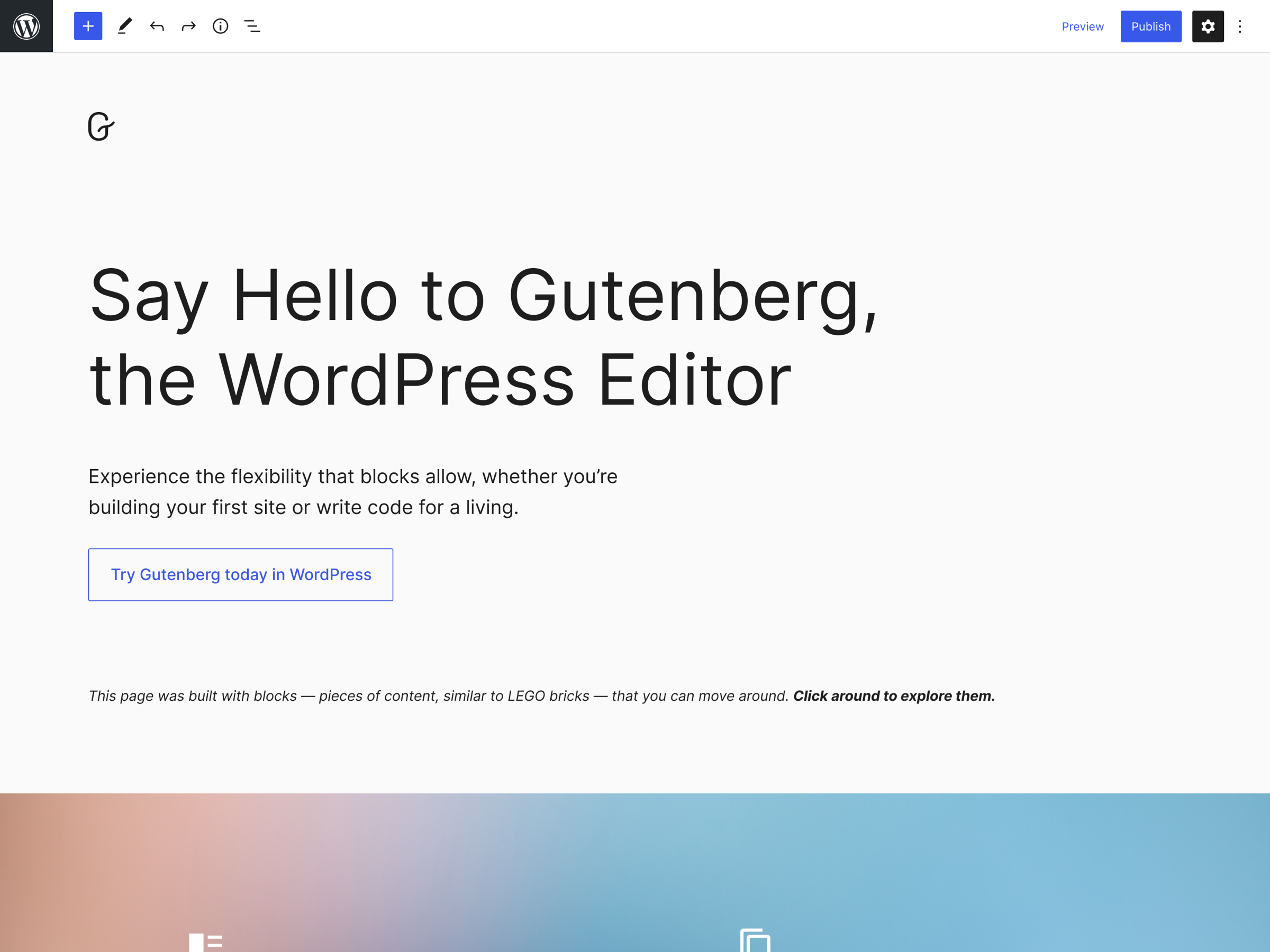
The Gutenberg block editor interface: drag-and-drop blocks replacing the classic WYSIWYG editor for modern, visual page building.
Matt Mullenweg's State of the Word 2024 — WordPress evolution, Gutenberg progress, and the future of open-source publishing.
Reception:
Gutenberg's launch was controversial:
- Supporters: Praised modern UX, visual editing, block reusability
- Critics: Complained about bugs, performance issues, steep learning curve
- Classic Editor holdouts: Over 4 million installations of Classic Editor plugin (as of 2026) show significant resistance to Gutenberg
Gutenberg evolution (2019-2026):
WordPress 5.4-5.9 (2020-2022):
- Block patterns (pre-designed block layouts)
- Block directory (install blocks from WordPress.org)
- Full Site Editing (FSE) beta—edit headers, footers, templates with blocks
- Query Loop block for dynamic content
- Navigation block for menus
WordPress 6.0-6.5 (2022-2024):
- Full Site Editing stable release
- Style variations for themes
- Design tools (color, typography, spacing) accessible to non-developers
- Performance improvements (faster load times for block editor)
WordPress 6.6-6.7 (2025-2026):
- AI-powered block suggestions tailored to content context
- Enhanced full-site editing enabling non-technical users to customize every aspect of design
- Integration with AI writing assistants for content generation
- Performance optimizations addressing historical slowness concerns
By 2026, Gutenberg has matured into a powerful, AI-augmented editing experience—though Classic Editor still maintains a significant user base unwilling to switch.
🤖 The AI Transformation (2025-2026)
AI integration trends (2026):
WordPress hasn't built native AI like competitors, but the ecosystem has embraced AI through plugins:
AI writing and content:
- Jetpack AI Assistant: Automattic's official AI writing tool (powered by GPT-4)
- AI Engine: Generate content, images, SEO meta descriptions
- Uncanny Automator: AI-powered workflow automation
AI SEO:
- Yoast SEO AI: AI-generated meta titles and descriptions
- Rank Math Pro: AI content analysis and optimization
- AIOSEO: AI-powered internal linking suggestions
AI image generation:
- Stable Diffusion plugins: Generate featured images from post content
- DALL-E integration: Create custom graphics without designers
Generative Engine Optimization (GEO):
By 2026, the SEO landscape is shifting from traditional Google search to generative AI search (Perplexity, ChatGPT Search, Gemini). WordPress sites optimizing for:
- Structured data and schema markup
- Clear, factual content with citations
- Entity-based SEO (topics, not keywords)
- AI-readable content hierarchies
The WordPress ecosystem is adapting, but slowly—most sites still optimize for traditional Google search.
⚖️ The WPEngine Controversy (2024-2025)
Background:
WPEngine is a managed WordPress hosting provider generating ~$400M in annual revenue. They use the open-source WordPress software but don't contribute significantly to WordPress.org development.
The conflict:
In late 2024, Matt Mullenweg (as both Automattic CEO and WordPress.org co-founder) publicly criticized WPEngine for profiting from WordPress without giving back. This escalated into:
- Public statements on both sides
- Legal threats and lawsuits
- Community debate about open-source sustainability
- Concerns about WordPress's future governance
Resolution (2025):
The situation largely resolved with clarifications about trademark use and contributions, but it highlighted tensions in the WordPress ecosystem:
- How should commercial companies fund open-source development?
- Should WordPress.org have more formal governance beyond Mullenweg?
- What obligations do WordPress-based businesses have to the project?
Impact on WordPress:
Speculation about WordPress's "end" proved unfounded. The controversy barely registered outside developer communities, and WordPress's dominance continued unaffected.
🧬 What Makes WordPress Different
1. Open Source and Community-Driven
WordPress is licensed under GPL (General Public License), meaning:
- Free forever: No licensing fees, ever
- Source code access: Anyone can inspect, modify, redistribute code
- Community ownership: No single company controls WordPress
- Fork-friendly: If Automattic goes evil, the community can fork
This open-source model has enabled:
- 59,000+ free plugins
- 11,000+ free themes
- Thousands of developers contributing code
- Hosting providers building businesses around WordPress
- Educational resources and tutorials created by community
2. Plugin and Theme Ecosystem
WordPress's extensibility through plugins and themes is unmatched:
Plugins (extend functionality):
- E-commerce: WooCommerce, Easy Digital Downloads
- SEO: Yoast SEO, Rank Math, AIOSEO
- Page builders: Elementor, Divi, Beaver Builder
- Security: Wordfence, Sucuri, iThemes Security
- Forms: Gravity Forms, WPForms, Contact Form 7
- Performance: WP Rocket, W3 Total Cache, Autoptimize
- Membership: MemberPress, Restrict Content Pro
- Literally anything you can imagine
Themes (control design):
- Free themes: 11,000+ in WordPress.org directory
- Premium themes: ThemeForest, StudioPress, Elegant Themes
- Block themes: Designed for Full Site Editing
- Multi-purpose themes: Divi, Avada, Astra (can be anything)
3. WordPress.org vs WordPress.com
Understanding the difference is crucial:
WordPress.org (self-hosted):
- Download free WordPress software
- Install on your own web hosting
- Full control: any plugin, theme, customization
- Responsible for: hosting, security, backups, updates
- Cost: Hosting ($3-100+/month), domain ($10-15/year), premium plugins/themes (optional)
WordPress.com (hosted service by Automattic):
- Managed hosting + WordPress software
- Limited plugins/themes (unless on Business/Commerce plan)
- Automattic handles: hosting, security, backups, updates
- Cost: Free tier (limited), Personal ($4/mo), Premium ($8/mo), Business ($25/mo), Commerce ($45/mo)
Which to choose:
- WordPress.org: You want full control, specific plugins, custom development
- WordPress.com: You want hands-off hosting, no technical management
4. Unmatched Market Share
WordPress's dominance creates network effects:
- Developers: Learn WordPress because it's most in-demand
- Themes/plugins: Developers target WordPress because of user base
- Hosting: Hosts optimize for WordPress (managed WordPress hosting)
- Content: Tutorials, courses, blogs focus on WordPress
- Jobs: More WordPress developer jobs than any other CMS
This creates a flywheel: more users → more developers → more extensions → more capable platform → more users.
💡 Potential Benefits of WordPress
For Bloggers and Content Creators
✅ Free and easy to start: No-cost software, cheap hosting ($3-10/month)
✅ Intuitive editor: Gutenberg block editor is visual and beginner-friendly
✅ SEO-optimized: Clean code, permalink structure, SEO plugins (Yoast, Rank Math)
✅ Monetization: Ads (Google AdSense), memberships, courses, donations
✅ Content ownership: You own your content (vs Medium, Substack platforms)
For Businesses
✅ Professional design: Thousands of premium themes for any industry
✅ E-commerce: WooCommerce for online stores (28% market share)
✅ Scalability: Scales from 10 visits/month to millions (with proper hosting)
✅ Integrations: Connect to CRM, email marketing, analytics, etc.
✅ Developer availability: Easy to find WordPress developers for custom work
For Developers
✅ Largest CMS ecosystem: Most jobs, clients, learning resources
✅ Extensible architecture: Hooks, filters, custom post types for any functionality
✅ Headless CMS: Use WordPress as backend with React/Vue/Next.js frontend (JAMstack)
✅ Active community: WordCamps, meetups, forums, Slack groups
✅ Commercial opportunities: Build plugins/themes, offer services
📊 WordPress Pricing Models
Self-Hosted WordPress.org
Initial costs:
- Domain: $10-15/year (e.g., yoursite.com)
- Hosting: $3-100+/month depending on tier
- Shared hosting: $3-10/month (Bluehost, SiteGround, HostGator)
- Managed WordPress: $30-100/month (WP Engine, Kinsta, Flywheel)
- VPS/Cloud: $10-200+/month (DigitalOcean, AWS, Google Cloud)
- Theme: Free to $200 one-time (or $50-100/year premium)
- Plugins: Free to $50-300/year per plugin
Annual cost examples:
- Basic blog: $50-150/year (shared hosting + domain)
- Business site: $500-1,500/year (managed hosting + premium theme + plugins)
- E-commerce: $1,000-5,000/year (hosting + WooCommerce extensions + payment processing)
WordPress.com
Pricing tiers (2026):
Free:
- WordPress.com subdomain (yoursite.wordpress.com)
- 1GB storage
- WordPress.com ads
- Basic themes
Personal ($4/month):
- Custom domain
- No WordPress.com ads
- Email/live chat support
Premium ($8/month):
- Advanced design tools
- CSS customization
- Google Analytics
- Remove WordPress.com branding
Business ($25/month):
- Install plugins
- Upload themes
- SEO tools
- SFTP/database access
- Automated site backups
Commerce ($45/month):
- Everything in Business
- WooCommerce extensions
- Accept payments in 60+ countries
- Integrated shipping labels
E-commerce ($75/month):
- Premium shipping integrations
- Live chat and email support
- Unlimited themes and plugins
🔮 The Future of WordPress
1. Full Site Editing (FSE) Maturity
By 2027-2028, WordPress aims for Full Site Editing to fully replace Classic Editor and traditional theme customization:
- Block-based everything: Headers, footers, sidebars, templates all built with blocks
- No code required: Non-developers can customize every design aspect
- Theme marketplace shift: New themes will be block themes (FSE-compatible)
- Page builder consolidation: Elementor/Divi may become less necessary as FSE improves
2. AI-Native Content Creation
WordPress is integrating AI throughout the content workflow:
- AI block suggestions: Context-aware recommendations (e.g., "Add a testimonial block")
- AI writing assistants: Generate outlines, paragraphs, meta descriptions
- AI image generation: Create featured images from post titles
- AI SEO optimization: Automatic internal linking, keyword suggestions
- AI accessibility: Automatic alt text, readability improvements
3. Performance and Core Web Vitals
WordPress has historically struggled with performance (bloat, slow loading). Efforts underway:
- Performance team: Dedicated team optimizing core WordPress
- Lazy loading: Images load only when visible
- WebP support: Modern image formats by default
- Fewer HTTP requests: Combining scripts, reducing dependencies
- PHP 8.x optimization: Faster code execution
Goal: WordPress sites rank better in Google (Core Web Vitals are ranking factors).
4. Headless WordPress and JAMstack
WordPress is increasingly used as a headless CMS:
- WordPress backend (content management, plugins, admin)
- React/Next.js/Gatsby frontend (fast, modern, serverless)
- WordPress REST API or GraphQL for data fetching
This "decoupled" approach solves WordPress's performance issues while retaining its content management strengths.
5. Gutenberg Beyond WordPress
The Gutenberg block editor is being positioned as a content editor for any platform:
- Gutenberg in Drupal
- Gutenberg in standalone apps
- Gutenberg as a React component library
If successful, Gutenberg could become the standard WYSIWYG editor across the web, not just WordPress.
Potential challenges:
- Complexity: WordPress is becoming overwhelming for beginners (too many options)
- Security: Large attack surface due to plugins/themes (constant patching needed)
- Fragmentation: Classic Editor vs Gutenberg split confuses users
- Automattic dependence: 80%+ of WordPress.org contributions come from Automattic employees
- Competition: Webflow, Squarespace, Wix offer simpler all-in-one solutions
Despite challenges, WordPress's open-source nature, massive ecosystem, and 43% market share make it unlikely to be displaced anytime soon.
🐑 Before you go... Looking for a content platform that goes beyond traditional CMS? Taskade Genesis brings the flexibility of WordPress with the intelligence of modern AI—no hosting, plugins, or theme configuration required.
- 💬 AI Chat: Brainstorm content ideas, get instant feedback, and collaborate with AI-powered assistance that understands your content strategy and brand voice.
- 🤖 AI Agents: Unlike WordPress's plugin ecosystem, Taskade AI Agents build entire content workflows from a single prompt. Describe your content pipeline and watch it materialize through vibe coding—no plugin configuration or compatibility issues.
- ✏️ AI Assistant: Generate blog outlines, SEO-optimized content, editorial calendars, and publishing workflows with intelligent templates that learn from your content patterns.
- 🔄 Workflow Generator: Build publishing automations that connect content creation, review, SEO optimization, and distribution—powered by your workspace memory and 100+ integrations.
Sign up today and experience content management reimagined—where living software handles the complexity while you focus on creating.
🔗 Resources
- WordPress.org - Download WordPress
- WordPress.com - Hosted WordPress
- WordPress Codex - Documentation
- WordPress Developer Resources
- WooCommerce Official Site
- Automattic Company Site
- WordPress Plugin Directory
- WordPress Theme Directory
💬 Frequently Asked Questions About WordPress
What is WordPress and what is it used for?
WordPress is a free, open-source content management system (CMS) used to create and manage websites without coding. Originally a blogging platform, WordPress now powers 43% of all websites including blogs, business sites, portfolios, e-commerce stores (via WooCommerce), membership sites, forums, directories, and virtually any type of website imaginable. For teams seeking intelligent content platforms beyond traditional CMS, Taskade Genesis offers living software that adapts to your content workflows.
Who created WordPress and when?
WordPress was created by Matt Mullenweg and Mike Little, launching publicly on May 27, 2003. They forked the abandoned b2/cafelog blogging software after its original developer, Michel Valdrighi, stopped maintaining it. Mullenweg was a 19-year-old University of Houston student at the time, and Little was a UK-based web developer. Like many successful open-source projects, WordPress grew from a small community project to global platform—similar to how Y Combinator startups often begin solving personal problems.
Is WordPress free or does it cost money?
WordPress software (from WordPress.org) is 100% free and open-source. You'll pay for web hosting ($3-100+/month) and a domain name ($10-15/year), but the WordPress software itself has no license fees. WordPress.com (the hosted service) has both free and paid plans ranging from $0 to $75/month depending on features needed. Modern platforms like Taskade simplify this by including hosting, deployment, and AI features in one transparent pricing model.
What is the difference between WordPress.org and WordPress.com?
WordPress.org is the self-hosted version where you download free WordPress software and install it on your own web hosting (full control, unlimited customization). WordPress.com is a managed hosting service run by Automattic that uses WordPress software (hands-off, limited customization unless on higher-tier plans). WordPress.org offers more control; WordPress.com offers more convenience. This trade-off between control and simplicity reflects a common pattern in productivity tools and content platforms.
How many websites use WordPress?
WordPress powers approximately 43% of all websites on the internet as of 2026, representing over 60 million actively maintained sites. WordPress also dominates the CMS market with 62.4% market share—nearly 10 times the market share of its closest competitor. This includes personal blogs, small businesses, major publishers, Fortune 500 companies, and e-commerce stores. This massive adoption demonstrates the power of open-source ecosystems and community-driven development.
What is Gutenberg in WordPress?
Gutenberg is WordPress's modern block-based editor, replacing the Classic Editor in WordPress 5.0 (December 2018). Instead of typing in a single text box, content is built with "blocks" (paragraph, image, heading, columns, etc.) that can be dragged, reused, and visually edited. Gutenberg enables complex page layouts without code or shortcodes, though it remains controversial with 4 million+ users still using the Classic Editor plugin. The block-based approach reflects broader design trends toward modular, reusable content components—similar to how AI app builders generate component-based interfaces.
What is WooCommerce and who owns it?
WooCommerce is a free e-commerce plugin for WordPress that powers approximately 28% of all online stores globally, making it the most popular e-commerce platform by installation count. WooCommerce was created by WooThemes in 2011 and acquired by Automattic (WordPress.com's parent company) in 2015 for $30 million. It enables WordPress sites to sell physical products, digital downloads, subscriptions, and services. The plugin ecosystem model—free core with premium extensions—is a proven monetization strategy in open-source software.
How does WordPress make money if it's free?
WordPress.org is a nonprofit and doesn't make money—it's maintained by the open-source community and funded primarily by Automattic. Automattic makes money through commercial products: WordPress.com hosting ($4-75/month plans), WooCommerce premium extensions, Jetpack plugin subscriptions, Tumblr, and other properties. Automattic generated $710 million in revenue in 2024. This dual model—open-source software paired with commercial hosting/services—balances community values with sustainable business operations.
Is WordPress good for SEO?
Yes, WordPress is excellent for SEO due to: (1) Clean code and semantic HTML structure, (2) SEO-friendly permalinks (custom URL structures), (3) Fast page load speeds with optimization plugins, (4) Mobile-responsive themes, (5) Powerful SEO plugins like Yoast SEO and Rank Math, (6) Easy schema markup implementation, (7) Regular updates and security patches. Many top-ranking websites use WordPress. For teams managing content at scale, AI-powered content tools can automate SEO optimization, internal linking, and meta tag generation.
What are WordPress plugins and how many are there?
WordPress plugins are software extensions that add functionality to WordPress without modifying core code. The WordPress.org plugin directory contains over 59,000 free plugins covering SEO, e-commerce, security, forms, page builders, performance, social media, analytics, membership, and virtually any function imaginable. Premium plugins (paid) number in the tens of thousands more. While powerful, plugin management can become complex—modern platforms increasingly favor native integrations over third-party extensions.
Can WordPress be used for e-commerce?
Yes, WordPress is one of the most popular e-commerce platforms through the WooCommerce plugin. WooCommerce adds full e-commerce functionality including product catalogs, shopping cart, checkout, payment processing (Stripe, PayPal, etc.), shipping calculations, inventory management, and more. WooCommerce powers approximately 28% of all online stores globally, more than Shopify by installation count (though Shopify leads in GMV). The extensibility that makes WordPress powerful also requires careful security management.
Is WordPress secure?
WordPress core is generally secure when kept updated, but security depends heavily on: (1) Keeping WordPress, themes, and plugins updated, (2) Using strong passwords and 2-factor authentication, (3) Choosing secure hosting, (4) Installing security plugins (Wordfence, Sucuri), (5) Avoiding poorly-coded plugins/themes. The main security risk comes from outdated software or vulnerable plugins—not WordPress core itself. Regular maintenance is essential. Modern cloud platforms increasingly handle security automatically through managed infrastructure and automated updates.
What is Automattic and how does it relate to WordPress?
Automattic is a company founded by WordPress co-founder Matt Mullenweg in 2005. Automattic builds commercial products using WordPress: WordPress.com (hosted WordPress), WooCommerce (e-commerce), Jetpack (plugin suite), Tumblr, Simplenote, and more. Automattic generates $710 million in annual revenue (2024) and was valued at $7.5 billion in 2021. Automattic employees contribute 80%+ of WordPress.org core development, creating a symbiotic relationship between commercial and open-source efforts. This model demonstrates how open-source projects can sustain commercial companies while remaining community-driven.
Can I build a website with WordPress without coding?
Yes! WordPress can be used without any coding knowledge through: (1) Gutenberg block editor for visual content creation, (2) Themes that provide pre-designed layouts (install and customize), (3) Drag-and-drop page builders (Elementor, Divi, Beaver Builder), (4) Plugins for any functionality (forms, SEO, e-commerce), (5) Full Site Editing (FSE) for customizing every design aspect visually. However, learning basic HTML/CSS expands customization options significantly. The rise of AI app builders and vibe coding is making no-code development even more accessible through natural language interfaces.
🧬 Build Your Own Content Platform
While WordPress powers 43% of the web through themes and plugins, Taskade Genesis reimagines content management for the AI era: build intelligent content systems from a single prompt—no hosting setup, plugin configuration, or theme customization required.
Why content teams are exploring beyond traditional CMS:
- Vibe Coding: Describe your ideal content workflow in natural language and watch Taskade build the entire system instantly—no Gutenberg blocks, page builders, or shortcodes to learn.
- Workspace DNA: Your content becomes living memory. AI Agents learn from your editorial style, content performance, and publishing patterns to make intelligent recommendations and automate repetitive tasks.
- Living Software: Unlike WordPress sites that require manual updates and plugin maintenance, Taskade apps evolve with your team—adapting content workflows, suggesting optimizations, and automating publishing based on actual usage.
- AI Agents: Train autonomous agents on your content strategy to handle research, outline generation, SEO optimization, internal linking, and content distribution—going far beyond WordPress plugins to actual intelligent execution.
Explore Taskade's intelligent content platform:
- Browse the Community Gallery to see content workflows built by teams worldwide
- Start with proven Content Templates and customize them with AI
- Connect your tools through 100+ Integrations with intelligent automation
- Read about AI-Powered Content Creation to understand the paradigm shift
