
🤖 AI Teams Roundtable, Automation for Custom Fields, RSS Feeds, & YouTube!
Hi Taskaders, We're excited to announce AI Teams with the new Roundtable Mode — where every AI Agent collaborates in real time. Plus, discover new AI Automatio...
Hi Taskaders,
We're excited to announce AI Teams with the new Roundtable Mode — where every AI Agent collaborates in real time. Plus, discover new AI Automations for Custom Fields, RSS Feeds, Youtube, and much more!
🤖 Supercharge AI Teams with Every Agent!
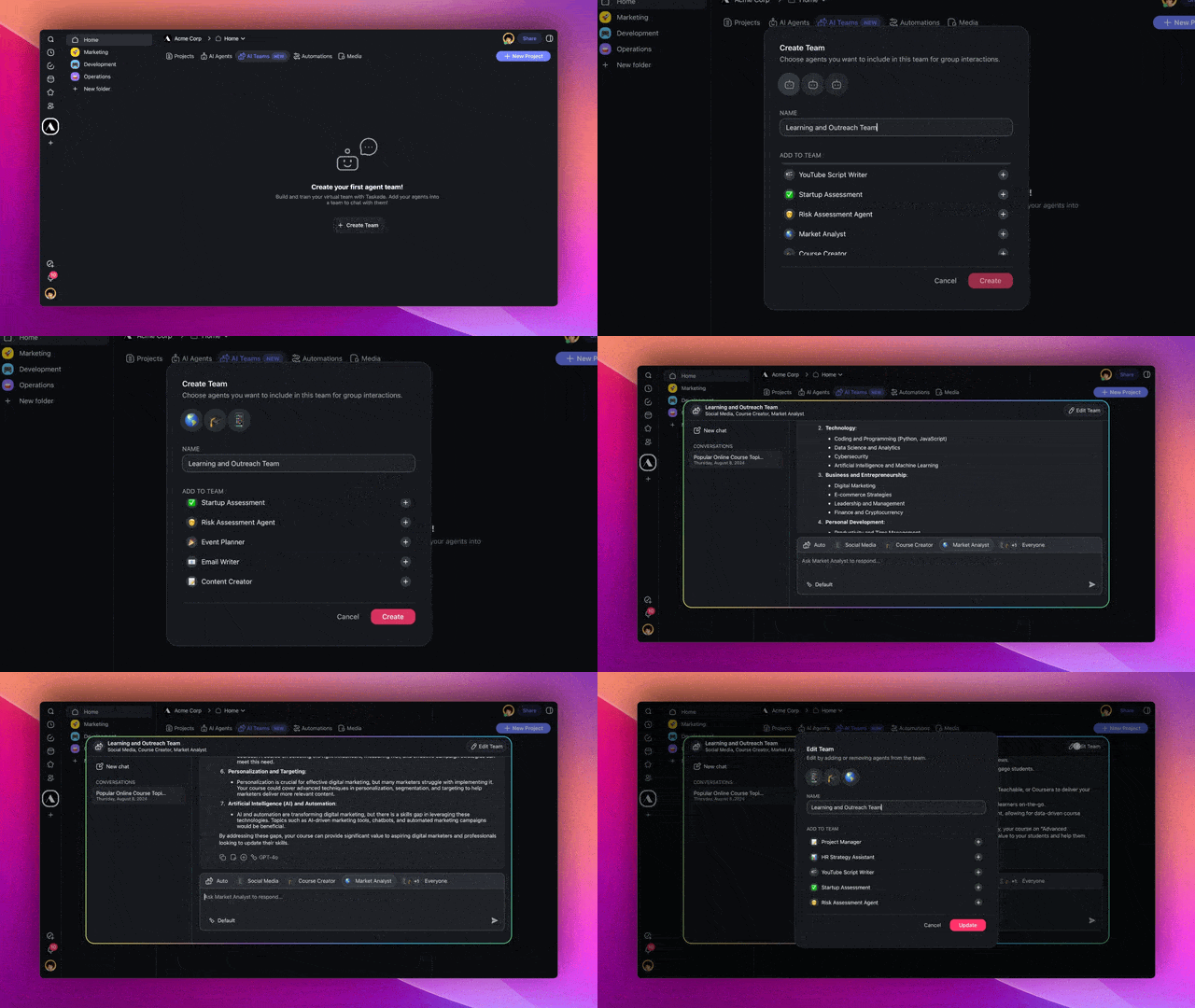
Build your AI workforce with AI Teams! Put together a crew of AI Agents, each with their own tools and knowledge, customized by you. Learn more.
Choose how your AI Team collaborates:
Automatic: Let Taskade pick the best agent for the job.
Manual Selection: Decide which agent you want to respond.
Roundtable Mode: Get everyone to respond for a full, real-time discussion.
It’s like having a room full of experts at your fingertips.
The most powerful AI collaboration is now live in Taskade!
How it works: Go to Workspace ➡ AI Teams tab ➡ Create Team.
✅ Custom Fields for AI Automation
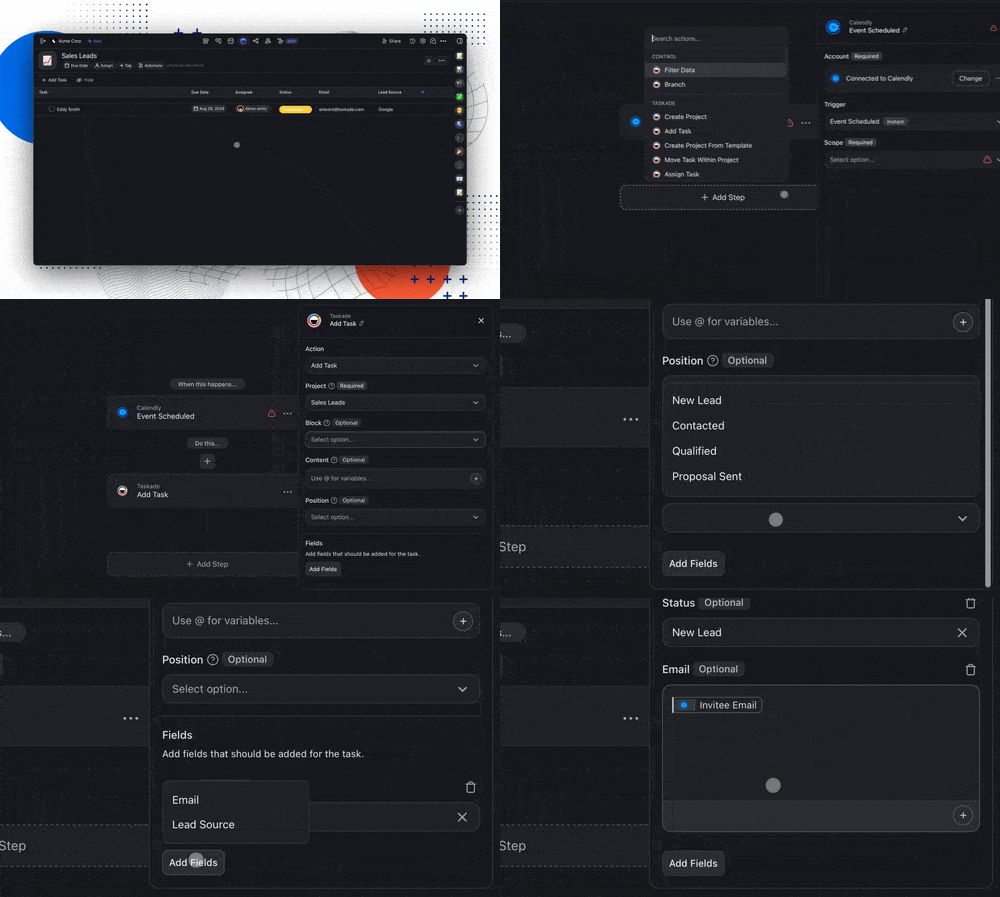
Now, you can automate and bring in data from third-party apps right into your projects. Use these custom fields to build a simple CRM, assign tasks, and keep track of everything—all within Table View! Learn more.
How it works: Go to your project ➡ Switch to Table View ➡ Click the ➕ button to add Custom Fields ➡ Set up automation with the Add Task action.
🛜 RSS Trigger for AI Automation
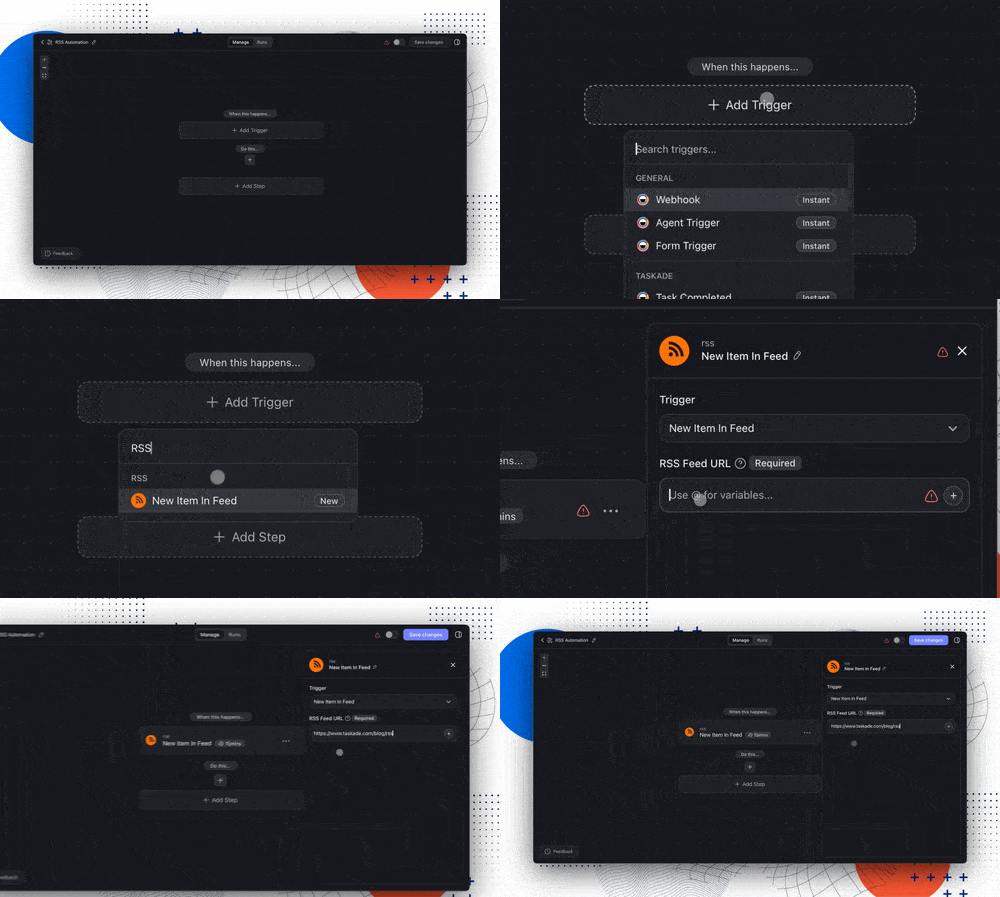
The new RSS trigger lets you automatically turn updates from your favorite blogs, podcasts, and news sites into tasks. Monitor feeds, analyze articles, and extract just what you need using our AI and media actions. Learn more.
Use Cases:
Blog Posts: Automatically create summaries of new blog articles.
Podcasts: Track and analyze new podcast episodes for easy access.
News Updates: Stay informed by logging news stories into your projects.
How it works: Set up the trigger ➡ Add RSS feed URL ➡ Automate new content into tasks or projects.
🎥 YouTube Trigger for AI Automation
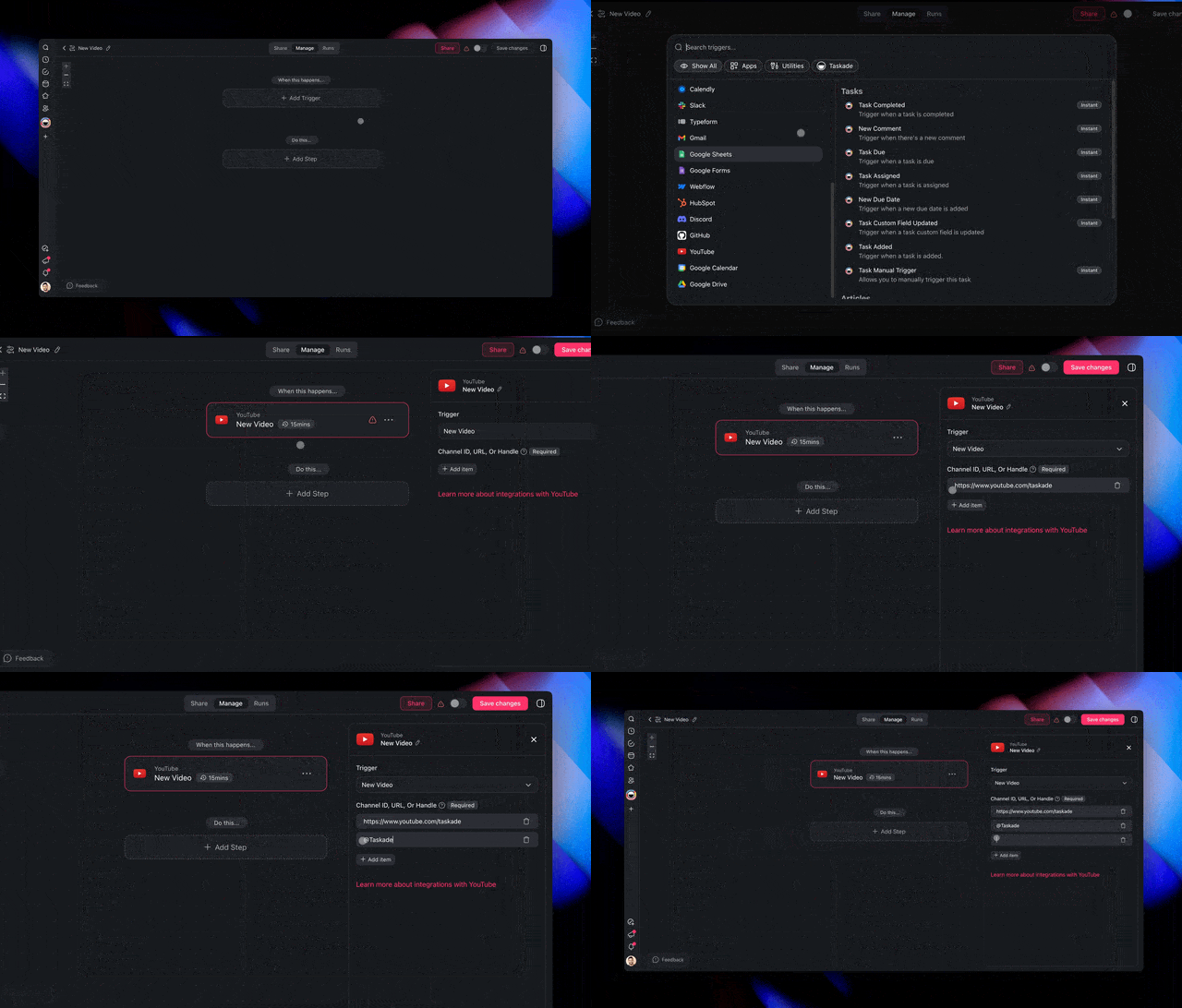
The new YouTube trigger lets you keep tabs on your favorite channels 24/7. Automatically create watch lists, summarize videos, or extract key information for later use. Learn more.
Use Cases:
Watch Lists: Automatically add new videos from your favorite creators.
Transcriptions: Get summaries of new content for review and analysis.
Project Management: Create tasks or projects based on new videos.
How it works: Set up the trigger ➡ Add the YouTube channel URL ➡ Automate tasks, transcriptions, project creations, and more.
🔗 Knowledge Backlinks
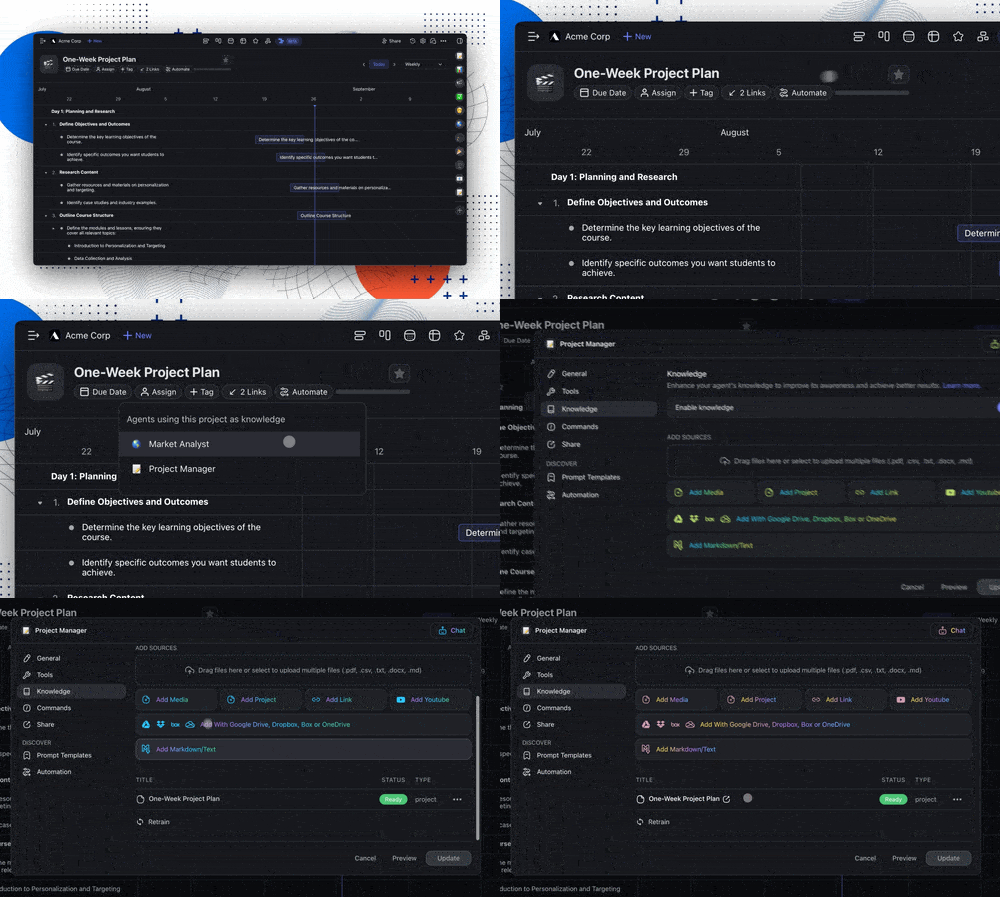
Now, when you add a project to an AI agent's knowledge, a backlink is automatically added to that project. This makes it easy to see which agents are using it as a dynamic knowledge source. Learn more.
Adding Taskade projects and links gives your agents real-time, dynamic knowledge, keeping them up-to-date. From tracking projects to syncing live web data, your agents stay current and ready to help.
🚥 Introducing Flow Paths in Automation
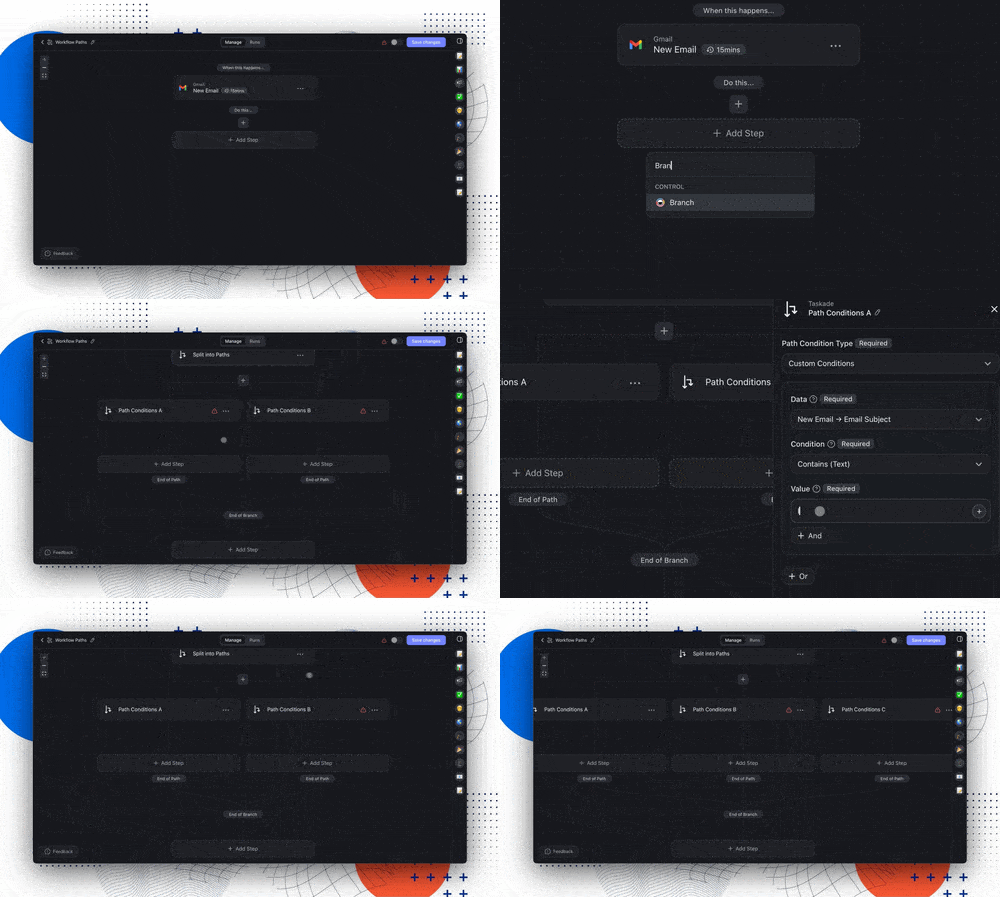
Taskade's new Flow Paths let you easily split workflows into different routes based on custom rules. It’s like a choose-your-own-adventure for your tasks—one condition leads one way, another takes a different route. This gives you more control and precision, making automation smarter and more flexible.
Now, you can create adaptable workflows without duplicating tasks or writing code. Whether you're managing projects or handling complex tasks, Flow Paths streamline your work like never before.
Exclusive Early Access: Want to try it first? Reply with "AI Automation" on our FB Group, Linkedin, Twitter/X, and Reddit posts to get an invite!
⚡️ TLDR: Watch Video Summary
In a hurry? Check our latest video summary for a step-by-step guide to the new changes:
🤝 Join Our Community & Connect
Other Improvements
New: Introducing Flow Paths for Automation, now in Beta. Get early access to unlock multi-path automation for greater workflow precision.
-
Multi-Agent Collaboration: Assemble a group of AI agents to work together seamlessly, leveraging their collective expertise.
Roundtable Mode: Enable all agents in your team to respond for a comprehensive, real-time discussion.
Intelligent Response Selection: AI Teams automatically choose the best agent to respond, ensuring high-quality answers.
Dynamic Conversations: Interact with AI Teams just like individual agents, but with added team awareness for cohesive responses.
Simplified AI Team Setup: Easily create and manage AI Teams by selecting and assigning agents with a few clicks.
-
Project Backlinks: Automatically see which agents are linked to your project as dynamic knowledge sources.
Add from Response: Quickly add information to an agent's knowledge base directly from their responses.
Bulk Knowledge Upload: Add multiple files to an agent's knowledge base at once, speeding up the training process.
Markdown/Text Support: Create new knowledge sources by directly pasting markdown or plain text.
Knowledge Source Preview: Easily preview sources directly from the agent's knowledge panel.
Choose Your AI Model: Select the AI model for each task.
AI Automation Enhancements****:
Gmail Draft Automation—Draft emails in Gmail directly from Taskade automations, perfect for streamlining your email workflows.
AI Form Enhancements: Improved public form styling and functionality, including the ability to submit forms with no inputs.
RSS Feed Automation: Automate workflows triggered by new RSS feed updates, perfect for staying on top of your favorite blogs or news sources.
Custom Field Support: Add and manage custom fields in automations to tailor workflows to your specific needs.
YouTube Automation: Automate tasks like transcribing videos or notifying teams whenever a new video is posted.
Improved Error Handling: Enhanced error messaging and handling for smoother automation processes.
Looking for additional integrations? Let us know here.
-
AI Agents Home: All your agents across workspaces in one place.
Multi-Chats with AI Agents: Simplify with separate chats.
Agent Command UI: Updated UI to match the web experience.
Persistent Push Notifications: Consistent notifications on mobile.
Bug Fixes: Improved toolbars, workspace filtering, and more.
Smoother automation setup with refined number fields.
Various bug fixes and performance improvements.
We can’t wait for you to try the new update — dive in and let us know what you think! Remember, our Help Center and Feedback Forum are always here for your questions and suggestions.
Here's to making this year the most productive yet with Taskade! 🚀
— Team Taskade 🐑
P.S. If you're loving Taskade, share your experience on our testimonials page to get featured, or dive into our Affiliate Partnership program today!🤖 AI Teams Roundtable, Automation for Custom Fields, RSS Feeds, & YouTube!
