Taskadetaskade
PricingLoginSign up for free →Sign up for free →
Loved by 1M+ users·Hosting 100K+ apps·Deploying 500K+ AI agents·Running 1M+ automations·Backed by Y Combinator·Powered by TSK-1
TaskadePricingFeaturesContact usIntegrationsMCP ServerDeveloper APIChangelogPressLearnAbout
GalleryProductivityKitsVideosReviewsFAQ
VibeVibe AppsVibe AgentsVibe CodingVibe WorkflowsVibe Marketing
Vibe DashboardsVibe CRMVibe AutomationVibe PaymentsVibe DesignVibe SEOVibe Tracking
Community
FeaturedQuick AppsToolsDashboardsWebsites
WorkflowsProjectsFormsCreators
DownloadsAndroidiOSMacWindows
ChromeFirefoxEdge
Compare
vs Cursorvs Boltvs Lovablevs V0vs Windsurf
vs Replitvs Emergentvs Devinvs Claude Codevs ChatGPTvs Claudevs Perplexityvs GitHub Copilotvs Figma AIvs Notionvs ClickUpvs Asanavs Mondayvs Trellovs Jiravs Linearvs Todoistvs Evernotevs Obsidianvs Airtablevs Basecampvs Mirovs Slackvs Bubblevs Retoolvs Webflowvs Framervs Softrvs Glidevs FlutterFlowvs Base44vs Adalovs Durablevs Gammavs Squarespacevs WordPressvs UI Bakeryvs Zapiervs Makevs n8nvs Jaspervs Copy.aivs Writervs Rytrvs Manusvs Crewvs Lindyvs Relevance AIvs Wrikevs Smartsheetvs Monday Magicvs Codavs TickTickvs Any.dovs Thingsvs OmniFocusvs MeisterTaskvs Teamworkvs Workfrontvs Bitrix24vs Process Streetvs Toggl Planvs Motionvs Momentumvs Habiticavs Zenkitvs Google Docsvs Google Keepvs Google Tasksvs Microsoft Teamsvs Dropbox Papervs Quipvs Roam Researchvs Logseqvs Memvs WorkFlowyvs Dynalistvs XMindvs Whimsicalvs Zoomvs Remember The Milkvs Wunderlist
Taskade GenesisVideo GuideApp BuilderVibe CodingAgent BuilderDashboard Builder
CRM BuilderWebsite BuilderForm BuilderWorkflow AutomationWorkflow BuilderBusiness-in-a-BoxAI for MarketingAI for Developers
AI Agents
FeaturedProject ManagementProductivityMarketingTranslator
ContentWorkflowResearchPersonalSalesSocial MediaTo-Do ListCRMTask AutomationCoachingCreativityTask ManagementBrandingFinanceLearning and DevelopmentBusinessCommunity ManagementMeetingsAnalyticsDigital AdvertisingContent CurationKnowledge ManagementProduct DevelopmentPublic RelationsProgrammingHuman ResourcesE-CommerceEducationLegalEmailSEODeveloperVideo ProductionDesignFlowchartDataPromptNonprofitAssistantsTeamsCustomer ServiceTrainingTravel PlanningUML DiagramER DiagramMath TutorLanguage LearningCode ReviewerLogo DesignerUI WireframeFitness CoachLead EnrichmentFounder OSSales DevelopmentBookkeepingRecruitingWebsite MonitoringAll Categories
Automations
FeaturedBusiness-in-a-BoxInvestor OperationsEducation & LearningHealthcare & Clinics
Real EstateStripeSalesE-commerceContentMarketingEmailCustomer SupportHubSpotProject ManagementAgentic WorkflowsBooking & SchedulingCalendarReportsSlackWebsiteFormTaskWeb ScrapingWeb SearchChatGPTText to ActionYoutubeLinkedInTwitterGitHubDiscordMicrosoft TeamsWebflowRSS & Content FeedsGoogle WorkspaceManufacturing & OperationsAI Agent TeamsMulti-Agent AutomationNotion AutomationsAgentic AutomationProposalBookkeeping & ExpensesClient OnboardingAll Categories
Wiki
Taskade GenesisAI AgentsAutomation
ProjectsLiving DNAAutonomous Workspaces, Agents & AppsQuantum AI & Taskade Genesis QuantumPlatformIntegrationsProductivityMethodsProject ManagementAgileScrumAI ConceptsCommunityTerminologyFeatures
Templates
FeaturedChatGPTTablePersonalProject Management
SalesFlowchartTask ManagementEngineeringEducationDesignTo-Do ListMarketingMind MapGantt ChartOrganizationalPlanningMeetingsTeam ManagementStrategyGamingProductionProduct ManagementStartupRemote WorkY CombinatorRoadmapCustomer ServiceLegalEmailBudgetsContentConsultingE-CommerceStandard Operating Procedure (SOP)Human ResourcesProgrammingMaintenanceCoachingSocial MediaHow-TosResearchMusicTrip PlanningCRMClient OnboardingEmployee OnboardingSOPBug TrackerRecruitment TrackerFormSales PipelineContent CalendarMarketing PlanProduct RoadmapBusiness PlanSWOT Analysis30-60-90 Day PlanInterviewNotion AlternativeKPIStrategic PlanMeeting AgendaInvoiceRisk RegisterIT Asset ManagementKanban BoardChange ManagementCommunication PlanRFPScope of WorkStatement of WorkHelpdeskKnowledge BaseCreative BriefGoal SettingExecutive SummaryGap AnalysisBooking SystemEvent ManagementPortfolio TrackerCustomer Onboarding PortalsClient PortalAgency OperationsFinance TrackingAll Categories
Generators
AI SoftwareNo-Code AI AppAI AppAI WebsiteAI Dashboard
AI FormAI AgentClient PortalAI WorkspaceAI ProductivityAI To-Do ListAI WorkflowsAI EducationAI Mind MapsAI FlowchartAI Scrum Project ManagementAI Agile Project ManagementAI MarketingAI Project ManagementAI Social Media ManagementAI BloggingAI Agency WorkflowsAI ContentAI Software DevelopmentAI MeetingAI PersonasAI OutlineAI SalesAI ProgrammingAI DesignAI FreelancingAI ResumeAI Human ResourceAI SOPAI E-CommerceAI EmailAI Public RelationsAI InfluencersAI Content CreatorsAI Customer ServiceAI BusinessAI PromptsAI Tool BuilderAI SEOAI Gantt ChartAI CalendarsAI BoardAI TableAI ResearchAI LegalAI ProposalAI Video ProductionAI Health and WellnessAI WritingAI PublishingAI NonprofitAI DataAI Event PlanningAI Game DevelopmentAI Project Management AgentAI Productivity AgentAI Marketing AgentAI Personal AgentAI Business and Work AgentAI Education and Learning AgentAI Task Management AgentAI Customer Relations AgentAI Programming AgentAI SchemaAI Business PlanAI Pitch DeckAI InvoiceAI Lesson PlanAI Social Media CalendarAI API DocumentationAI Database SchemaAI Marketing PlanAI Sales PipelineAI Course BuilderInternal ToolsBooking SystemReal Estate CRMInventory ManagementAll Categories
Converters
AI Featured ConvertersAI PDF ConvertersAI CSV ConvertersAI Markdown ConvertersAI Prompt to App Converters
AI Data to Dashboard ConvertersAI Workflow to App ConvertersAI Idea to App ConvertersAI Flowcharts ConvertersAI Mind Map ConvertersAI Text ConvertersAI Youtube ConvertersAI Knowledge ConvertersAI Spreadsheet ConvertersAI Email ConvertersAI Web Page ConvertersAI Video ConvertersAI Coding ConvertersAI Task ConvertersAI Kanban Board ConvertersAI Notes ConvertersAI Education ConvertersAI Language TranslatorsAI Business → Backend App ConvertersAI File → App ConvertersAI SOP → Workflow App ConvertersAI Portal → App ConvertersAI Form → App ConvertersAI Schedule → Booking App ConvertersAI Metrics → Dashboard ConvertersAI Game → Playable App ConvertersAI Catalog → Directory App ConvertersAI Creative → Studio App ConvertersAI Agent → Agent App ConvertersAI Audio ConvertersAI DOCX ConvertersAI EPUB ConvertersAI Image ConvertersAI Resume & Career ConvertersAI Presentation ConvertersAI PDF to Spreadsheet ConvertersAI PDF to Database ConvertersAI PDF to Quiz ConvertersAI Image to Notes ConvertersAI Audio to Notes ConvertersAI Email to Tasks ConvertersAI CSV to Dashboard ConvertersAI YouTube to Flashcards ConvertersURL to NotesVideo → SummaryAI Receipts to Expense Tracker ConvertersAI Docs to Knowledge Base ConvertersAI Form to Client Portal ConvertersSpreadsheet to CRMAll Categories
Prompts
Blog WritingBrandingPersonal Finance
Human ResourcesPublic RelationsTeam CollaborationProduct ManagementSupportAgencyReal EstateMarketingCodingResearchSalesAdvertisingSocial MediaCopywritingContentProject ManagementWebsite CreationDesignStrategyE-commerceEngineeringSEOEducationEmail MarketingUX/UIProductivityInfluencer MarketingAnalyticsEntrepreneurshipLegalVibe CodingCRMCustomer SupportRecruitingAll Categories
Blog
AI Workflow Generator: Build Automations From a Single Prompt (2026)How to Automate 99% of Business Operations with AI Agents (2026)The 8 Best AI App Builders With Memory, Ranked (2026)
Agentic Process Automation (APA): How AI Agents Run Business Processes (2026)AI Content Pipelines: Automate Your Distribution in 2026How to Automate 99% of HR and Recruiting with AI Agents (2026)The Living Software Era: Why Apps Now Remember, Reason, and Run (2026)AI Invoice Automation: Generate, Bill & Get Paid Faster (2026)Introducing Taskade TSK-1: The System Kernel Behind Every App (2026)How to Automate 99% of Customer Support with AI Agents (Full Guide, 2026)AI Agent Knowledge Files: Train AI on Your Own Docs (2026)How to Automate 99% of Healthcare Admin with AI Agents (Full Guide, 2026)How to Automate 99% of Bookkeeping and Accounting with AI (Full Guide, 2026)AI Agent Error Handling & Self-Healing Patterns (2026)AI for Professional Teams: Build No-Code Apps in 2026Best Claude Code Skills in 2026 (Tested + How to Build Your Own)How to Automate 99% of Legal Work with AI Agents (Full Guide, 2026)Claude Code vs OpenClaw: Which AI Agent Should You Run in 2026?AI for Agencies: Run Your Whole Client Operation (2026)Run Your Whole Business in One App with Taskade Genesis (June 2026)
AIAutomationProductivityProject ManagementRemote WorkStartupsKnowledge ManagementCollaborative WorkUpdates
Changelog
Table Multi-Select, New Triggers & App Polish (Jul 8, 2026)Introducing TSK-1, the Taskade System Kernel (Jul 8, 2026)Agent Actions, Dark Mode & Table View Polish (Jul 7, 2026)
Public Agent Endpoints & Chat Polish (Jul 7, 2026)Workspace-Wide Automation Run Timeline (Jul 7, 2026)Webhook Automations Live & Taskade Genesis Proxy Reliability (Jul 6, 2026)Relationship Fields, Multi-Cell Copy-Paste & Smarter Builds (Jul 6, 2026)
Wiki
Taskade GenesisAI AgentsAutomation
ProjectsLiving DNAAutonomous Workspaces, Agents & AppsQuantum AI & Taskade Genesis QuantumPlatformIntegrationsProductivityMethodsProject ManagementAgileScrumAI ConceptsCommunityTerminologyFeatures
Prompts
Blog WritingBrandingPersonal Finance
Human ResourcesPublic RelationsTeam CollaborationProduct ManagementSupportAgencyReal EstateMarketingCodingResearchSalesAdvertisingSocial MediaCopywritingContentProject ManagementWebsite CreationDesignStrategyE-commerceEngineeringSEOEducationEmail MarketingUX/UIProductivityInfluencer MarketingAnalyticsEntrepreneurshipLegalVibe CodingCRMCustomer SupportRecruitingAll Categories
© 2026 Taskade
PrivacyTermsSecurity
Made withTaskade AIforBuilders
BlogProduct UpdatesZapier Integrations on…

Zapier Integrations on Taskade: How to Automate Your Workflow

The day has come. Taskade has partnered with Zapier to give you access to powerful integrations that will boost your productivity. 🚀 You can now automate your ...

Zapier Integrations on Taskade: How to Automate Your Workflow
September 27, 2022Updated April 7, 20268 min readJohn XieUpdates
On this page (13)
🟠 “Ok, but What Is Zapier?”🤖 4 Ideas for Automating Your Taskade Workflow With ZapierTurn Calendar Events Into Actionable TasksAggregate Tasks and Notes From Other PlatformsSend Important Inbox Emails as TasksAggregate Content Feeds Inside a Project🏗 How to Set Up Your First Zap🤹‍♀️ Other Integrations You Can Use in Taskade🔵 Trello🔴 Markdown🟡 Calendar🐑 Parting WordsFrequently Asked Questions

The day has come. Taskade has partnered with Zapier to give you access to powerful integrations that will boost your productivity. 🚀 You can now automate your workflow by combining Taskade with 5000+ top-notch apps in a few clicks.

TL;DR: This 2022 guide showed how to wire Taskade to Zapier. Since then, Taskade has built 100+ native integrations directly into the platform — no Zapier required. Today's Automations run reliable workflows natively, and AI Agents execute multi-step tasks across Taskade Genesis apps.

Then → Now: Zapier glue in 2022 → today's 100+ native integrations baked right into Automations.

Integration 2022 approach 2026 approach
Slack, Gmail, Notion Connect via Zapier (paid) Native integration, free
Trigger reliability Polling, 5–15 min delay Real-time webhooks
Workflow logic Linear Zaps Branch / Loop / Filter
Cost Per-task Zapier pricing Included in plan
Gmail Zapier 2022 Taskade Gmail Taskade Automations 2026 AI Agent acts Project updated
  Anatomy of a Zap (2022)         Anatomy of a Taskade Automation (2026)
 ┌──────────────────────┐         ┌─────────────────────────────────────┐
 │  TRIGGER             │         │  TRIGGER                            │
 │  └ new Gmail email   │         │  └ webhook · schedule · form · AI   │
 ├──────────────────────┤         ├─────────────────────────────────────┤
 │  ACTION              │         │  STEPS                              │
 │  └ create Taskade    │         │  ├ branch (if/else)                 │
 │    task              │         │  ├ loop (for each)                  │
 │                      │         │  ├ filter                           │
 │                      │         │  ├ AI agent step                    │
 │                      │         │  └ 100+ native integrations         │
 └──────────────────────┘         └─────────────────────────────────────┘
   linear · paid · poll              branching · included · webhook

Today the same workflow lives natively inside Automations, can call any of 33 AI Agent tools, and runs on the same workspace as your projects. Browse real examples in the Community Gallery or Automations templates.
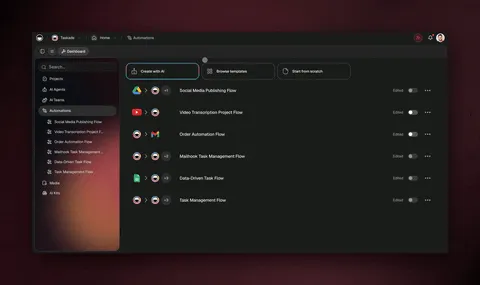
AI automation flows

🟠 “Ok, but What Is Zapier?”

Zapier is the biggest (and arguably the most popular) workflow automation platform in the wild. It enables different apps to “communicate” and exchange data so you don’t have to copy things manually from one tool to another. Isn't that cool?

Every integration is governed by a Zap, an automated workflow that acts as a bridge between two or more apps in your toolbox. A Zap includes a trigger (an event that kicks off the Zap) and at least one action or step the Zap performs when a trigger is present.

You can use Zaps in many creative ways. For instance, Zapier can automate your marketing pipeline and push new Typeform leads to Taskade as tasks. You can even set a trigger for new comments and mentions on social media so you stay on top of things 24/7.

Here are a few more ideas for using Taskade with Zapier. 👇

🤖 4 Ideas for Automating Your Taskade Workflow With Zapier

Turn Calendar Events Into Actionable Tasks

Let’s face it. Staying on top of all meetings and events is tough. It gets even more complicated when you have to juggle several calendar apps for personal and business stuff.

Sure, you can see upcoming events in a nice calendar spread. But wouldn’t it be nice if you could turn them into a list of actionable tasks you can easily prioritize?

All you need to do is connect Taskade to a calendar service like Gmail or Outlook and set up a Zap that will automatically convert new or existing calendar events into tasks.

Use these templates to set up your first Zap. 👇

Aggregate Tasks and Notes From Other Platforms

“I’m using tool A to take notes, but I keep all my tasks in tool B.”

That’s a productivity nightmare if we’ve ever seen one. Unfortunately, fragmented workflows are the norm these days. A study by Cornell University’s Ellis Idea Lab found that workers burn an average of 59 minutes just to scope information hidden within multiple apps.

Instead of grappling with a fragmented workflow, you can pick up the pieces and bring them under one roof. A simple Zap will automatically import tasks, notes, cards, and database items from Notion, Asana, Trello, or Evernote, just to name a few, to your Taskade Project.

Use these templates to set up your first Zap. 👇

Send Important Inbox Emails as Tasks

There are few bigger productivity killers than an inbox clogged up with spam, newsletters, unsolicited pitches, and a few genuine messages sprinkled on top. It’s a nightmare.

Cleaning up your inbox to get to inbox zero is a noble goal. But chances are you don’t have much time left on a regular workday to sort through all incoming emails at once. That means every time you check email, you waste time and get distracted because there’s so much clutter.

The alternative?

You can set up a Zap that will automatically create a new task in Taskade every time you star an email in your inbox. Instead of sorting through all that noise, you can simply get all the details straight to your Taskade Project and take action.

Use these templates to set up your first Zap. 👇

Aggregate Content Feeds Inside a Project

There’s a ton of valuable (and free) information out there. Blogs, articles, YouTube videos, Reddit threads, Tweets, it’s like a content Disneyland, minus a tour guide.

You can now combine all those content sources into the ultimate daily digest list. All you need is a simple Zap that will pull updates from your favorite sites and push them as tasks to Taskade.

You can personalize each Zap so that new tasks include details like publication date, author, snippet, and link to the source. You can even create Zaps for content management and bookmarking tools like Pocket or RSS to get a rundown of interesting bits from around the web.

Use these templates to set up your first Zap. 👇

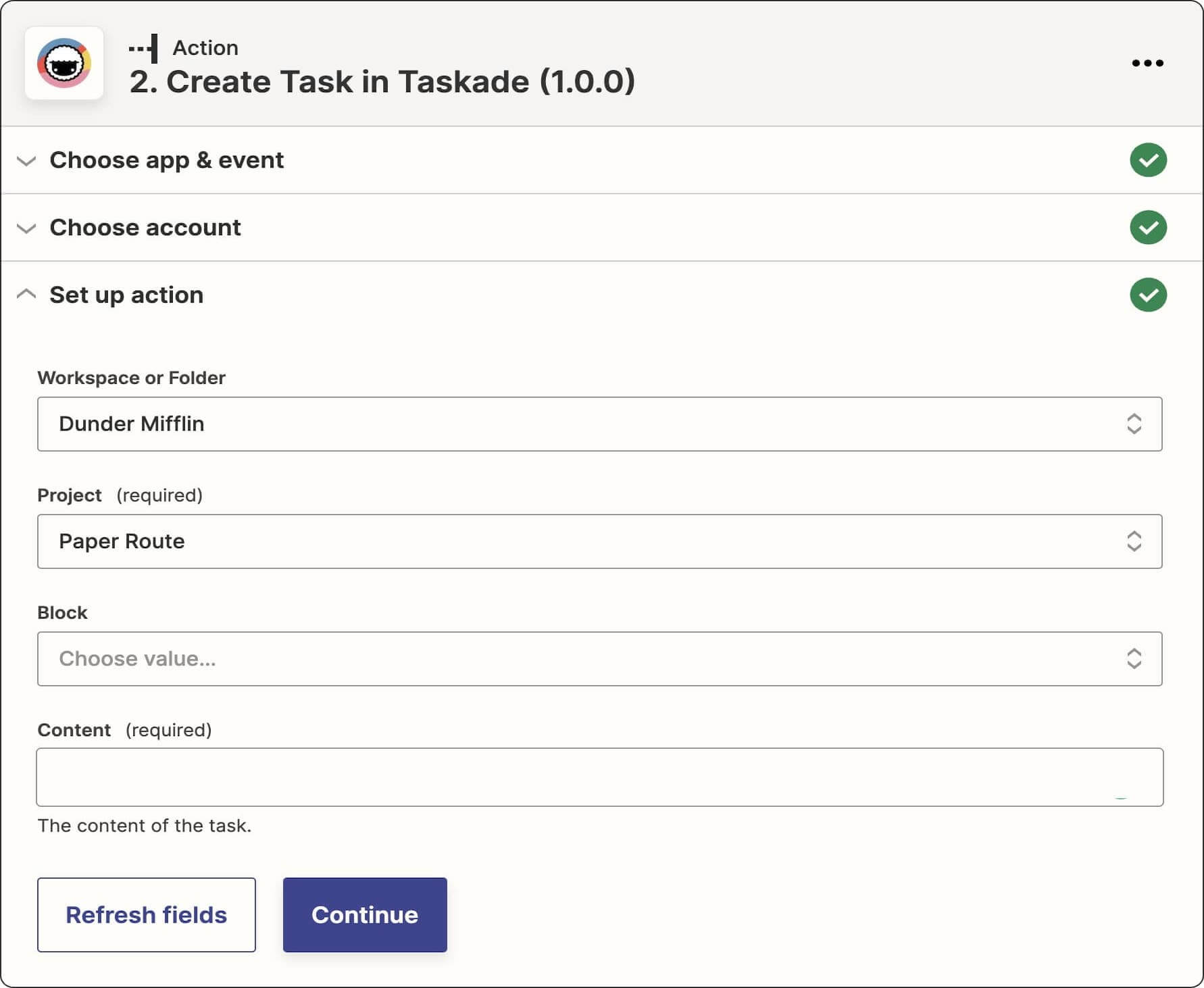
🏗 How to Set Up Your First Zap

Before you can start creating Zaps, you need a Zapier account. Jump over here to create one here for free. The basic tier lets you set up 5 zaps and run 100 tasks each month.

  • After signing up, click the ➕ Create Zap button in your Zapier Dashboard
  • Pick Taskade as a Trigger or Action for your Zap
  • Choose an Event from the drop-down list and click Continue
  • Sign in to your Taskade account to connect it to Zapier
  • Choose the correct Workspace, Folder, and Project in the Trigger section
  • Test your Zap to see if everything works
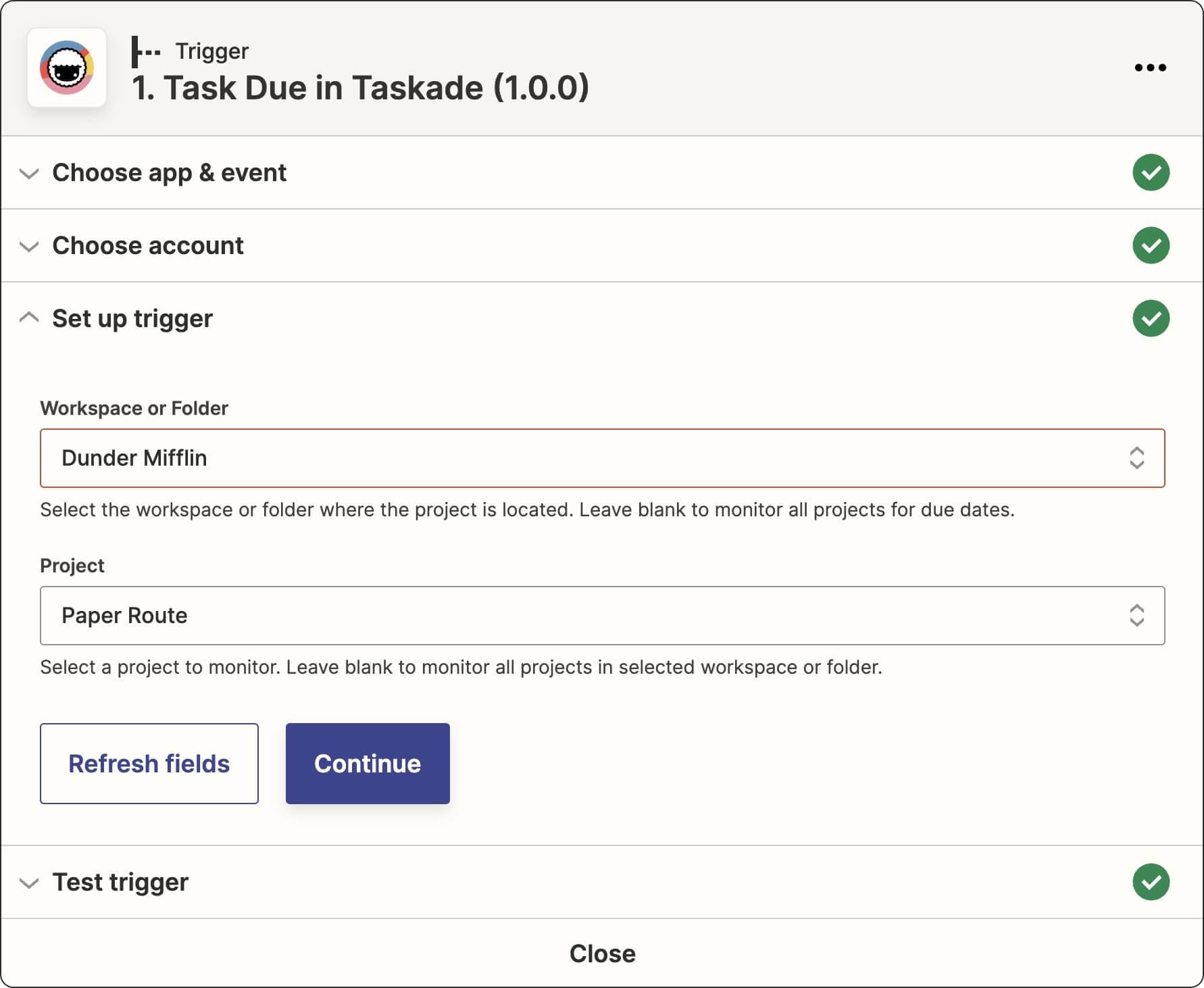
zap trigger 1

zap action 1

Taskade currently supports Due Date as a trigger and Create Task as an action. We’re working on implementing more actions and triggers so keep an eye on our Product Updates page to stay up to date with new features. Here are a few actions/triggers coming next:

  • Assigned or completed tasks
  • New Projects in a Workspace/Folder
  • New tasks in a Project
  • Task updates in a Projects
  • Edited, assigned, or completed Projects

🤹‍♀️ Other Integrations You Can Use in Taskade

Zaps are just one way of integrating Taskade with other popular apps and tools. Here are a few more alternative methods for importing your data from other platforms.

🔵 Trello

Taskade comes with a dedicated Trello import feature that lets you turn a Trello board into a new Taskade Project. All you need to do is navigate to your Workspace/Folder, click the arrow next to the ➕ New Project button, and choose Trello ➡ Import.
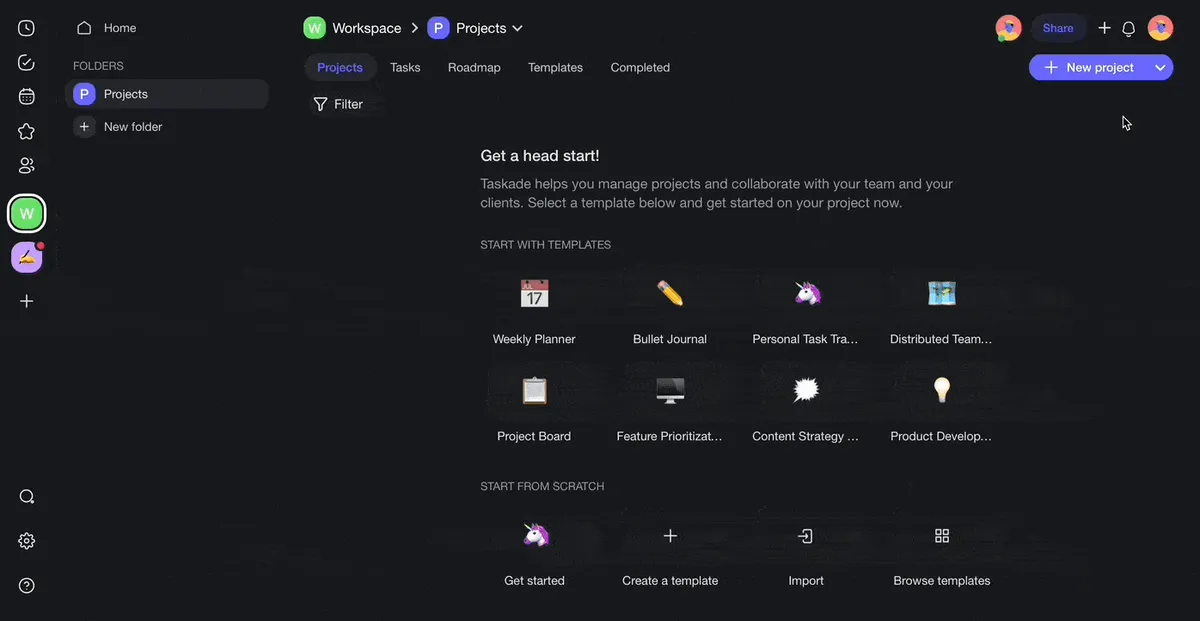
trello import

🔴 Markdown

Who doesn’t love Markdown? It's universal, easy to learn, and minimalist to the core. Taskade supports Markdown in chat, comments, and the Quick Add widget. Bust most importantly, you can import Markdown syntax from other platforms that support .md files including:

  • 🟠 Dynalist
  • 🟣 Obsidian
  • 🔴 Bear
  • 🟤 Roam Research
  • 🟡 iA Writer
  • And more!

To import Markdown, open your Workspace/Folder, click the arrow next to the ➕ New Project button, and choose Markdown ➡ Import. Upload your .md file or copy the Markdown syntax directly into the Import menu to preserve the status of completed tasks.
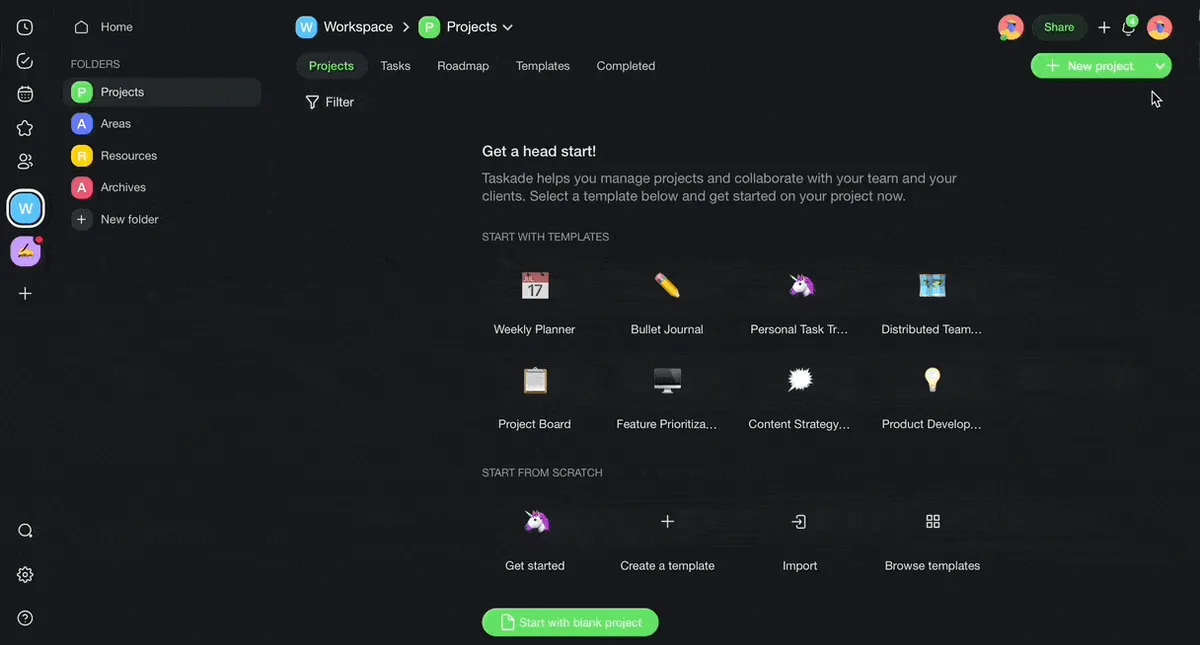
markdown import

🟡 Calendar

Finally, let’s talk about calendar integrations. While Zaps let you turn calendar events into tasks, you can synchronize Taskade with Apple, Outlook, and Google calendars to see scheduled tasks and Projects in your favorite calendar app.

Here’s how to enable calendar sync:

  1. Click your avatar (top right-hand corner) and select ⚙️ Settings
  2. Navigate to the Integrations tab and Generate API Token
  3. Copy the URL and follow the instructions to sync with your calendar

If you’re a Taskade Unlimited user, you can also enable two-way synchronization with the Google Calendar to manage Taskade Projects and tasks in Google Calendar and vice versa!

Visit 📆 Google Calendar Two-Way Sync to learn more.

And that’s it! 🥳

🐑 Parting Words

Zaps are a powerful tool for transforming all kinds of workflows. Whether you want to cut down on repetitive tasks or just get work done with your team, our new integration will do the heavy lifting for you. If you want to learn more about Zaps, read Taskade + Zapier for details.

Not a Taskade user? Sign up for a free account and get work done the easy way! 👈

Till next time! 👋

Frequently Asked Questions

What is Zapier and how does it work with Taskade?

Zapier is a workflow automation platform that connects Taskade with 5,000+ apps. Each automation (called a Zap) has a trigger event and one or more actions. For example, a new calendar event can trigger Zapier to automatically create a task in Taskade, eliminating manual data entry between tools.

Can I turn calendar events into Taskade tasks automatically?

Yes. Connect Taskade to Gmail, Outlook, or another calendar service via Zapier, then create a Zap that triggers on new or updated calendar events. Zapier automatically converts each event into a Taskade task with details like title, date, and description — keeping your task list and calendar in sync.

How do I import tasks from other platforms into Taskade?

Use Zapier to create a Zap that connects the source app (Notion, Asana, Trello, Evernote, etc.) to Taskade. When a new task, card, or note is created in the source app, Zapier automatically pushes it as a task to your chosen Taskade project. You can also import directly via Markdown or Trello's built-in importer.

Does Taskade support calendar integrations with Google and Outlook?

Yes. Taskade supports calendar feed sync with Apple, Outlook, and Google calendars to display scheduled tasks in your preferred calendar app. Taskade Unlimited users can enable two-way Google Calendar sync, allowing you to create and manage tasks from either platform.

0%

On this page

🟠 “Ok, but What Is Zapier?”🤖 4 Ideas for Automating Your Taskade Workflow With ZapierTurn Calendar Events Into Actionable TasksAggregate Tasks and Notes From Other PlatformsSend Important Inbox Emails as TasksAggregate Content Feeds Inside a Project🏗 How to Set Up Your First Zap🤹‍♀️ Other Integrations You Can Use in Taskade🔵 Trello🔴 Markdown🟡 Calendar🐑 Parting WordsFrequently Asked Questions

Related Articles

TSK-1, the Taskade System Kernel, auto-routing requests across frontier AI models inside a live Taskade workspace
July 8, 2026Product Updates

Introducing Taskade TSK-1: The System Kernel Behind Every App (2026)

Every app you build in Taskade now runs on TSK-1, the Taskade System Kernel. Here is what the kernel is, and why it is n...

An automation running follow-ups, reminders, and invoices on its own inside a Taskade Genesis business app, the busywork handled while the operator works
June 21, 2026Product Updates

Automate the Busywork: Set It Once, It Runs While You Work (June 2026)

Describe the busywork once and your Taskade Genesis app runs it: lead follow-ups, client reminders, invoices, file intak...

A whole-business operations dashboard built with Taskade Genesis, every job, asset, and status on one screen, the way a real field-service crew runs the day
June 7, 2026Product Updates

Run Your Whole Business in One App with Taskade Genesis (June 2026)

A concrete crew, a solo realtor, a wellness clinic, each runs the whole business on one app they built by describing it....

Describe a job and Taskade Genesis generates the workflow, assembles an agent team, and runs it across 100+ integrations on autopilot
June 3, 2026Product Updates

Taskade Genesis: Generate Workflows, Deploy Agent Teams, Automate (June 2026)

Describe a job and Taskade Genesis builds the workflow, assembles an agent team, and runs it across 100+ integrations 24...

A meeting picker, hiring board, and internal wiki running as live Taskade Genesis workspace apps a team uses every day
May 30, 2026Product Updates

Live Workspace Apps: a Wiki That Answers, a Board That Hires, a Picker That Schedules (May 2026)

Clone a wiki that answers, a board that hires, and a picker that schedules, three live Taskade Genesis apps that run you...

Taskade Genesis app kits arrive pre-wired to 100+ bidirectional integrations, the connector grid behind every Ops, Founder, Marketing, Sales, and Support kit
May 21, 2026Product Updates

Taskade Genesis: New App Kits, Agents, and Workflows (May 21 2026)

Five business stacks. Twenty-four app kits. Clone any one free, every kit ships with Workspace DNA: memory, agents, and ...

View All Articles
Zapier Integrations on Taskade: How to Automate Your Workflow | Taskade Blog