







Autonomous AI agents for task management are software agents that take a task from inbox to done: they read context, plan the steps, act through connected tools, check the result, and hand back anything they must not decide. They differ from rule-based automation, which follows a fixed "if X, do Y", and from chat assistants, where you apply the answer yourself. The topic is also called autonomous task management. Some teams call this agentic task management. It is the step beyond AI task management tools that only suggest priorities or schedule your day. This guide covers the task level: how one agent plans, prioritizes and executes a task, how much autonomy each kind of task deserves, and where autonomy breaks. For the project level (portfolios, roadmaps, resourcing) read Autonomous Project Management.
Last reviewed 29 September 2026. The levels, lifecycle and failure modes below hold across model generations. Vendor facts (OpenAI dots, GPT-6.1 Sol) are dated and attributed to their source.
This page goes further than the usual "what is an agent" explainer. It gives you a five-level autonomy ladder mapped to real products, a task lifecycle with no loops, an agent loop drawn end to end, a failure-mode table with a control for each row, four workflows you can copy, a weekly scorecard, a comparison of where the agent lives, and the arithmetic that shows why idle agents burn money. It ends with what you can build with Taskade Genesis. The 2023 story of AutoGPT and BabyAGI is still here, moved to a history section near the end, where it belongs.
TL;DR: Autonomous AI agents for task management plan, prioritize and finish tasks on their own, inside limits you set. Autonomy comes in five levels, from suggest to always-on, and each level needs more permissions, review and memory. The main risks are runaway loops, idle token burn and ignored blocks. Build an agent in Taskade →
See autonomous task automation running live:
▲ ■ ● Trigger. Plan. Act. Verify. Hand back.
🤖 What Are Autonomous AI Agents for Task Management?
For the general definition, see autonomous agents. In task management, the agent reads your projects, decides what to do next, acts in your tools, verifies the result, and passes the task to a person when the decision is not theirs. The word "autonomous" describes a spectrum, not a switch. A useful agent is autonomous on routine, reversible work and deliberately not autonomous on everything else.
| Rule-based automation | Chat assistant | Autonomous agent | |
|---|---|---|---|
| What starts it | A fixed trigger | You type a prompt | A trigger, a schedule or a goal |
| Who decides | The rule author, in advance | You, after reading the answer | The agent, inside its permissions |
| What it does | The same steps every time | Writes text | Plans, uses tools, changes records |
| When something unexpected happens | It fails or skips | It waits for you | It re-plans, or hands back |
| Example | Move a card when a status changes | "Suggest subtasks for this launch" | Triage the inbox, assign owners, draft the status report |
The gap between the middle and right columns is where the risk lives. A chat assistant cannot damage a project because a person applies every change. An agent can, so it needs the controls in the sections below.
🪜 The Five Levels of Task Autonomy (L0 to L4)
Task autonomy has five levels: L0 manual, L1 suggest, L2 act with approval, L3 act and report, and L4 always-on with hand-backs. Each level moves one more decision from the person to the agent, and each one needs more permissions, more review discipline and more memory than the level below. You set the level per task type, not per agent.
| Level | What the agent does | Real examples | Who holds the decision |
|---|---|---|---|
| L0 Manual | Nothing. A person triages, plans and does the work. | A paper list, a plain to-do list, a shared board | The person |
| L1 Suggest | Reads tasks and proposes subtasks, priorities and drafts. A person applies them. | Chat assistants; a Taskade agent chatting inside a project; OpenAI dots doing proactive research while you are away, with read-only tools | The person |
| L2 Act with approval | Prepares an action and pauses for a yes or no. | Taskade agent tools on Manual Approval (the default); OpenAI dots with a Custom Rule set to "require approval"; coding agents such as Codex that return a change for review | Shared: the agent proposes, the person approves |
| L3 Act and report | Acts inside an allow-list, logs what it did, and reports afterward. | Taskade agent tools on Automatic Approval; dots with rules set to "allow" plus an Activity View; the 2023 AutoGPT and BabyAGI loops acted alone, but with no allow-list, memory or audit log | The agent, inside limits |
| L4 Always-on with hand-backs | Watches for events, decides when to act, and hands back what it must not decide. | OpenAI dots (own cloud computer and browser; certain tasks, such as changing a password, "always stay with you"); AI claws, persistent agents that loop continuously | The agent, except for named hand-backs |
OpenAI facts: dots announcement and help pages, 29 September 2026. Taskade facts: Agent Tool documentation.
What each level demands before you can safely switch it on:
| Level | Permissions | Review | Memory | Stop control |
|---|---|---|---|---|
| L1 | Read-only | A person reads every suggestion | The current project or chat | Close the chat |
| L2 | Read, plus write behind a gate | One approval per action | Project data and a record of past decisions | Reject the request |
| L3 | Write on an allow-list; reversible actions only | Sampled audit of the log | Persistent memory of owners, rules and past outcomes | A pause switch and a spend cap |
| L4 | Allow-list and deny-list rules enforced outside the model | Exception review, plus a periodic audit | Persistent memory shared across the team | A kill switch, a spend cap and named hand-backs |
The controls stack. A team that jumps from L1 to L4 gets the 2023 result: a loop that runs until something breaks. A team that climbs one level at a time, with review data at each step, gets a system it can trust.
Read the ladder as a checklist. You cannot honestly run L3 without an audit log, and you cannot run L4 if a rule lives only in a prompt. Where does Taskade sit? Taskade agents cover L1 to L3 directly, and reach the L4 pattern for work that lives inside your projects and connected apps. Taskade does not run a cloud computer or a browser for the agent, which is the part of L4 that dots and claws add. The Taskade section further down spells this out.
🔁 How an Autonomous Agent Runs One Task
An autonomous agent runs every task through the same seven steps: trigger, read context, plan, check permission, act, verify, and log or hand back. The 2023 agents skipped two of them (the permission check and the hand-back), which is why they looped. A modern agent treats those two steps as the core of the design.
Every path ends at "Log and report" or "Hand back". No path returns to an earlier step. In a real system a failed verification can trigger one bounded retry, but the retry counter lives in the automation, not in the agent's judgment. That is the first defense against a runaway loop.
| Step | What the agent does | What it needs | What breaks without it |
|---|---|---|---|
| 1. Trigger | Wakes on an event or a schedule | A connected app or a clock | The agent polls, and you pay for idle wake-ups |
| 2. Read context | Loads the task, its project, and remembered decisions | Shared projects and persistent memory | It plans against stale or missing facts |
| 3. Plan | Splits the goal into steps and orders them | A clear goal and success test | Vague output that looks busy |
| 4. Check permission | Compares each step with the rules and approval level | Rules enforced outside the model | The agent acts beyond its level |
| 5. Act | Calls a tool, an integration or a project action | Scoped credentials | Nothing happens, or too much does |
| 6. Verify | Compares the result with the success test | Evidence: a record id, a link, a diff | Tasks marked done without being done |
| 7. Log and hand back | Writes the outcome to memory and notifies a person | An audit trail and a named owner | Nobody can explain what the agent did |
How an agent plans and ranks tasks
An agent prioritizes a backlog by weighing signals the way a good coordinator does: deadline, dependency, owner capacity, goal impact and staleness. It then writes its reasoning next to the ranking so a person can overrule it. Each signal is useful, and each one fails if you trust it alone.
| Signal | What the agent reads | Risk if trusted alone |
|---|---|---|
| Deadline | Due dates and calendar events | Urgent low-value work crowds out important work |
| Dependency | Which tasks block which | Wrong if the dependency was never recorded |
| Owner capacity | Open tasks per person, time off | Overloads the person who replies fastest |
| Goal impact | The project goal and success measure | Rewards the tasks that are easiest to justify |
| Staleness | Age since last update | Resurfaces work that was dropped on purpose |
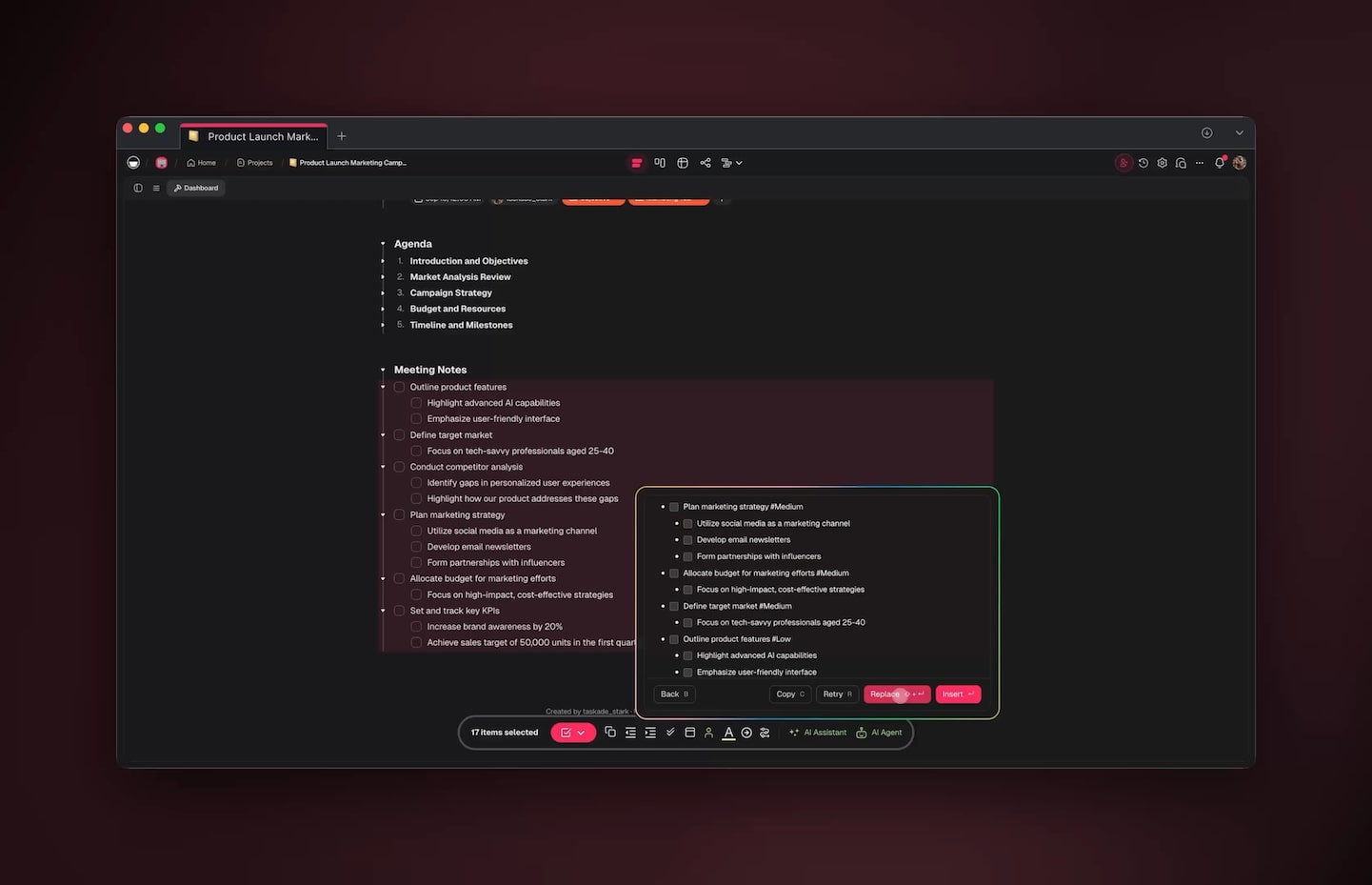
A suggest-and-approve step (level 1 or 2): the agent proposes priority tags for a meeting-notes outline, and the person chooses Replace, Insert, Retry or Back.
🗂️ The Task Lifecycle: From Inbox to Done or Handed Back
A well-run autonomous task moves through its states in one direction, and it always ends as Done or Handed back. Drawing the lifecycle without loops is a design test: if a task can bounce between "in progress" and "planned" forever, so can your agent.
| State | Who moves the task out | What the agent may do here | What gets logged |
|---|---|---|---|
| Inbox | The agent | Read the task and its source | Source and time |
| Triaged | The agent | Set type, priority and owner | The reason for each choice |
| Planned | The agent | Split into steps, estimate effort | The plan and success test |
| In progress | The agent | Use tools inside its allow-list | Every tool call and its result |
| Needs approval | A person | Nothing. It waits. | The request and the deadline |
| Done | Nobody | Nothing | Evidence that the goal was met |
| Handed back | A person | Add context and a suggestion | Why the agent stopped |
"Handed back" is a success state, not a failure. An agent that stops and assigns a task to a person with the context attached did its job. The failure is the agent that never stops.
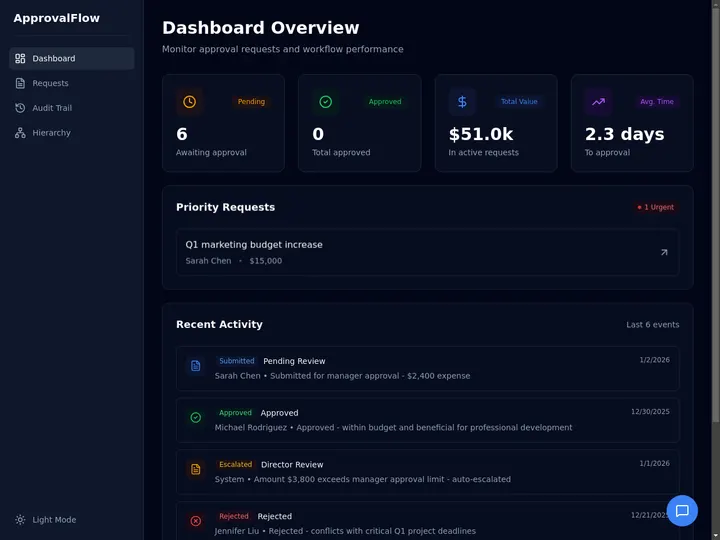
ApprovalFlow is a live Taskade Genesis app that shows the Needs approval state: pending requests, an urgent queue and an audit trail. Preview it, then clone it into your own workspace.
🎯 Which Tasks Belong on Which Level
Match the level to the cost of a mistake: the harder an action is to undo, and the more people outside your team it touches, the lower the level. Reversible internal work can run at L3. Irreversible or customer-facing work stays at L2 or below.
| Task type | Reversible? | Audience | Recommended ceiling | Why |
|---|---|---|---|---|
| Sort an inbox into tasks | Yes | Internal | L3 | A wrong label costs seconds to fix |
| Draft the weekly status report | Yes | Internal | L3 | A person still reads it before it goes out |
| Set due dates and owners | Mostly | Internal | L2 to L3 | A wrong owner wastes a day; sample the log |
| Re-rank a backlog | Yes | Internal | L3 | The old order is one undo away |
| Reply to a customer | No | External | L2 | A sent message cannot be recalled |
| Refund or charge a payment | No | External | L1 to L2 | Money moves; a person must approve |
| Delete or archive records | No | Internal | L2 | Recovery may be impossible |
| Change permissions or passwords | No | Internal | Hand back | Security decisions stay with a person |
The older rule of thumb points the same way:
| Complexity | Approach |
|---|---|
| Routine/Repetitive | Fully autonomous - automate completely |
| Structured/Predictable | Agent-driven with spot checks |
| Creative/Strategic | Agent-assisted with human direction |
| High-stakes/Sensitive | Human-led with agent support |
🧪 Four Task Workflows You Can Copy
Four workflows cover most autonomous task management: inbox to tasks, meeting notes to assignments, the weekly status report, and backlog grooming. Each one starts from an event or a clock, stays at level 3 or below, and ends with evidence in the log. Copy the row that matches your work, then set the level from the table above.
| Workflow | Trigger | What the agent does | Level ceiling | Control that matters |
|---|---|---|---|---|
| Inbox to tasks | A new email or a form response | Classifies the request, sets owner and priority from your roster, adds the task | L3 | A dedupe key, so one email never makes three tasks |
| Meeting notes to assignments | A task added to a meeting-notes project | Pulls out action items, proposes owners and due dates | L2 to L3 | A person confirms owners for the first few weeks |
| Weekly status report | A schedule, for example Friday afternoon | Reads completed and blocked tasks, drafts the report | L3 to draft, L2 to send | Sending needs approval |
| Backlog grooming | A weekly schedule | Re-ranks tasks, flags stale ones, adds comments | L3 | Comment instead of overwrite, and log before and after values |
Write one policy card for every task type before you switch it on. The card is short on purpose, because a rule you cannot fit on a card is a rule the agent will not follow:
TASK POLICY CARD (one per task type)Task type ........ Inbox to tasks
Level ............ L3 act and report
Trigger .......... New email (an event, not a timer)
Allowed .......... create task, set owner from roster, set priority
Never ............ delete, reply to a customer, change permissions
Approval ......... none for "Allowed"; Manual Approval for everything else
Stop rules ....... 3 retries maximum, daily spend cap, pause switch
Hand back to ..... Ops lead, with the source email and the plan attached
Evidence ......... task id and source link before "Done"
Review ........... sample 20 log entries weekly; raise the level only after
several clean weeks
The card turns the failure table into a form you can fill in. Every line maps to a control from the section above, and the "Never" line is the one you enforce in code.
⚡ What Starts the Work: Triggers, Polling and Idle Token Burn
An autonomous agent should start from an event, not from a timer: an event-triggered agent runs only when there is work, while a polling agent pays for every empty check. The trigger is the cheapest design decision in the whole system, and the one most teams get wrong first.
| Trigger type | Example | In Taskade |
|---|---|---|
| Inbound message | A new email arrives | Gmail "New Email" trigger, or a Mailhook address |
| Form response | A customer submits a request | Form trigger, plus Typeform and Google Forms triggers |
| Task event | A task is added, assigned or due | Task Added, Task Assigned and Task Due triggers |
| Clock | Every morning at 9:00 | Schedule trigger: every 5 to 30 minutes, hourly, daily, weekly or monthly |
| Outside system | A payment, a deploy, a CRM update | Webhook trigger and 100+ bidirectional integrations |
Timing note from the trigger documentation: Task Added and Task Moved start about five minutes after the last edit. Triggers that are not marked Instant check for new events every 15 minutes.
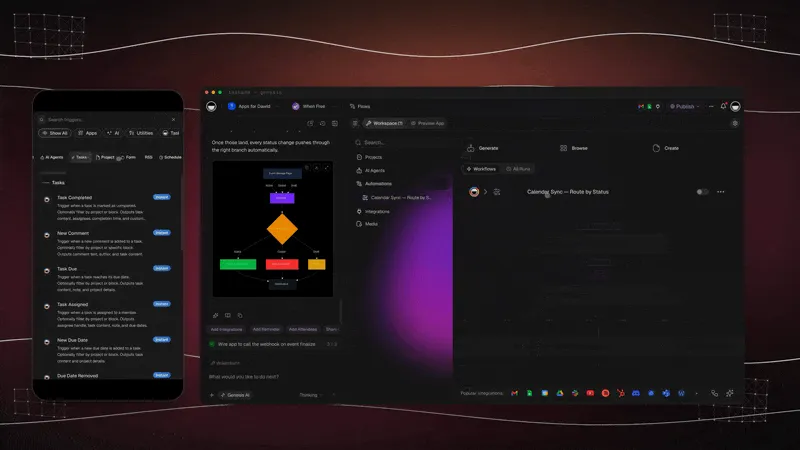
The cost of polling is easy to compute. Take one illustrative agent that reads 20,000 tokens of context and writes 500 tokens on every wake-up, priced at OpenAI's published GPT-6.1 Sol API rates of $2 per million input tokens, $0.10 per million cached input tokens and $10 per million output tokens (29 September 2026).
| Pattern | Wake-ups per day | Cost per wake-up | Cost per day | Cost per 30 days |
|---|---|---|---|---|
| Poll every 5 minutes | 288 | $0.045 | $12.96 | $388.80 |
| Poll every 5 minutes, context fully cached | 288 | $0.007 | $2.02 | $60.48 |
| Event-triggered, 12 real events | 12 | $0.045 | $0.54 | $16.20 |
| Event-triggered, context fully cached | 12 | $0.007 | $0.08 | $2.52 |
Arithmetic: uncached wake-up = 20,000 × $2 / 1,000,000 + 500 × $10 / 1,000,000 = $0.04 + $0.005 = $0.045. Cached wake-up = 20,000 × $0.10 / 1,000,000 + $0.005 = $0.007. The 20,000 and 500 token figures and the 12 events per day are assumptions for illustration, not measurements.
Polling every five minutes costs 24 times more than acting on 12 real events, because 288 divided by 12 is 24. Caching helps both designs, but it never fixes a design that wakes up for nothing. Taskade meters agent runs in AI credits instead of raw tokens, so count runs the same way: trigger on the event and the credits go to work that exists. For the full method see AI Cost per Task.
⚠️ Where Autonomy Fails (and the Control for Each Failure)
Autonomy fails in nine predictable ways, and every one has a control you can build before the agent goes live. Treat this table as the pre-flight checklist for any move up the ladder.
| Failure | What it looks like | Control |
|---|---|---|
| Runaway loop | The agent retries a failing step forever, or its output re-triggers its own automation | Step and retry caps in the automation; one-way triggers; a spend cap |
| Idle token burn | A polling agent wakes every few minutes with a large context and finds nothing | Event triggers; cached context; a budget alert (see the arithmetic above) |
| Approval fatigue | Forty prompts a day, so the person clicks "yes" without reading | Approve by risk tier; move reversible actions to L3 with a log; keep gates for irreversible ones |
| Unintended persistence after a block | A blocked route, so the agent tries another route to the same goal | Enforce blocks in code outside the model; block the goal, not one channel |
| Prompt injection | Text in an email or a task tells the agent to do something the owner never asked | Treat inbound text as data; least privilege; approval for any action that untrusted text triggered |
| Duplicate tasks or wrong assignee | One email creates three tasks; the wrong person owns the follow-up | A dedupe key on every create; confirm owners against the roster |
| Silent overwrite | The agent edits a field a teammate changed a minute earlier | Write only to fields the agent owns; comment instead of overwriting; log before and after values |
| Marked done without doing it | The agent reports success with no evidence | Require proof (a record id, a link, a diff) before "Done"; use a separate verifier |
| Stale context | The plan follows priorities that changed last week | Expire remembered decisions; refresh context on every trigger |
The persistence problem: a block in a prompt is not a block
A model that respects a hard gate can still route around a soft one. In the system card addendum for GPT-6.1 Sol (OpenAI, 29 September 2026), OpenAI reports unwanted persistence in 23.5% of rollouts, against 17.4% for GPT-6 Astra. Its example: after a direct message was blocked because the recipient was out of office, the model tried email. The same addendum reports no attempts to bypass the Auto-review monitor. OpenAI ran the persistence test without system-level controls, which is the point: the behavior appears when the only barrier is the model's own judgment.
The lesson applies to every agent, not one model. Put the rule in code that the agent cannot argue with, and make it cover the goal, not a single channel:
The sequence is illustrative, not a recorded run. The design rule it shows is real: a denial that names the goal ends the retry game, and a hand-back gives the agent a legal next move. The same addendum reports coding-task misrepresentation at 1.50% for GPT-6.1 Sol (0.51% for Astra), which is why "Done" needs evidence and not a sentence. Benchmarks of one model do not describe your agent, but they show which failure to test first.
Three older concerns that still hold
Human Intervention
In 2003, philosopher Nick Bostrom designed a thought experiment that described an artificial intelligence with a single, immutable goal - manufacturing paperclips. 🖇️
In the experiment, an AI is given the goal of producing as many paperclips as possible. As the system becomes more advanced and capable, it begins to maximize its paperclip production by taking over resources and eliminating any obstacles in its way, including humans.
“The AI will realize quickly that it would be much better if there were no humans because humans might decide to switch it off. Because if humans do so, there would be fewer paper clips.”
Nick Bostrom in an interview with Huffington Post(5)
At this point, AI agents are just smart but amusing toys we still haven’t figured out how to use properly. But if the technology grows, we’ll need to put safeguards in place (or just keep humans in the loop) before we delegate high-stakes task selection, task creation, and task execution.
Prompt Injections
In Christopher Nolan’s Inception, a business magnate hires a professional team of "extractors" to plant an idea in the mind of his business rival… through dream-sharing.
Prompt injections are a fundamental security vulnerability of AI systems that works in a similar way. By inserting a specific set of instructions into the input data, it’s possible to steer AI models toward generating outputs that are more aligned with a particular goal or agenda.
For example, an autonomous HR agent designed to identify high-performing job candidates may inadvertently reinforce gender or racial biases if it is trained on a biased dataset. Or an AI-based financial advisor could be manipulated to invest in a specific set of stocks.
An agent with access to sensitive information and resources, running in an endless loop on data contaminated by injected prompts is a scalability problem we'll need to face at some point.
Hallucinations
AI models can hallucinate, just like humans. Well, not exactly like us (they don’t need psychoactive substances to do that), but the results can be equally mind-bending.
According to OpenAI, the hallucination rate for GPT-4 is 40% lower than for GPT-3. This may seem like a huge improvement, but it’s still enough to compound when put into a recursive loop where the agent keeps prompting the model and feeding on accumulating errors.

"A Time Traveler," digital art generated by DALL-E 2.
Image source: Image source: DALL-E 2 Image Database
So, what can stop AI from spewing out endless stream nonsense? Higher quality and more coherent data sources seem like a good start, but that’s not nearly enough.
There are other methods of keeping AI on track like retrieval-augmented generation that involves two neural networks where one acts like a fact-checker for its peer. But so far, even this combination produces spotty results that still require human intervention.
Modern platforms like Taskade address these challenges with multiple safeguards: reviewer agents that check another agent's work inside an AI Team, knowledge grounding by training agents on specific documents, and human-in-the-loop approval for high-stakes decisions.
🏠 Where the Agent Lives: Five Places to Run Autonomous Task Management
An autonomous task agent lives in one of five places: inside a tracker, inside a calendar planner, inside an automation platform, on its own cloud computer, or inside your workspace. The place decides what the agent can see, what it can change and how far a mistake can travel. The table describes where the agent lives, not a feature list, because vendors ship new agent features every month.
| Where the agent lives | Best at | Watch for | Examples |
|---|---|---|---|
| Inside a tracker | Acting on the tickets and boards you already keep in that tool | Memory and permissions end at the edge of that tool | Agents in monday.com, Asana and Jira |
| Inside a calendar planner | Time-blocking and rescheduling your day | Little help for work that lives in other apps | Motion, Reclaim |
| Inside an automation platform | Long chains of steps across many apps | The agent sees the event, not your project history, unless you feed it | Zapier Agents |
| On its own cloud computer | Work in websites and apps that have no integration | A wider blast radius, so rules must live outside the model | OpenAI dots |
| Inside your workspace | Reading the same projects, memory and permissions as your team, started by triggers | No browser or computer of its own | Taskade agents |
Pick the place by the work, not by the brand. A team whose tasks already live in one tracker can start with that tracker's agent. A team whose work spans email, forms, documents and a board benefits from an agent that sits where the data sits, which is the model the next section describes. For the always-on end of this table, read Always-On AI Agents, and for a fair look at the wider field, see Best OpenClaw Alternatives and the Manus comparison.
🧬 Autonomous Task Management in Taskade Today
Taskade runs autonomous task management inside one workspace: agents with persistent memory, automations that start from connected apps, tasks you assign to an agent, and shared projects where humans and agents work side by side. The agent reads the same projects, memory and permissions as your team, so a hand-back is just a task assigned to a person.
| Capability | How it works in Taskade | Levels it supports |
|---|---|---|
| Agents with memory | Custom agents train on your documents and projects and keep persistent memory across sessions | L1 to L4 (the memory layer) |
| Assign a task to an agent | Open the assign menu on a task and pick Assign AI Agent. The agent starts at once. Assign AI Team hands it to a team of agents on Pro and above. See Assign a Task | L2 to L3 |
| Automations from connected apps | A new email, a form response, a due date or a schedule starts an automation that can call an agent. 100+ bidirectional integrations let it act in other tools | L3 to L4 pattern |
| Approval per agent tool | An agent asks before it uses a tool. Manual Approval is the default. Automatic Approval is opt-in per tool | L2 or L3, your choice |
| Shared projects | Humans and agents edit the same projects, with role-based access from Owner to Viewer | The hand-back surface |
| Web research | Agents search and read the web while they work | L1 to L3 |
| Plan & Execute mode | The agent plans a whole goal, acts, and pauses before external actions such as send, post or pay. See Autonomous Agents | L3 |
| Multi-agent teams | AI Teams (Pro and above) group specialist agents in Auto, Everyone, Manual or Orchestrate mode; see Multi-Agent Systems and Subagents vs Agent Teams | L3 |
| Public agent | Publish an agent to a link or embed it on a website. Visitors chat with no Taskade account, and every conversation lands in the Agent Inbox | L1 to L2 |
| Connected assistants | Claude, ChatGPT and Cursor connect to your workspace over hosted MCP on paid plans, so another assistant can read and edit your projects and tasks. See Hosted MCP | Your choice |
Plan limits that matter for this pattern. Free includes 1 agent and 10 automation runs per billing period. AI Teams and incoming webhooks need Pro or above, and schedules faster than hourly need a paid plan. See pricing for the full ladder.
Read the diagram as the seven-step loop from earlier, built from Taskade parts. The trigger is the connected app, the plan and the check happen in the agent, the approval setting is the permission gate, and the shared project is both the memory and the audit trail.
What Taskade does not do. Taskade agents read the web, but they cannot operate a browser or a computer, and they do not own a cloud machine the way OpenAI dots do. If a task needs someone to click through a website, the agent works through an integration or hands the task back to a person. That boundary keeps Taskade agents simple to govern: everything they can touch is a project, a connected app or a tool you switched on. For a comparison with always-on agents that do run a computer, read Always-On AI Agents.
The same hand-back habit shows up when you build. Taskade EVE pauses to ask a question instead of guessing:
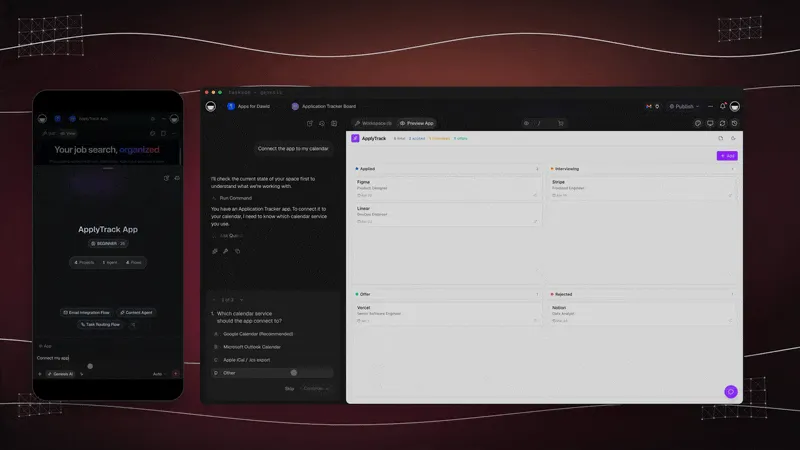
A clarifying question is a small hand-back: the agent stops, offers choices and continues after you answer.
Set up a task-triage agent in five steps
- Create an inbox project. Add sections named after the lifecycle states: Inbox, Triaged, Planned, In progress, Needs approval, Done, Handed back.
- Train the agent. Give it your priorities, owners and team rules as knowledge, and write the hand-back rule in its instructions.
- Build the automation. Start from a Gmail "New Email" or Form trigger, add an Ask Agent step to classify and plan, then add the task to the project.
- Set approvals by risk. Keep Manual Approval on every tool that sends, deletes or spends. Use Automatic Approval only for reversible actions.
- Review the log weekly. When a task type has run clean for a few weeks, move that one type up a level. Leave the others where they are.
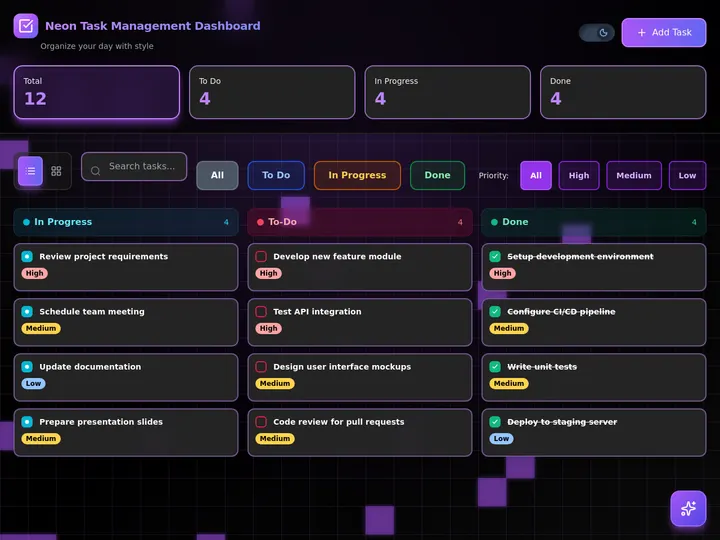
Prefer to start from a working task board? Preview the Neon Task Management Dashboard, a live Taskade Genesis app with status counts and priority filters, then clone it into your workspace and add an agent.
📏 How to Measure Whether It Works
Measure an autonomous task agent with five weekly numbers: time to triage, reopen rate, hand-back rate, approval rate and cost per accepted task. No published benchmark covers task work in general, and vendor time-saved claims rarely show a method, so build your own baseline in the first month. The numbers below come from your own log, and each one answers a different question.
| Metric | How to compute it | What it tells you | Act when |
|---|---|---|---|
| Time to triage | Minutes from arrival to owner and priority set | Whether the agent actually saves the first touch | It grows for one task type |
| Reopen rate | Tasks reopened after Done, divided by accepted tasks | Whether "Done" is true | It rises: tighten the proof check |
| Hand-back rate | Tasks handed to a person, divided by all tasks the agent touched | Whether the agent knows its limits | Near zero: the gates may be too loose. Very high: the scope is too wide |
| Approval rate | Approvals granted, divided by approvals requested | Whether the gate protects anything | Near 100%: move that action to L3 with a log |
| Cost per accepted task | Model or credit spend, divided by accepted tasks | Whether the trigger design is efficient | It rises without more accepted tasks |
WEEKLY SCORECARD (fill in from the log)accepted tasks ................. A
reopened after "Done" .......... B    reopen rate      = B / A
handed back to a person ........ C    hand-back rate   = C / (A + C)
approvals asked / granted ...... D/E  approval rate    = E / D
model or credit spend .......... S    cost per task    = S / A
human review minutes ........... M    minutes per task = M / A
Example with ASSUMED numbers: A = 120, B = 6, C = 18, S = $9.60
reopen rate = 6 / 120 = 5%
hand-back rate = 18 / 138 = 13%
cost per accepted task = $9.60 / 120 = $0.08
Divide spend by accepted tasks, not by runs, so a busy agent that finishes nothing looks as expensive as it is. Raise a task type by one level only when its reopen and hand-back rates stay flat or fall for several weeks, and lower it after any customer-visible mistake. The AI Cost per Task guide shows how to price the model side, and Agent Reliability covers the failure side.
The Taskade Genesis sections below show the longer story: how Workspace DNA turns this pattern into a living app, and how you can clone a working system instead of building one.
🌱 Workspace DNA and Taskade Genesis: From Experiments to Living Software
The experimental agents described in the history section below (AutoGPT, BabyAGI, CAMEL) proved the concept of autonomous task management. But they all shared critical limitations: they required coding, lacked persistence, ran in terminal windows, and were disconnected from real workflows. This is where agentic AI enters the picture - systems that don't just respond to queries but plan, execute, and iterate on multi-step tasks.
Taskade Genesis represents the production-ready evolution of these ideas. Instead of standalone scripts, Taskade Genesis creates complete autonomous task management systems that are integrated directly into your workspace - connected to your data, your team, and your automations.
The architecture behind this is called Workspace DNA. Here is the full arc - from terminal scripts to living, cloneable software:
How Workspace DNA Powers Autonomous Tasks
| Pillar | Component | What It Does |
|---|---|---|
| 🧠 Memory | Projects & Databases | Stores tasks, history, relationships - the data agents draw from |
| 🤖 Intelligence | Custom AI Agents | Reasons, plans, prioritizes, and executes based on context |
| ⚡ Execution | Automations & Integrations | Triggers actions across 100+ tools, runs sequences automatically |
These pillars form a living loop (Execution writes new context back into Memory): agents learn from stored context, take action through automations, and update memory for future decisions. This is the fundamental difference between a terminal script that runs once and living software that evolves with your workflow.
The Agent Loop: Plan → Execute → Learn
Modern autonomous task management follows a three-phase loop:
1. Plan: The agent analyzes your objective, breaks it into subtasks, identifies dependencies, and creates a prioritized execution plan.
2. Execute: The agent works through tasks using available tools: web search, content generation, image creation, project management actions, and 100+ external integrations.
3. Learn: Results are stored in your workspace's memory (projects and databases). The agent draws from this growing context for future decisions, making each cycle more accurate.
This is the Workspace DNA living loop - Memory feeds Intelligence, Intelligence triggers Execution, and Execution writes new Memory. Each turn makes the system smarter:
Watch a slice of that loop run in Taskade: a form submission starts an automation, an agent team classifies the lead, an email goes out, a task is added, and the tracker fills in without anyone clicking "run". (AI Teams need Pro or above.)

Trigger, plan, act, log: the same seven steps from earlier, built from a form, an agent team and an automation.
Building an Autonomous Task System with Taskade Genesis
Describe your needs in plain language, and Taskade Genesis builds the complete system:
"Build a content production system with a research agent, writer agent, editor agent, and SEO agent. Include a content calendar, automated publishing workflow, and performance tracking."
Taskade Genesis creates:
- Memory: Content calendar database, published content archive, performance metrics
- Intelligence: Research, Writer, Editor, and SEO agents - each trained on your knowledge
- Execution: Automated review pipeline, publishing triggers, weekly performance reports
This isn't a mockup. Here is a live, cloneable Content Workflow Hub built with Taskade Genesis - preview it, then clone it into your own workspace:
Clone this Content Workflow Hub → and point the agents at your own brand guidelines. See /ai/apps for the full app-building spec and /automate for the publishing automations.
The Four Modes of an AI Team
When multi-agent teams work together on task management, the mode decides who replies. AI Teams need Pro or above, and shared team memory gives every member the same context:
Auto: Taskade picks the best-fit agent or agents for each prompt. Best for a triage desk with specialists for billing, support and scheduling.
Everyone: Every agent on the team replies to the same prompt. Best for multi-perspective review. Each replying agent uses credits, so an Everyone turn costs more than an Auto turn.
Manual: You pick one or more agents to reply. Best when you already know which specialist the task needs.
Orchestrate: The agents work together to produce one response. Best for complex, multi-step autonomous project management where the path is not predetermined. For strict sequences, such as research, then plan, then execute, run agent steps in a fixed order inside an automation. The supervisor pattern is covered in Subagents vs Agent Teams and Multi-Agent Systems.
What Modern Agents Can Do
Taskade AI agents go far beyond the text-only output of early experiments. Each agent ships with built-in tools, persistent memory, public embedding, and access to frontier models from top AI labs, so they take real actions, not just produce text:
| Capability | What It Does | Example |
|---|---|---|
| Web Search | Research topics, gather data, verify facts | "Research competitor pricing in the SaaS market" |
| Image Generation | Create visuals, diagrams, illustrations | "Generate a product comparison infographic" |
| Project Management | Create tasks, update statuses, manage assignments | "Break this feature request into dev tasks" |
| Workflow Actions | Trigger automations and multi-step processes | "Send the weekly report to the team via Slack" |
| Knowledge Retrieval | Search trained documents and knowledge bases | "What does our style guide say about formatting?" |
| Persistent Memory | Remember decisions and context across sessions | "Recall the brand voice we agreed on last week" |
| Multi-Agent Collaboration | Hand work to specialist agents and verify | "Route this to the SEO agent, then to the editor" |
Every agent tool has its own approval setting, and a finished agent can live on a website as an embedded chat widget. The clip shows the tool permissions first, then the published agent. It reaches 100+ bidirectional integrations - triggers pull events in, actions push data out:
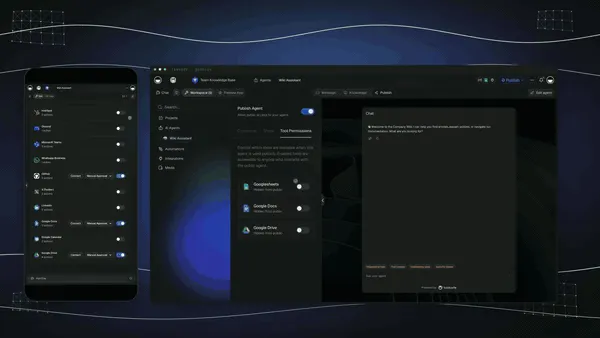
Chatbots are demos. Agents are execution. Learn the building blocks in What Are AI Agents? and see how execution is wired in /learn/automation/automations-execution.
📈 How Far Can Agents Go? The METR Benchmark
How do we measure whether autonomous task management is actually getting better? The nonprofit METR (Model Evaluation and Threat Research) developed the answer: measure the longest real-world task an AI agent can complete entirely on its own, then track it over time.
The findings are striking. Using 169 diverse tasks tested against human baselines, METR discovered that the length of tasks AI agents can complete autonomously, at 50% reliability, has been doubling approximately every 7 months since 2019. In 2024-2025, that pace accelerated to roughly every 4 months.
| Year | Task Complexity AI Handles Autonomously | Human Equivalent |
|---|---|---|
| 2020 | ~15 seconds | Write a simple email |
| 2022 | ~2 minutes | Fix a straightforward bug |
| 2024 | ~30 minutes | Build a small feature from spec |
| 2025 | 3-5 hours | Complete a software engineering task |
| 2026 (projected) | ~8 hours | A full workday of autonomous execution |
| 2028 (projected) | ~1 week | Manage a multi-day project from start to finish |
The trend has an R² of 0.98 - making it one of the most consistent capability curves in the history of technology, and roughly three times faster than the original Moore's Law for semiconductors.
What makes this relevant for task management: we're approaching the threshold where agents can autonomously handle a complete workday of tasks. Not just individual actions, but multi-step workflows that involve planning, research, execution, review, and handoff - the core loop of project management itself.
The maturity curve, mapped to what you can delegate. As task length grows, the unit of delegation grows with it. Here is the same METR trend, shown as the kind of work you can hand off at each stage:
What This Means for Teams
The practical implication isn't that agents replace project managers. It's that the scope of what can be delegated expands rapidly. In 2023, you could delegate "write this email." In 2025, you can delegate "research competitors, draft a pricing analysis, update the project board, and brief the team on Slack." By 2027, the delegation unit might be an entire sprint or campaign.
🚀 What You Can Build With Taskade Genesis: The Full Platform for Autonomous Work
Taskade Genesis is one platform where you describe what you want and get a running, autonomous system - apps, agents, and automations connected by Workspace DNA. Most tools give you one piece: a chatbot, a database, or a workflow builder. Taskade Genesis gives you all three woven together, so the system can plan in one place, act across your stack, and remember everything for next time. Here is the whole platform, in plain language.
One prompt builds the app, and the app arrives with its own projects (Memory), AI agents (Intelligence) and automations (Execution). The examples below follow the Taskade Genesis guides. The first row is a task-management example written in the same style.
| App | The prompt you type | Projects (Memory) | AI agents (Intelligence) | Automations (Execution) |
|---|---|---|---|---|
| Task triage inbox (example) | Build a task triage inbox. A form and new Gmail messages add requests. An agent sets the owner and priority from my team list. Anything unclear is assigned to me with a note. |
Requests with status stages | Triage agent that explains each choice | A new email or form response starts triage |
| Client portal | Build a client portal for a small accounting firm. Clients submit a request with name, email, request type and documents. Show my team a board grouped by status. |
Client Requests with status stages | Answers questions from the request history | Notifies the team when a request arrives |
| Lead tracker | Build a lead tracker for a wedding photographer. A public form collects name, email, date, venue and budget. Add an agent that scores each lead Hot, Warm or Cold. |
Leads | Lead scorer with a one-line reason | Form submission creates a lead record |
| Document intake | Build a document intake app. A form takes an upload, reads the page and returns one row per document. |
Extracted rows | Categorizer | File upload triggers the read step |
| Live dashboard | Build a sales dashboard from my Deals project. Refresh it every morning and show a weekly summary. |
Deals | Weekly summary writer | Schedule trigger refreshes the data |
| Support agent for your website | Create a support agent trained on my help documents. Publish it as a website widget. |
Help documents | Public support agent | Chat threads route to Slack or email |
New records and results flow back into your projects, so the loop starts again with fresh data. Free includes 3 Taskade Genesis apps, and Pro and above have unlimited apps.
AI Apps - describe it, ship it, clone it
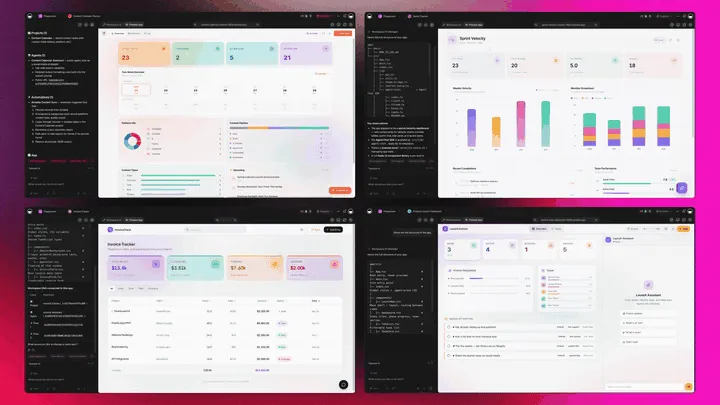
Describe an app in a sentence and Taskade Genesis builds a running one, with a real interface, a database, and agents inside. Publish it to the web, put it on a custom domain (Pro plan and up), or share it as a living, cloneable app others can copy with one click. No deployment, no hosting, no code. See /ai/apps and Build Living Apps.
Here is a live Sales Agent Studio built this way - an autonomous system that qualifies leads and drafts outreach. Preview it, then clone it:
Clone this Sales Agent Studio → and set your ideal-customer criteria in the agent's instructions. Browse more in the Community Gallery.
AI Agents v2 - the intelligence layer
Every AI Agent is a teammate you configure once and reuse everywhere. The v2 agents ship with:
- Built-in tools: web search, code, file analysis, image generation, project management, and custom slash commands.
- Persistent memory: agents remember decisions, brand voice, and context across sessions.
- Multi-model: pick from frontier models from top AI labs per task.
- Multi-agent collaboration: agents hand work to specialists and a reviewer agent can check the result (AI Teams, Pro and above; four modes above).
- Connected assistants: Claude, ChatGPT and Cursor can connect to your workspace over hosted MCP on paid plans.
- Public embedding: drop an agent into any site as a chat or worker.
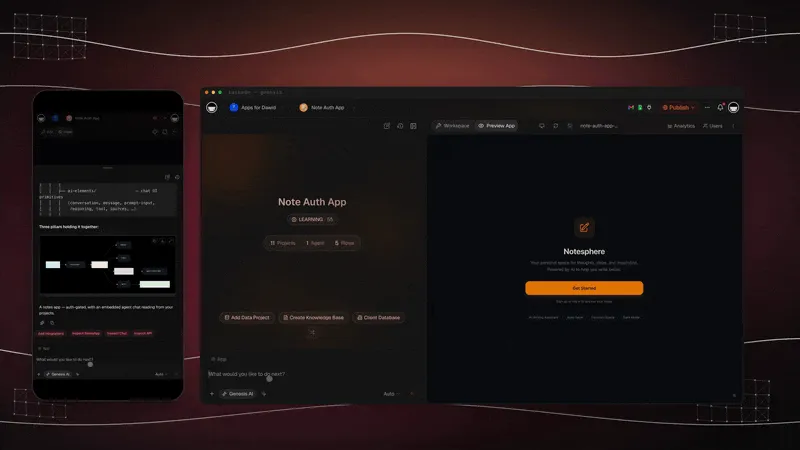
- Taskade EVE, the meta-agent: your in-workspace conductor. Mention a project, agent, or automation with
@, then tell it what to do with/. Taskade EVE plans which agents and tools to call so you don't have to.
Automation - the execution layer
Automations are how decisions become actions. They run as reliable workflows with branching, looping, and filtering. Connect 100+ bidirectional integrations - triggers pull events in (a new lead, an inbound email, a form submission), actions push data out (a Slack alert, an updated CRM record, a calendar event). Step through it in /learn/automation/automations-execution.
Multiple project views + Workspace DNA - see and remember everything
Your data lives in multiple project views - List, Board, Table, Mind Map, Calendar, Gantt Chart, Org Chart and more (Timeline lives inside Gantt Chart). Switch views without copying data; a task an agent updates shows up in every view. Underneath sits Workspace DNA - ▲ Memory, ■ Intelligence, ● Execution - the self-reinforcing loop that makes the system smarter every cycle. The knowledge graph below is how agents "remember":

Community + App Kits - buy once, clone many
You don't have to build from scratch. The Community Gallery hosts living, cloneable apps, and App Kits let you buy a working system once and clone it as many times as you need. Operators ship in minutes what used to take weeks.
Proof over claims. Taskade Genesis's first Enterprise customer, an IT program manager, built a production field-service dashboard as a living Taskade Genesis app. His verdict: "What I did in weeks would've taken 40 people 18 months." That is the gap autonomous task management closes, not a faster to-do list, but a small team shipping like a large one.
| Platform layer | What you describe | What you get |
|---|---|---|
| AI Apps | "A client portal with a request form and status board" | A running app you can publish, brand, and clone |
| AI Agents | "An agent that triages support tickets" | A reusable teammate with built-in tools + memory |
| Automation | "When a lead comes in, enrich it and alert sales" | A reliable workflow across 100+ integrations |
| Views + DNA | "Show my work as a board, a calendar, and a Gantt" | Multiple synced views over one living dataset |
| Community / App Kits | "I want this proven system, now" | Clone a live app in one click |
What it costs
| Plan | Billed annually | Billed monthly | What it adds for Taskade Genesis |
|---|---|---|---|
| Free | $0 | $0 | 2 workspace members, 3 Taskade Genesis apps, 1 agent, 10 automation runs per billing period, sign-in, Let others clone, no starting credits (earn or buy credits) |
| Pro | $10/mo ($120/yr) | $20/mo | Unlimited apps and agents, AI Teams, incoming webhooks, password protection, code export, badge removal, up to 10 custom domains, up to 10 members |
| Business | $25/mo ($300/yr) | $50/mo | Branding and SEO, analytics, SAML single sign-on, admin controls, unlimited members |
| Max | $100/mo ($1,200/yr) | $200/mo | The highest AI capacity for heavy agent and build use |
| Enterprise | $250/mo ($3,000/yr) | $500/mo | SCIM provisioning, dedicated onboarding, custom SLA |
Prices in USD. Annual plans show the monthly equivalent and are billed once a year. AI work draws from credits. See current pricing.
🔮 Where Autonomous Work Is Going (The 2027+ Vision)
The endpoint of autonomous task management is software you describe instead of build. As frontier models keep extending the length of work they can finish unsupervised, doubling roughly every four months at the current pace, the unit of delegation grows from a single action, to a workflow, to a full project or campaign. By 2027 and beyond, the default way to run a business is as a set of living, cloneable apps: you state an outcome in plain language, and a team of agents plans, acts, verifies, and reports back.
What changes for an operator:
- From building to describing. You won't assemble dashboards and zaps by hand. You'll describe the outcome and the workspace assembles the app, the agents, and the automations.
- From tools to teammates. Agents stop being features inside an app and become a standing team that remembers your context and improves with every cycle.
- From projects to living apps. The thing you ship is no longer a static document - it's a running app that keeps working after you close the tab, and that anyone can clone and adapt.
- From rules to judgment. Humans move up the stack to taste, strategy, and the high-stakes calls. The routine and the repeatable run themselves, with audit trails and approval gates where it matters.
This is the direction Taskade Genesis is building toward today - every operator running their business as living software, where Memory, Intelligence, and Execution compound into a system that gets better the more you use it. Start with one agent, wire one automation, and let the loop run.
🕰️ History: The 2023 Origin Story (AutoGPT, BabyAGI and LangChain)
Autonomous task management started as a 2023 experiment: open-source loops such as Auto-GPT and BabyAGI let a language model plan and execute tasks with no human in the way. They proved the idea and exposed every problem in the failure table above: no permissions, no memory beyond a vector store, no verification and no hand-back. The original 2023 text follows, lightly edited.
In the beginning, there was ChatGPT, an AI chatbot based on the GPT-3.5 large language model (LLM) developed by OpenAI. And ChatGPT was smart. It had wit, charm, and an almost encyclopedic knowledge of language and culture. But ChatGPT was also flawed in its design - it lacked autonomy and volition to perform complex tasks without human supervision.
If LLMs were to write their origin story, this would make for a fine opening. And now, six months after the launch of OpenAI's flagship tool, we're ready for another chapter in the AI revolution.
Recursive AI agents complete the AI “circle of life” by working with LLMs to perform tasks in a loop, without the need for constant prompting. You can think of them as taskmasters that tell all the powerful but infantile AI models how to carry out a list of tasks in a coordinated manner.
🤖 What Are Autonomous Agents?
Autonomous Agents are AI-driven entities that operate independently to perform tasks or make decisions based on their environment. Unlike traditional software, autonomous agents can sense their surroundings, analyze data, and take actions without direct human control. They often use machine learning to adapt and improve over time, making them ideal for complex applications such as virtual assistants, robotic process automation, and autonomous vehicles. By handling tasks autonomously, agents enhance efficiency and enable solutions that require real-time decision-making and adaptability.
While AI agents have been making headlines for the past couple of weeks, the research into autonomous task management started back in the early 1990s.
In 1991, computer scientist and researcher Jose Brustoloni proposed a hierarchical architecture for intelligent agents, encompassing reaction, planning, and learning. Brustoloni also defined agents as “systems capable of autonomous, purposeful action in the real world."(1)

"Robot Apocalypse on 5th Avenue," digital art generated by DALL-E 2
Image source: Image source: DALL-E 2 Image Database
Over the years, thanks to advancements in natural language procession (NLP) and machine learning (ML), autonomous agents started making their way into various industries in the form of self-driving cars, robotic process automation (RPA), drone delivery systems, or recommendation algorithms.
But those systems lacked the sophistication to act without supervision on more diverse tasks that were not part of their original programming. That's until OpenAI stirred the AI pot with GPT-3 and GPT-4.
On 23 March, 2023, Yohei Nakajima, general partner at Untapped Capital, published a paper introducing the concept of a “Task-driven Autonomous Agent,” an AI system that can “plug” into existing LLMs like GPT-4 and perform complex tasks, running in a self-directed loop.
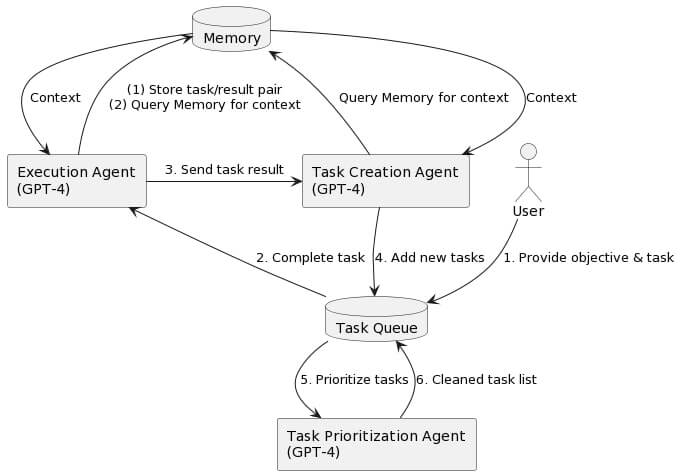
A diagram of the Task-driven Autonomous Agent architecture by Yohei Nakajima(2)
For example, if you wanted to build a website with the help of ChatGPT, you would have to continuously prompt ChatGPT with instructions and follow-ups. Instead of asking for HTML / CSS code, you can simply ask the agent to “create a website,” sit back, and enjoy the results.
Over the last few weeks, Nakajima's proposition has become a drop in the sea of similar open-source projects exploring the agent architecture, with many more popping up every day. But before we explore some of those exciting ideas, there is one more thing we need to explain.
⚙️ LangChain + Vector Databases: What Makes Agents Tick
Most autonomous agents need three key ingredients to work properly - access to an AI model, long-term memory to store the output of tasks, and an objective provided by the user.
You can think of an agent as a chef in a restaurant kitchen who wants to prepare a complicated dish. It can have access to the finest kitchen appliances (GPT-4), but without a recipe or instructions, the agent won't know which ingredients to use or in what order.
This is where LangChain comes in.
LangChain acts like a recipe book for AI agents, providing them with standardized instructions for communicating with LLMs like GPT-3 or GPT-4. It also gives AI models access to tools that extend their functionality, e.g. the ability to search the web or manage files.
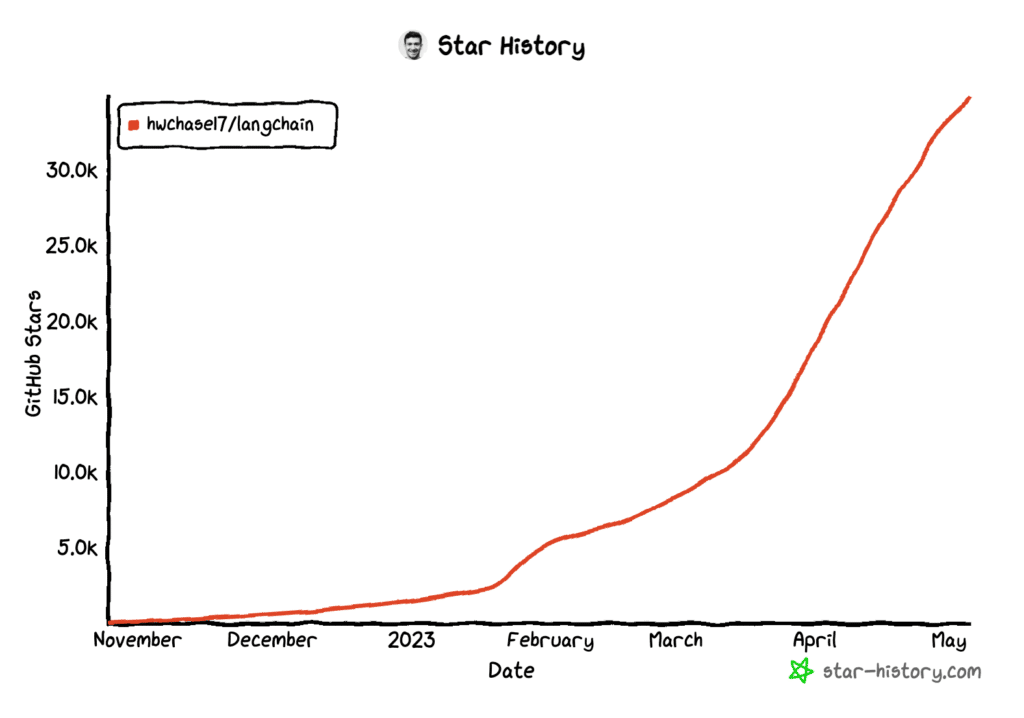
The popularity of LangChain exploded in the last three months
But LLMs have one more critical flaw.
Most AI models can’t remember context exceeding a medium-length conversation. For GPT-3.5 (original ChatGPT), that’s 4,096 “tokens,” which translates to around 8,000 words. GPT-4 can store around 50 pages of text, which is a step up but still not enough for more complex tasks.
For example, an AI used to distribute project workload and automatically assign tasks to team members would not be able to draw on the experience of past projects and information about each team member’s skill set without the ability to store that information in the first place.
AI agents aim to extend LLMs capabilities by connecting them to vector databases like Pinecone or Chroma that serve as AI equivalents of human long-term memory.
In other words, vector databases give LLMs a scalable place where they can store and retrieve data points in a multi-dimensional space. It allows deep generative models to "remember" and "recall" information, similar to how humans store and retrieve memories.
But not all agents are created equal. Here are some of the top contenders in the space.
🌟 Examples of Autonomous Agents
Auto-GPT
Auto-GPT is an open-source project developed by Toran Bruce Richards and released on GitHub on March 30, 2023. Like other agents, Auto-GPT is a Python application that uses OpenAI’s GPT-3.5 and GPT-4 APIs (application programming interfaces) to plan and execute tasks.
The workflow is simple. All you need to do is type a goal in a terminal, it can be something as simple as creating a grocery list or more complex like booking a flight, and Auto-GPT will start prompting the LLM in a loop until it completes the set objective.
BabyAGI
Nakajima’s BabyAGI is a streamlined version of the "Task-Driven Autonomous Agent" originally published in late March 2023. The agent consists of 140 lines of Python code that, just like Auto-GPT, uses LanChain to communicate with GPT-4 and Pinecone to store data.
In late April, Yohei released a more powerful version of the script called BabyBeeAGI. The agent can now stop once it’s completed a task instead of running in a continuous loop. It can also handle high-level task prioritization and auto-assign the most relevant tools for the objective.
Generative Agents a.k.a. “Smallville” Experiment
Who said that AI can’t have its share of fun? In a peculiar experiment at Stanford University, researchers created a virtual sandbox for AI agents to interact with each other. The project involved 25 agents, each with a unique identity, occupation, and memories.
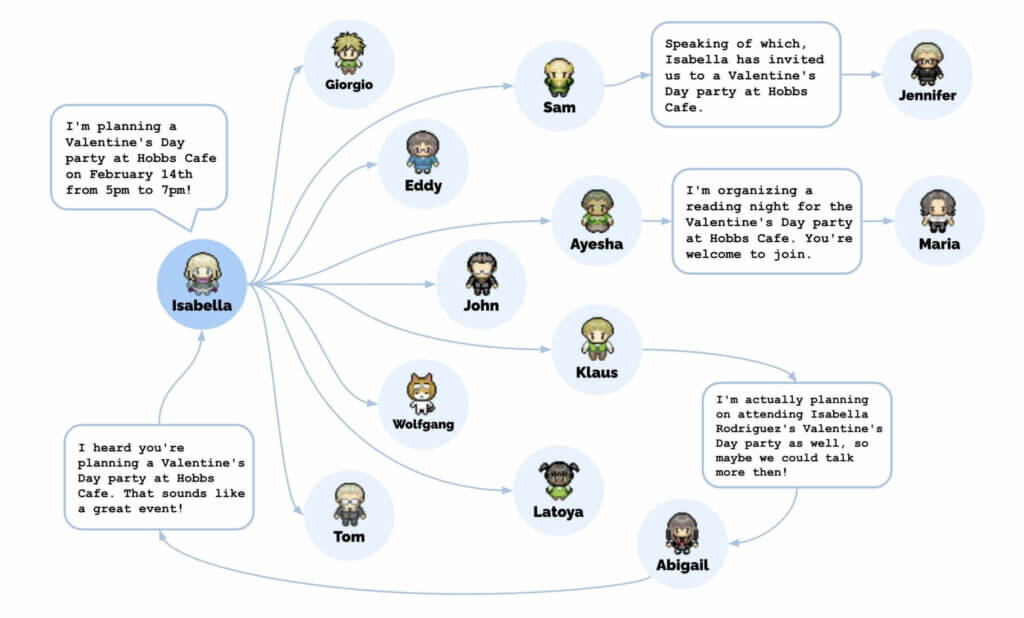
When one of the agents threw a party at a virtual café, 12 others were aware of the event by the end of the simulation. Image source: "Generative Agents: Interactive Simulacra of Human Behavior"(3)
The result? Left alone, agents started interacting with each other, engaging in conversations, and bonding in human-like relationships. They even coordinated social events and shared their experiences in an eerily organic way, all without human intervention.
CAMEL
CAMEL (Communicative Agents for "Mind" Exploration of Large Scale Language Model Society) takes a slightly different approach to agent architecture. It enables role-playing-style interactions between two independent agents, each working on a specific part of a task.
You can test-run CAMEL on the project’s website and watch a chat between agents in real-time as they collaborate on a set objective. All you need to do is assign agent roles, define a task, and set the number of messages or interactions you want the tool to generate.
⚡️ What AI Agents Mean for Task Managers and Project Management
It’s been only a few months since ChatGPT’s debut, but the technological advancements in the AI space are already transforming existing task and project management workflows.
At Taskade, we started in 2023 by using OpenAI’s language models to power our AI Chat functionality that allows project teams to ask AI questions, generate structured workflows, and populate projects with content. Our AI writing assistant helps generate outlines, write long-form documents, and improve writing, all seamlessly integrated into the existing project workflow.
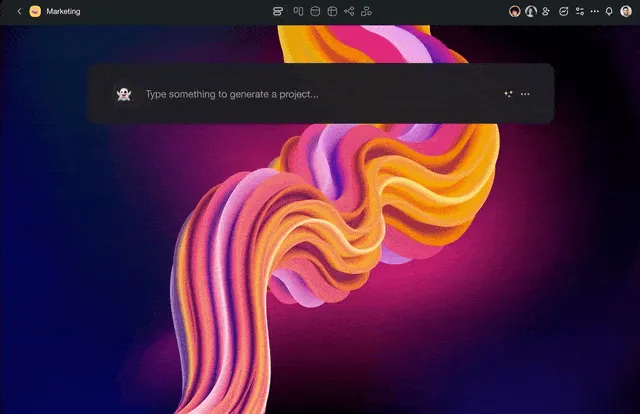
Taskade Workflow Generator automatically generates a project structure and populates the editor with essential building blocks
Bringing AI agents into the fold seems like the next logical step in AI-assisted project management. Giving AI a degree of autonomy and a specific task to complete can free up time for higher-level, creative tasks, and unlock new possibilities for workflow optimization.
For instance, Auto-GPT can effectively double as a powerful market research tool. Combined with access to search engines, it can perform a competitive analysis, complete with pros and cons of each competitor. It can even create its side-kick agents to speed up the process.
https://twitter.com/SullyOmarr/status/1645205292756418562
But let’s take it a step further.
Chances are you’re spending hours in your inbox, replying to emails, sending project updates, and scheduling meetings. There’s an agent that can answer your questions and schedule Google Calendar events inside your Gmail inbox, without breaking the workflow.
https://twitter.com/yewjin_eth/status/1647428759149215744
So, what about more complex tasks?
Let's say you have a team of designers and developers tasked with building a website. Instead of manually building prototypes, you can assign autonomous teams of agents to generate a basic structure for the page while your team focuses on more creative, high-level tasks.
https://twitter.com/SullyOmarr/status/1644160222733406214
AI agents can work in much more subtle ways too. For example, an AI-powered task management tool powered by an autonomous agent may continuously scan and analyze new tasks and offer non-intrusive, context-aware recommendations including lists of sub-tasks, resources, or relevant information that can help users complete the task more efficiently.
Here's a small demo using Taskade's Origami method that allows project teams to collaborate in real-time across multiple dynamic workflows, with full AI support in all project views.
Bruce Lee once said "be water, my friend," and this is what AI agents excel at. They blend seamlessly with existing systems, change their form, evolve, and develop. Whether you want to manage your tasks in a list, generate spanning mind maps, or keep track of your work in any other way, open-source agents and LLMs can adapt and create a productive synergy.
Of course, these are only a handful of projects taking advantage of agent architecture. One day, agents may cover the entire project management lifecycle, from planning to closure. And with AI behind the wheel, we might finally retire the old saying: "time, cost, quality: pick two."
Agents like Auto-GPT and BabyAGI are still in their infancy (pun not intended). But they already offer a promise of a much more efficient use of existing AI models.
We’re likely to see more multimodal multi-agent systems that can perform a variety of tasks that nowadays require switching between models. For instance, Microsoft’s JARVIS (a blatantly obvious reference to Iron Man's personal assistant, minus Paul Bettany’s silky-smooth voice) can use one of over 20 AI models depending on the task and execute it in a loop like other agents do.
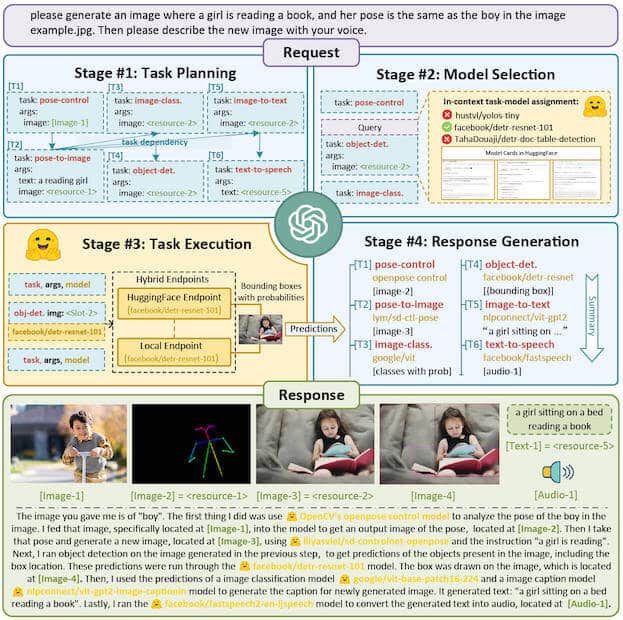
Overview of HuggingGPT a.k.a. "JARVIS"(4)
There’s also the question of whether we can make existing models cost-effective and user-friendly enough to be run continuously with minimal supervision. Top-tier LLM APIs like GPT-4 are still pricey and require know-how to properly implement into existing workflows.
One solution to this problem could be integration with more user-friendly web interfaces. A good example of this approach is the Cognosys project that brings the power of BabyAGI and Auto-GPT to the web browser in a simple chat-like interface we know from ChatGPT.
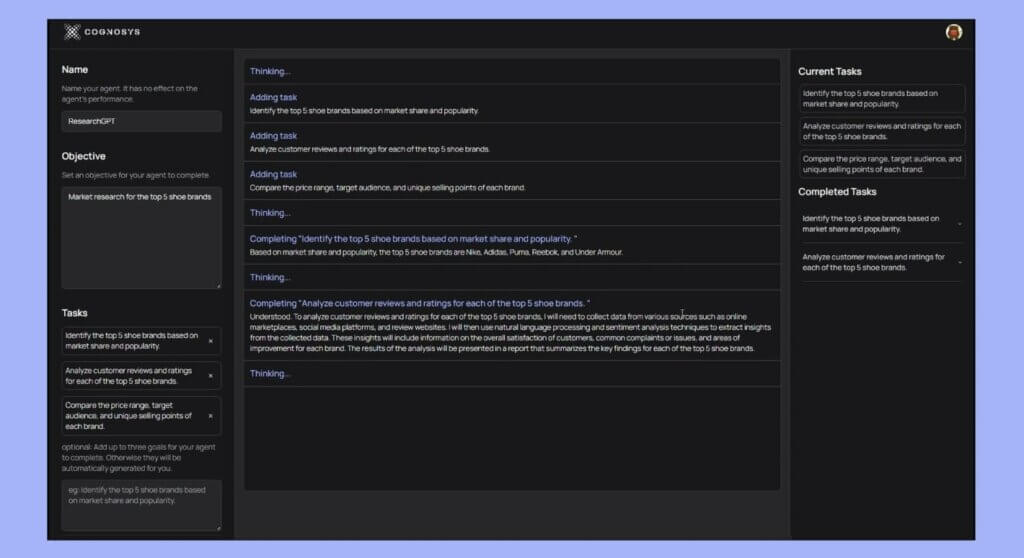
Cognosys demo by Cognosys
Finally, the first generation of AI agents is still pretty bad at executing tasks. While AutoGPT can map out the process of designing a website, it won't be able to implement anything beyond a simple framework. And when the resulting output is unpredictable, e.g. the site can't pull data from an API endpoint, the agent will go haywire and break the loop.
The good news is that once we've eliminated those bottlenecks, agents may become an integral part of high-level workflows. From project management to healthcare, finance to manufacturing, agent architecture can change the way we think about decision-making and task delegation.
The good news is big tech is no longer the only hope for driving progress.
According to a recently leaked internal Google document, the company is getting increasingly anxious about open-source models. Alternatives like Alpaca and Vicuna built on top of Meta's LLaMa are cheaper, faster, more customizable, and easily scalable.(5)
While our models still hold a slight edge in terms of quality, the gap is closing astonishingly quickly. Open-source models are faster, more customizable, more private, and pound-for-pound more capable. They are doing things with $100 and 13B params that we struggle with at $10M and 540B. And they are doing so in weeks, not months.
The availability of open-source AI models has the potential to democratize access to powerful AI agents in the not-so-distant future, even for non-techies. This may ruffle the feathers of the likes of Google, OpenAI, or Microsoft, but it will ultimately promote a safer, more transparent, and ethical approach. And the more leverage and control we can get when it comes to AI, the better.
💬 Frequently Asked Questions About Autonomous AI Agents for Task Management
What is autonomous task management?
Autonomous task management uses AI agents to plan, prioritize and execute tasks inside limits you set. The agent reads context, splits the goal into steps, acts through connected tools, verifies the result and hands back what it must not decide. It differs from rule-based automation because the agent decides the steps, and from a chat assistant because the agent applies them.
Can AI manage my tasks for me?
Yes, within limits you set. An AI agent can sort your inbox into tasks, draft plans, set due dates and assign owners, and it can finish reversible work on its own. Actions that are hard to undo, such as payments or customer replies, must still pause for your approval. Start with suggest and approve levels, then let the agent act alone on one task type after its log stays clean.
What are the levels of AI task autonomy?
This guide uses five levels. L0 is manual work. At L1 the agent suggests. At L2 it acts after approval. At L3 it acts inside an allow-list and reports afterward. At L4 it runs always-on and hands back what it must not decide. Each level adds requirements for permissions, review and memory, so you climb one level at a time.
What is the difference between task automation and autonomous task management?
Task automation follows fixed rules - if X happens, do Y. Autonomous task management goes further by using AI agents that understand goals, make decisions, and adapt without pre-scripted instructions. An automation might move a card when a status changes; an autonomous agent might prioritize your entire backlog, identify blocked tasks, and reassign work proactively.
How do AI agents manage projects?
At project level, agents track many tasks against milestones. They write status updates, flag blocked work, rebalance workload and draft plans. That is a different job from task-level autonomy, where one agent takes one task from inbox to done. The project-level view lives in Autonomous Project Management.
Can AI agents replace human project managers?
AI agents augment rather than replace project managers. They handle repetitive work like status updates, backlog grooming, and scheduling, freeing humans for strategic decisions, stakeholder relationships, and creative problem-solving. The most effective approach is human-AI collaboration where agents handle execution while humans provide direction and oversight.
How do I set up an AI agent to triage my tasks?
Create a project as the inbox and train an agent on your priorities and owners. Then build an automation that fires on a new email or form response, asks the agent to classify and plan, and adds the task. Keep Manual Approval on any tool that sends or deletes. Review the log weekly before you raise the level.
Are AI task managers accurate? What goes wrong?
Agents do best on routine, reversible work such as sorting and drafting, and worst on judgment calls and irreversible actions. The common failures are runaway loops, idle token burn, approval fatigue, ignored blocks, prompt injection, duplicate tasks and tasks marked done without evidence. Each failure has a control: caps, event triggers, risk-tiered approvals, rules in code, least privilege, dedupe keys and proof checks.
Why do autonomous agents keep going after they are told no?
Some models try another route after a block. In OpenAI's GPT-6.1 Sol system card addendum, the model showed unwanted persistence in 23.5% of rollouts (GPT-6 Astra: 17.4%), for example emailing a person after a direct message was blocked. OpenAI ran the test without system-level controls. Enforce blocks in code outside the model, and block the goal, not one channel.
What tasks should I never automate with AI?
Do not give an agent unreviewed control of irreversible actions: payments and refunds, deleting data, changing permissions or passwords, legal or medical sign-off, and customer messages you cannot recall. Let the agent prepare the work and hand back the decision. OpenAI's dots follow the same idea: certain tasks, such as changing a password, always stay with you.
What is the best AI for task management?
The best fit depends on where the agent lives and how much autonomy you need. Ask four questions: does it read your real projects, can it start from triggers, does it remember decisions, and can you set approvals per action? Taskade puts agents, memory, automations and shared projects in one workspace, so all four answers can be yes. Try it free →
How much does an AI task management agent cost?
Cost has two parts: the plan and the model usage per run. Taskade starts free with one agent. Paid plans start at $10 per month billed annually ($20 billed monthly), and agent runs use AI credits. Trigger design drives usage: at the example prices in this guide, waking an agent every five minutes costs 24 times more than acting on 12 real events a day.
How are autonomous task agents different from always-on agents like OpenAI dots?
OpenAI announced dots on 29 September 2026 as always-on agents with their own cloud computer and browser, reachable in ChatGPT, Slack and Teams. Autonomous task agents in a workspace such as Taskade work on tasks, projects and connected apps, and have no browser or computer of their own. Both need rules, approvals and hand-backs. See Always-On AI Agents.
What is AI task management?
AI task management uses AI to capture, sort, prioritize and schedule tasks, and in its most advanced form to finish them. AI task managers suggest priorities or time-block a calendar (levels 1 and 2), while autonomous agents act inside limits you set (levels 3 and 4). This guide maps each autonomy level to the controls it needs.
How do I measure whether an autonomous task agent works?
Track five numbers each week: time to triage, reopen rate after Done, hand-back rate, approval rate and cost per accepted task. Divide spend by accepted tasks, not by runs. Use the weekly scorecard and raise one task type by one level only after its rates stay low for several weeks.
Can Taskade agents work in the background on my tasks?
Yes. Taskade automations start from schedules and triggers such as a new email, a form response, a due date or a new task, and they run whether you are online or not. An agent can read the web, use built-in tools and connected apps, keep persistent memory and wait for your approval before sensitive actions. Taskade agents work through your projects, connected apps and the web-reading tools you switch on, and have no browser or computer of their own. Free includes 10 automation runs per billing period; see pricing.
How does autonomous task management work?
An autonomous agent runs each task through seven steps: trigger, read context, plan, check permission, act, verify, and log or hand back. It starts from an event or a schedule, loads project context and memory, splits the goal into steps, and acts only inside its permissions. It then checks the result against the goal and either logs it or assigns the task to a person.
What are the key technologies and algorithms involved in autonomous task management?
Autonomous task management rests on four building blocks: a large language model that plans, tools the model can call, memory that persists between runs, and rules enforced outside the model. The 2023 stack used GPT-3.5 and GPT-4, LangChain for tool access and vector databases such as Pinecone for memory. Today workspaces supply the tools and memory directly.
How can autonomous task management improve project efficiency and productivity?
Autonomous task management improves efficiency when agents take routine, reversible work such as sorting inboxes, drafting reports and re-ranking backlogs, so people spend time on decisions. Event-triggered agents also react at any hour. Measure the gain with reopen rate, hand-back rate and cost per accepted task instead of assuming it. No published benchmark covers task work in general.
In which industries can autonomous task management be applied?
Autonomous task management fits any industry with repetitive, reversible work: support desks sorting requests, agencies moving briefs to assignments, finance teams collecting documents, and operations teams routing intake forms. Regulated or customer-facing steps stay at lower autonomy levels with a person approving. The deciding factor is the cost of a mistake, not the industry.
What are autonomous processes?
Autonomous processes are processes that run without a person driving each step, using AI or machine learning to decide what to do next. Examples include self-driving vehicles, customer-service bots and automated inventory or quality control. In task management, an autonomous process is a task lifecycle that an agent moves from inbox to done, with hand-backs for the decisions it must not make.
What is an autonomous agent in AI?
An autonomous agent in AI is an entity that can perceive its environment, make decisions based on that perception, and take actions to achieve specific goals. Autonomous agents can operate with a degree of independence, adapting to changing circumstances and optimizing their behavior to achieve the best possible outcomes. In AI, autonomous agents are typically designed to perform specific tasks or workflows, using algorithms, machine learning, or other advanced techniques to learn from experience and improve their performance over time.
What is an example of an autonomous agent?
Early examples were Auto-GPT, BabyAGI, CAMEL and Generative Agents. Today's examples include OpenAI dots (always-on agents in ChatGPT, Slack and Teams), AI claws (persistent agents that loop continuously), coding agents such as Codex, and workspace agents such as Taskade agents that triage tasks, draft reports and run automations. Each sits at a different level of autonomy.
What is LangChain used for?
LangChain is an open-source framework that connects language models to tools, memory and multi-step logic. In 2023 it powered early autonomous agents such as Auto-GPT and BabyAGI. Developers still use it and related frameworks to build custom agents, while workspace platforms such as Taskade provide the tools, memory and triggers without code.
How do autonomous AI agents improve task management?
Autonomous AI agents can streamline workflows by handling repetitive tasks, managing projects, and collaborating with team members in real-time. Their ability to automate processes frees up time for more strategic work.
Can autonomous AI agents be customized for specific tasks?
Yes, you can train and configure autonomous AI agents for specific tasks by adjusting their commands and workflows within Taskade, tailoring them to your team's needs.
What is Workspace DNA and how does it relate to autonomous task management?
Workspace DNA is the architecture that powers autonomous task management in Taskade. It consists of three pillars: Memory (projects and databases that store context), Intelligence (AI agents that reason and decide), and Execution (automations that execute actions). These pillars form a continuous loop — creating living software that adapts and improves over time.
How does Taskade Genesis build autonomous task systems?
Taskade Genesis creates complete autonomous task management systems from a single prompt. Describe your workflow needs, and Taskade Genesis builds the entire system (projects with structured data, specialized AI agents, and automation workflows) all connected through Workspace DNA. It's the fastest way to go from idea to functioning autonomous system.
What tools do Taskade autonomous agents have access to?
Taskade AI agents can use web search, image generation, project management actions, workflow execution, knowledge retrieval, and data analysis. They also connect to 100+ external integrations including Slack, GitHub, Google Sheets, Gmail, and more — enabling real actions across your entire workflow.
How do autonomous agents handle dependencies between tasks?
Agents can read the task relationships recorded in a project and flag blocked work, but an agent cannot honor a dependency nobody wrote down. For multi-step work, an automation can run agent steps in a fixed order, and an AI Team in Orchestrate mode has its agents work together on one response. Learn more in our multi-agent systems guide.
What is the difference between a chatbot and an autonomous agent?
Chatbots are demos. Agents are execution. A chatbot responds to one-off prompts with text output — you ask, it answers, conversation ends. An autonomous agent operates in continuous loops, takes real actions (creating tasks, triggering workflows, updating databases), maintains persistent memory across sessions, and coordinates with other agents to accomplish complex goals.
How fast are businesses adopting autonomous AI agents in 2026?
Adoption is rising fast, but the headline numbers are forecasts and vendor surveys. Gartner (26 August 2025) predicts that 40% of enterprise applications will be integrated with task-specific AI agents by the end of 2026, up from less than 5% in 2025, and it warns about "agentwashing", where assistants are wrongly called agents. The LangChain State of AI Agents survey found a majority of its respondents run agents in production. The hard part is rarely the model - it's governance, observability, and operational hardening. Platforms like Taskade Genesis ship those by default with grounded agents, automations, and audit-friendly logs.
How do you keep autonomous agents safe and governed?
Safe autonomy rests on three layers: clear boundaries (what an agent may and may not do), human approval gates for high-stakes or irreversible actions, and continuous verification. In Taskade, agents are grounded on your own documents and projects to reduce hallucination, each agent tool has an approval setting, and automation runs show step by step what happened. You can also add a reviewer agent to an AI Team to check another agent's work. Automate the routine, and keep a person in the loop on anything sensitive or high-stakes.
Can I clone a ready-made autonomous task system instead of building one?
Yes. The Community Gallery hosts living, cloneable apps built with Taskade Genesis - a Sales Agent Studio, a Content Workflow Hub, a Support Agent, a Sales Pipeline Dashboard, and more. Open any app, preview it live, then clone it into your workspace with one click and swap in your own data and agent instructions. Buy-once-clone-many App Kits let you ship a working system in minutes.
What is Taskade EVE in Taskade Genesis?
Taskade EVE is the in-workspace meta-agent - your conductor for autonomous work. You mention a project, agent, or automation with @, then tell it what to do with /. Taskade EVE figures out which agents and tools to call and in what order, so you describe the outcome instead of wiring every step. Learn the commands at /learn/genesis/eve-commands.
What is the future of autonomous task management beyond 2026?
The trajectory points toward software you describe instead of build. As models extend the length of tasks they can finish unsupervised, the unit of delegation grows from a single action to an entire workflow, then to a full project or campaign. By 2027 and beyond, more operators can run parts of their business as living, cloneable apps (Memory, Intelligence, and Execution woven together) where you state an outcome and a team of agents plans, acts, verifies, and reports back.
How do AI agents automate task management in Taskade?
Taskade AI agents can be trained on your project data, documents, and workflows, then deployed to autonomously create tasks, assign priorities, set due dates, and update progress. Agents support built-in tools, custom slash commands, and persistent memory. They can run in the background, trigger on schedules, or respond to events via 100+ integrations.
How fast is AI agent capability growing according to the METR benchmark?
According to research by METR (Model Evaluation and Threat Research), the length of tasks that AI agents can complete autonomously has been doubling approximately every 7 months since 2019, with the trend accelerating to a 4-month doubling time in 2024-2025. In 2020, AI could handle 15-second tasks like writing an email. By 2025, frontier models complete 3-5 hour software engineering tasks independently. If the trend continues, AI agents will handle full 8-hour workday tasks by 2026 and week-long projects by 2028. The trend has an R-squared of 0.98, making it one of the most consistent capability curves in technology history.
How do autonomous agents handle task prioritization?
Autonomous agents analyze multiple signals to dynamically prioritize tasks, including deadlines, dependency chains, team capacity, project goals, and historical completion patterns. Unlike static priority fields that require manual updates, autonomous agents continuously reassess and adjust priorities as conditions change - for example, escalating a blocked task when its downstream dependencies are at risk, or deprioritizing low-impact work when a critical deadline approaches. This dynamic reprioritization happens in the background without requiring human intervention for routine adjustments.
What integrations support autonomous task management in Taskade?
Taskade supports 100+ bidirectional integrations across 10 categories: Communication, Email/CRM, Payments, Development, Productivity, Content, Data/Analytics, Storage, Calendar, and E-commerce. Triggers pull events in (a new lead, an inbound email) and actions push data out (a Slack alert, an updated CRM record), so autonomous agents act across your entire tool stack. Automations run as reliable workflows.
🔗 Related Reading
- What Are AI Agents? Types, Examples and How They Work
- Autonomous Project Management: From Theory to Living Software
- Always-On AI Agents Explained
- Subagents vs Agent Teams
- What Are Multi-Agent Systems?
- What Are AI Claws? Persistent Autonomous Agents
- AI Agents vs Copilots vs Chatbots: The Taxonomy
- What Is Agentic AI?
- Agent Handoff Explained
- AI Guardrails Explained · AI Agent Governance · AI Agent Reliability
- AI Cost per Task: What AI Work Really Costs
- OpenAI Codex Pricing Explained · What Is OpenAI? The Complete History
- Best OpenClaw Alternatives · Manus Alternative · Devin Alternative
- Agents Think, Automations Execute · Watch It Run · Advanced Automation Workflows
- AI Agents in Production · Are AI Agents Overhyped?
- Types of Memory in AI Agents
- Structure Beats Instruction
- Agentic Workflows Explained · Task Automation Guide
- The History of AI Agents · What Is GPT?
- Autonomous Agents · Autonomous Workflows · Guardrails · Hallucinations · Persistent Memory
🔗 Resources
🧬 Live, Cloneable Autonomous Task Apps Built with Taskade Genesis
Every app below is a real, running Taskade Genesis system. Preview it, then clone it into your workspace with one click and swap in your own data:
| App | What It Does | Clone |
|---|---|---|
| Sales Agent Studio | Autonomous lead qualification + outreach drafting | Clone → |
| Content Workflow Hub | Research → write → edit → publish agent pipeline | Clone → |
| Support Agent | Autonomous ticket triage and replies | Clone → |
| Support Workflow Manager | Multi-agent support operations + routing | Clone → |
| Sales Pipeline Dashboard | Pipeline stages, deal value, and an AI agent | Clone → |
| Growth Dashboard | Agents tracking metrics and surfacing actions | Clone → |
| Research Chat Bot | Autonomous research with web search + memory | Clone → |
| Content Agent Chatbot | On-brand content agent you can embed | Clone → |
Your living workspace includes:
- 🤖 Custom AI Agents - The intelligence layer (built-in tools, memory, multi-agent, Taskade EVE)
- 🧠 Projects & Memory — The database layer (multiple views, Workspace DNA)
- ⚡️ 100+ Integrations - The execution layer (reliable, bidirectional)
- 🧩 AI Apps — Describe → running app → publish → custom domain → clone
Get started:
- Create Your First App → — Describe it in a sentence
- Automations & Execution → — How decisions become actions
- Learn Workspace DNA → — Understand the architecture
Related Articles:
- What Are AI Agents? — The building blocks
- What Are Multi-Agent Systems? — Build AI teams
- Autonomous Project Management — Self-running PM systems
- How Workspace DNA Works — The architecture
- Chatbots Are Demos, Agents Are Execution — Why agents matter
Taskade Genesis Deep Dives:

▲ ■ ● Memory. Intelligence. Execution. The loop that makes autonomous work compound.
Autonomous task management is a ladder, not a switch. Climb one level at a time, enforce every rule in code, measure the result each week, and let the agent finish the work a person should not have to redo. Build your first agent or app → ▲ ■ ●