
Hey Taskaders! 👋
We’ve just shipped the biggest update yet. You can now generate entire workflows, agent teams, and subspaces — from a single prompt. Then chat directly with your projects, agents, and automations to build, edit, and take action in real-time.
This is the foundation of Taskade Genesis, our upcoming AI App Generator that turns your intent into a living, intelligent, shareable web application. One prompt. One app.
Here’s what’s live today 👇
⚡️ Generate Workflows with AI
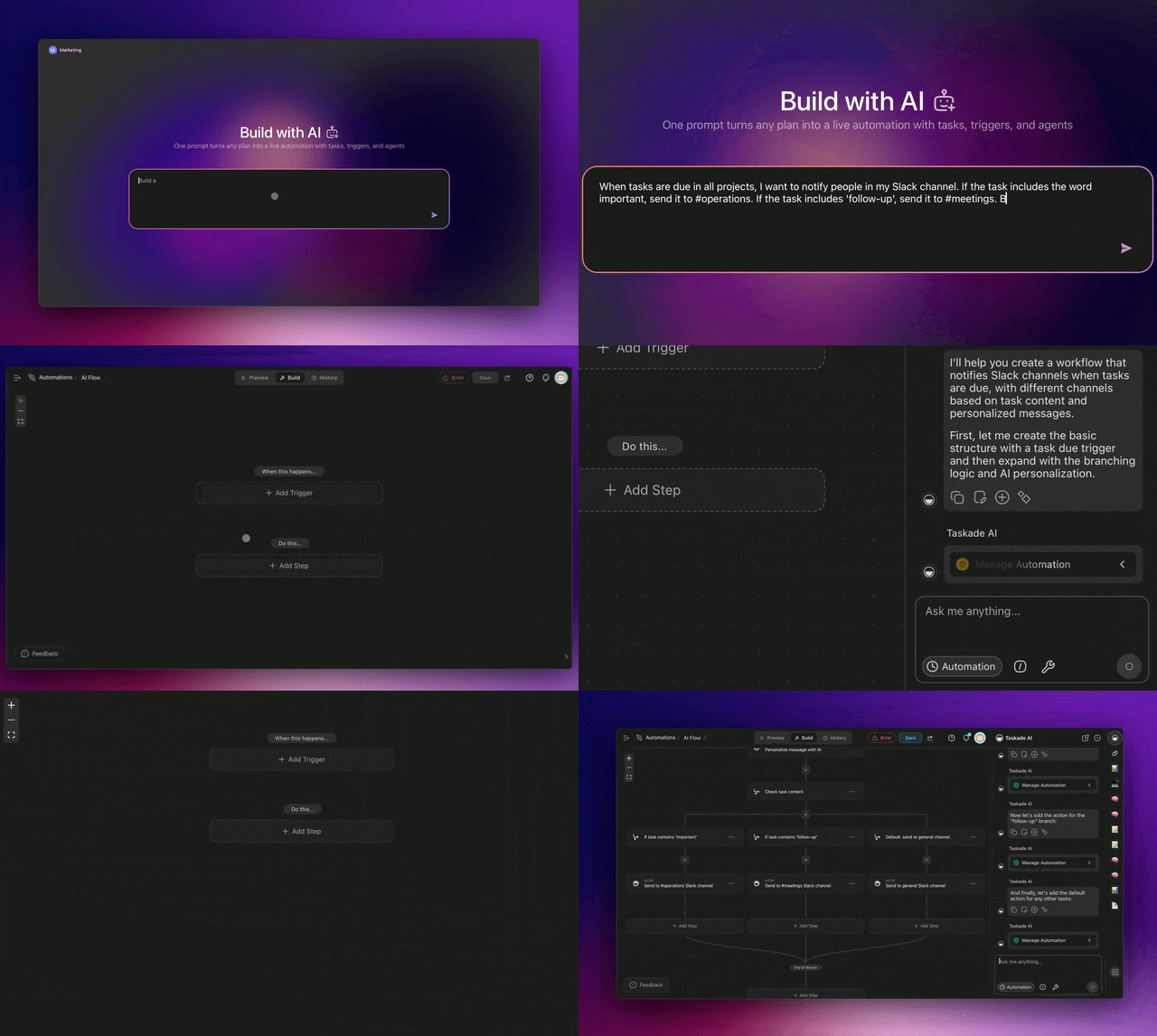
Transform static plans into living, running flows. The new Workflow Generator can think, branch, loop, filter, trigger, and act across your entire workflow ecosystem.
Chat with AI and build complex automation workflows instantly. Create, edit, and manage your entire automation flows using natural language. Learn more.
What's possible:
- "When a form is submitted, create a task, notify the team, send follow-up emails"
- "Monitor X for new content, summarize it, and create projects for each entry"
- "Every Monday, generate a progress report for X and share it with stakeholders"
- "Create an AI Agent that processes customer feedback and assigns follow-up"
- "Build an automation engine that posts our blog content to social media"
- And much more...
Smart edits and chat:
- "Add a Slack notification to this workflow and branching logic"
- "Change the trigger to run daily instead of weekly and add looping"
Key features:
-
⚡ Instant Creation: Build complex automation flows in minutes instead of hours
-
💬 Natural Language: Describe your workflow and what you want automated
-
🔧 Intelligent Editing: Ask AI to modify existing workflows with simple requests
-
📊 Smart Recommendations: AI suggests optimizations and improvements
-
🔗 Built-in Integration: AI helps you connect with 100+ apps and services
👉 How to use: Go to taskade.com/create/flow or Automations > Enter your workflows
🤖 Generate AI Agent Teams
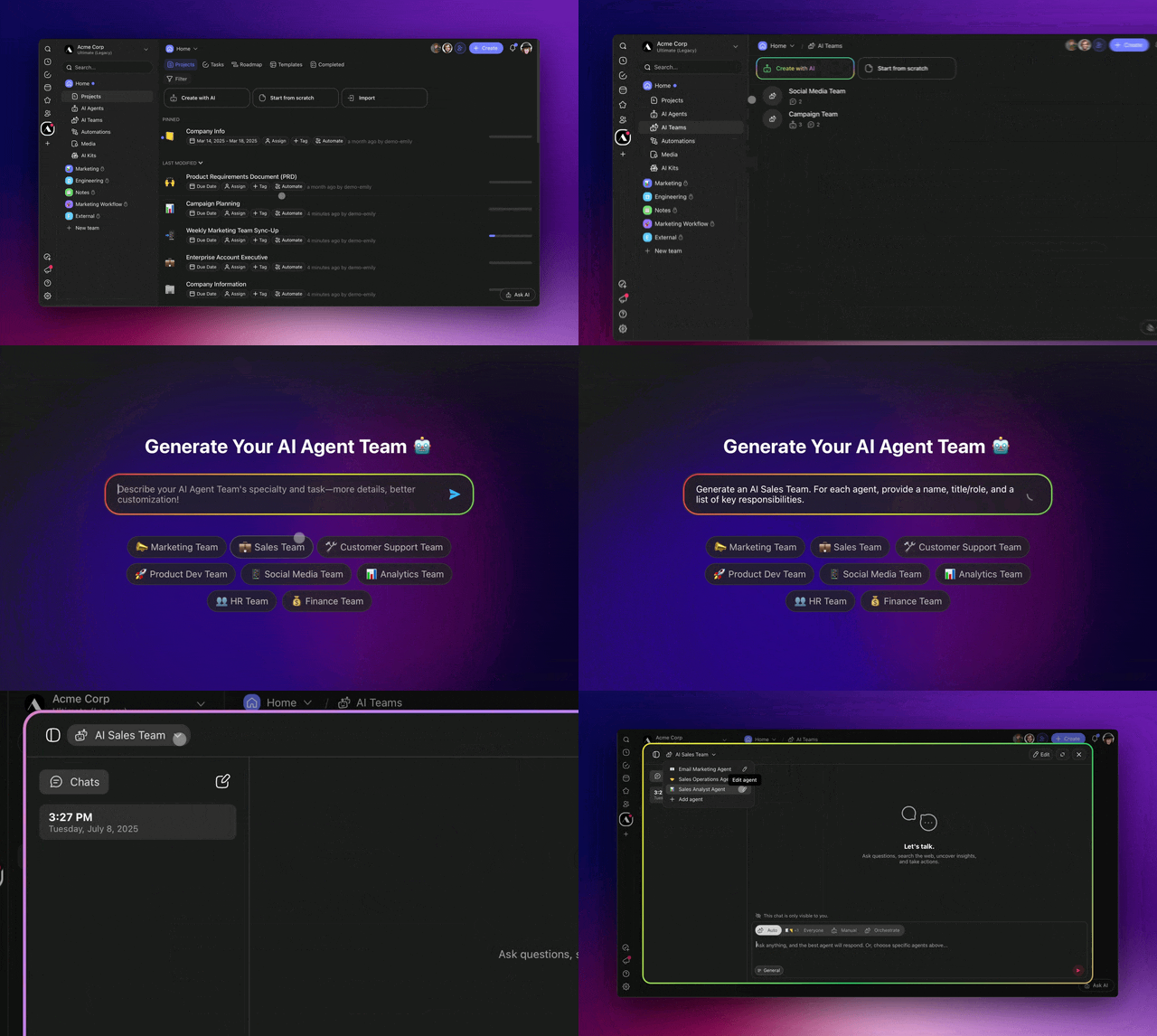
Generate custom AI Agent Teams that work together to tackle complex projects. Train each agent with its own knowledge, skills, and tools for any role you need.
Switch to the new Orchestrate Mode and watch as your AI agents delegate tasks, solve problems, and coordinate work for you, all on autopilot. Learn more.
What's possible:
- "Create a marketing team for social media campaigns"
- "Build a customer support team for technical troubleshooting"
- "Set up a content creation team with writers, editors, and researchers"
Key features:
- ⚡ Three Execution Modes: Auto, Everyone (manual), Orchestrate (AI-managed)
- 🔧 Smart Specialization: Each agent has specific roles, tools, and knowledge
- 📈 Workflow Intelligence: Teams understand dependencies and hand-offs
👉 How to use: Go to Workspace > AI Teams > Create with AI > Enter your tasks
📝 Generate Subspaces with AI
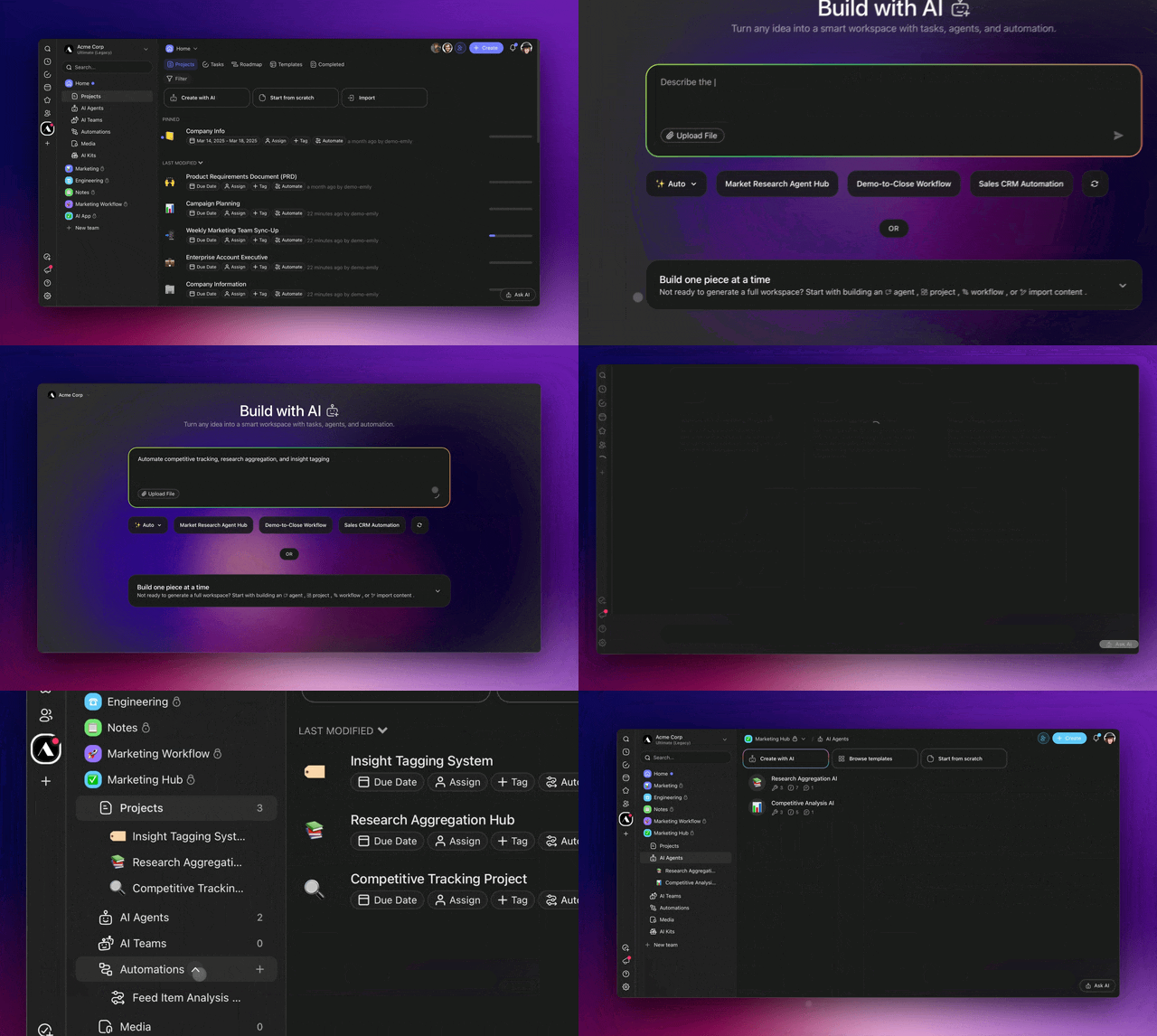
Generate complete subspaces with the new Taskade Autopilot. Build workspaces with connected projects, agents, and automation flows. Start from templates or build from scratch to deploy an entire system from a single prompt. Learn more.
One prompt creates everything:
- "Build a content marketing operation with social automation"
- "Set up sprint planning with task tracking and team coordination"
- "Create a customer onboarding system with automated follow-ups"
What you get:
- 📊 Structured Projects (your future app's data layer)
- 🤖 Intelligent Agents (your future app's reasoning layer)
- ⚡ Smart Automations (your future app's action layer)
👉 How to use: Go to taskade.com/create > describe workspace > press Enter
🤖 Chat with AI Project Manager
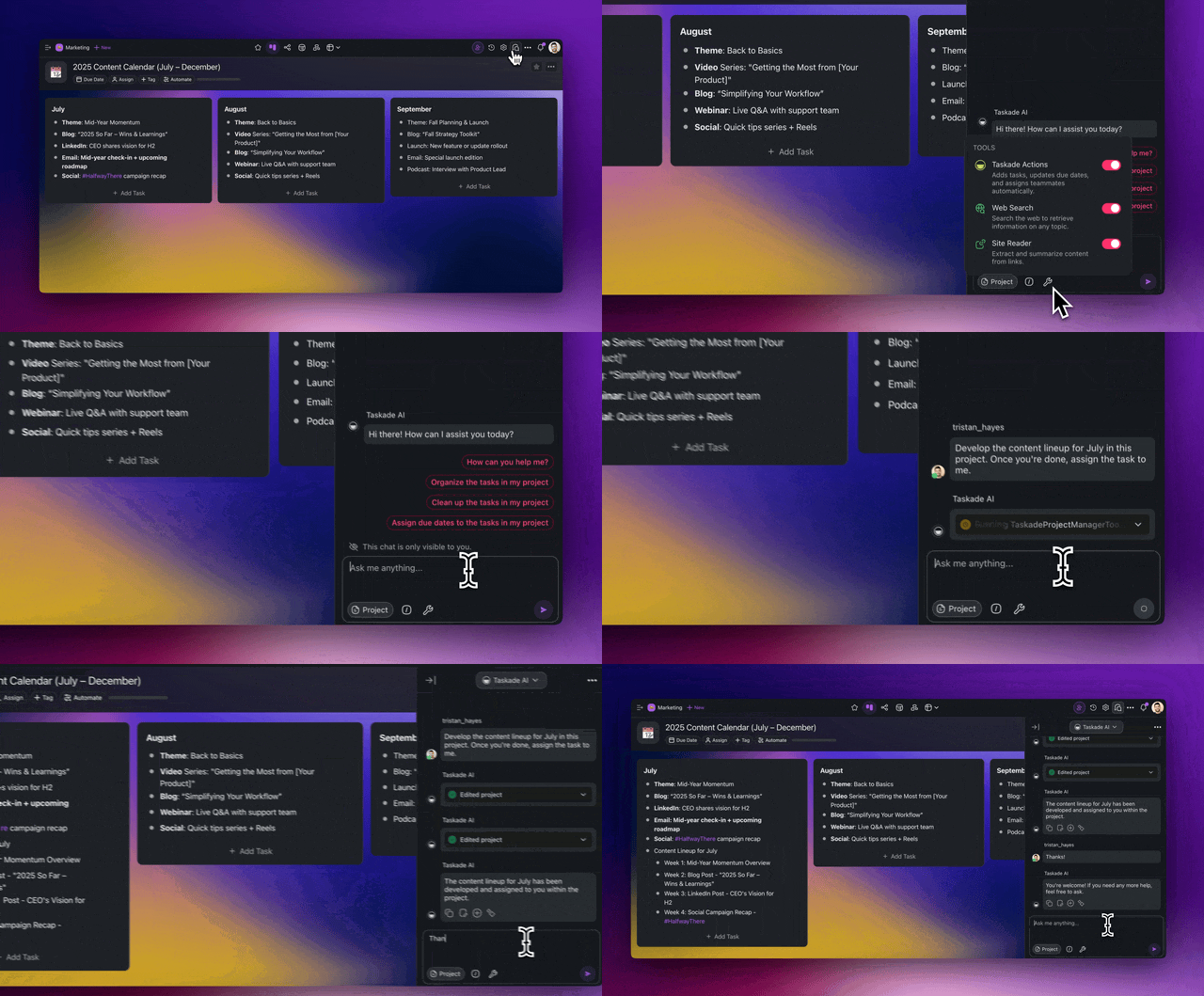
Meet your new AI Project Manager. Taskade’s AI Assistant Agent understands the full context of your workspace and helps you manage projects in real time.
Just chat to update tasks, assign team members, adjust timelines, restructure workflows, and more — without lifting a finger. Learn more.
What's possible:
- "Create a product launch plan with 5 phases and assign team members"
- "Restructure this project timeline and update all dependencies"
- "Add custom fields for budget tracking across all marketing tasks"
Key features:
- ⚡ Instant Execution: Changes happen in real-time as you chat
- 👥 Smart Collaboration: Assigns tasks, sets deadlines, manages teams
- 📊 Contextual Awareness: - Remembers project history and team interactions
- 🧠 Project Intelligence: Understands relationships, dependencies, and impacts
👉 How to use: Open a project > select Taskade AI in project chat > Enter any task
📊 Automate Project Management
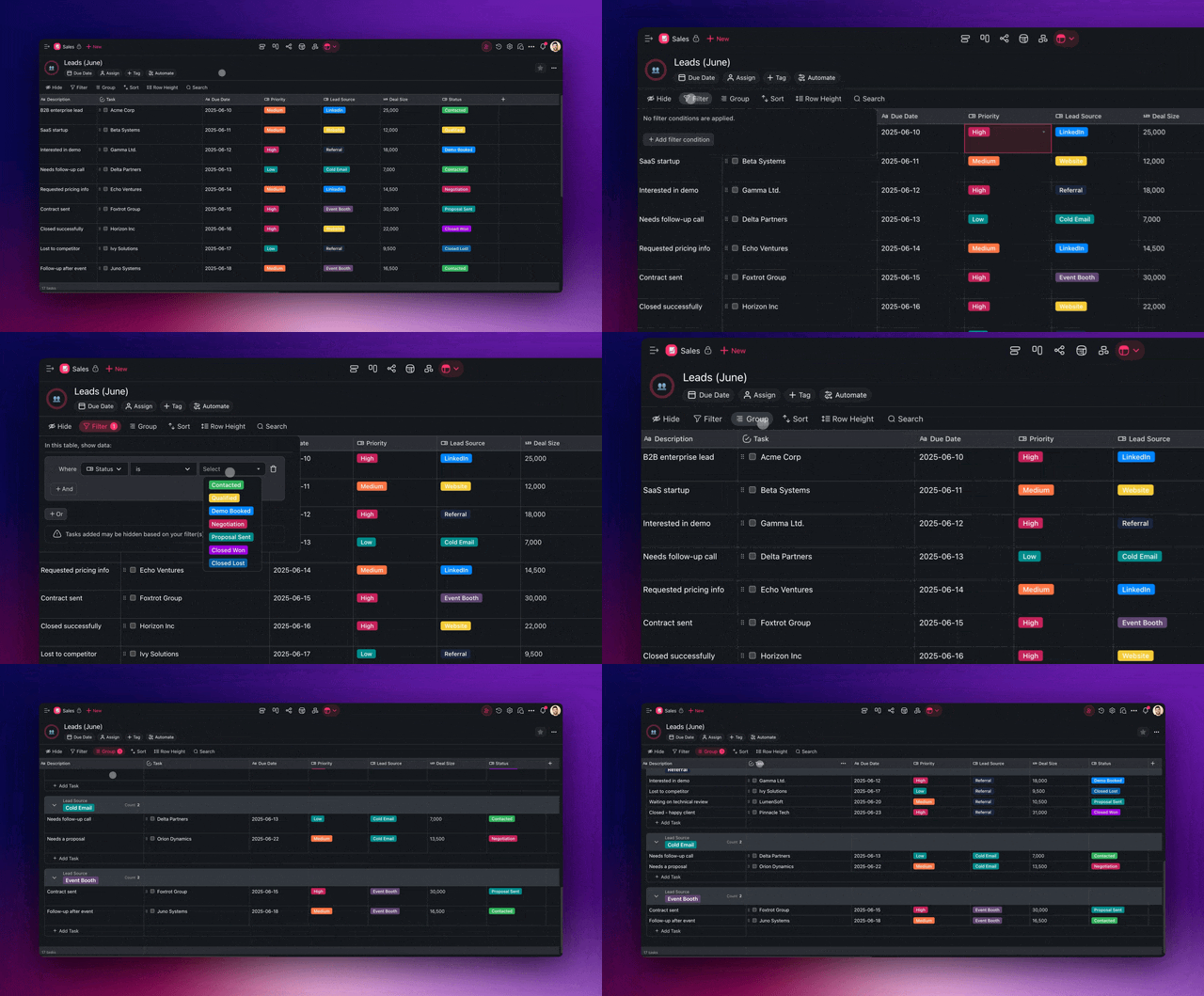
Manage anything with Taskade’s new Table View. Automate pipelines, roadmaps, and reporting dashboards using intelligent auto-fill, advanced filters, and smart search.
Customize fields, fine-tune layouts, and stay in control of your projects. Learn more.
- 🧠 Fill with AI: Automatically populate columns based on context
- 🔍 Advanced Filters: Smart search and filtering across all data
- 🎯 Custom Fields: Rich data types and formatting options
- 📈 Real-time Sync: Seamless integration with project workflows
👉 How to use: Open a project > switch to Table view > use Fill with AI
🎥 Automate YouTube Transcription
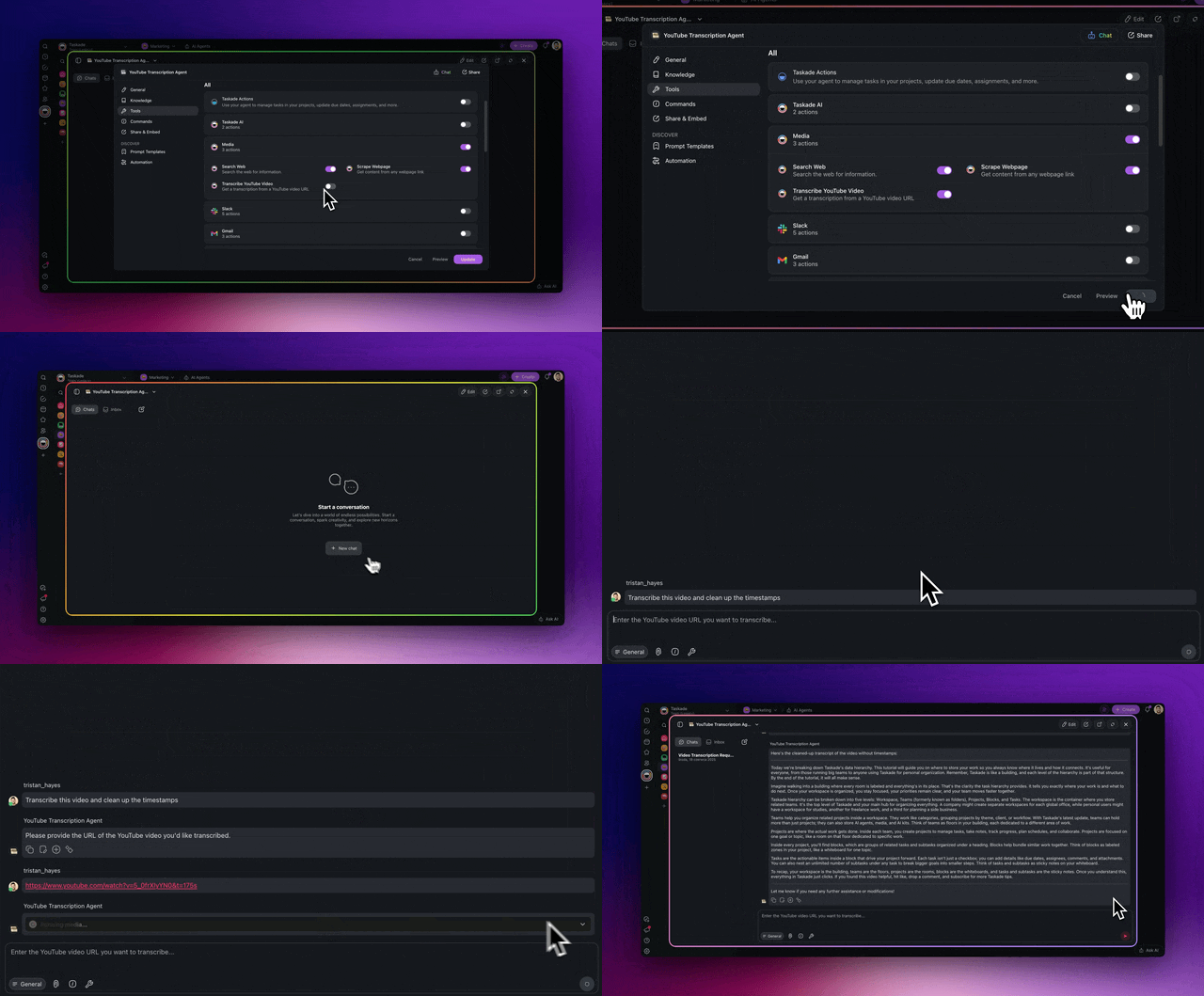
Unlock the full potential of your video content with Taskade’s YouTube Automation. Automatically transcribe, summarize, and repurpose new YouTube uploads into tasks, documents, and projects.
Trigger follow-ups, generate social posts, or kick off entire workflows in real time. Perfect for creators, coaches, and marketers turning videos into content. Learn more.
- 🤖 Agent Integration: YouTube tool built into Taskade AI agents
- ⚡ Automation Triggers: Process new YouTube videos automatically
- 📝 Accurate Video Transcription: Better quality and faster processing
- 📊 Content Repurposing: Transform videos into tasks, docs, and summaries
👉 How to use:
-
Go to Automations > ➕ Add Trigger or Action > YouTube
-
Go to Agents > Edit Agent > Tools > YouTube
📝 Automate Data Collection with Forms
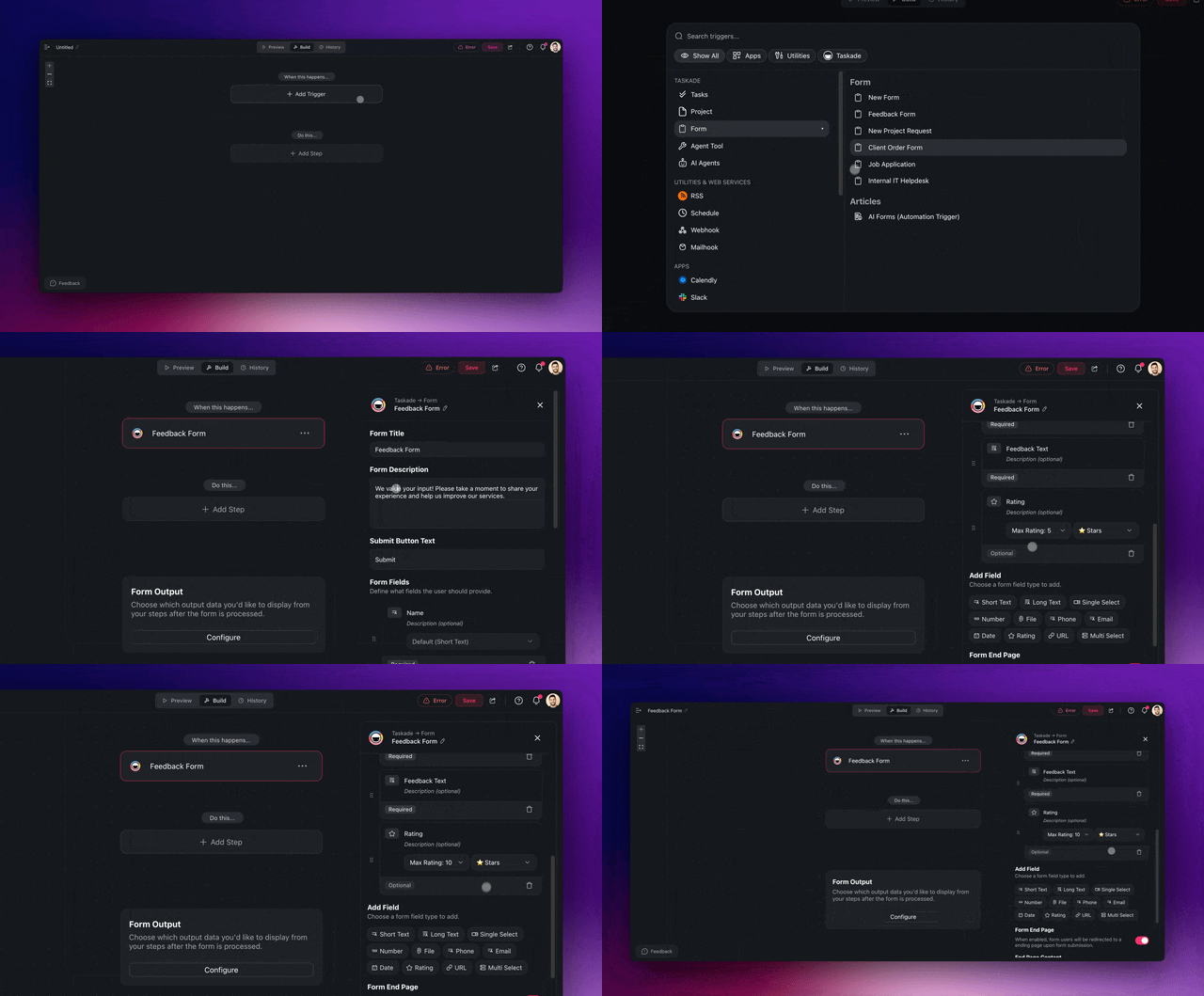
Build AI Forms that think ahead. Capture richer inputs with smart fields, then process them with AI Agents that understand context, extract insights, and take action instantly.
Whether you're collecting feedback, onboarding clients, or qualifying leads, AI Forms now do the work for you with dynamic fields and built-in automations. Learn more.
-
Choose from ready-made form templates for common use cases
-
Collect richer input with support for .pptx, .xlsx, .epub, and more
-
Add rating fields to capture qualitative scores like satisfaction or priority
New Form features:
- ⭐ Rating Fields: Capture satisfaction scores and feedback
- 📁 Rich File Support: Accept .pptx, .xlsx, .epub, and more
- 🎨 Smart Templates: Pre-built forms for common use cases
- 🔄 Automation Triggers: Instantly process and act on submissions
👉 How to use: Go to Automations > ➕ Add Trigger > Form
-
New: Taskade Autonomous Agent (TAA) with new tools, smarter organization, improved task breakdown, and intelligent suggestions for your projects
-
New: AI Agent Teams with Auto, Everyone, and Orchestrate modes
-
New: Agent Knowledge Management — add media, projects, files
-
New: Custom Agent Commands editable directly in the editor and chat
-
New: Orchestrate Mode for autonomous delegation
-
New: Client Action Tools — create projects and update tasks from chat
-
New: Enhanced Project Filling — AI can auto-fill templates from your instructions
-
Improved: Agent Tool UI and accessibility
-
Improved: Agent Team Interface — better layouts, button wrapping
-
Improved: Agent Name Display — text truncation fixes
-
Improved: Command Editing — modify directly in chat
-
Improved: Tool Integration with automations and services
-
Enhanced: UI Components — modern design system elements
-
Fixed: Agent Delegation — less repetition, better coordination
⚡ Taskade Automation & Workflows
-
New: Reddit Integration — monitor posts and threads
-
New: Improved Email Support — better parsing, mailhook, and notifications
-
New: Advanced Webhook Support — more reliable processing and error recovery
-
New: Ask Agent Team Action — delegate tasks to AI Teams via automation
-
New: Enhanced Triggers — task completion, field updates, comments, and more
-
New: Connection Management — rename and organize service integrations
-
Enhanced: YouTube Integration — improved transcripts, summaries
-
Enhanced: RSS Enhancements — more reliable testing
-
Enhanced: Slack Integration — fixed messaging and added actions
-
Enhanced: Gmail Integration — better date formats, improved handling
-
Enhanced: API Integration — stronger authentication and error handling
-
Improved: Workflow Visualization — better diagrams and navigation
-
Improved: Form Management — easier editing, better layout
-
Improved: Automation UI — cleaner and more informative
📝 Taskade AI Forms & Automation
-
New: Advanced Fields — multi-select, ratings, URL validation, radio buttons
-
New: Form Publishing — custom domains and white-labeling
-
New: Enhanced Automation — trigger workflows from every submission
-
New: Rating Form Fields — collect star ratings and feedback in automation forms
-
New: Multi-Select Form Fields — collect flexible responses
-
Improved: Form Field Management — streamlined editing and organization
-
Improved: Radio Button Controls — consistent styling for single-choice fields
-
Improved: UI — mobile, responsive, and validated inputs
📊 Taskade Cascade – The New Table View
-
New: Cascade is here. Taskade’s next-gen project engine is now live — faster, smarter, and built for agentic workflows. Cascade powers the all-new Table View with real-time collaboration, custom fields, AI Agent-assisted editing, and more!
-
New: Custom Fields — text, number, date, dropdown, multi-select
-
New: Fill with AI — populate cells with smart suggestions and batch generation
-
New: Advanced Table Features — bulk edit, copy/move tasks, drag-and-drop columns, smart duplicate detection
-
New: Table Search — find data across all columns with advanced filters including on/after, on/before, “is not”, and more for dates and fields
-
Improved: Column Filters — searchable dropdowns and refined logic
-
Improved: Table Performance — faster rendering, better virtualization
-
Improved: Export & Integration — easier data sync and sharing across tools
🔧 Taskade Project Management
-
New: Enhanced Project Views — switch between List, Board, Calendar, Table
-
New: Advanced Task Operations — better copying, moving, bulk actions
-
New: Improved My Tasks — filter, organize, and track personal tasks
-
New: Enhanced Search — faster, more powerful with filters
-
Improved: Real-time Collaboration — faster updates, better conflict handling
🚀 Taskade AI Kit & Template System
-
New: Enhanced AI Kit Support — improved installation, sharing, organization
-
New: Improved Kit Editor — validation and error handling upgrades
-
New: Kit Publishing — share AI kits with custom domains and discovery
-
Improved: Template Management — better organization, speed, search
🎨 User Interface & More
-
New: Redesigned Panels — Primary and Secondary navigation
-
New: Header Navigation — workspace switcher, profile, notifications
-
Improved: Mobile Apps and Dark Mode
-
Improved: Performance — faster loads, better caching, optimized queries
-
Improved: Security — more safeguards, error handling, and protection
-
Improved: Accessibility — screen reader support, keyboard nav, color contrast
-
Improved: Internationalization — updated translations and localization
-
Improved: Reliability — stronger sync and error recovery
Check out all the latest updates on our Changelog Forum.
✨ Community AI Kits of the Week!
Get started with these ready-to-use AI Kits with a one-click install. Learn more.
- 🗓️ Google Sheets Weekly Task Log Kit → Simplify employee onboarding.
- 🔎 Google Sheets Submission Tracker → Convert feedback emails into tasks.
- 📑 Google Sheets to Project Kit → Automate Facebook Page posts.
- 🪄 Convert Notes to Google Docs Kit → Boost marketing campaign execution.
- 🗂️ Organize New Google Drive Files Kit → Turn YouTube videos into blog content.
🚀 Join the Community
Join us every Friday at 9 AM (US PT) for our weekly Taskade Live Stream, featuring demos, advanced use cases, and live Q&A with the Taskade team.
- 📺 Missed a session? Watch all past episodes on our YouTube channel.
- 🎥 Latest episode: Taskade Live: Build Your Automated Client Pipeline
- 🤝 Connect with us: Forum | Official Subreddit | Facebook Group | X (Twitter)
- 🤔 Have questions? Explore the Help Center, FAQ, Product Updates, or API Docs.
Need help with something else? Contact us — we're here to help!
🧬 Introducing Taskade Genesis (Preview)
One Prompt. One App. The Origin of AI Software.

Genesis is the foundation. The full-stack evolution of Taskade. A new system that transform your intent into a fully structured, living web application, branded, intelligent, and fully connected with your workspace.
What's coming:
- ⚡ One-Prompt App Generation: From idea to deployed app
- 🎨 Beautiful & Branded: Custom domains, themes, and polished UI
- 🔗 Fully Integrated: Built on your Taskade projects, agents, and automations
- 🌐 Public or Private: Launch externally or keep it internal
- 📱 Multi-Platform: Web, mobile, and API access
Every app is powered by your:
-
⚡ Projects → Structured memory and data
-
🧠 Agents → Built-in logic and reasoning
-
🔁 Automations → Executable workflows and behaviors
-
🌐 Subspaces → Branded, sharable, embeddable web apps
No code. No templates. No fluff.
Just raw output: intelligent, usable software you can deploy, embed, and share.
From Task Lists to Living Systems.
Genesis empowers a new generation of creators. Not with static stacks, but with dynamic, intelligent applications powered by your Taskade workspace
The Genesis Flow:
Prompt → Projects → Agents → Automations → App
This isn’t just a feature. It’s a shift.
From unified workspace… to AI-native creation platform.
Your workspace becomes the backend. Your prompt becomes the app.
Just as HyperCard empowered anyone to build software in 1987,
Taskade Genesis empowers anyone to build intelligent, living systems in 2025.
This is just the beginning. 🚀
John Xie
Co-founder & CEO, Taskade
— Team Taskade 🐑
P.S. Love Taskade? Share your story to get featured and explore our partnership program.