# Google Calendar Integration
> The Google Calendar integration allows you to sync your events with your projects, so you never miss a deadline or meeting. Here's everything you nee...
- Source: https://www.taskade.com/learn/connect/google-calendar
- Section: Connect
- Updated: 2026-11-09
- Index of all pages: https://www.taskade.com/learn/llms.txt
## Overview
The Google Calendar integration syncs your events with Taskade Projects, so meetings, deadlines, and free-busy windows live in the same place as your tasks and agents. Read your calendar inside automations, write new events from an automation, and check availability before a tool tries to schedule.
> **TL;DR:** Google Calendar triggers and actions let your [automations](https://www.taskade.com/learn/automation/automations-execution) read and write your calendar. `New Event`, `New or Updated Event`, and `Event Cancelled` start an automation. `Create Event`, `List Events`, `Get Free/Busy`, and `List Calendars` write events, read a time window, and check open slots. Pair them with [Custom AI Agents](https://www.taskade.com/learn/agents/custom-agents) for scheduling.
```mermaid
graph TD
T[📅 New or Updated
Event]:::blue --> F[Filter:
client meetings]:::pink
F --> A[🧠 AI Agent
summarizes
attendees, agenda]:::pink
A --> ADD[➕ Add Task
Taskade Project]:::green
ADD --> SLACK[💬 Slack DM
to the owner]:::green
S[⏰ Schedule
weekdays 9am]:::orange --> LIST[📋 List Events
next 24 hours]:::blue
LIST --> BUSY[🟢 Get Free/Busy
team calendars]:::blue
BUSY --> DIGEST[📨 Daily digest
via Gmail]:::green
classDef blue fill:#0d1b2a,color:#7dd3fc,stroke:#38bdf8,stroke-width:1.5px
classDef pink fill:#2a1225,color:#ff8fa3,stroke:#ff2d60,stroke-width:1.5px
classDef green fill:#0d1a0e,color:#86efac,stroke:#22c55e,stroke-width:1.5px
classDef orange fill:#1a140a,color:#ffb74d,stroke:#e65100,stroke-width:1.5px
```
Two flows above. Top: event-driven. Bottom: schedule-driven. Same calendar, different starting points.
---
### Google Calendar Automation
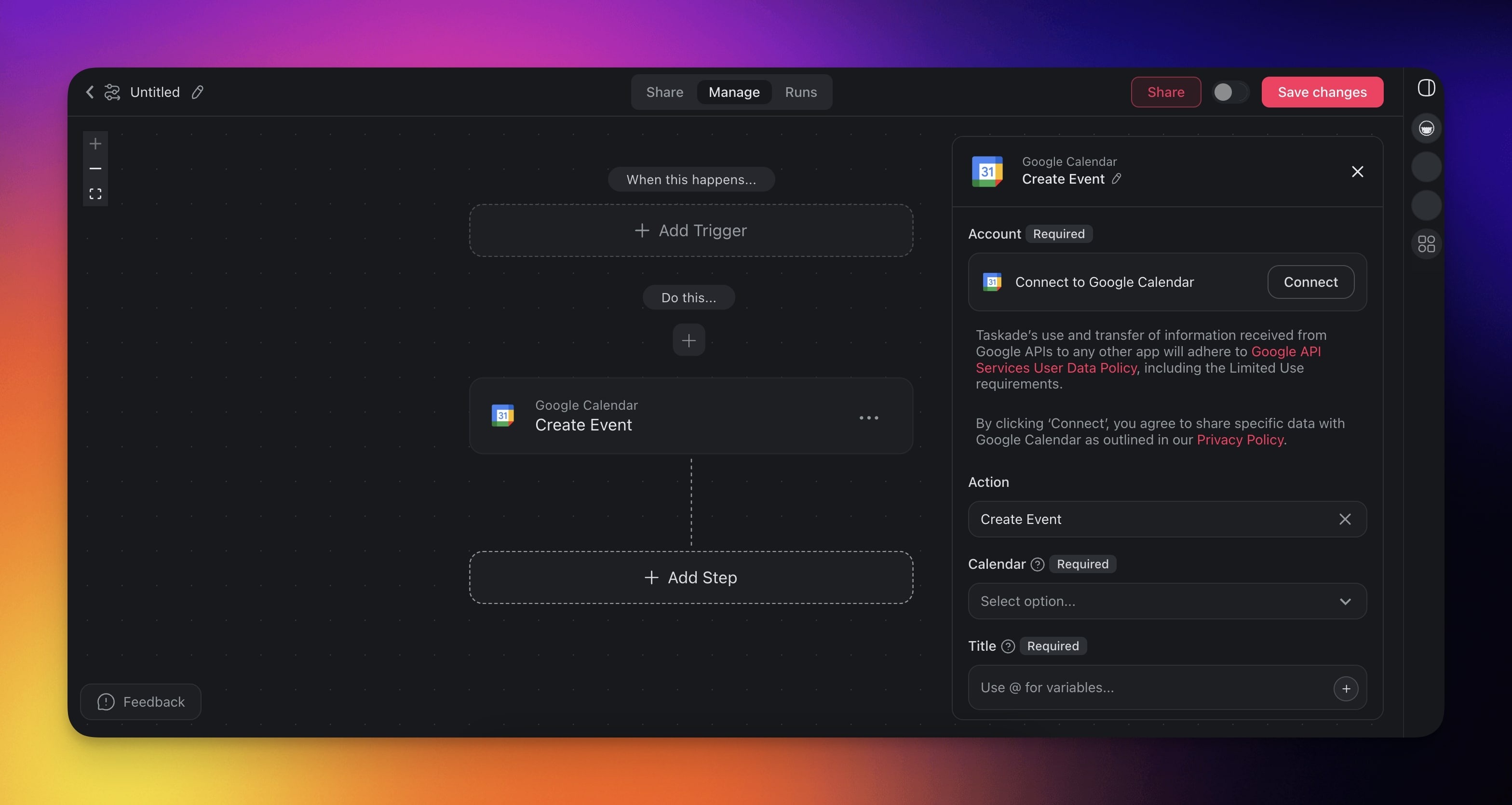
When a trigger occurs, such as a project milestone or a completed task, Taskade syncs and updates your Google Calendar automatically.
> 💡 **Note**: Visit our [Automation Guide](https://www.taskade.com/learn/automation/automations-execution) to learn more.
---
## Calendar Triggers & Actions
Here are the [triggers](https://www.taskade.com/learn/automation/triggers) & [actions](https://www.taskade.com/learn/automation/actions) you can use in your workflows:
| Type | Description |
| --- | --- |
| **New or Updated Event** (Trigger) | Triggers when an event is added or updated. |
| **New Event** (Trigger) | Triggers once when a new event is created. An edit does not trigger it again. A new recurring event triggers once for the series. |
| **Event Cancelled** (Trigger) | Triggers once when an event is cancelled or deleted. Google can return few details for a deleted event, so the title can be empty. |
| **Create Event** (Action) | Adds a new event to Google Calendar. |
| **Create Quick Event** (Action) | Creates a quick event from a natural-language string. |
| **Delete Event** (Action) | Deletes an event from Google Calendar. |
| **List Events** (Action) | Lists events within a specified time window. |
| **Get Free/Busy** (Action) | Checks availability for a calendar. |
| **List Calendars** (Action) | Lists the calendars of the connected account, with the ID of each calendar for the other Google Calendar steps. |
> 💡 **Note**: Google Calendar is a premium integration. Its triggers and actions need a paid plan.
---
### Calendar Automation Settings
Connector options give you full control over the Google Calendar automation:
| Field | Description |
| --- | --- |
| (required) CALENDAR | The calendar to add to. |
| (required) TITLE | Title of the event. |
| (required) START DATE TIME | Start date time of the event. |
| (optional) SUMMARY | Short description of the event. |
| (required) EVENT ID | The ID of the event. |
| (optional) END DATE TIME | End date time of the event. |
| (optional) LOCATION | Location of the event. |
| (optional) DESCRIPTION | Description of the event. |
| (optional) ATTENDEES | Email addresses to invite as guests, on **Create Event** and **Update Event**. Each guest can accept or decline from their own calendar. In **Update Event**, leave it empty to keep the current guest list. |
| (optional) SEND UPDATES | Guests to notify. Set it to **All** so the guests you add receive the invitation email. |
---
### Calendar Automation Use Cases
Here are a few ways to use the Google Calendar integration:
| Use Case | Automation Flow |
| --- | --- |
| Auto-schedule project meetings when milestones complete | ✅ Trigger: Task Completed (milestone task)
➡️ Action: Create Event (Google Calendar) for team review
➡️ Action: Send Channel Message (Slack) with details |
| Block calendar time when important tasks are due | ✅ Trigger: Task Due
➡️ Action: Create Quick Event (GCal)
➡️ Action: Update Custom Fields to mark as scheduled |
| Create follow-up meetings from form submissions | ✅ Trigger: New Response (Google Forms)
➡️ Action: Create Event (GCal) with details
➡️ Action: Add Task for meeting preparation |
| Schedule team check-ins when projects start | ✅ Trigger: Project Created
➡️ Action: Create Event (GCal) for kickoff meeting
➡️ Action: Assign Task to project manager |
| Create calendar events from new calendar events | ✅ Trigger: New or Updated Event (Google Calendar)
➡️ Action: Add Task with event details
➡️ Action: Create Document (Google Docs) for minutes |
| Schedule recurring reviews for ongoing projects | ✅ Trigger: Schedule (weekly)
➡️ Action: Create Event (Google Calendar) for review
➡️ Action: Write with AI to prepare agenda items |
| Auto-schedule client calls when deals progress | ✅ Trigger: New Deal (HubSpot)
➡️ Action: Create Event for discovery call |
---
### Google Calendar Actions
| Action | Description |
| --- | --- |
| Create Event | Add a new event with date, time, and attendees |
| Update Event | Change the time, attendees, or details of an existing event |
| Create Quick Event | Create an event from a natural-language string (1-hour duration, 10-min reminder) |
| Delete Event | Remove an event from the calendar |
| List Events | List events from a calendar within a time window, optionally filtered by a search query |
| Get Free/Busy | Check availability for a calendar within a time window |
| List Calendars | List the calendars of the connected account, with the ID of each one |
---
### Auto-Schedule Meetings
The **List Events** and **Get Free/Busy** actions turn Google Calendar into a real scheduling backend. Pair them with [Branch](https://www.taskade.com/learn/automation/branch-action) and an [AI Agent](https://www.taskade.com/learn/automation/agent-action) to schedule meetings into actual gaps instead of double-booking.
| Action | Inputs | Outputs |
| --- | --- | --- |
| **List Events** | Calendar · Time min · Time max | Array of `{ id, summary, start, end, attendees[] }` |
| **Get Free/Busy** | Calendar(s) · Time min · Time max | Array of busy blocks: `{ start, end }` |
```mermaid
sequenceDiagram
autonumber
participant Form as Booking form
participant Auto as Taskade Automation
participant GCal as Google Calendar
participant Agent as AI Agent
Form->>Auto: New response (requested window)
Auto->>GCal: Get Free/Busy (next 7 days)
GCal-->>Auto: busy[] blocks
Auto->>Agent: Pick best 30-min slot in window
Agent-->>Auto: Chosen start time
Auto->>GCal: Create Event with attendee
Auto->>Form: Send confirmation email
```
| 🪄 Use Case | ⏩ Action Flow |
| --- | --- |
| Smart booking link | ✅ Trigger: New Submission (Typeform)
➡️ Action: Get Free/Busy for next 14 days
➡️ Action: Ask an agent to pick first 30-min slot that respects buffer rules
➡️ Action: Create Event + send confirmation email |
| Daily standup digest | ✅ Trigger: Schedule (weekdays 8:55 AM)
➡️ Action: List Events (today)
➡️ Action: Transform Array to String
➡️ Action: Send Channel Message (Slack) with the day's agenda |
| Conflict-aware reschedules | ✅ Trigger: Event Updated
➡️ Action: Get Free/Busy for new window
➡️ Action: Branch. If conflict, Ask an agent to propose alternatives + Send Email |
### Use Calendar with AI Agents
Your [AI agents](https://www.taskade.com/learn/agents/custom-agents) can call Google Calendar actions as tools during conversations. Turn on Google Calendar as an agent tool in the **Tools** tab. Your agents can then create events, check your free and busy times, and list upcoming meetings. Your agents read your events with the **List Events** and **Get Free/Busy** actions.
### Prompt Examples
- "Create an event called 'Team Standup' tomorrow at 10am"
- "List all events for next week"
- "Check if I am free on Friday afternoon"
---
Use this integration as an AI agent tool. See [Tools for AI Agents](https://www.taskade.com/learn/agents/agent-tools).
#### Available Capabilities
| Type | Capability | Description |
| --- | --- | --- |
| ⚡ Trigger | New or Updated Event | Fires when an event is added or updated |
| ⚡ Trigger | New Event | Fires once when a new event is created |
| ⚡ Trigger | Event Cancelled | Fires once when an event is cancelled or deleted |
| 🔧 Action | Create Event | Adds a new event with date, time, and attendees |
| 🔧 Action | Update Event | Changes the time, attendees, or details of an existing event |
| 🔧 Action | Create Quick Event | Creates an event from a natural-language string |
| 🔧 Action | Delete Event | Removes an event from the calendar |
| 🔧 Action | List Events | Lists events within a specified time window |
| 🔧 Action | Get Free/Busy | Checks availability for a calendar |
| 🔧 Action | List Calendars | Lists the calendars of the connected account |
---
### Related guides
- [Calendar Sync](https://www.taskade.com/learn/connect/calendar-sync). Detailed sync setup
- [Calendar Feed](https://www.taskade.com/learn/connect/calendar-feed). Read-only iCal feed for other clients
- [iCal Feed Integration](https://www.taskade.com/learn/connect/ical-feed-integration). Start an automation from any shared iCal calendar link
- [Calendly](https://www.taskade.com/learn/connect/calendly-integration). Trigger automations from bookings
- [Calendar View](https://www.taskade.com/learn/projects/calendar-view). Visual calendar inside Taskade