# Prompt Library for Automations
> Build, edit, and manage your automations in natural language with Taskade EVE. Use these ready-to-run prompts to wire triggers, actions, and connected apps without touching the builder.
- Source: https://www.taskade.com/learn/automation/prompts
- Section: Automation
- Updated: 2026-08-11
- Index of all pages: https://www.taskade.com/learn/llms.txt
## Overview
This library will help you build, edit, and manage your automations entirely through natural language using [Taskade EVE](https://www.taskade.com/learn/agents/eve-assistant), Taskade's AI assistant. Use these prompts to create workflows, connect tools, and much more.
> **TL;DR:** Describe what you want in plain language and [Taskade EVE](https://www.taskade.com/learn/agents/eve-assistant) builds, edits, and manages the automation for you. No builder required. Use these ready-to-run prompts to wire triggers that pull events in, actions that push work out, and connected apps.
```mermaid
flowchart LR
A[You describe
in plain words] --> B[Taskade EVE]
B --> C[Automation built
and saved]
C --> D[Automation runs
on its own]
style A fill:#0d1b2a,color:#7dd3fc,stroke:#38bdf8,stroke-width:1.5px
style B fill:#2a1225,color:#ff8fa3,stroke:#ff2d60,stroke-width:2px
style C fill:#0d1a0e,color:#86efac,stroke:#22c55e,stroke-width:1.5px
style D fill:#1a140a,color:#ffb74d,stroke:#e65100,stroke-width:1.5px
```
**Related reading:**
- Learn how to access and use Taskade EVE: [Taskade EVE Assistant](https://www.taskade.com/learn/agents/eve-assistant)
- Understand automation building blocks: [Automations: Overview](https://www.taskade.com/learn/automation/automations-execution)
- Browse building blocks: [Automation Triggers](https://www.taskade.com/learn/automation/triggers) / [Automation Actions](https://www.taskade.com/learn/automation/actions)
---
### Taskade EVE for Automations
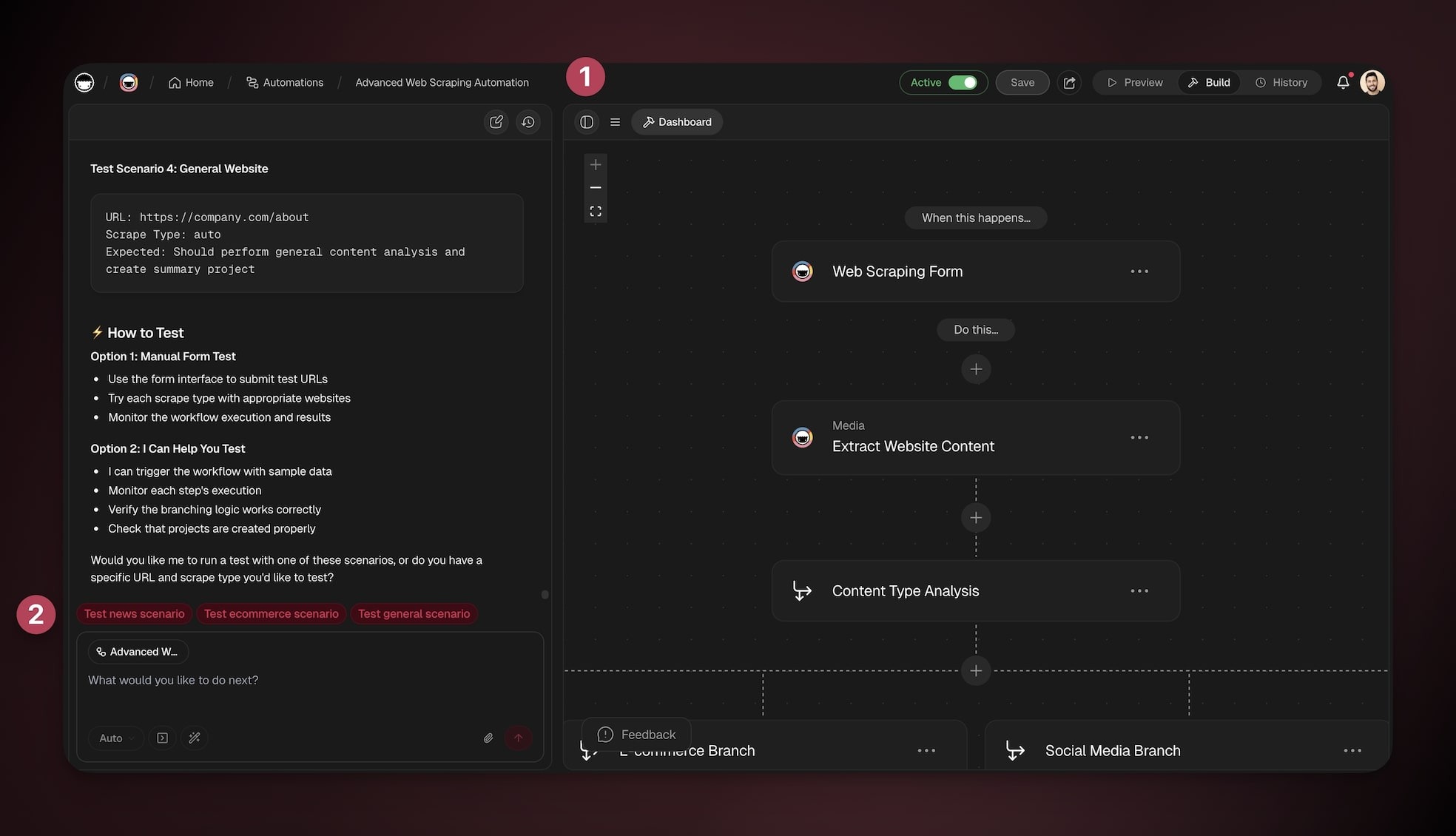
You can build and manage your automations from anywhere inside your workspace:
- Open Taskade EVE in the left panel.
- Describe what you want to automate (see the prompts below).
- If credentials are needed, Taskade EVE will request them automatically.
- Review, save, and turn the automation on.
---
## Core Automation Capabilities
Use these prompts with Taskade EVE to build, edit, and manage automations.
---
### Create Workflows
Build complete automation workflows from scratch.
| Action | Prompt example |
| --- | --- |
| Design multi-step workflows with triggers and actions | “Create an automation that monitors my Gmail for support emails, categorizes them with AI, creates tasks in my project, and sends acknowledgment replies.” |
| Set up conditional logic and branching paths | “Create a workflow that monitors RSS feeds for industry news, summarizes articles with AI, and creates research tasks in my project.” |
| Configure loops for batch processing | “Set up an automation that runs daily at 9 AM, checks for overdue tasks, sends reminder emails, and creates follow-up tasks for managers.” |
| Implement error handling and fallback scenarios | “When any step fails, continue the workflow and notify me with the failure details.” |
| Create custom triggers (webhook, form, manual) | “Build a workflow that triggers when a Google Form is submitted, processes the data with AI, and creates tasks with custom fields.” |
| Connect multiple external services in one workflow | “Build an automation that processes webhook data from my website, qualifies leads with AI, and creates opportunities in my sales pipeline.” |
---
### Edit & Modify Workflows
Update existing automation flows and configurations.
| Action | Prompt example |
| --- | --- |
| Add new steps to existing workflows | “Add email notifications to my existing task completion workflow so the team gets notified when high-priority tasks are done.” |
| Modify trigger conditions and parameters | “Change my form processing automation to trigger only for submissions tagged urgent.” |
| Update action configurations and inputs | “Update my daily report workflow to include data from two additional projects.” |
| Change workflow logic and branching | “Modify my lead processing automation to include AI categorization before creating tasks.” |
| Adjust timing and scheduling settings | “Add a delay step to my email sequence automation so there’s a 2-hour wait between messages.” |
| Fix broken connections and errors | “Find and fix any broken connections in my lead pipeline automation.” |
---
### Analyze & Retrieve Workflows
Examine existing automation workflows and understand their structure.
| Action | Prompt example |
| --- | --- |
| Retrieve and display workflow structures | “Show me how my current email processing automation works and explain each step.” |
| Explain how existing automations work | “Retrieve my customer onboarding automation and explain what happens when a new customer signs up.” |
| Identify potential issues or improvements | “Analyze my lead generation workflow and tell me if there are any potential issues.” |
| Map data flow between steps | “Show me how data moves between steps in my form-to-task automation.” |
| Document workflow logic and dependencies | “Create a brief description of the logic and dependencies in my social media workflow.” |
| Analyze performance and efficiency | “Analyze my social media posting workflow and suggest improvements for better performance.” |
---
### Integration & Connectivity
Connect workflows to external services and APIs.
| Action | Prompt example |
| --- | --- |
| Integrate with third-party services | “Connect my workflow to send Slack notifications when tasks are overdue in my project.” |
| Set up webhook endpoints and API connections | “Create a webhook endpoint and map incoming fields to my project’s custom fields.” |
| Configure authentication and credentials | “Connect my Google Sheets account and authorize access for this workflow.” |
| Map data between different systems | “Set up an integration that syncs new Google Sheets rows with my Taskade project and creates tasks.” |
| Handle API rate limits and error responses | “Filter out invalid payloads before the HTTP step, and alert me in Slack if it fails.” |
| Create custom HTTP requests | “Create a workflow that posts to Twitter when I publish a new blog post in my content project.” |
---
### Deploy & Manage
Test, troubleshoot, and maintain automations.
| Action | Prompt example |
| --- | --- |
| Test workflows with sample data | “Test my email automation with sample data to make sure it works correctly.” |
| Debug failed automation runs | “My lead processing workflow stopped working. Help me debug what’s wrong.” |
| Monitor workflow performance | “Set up monitoring for my daily report automation so I get notified if it fails.” |
| Set up error notifications | “Alert me in Slack when any step fails in the weekly report workflow.” |
| Manage workflow credentials | “Review and update the credentials used by my lead pipeline automation.” |
| Duplicate a workflow before editing | “Duplicate my onboarding workflow so I can test changes without touching the live one.” |
---
### Duplicate & Clone
Copy and modify existing workflows for new purposes.
| Action | Prompt example |
| --- | --- |
| Clone existing workflows with modifications | “Copy my customer onboarding workflow and modify it for employee onboarding.” |
| Adapt workflows for different projects | “Clone my lead generation automation and adapt it for partnership inquiries.” |
| Create workflow templates for reuse | “Create a template version of my email campaign automation that I can reuse for different campaigns.” |
| Scale workflows for multiple teams | “Duplicate my project completion workflow for the Design and Marketing teams.” |
| Customize cloned workflows for new use cases | “Copy my support ticket workflow and modify it to handle refund requests.” |
---
### Delete & Remove
Remove outdated or unnecessary automation workflows.
| Action | Prompt example |
| --- | --- |
| Safely delete workflows with dependency checking | “Delete my old marketing automation that’s no longer needed.” |
| Archive workflows for future reference | “Archive my seasonal campaign automation until next year.” |
| Clean up unused automations | “Delete all the test workflows I created during setup.” |
| Remove broken or obsolete workflows | “Remove the broken email workflow and clean up any related connections.” |
| Manage workflow lifecycle | “Replace my old lead scoring automation with the new version.” |
---
### Troubleshoot & Debug
Identify and fix issues in automation workflows.
| Action | Prompt example |
| --- | --- |
| Diagnose workflow failures and errors | “My daily automation runs but doesn’t process all the data. Help me optimize it.” |
| Fix broken connections and integrations | “Fix my Slack notification workflow that’s not triggering properly.” |
| Resolve authentication issues | “Reauthenticate my Gmail step and verify permissions.” |
| Optimize slow-running workflows | “Speed up my report generation workflow to run under 2 minutes.” |
| Handle data format mismatches | “Fix the step that creates tasks with empty fields from form submissions.” |
| Debug conditional logic problems | “Troubleshoot why my AI categorization step is returning unexpected results.” |
---
### Explain & Teach
Provide education on automation concepts and best practices.
| Action | Prompt example |
| --- | --- |
| Explain automation concepts and terminology | “Explain the difference between triggers and actions in automation.” |
| Teach workflow design best practices | “Teach me the best practices for designing reliable email automations.” |
| Provide guidance on integration strategies | “What are the best strategies for connecting multiple external services?” |
| Share optimization techniques | “How do I handle errors gracefully in my workflows?” |
| Demonstrate advanced features | “Show me how to use retries and fallbacks properly.” |
| Offer troubleshooting methodologies | “Give me a step-by-step method to debug failing automations.” |
---
### Optimize & Improve
Enhance workflow performance and efficiency.
| Action | Prompt example |
| --- | --- |
| Analyze workflow performance bottlenecks | “Identify bottlenecks in my data processing automation.” |
| Optimize data processing efficiency | “Optimize my data processing automation to run faster and handle more records.” |
| Reduce unnecessary steps and complexity | “Remove redundant steps and consolidate actions in my onboarding flow.” |
| Improve error handling and reliability | “Harden my workflow with better error handling and alerts.” |
| Enhance user experience and outcomes | “Optimize my daily report generation to include more relevant data.” |
| Scale workflows for higher volume | “Improve my lead qualification workflow to be more accurate and efficient.” |
---
### Convert & Migrate
Transform manual processes into automated workflows.
| Action | Prompt example |
| --- | --- |
| Analyze manual processes for automation opportunities | “Convert my manual customer onboarding process into an automated workflow.” |
| Design workflows that replicate manual steps | “Turn my weekly report creation process into an automated system.” |
| Migrate data and processes to automated systems | “Migrate my manual lead qualification process to an AI-powered automation.” |
| Create hybrid manual-automated workflows | “Convert my manual social media posting routine into an automated workflow.” |
| Gradually transition from manual to automated processes | “Transform my manual expense approval process into an automated system.” |
---
### Template & Standardize
Create reusable workflow templates and standards.
| Action | Prompt example |
| --- | --- |
| Create standardized workflow templates | “Create a reusable template for customer onboarding automations.” |
| Design reusable automation patterns | “Build a standard workflow template for processing form submissions.” |
| Establish workflow naming conventions | “Propose a naming convention for all our automation workflows.” |
| Create documentation templates | “Provide a template for documenting each workflow’s steps and variables.” |
| Build workflow libraries for teams | “Organize our common automations into a shareable library.” |
| Standardize integration approaches | “Create a standardized approach for integrating new tools with our workflows.” |
---
## Advanced Automation Features
Use these patterns to add intelligence, control, and resilience to your automations.
---
### Conditional Logic & Branching
| Action | Prompt example |
| --- | --- |
| If/then/else conditional statements | “Create a workflow that routes support tickets differently based on priority and customer type.” |
| Multiple condition evaluation | “Send different email sequences depending on acquisition source and deal stage.” |
| Text comparison and pattern matching | “Flag and route tasks whose title contains refund or chargeback to Billing.” |
| Numeric comparisons and calculations | “Assign tasks to the least-loaded team member based on current open task count.” |
| Date and time-based conditions | “Escalate tickets that have been open more than 7 days.” |
| Complex boolean logic | “Only create a follow-up if project=A and priority=High, or the due date is today.” |
---
### Loops & Batch Processing
| Action | Prompt example |
| --- | --- |
| Process arrays and lists of data | “Process a list of customer emails and create an individual task for each.” |
| Iterate through database records | “Loop through all overdue tasks and send personalized reminders.” |
| Batch process multiple files or items | “Process multiple form submissions in batch and create a summary report.” |
| Handle dynamic list sizes | “Iterate through all new rows in my sheet regardless of count.” |
| Aggregate results from multiple iterations | “Compile a daily digest summarizing all processed items.” |
---
### Scheduling & Timing
| Action | Prompt example |
| --- | --- |
| Hourly, daily, weekly, monthly schedules | “Run a daily automation at 8 AM to prepare task assignments.” |
| Custom time-based triggers | “Schedule a monthly workflow to process subscription renewals and send invoices.” |
| Timezone-aware scheduling | “Run the status report at 9 AM Pacific time.” |
| Delay and wait steps | “Add a 2-hour delay between each email in my sequence.” |
| Time-based conditions | “Only process tasks created in the last 24 hours.” |
---
### Error Handling & Reliability
| Action | Prompt example |
| --- | --- |
| Try/catch error handling | “Continue the workflow even if one email step fails.” |
| Fallback actions for failures | “If Slack notification fails, send an email instead.” |
| Automatic retries on transient failures | “Transient failures like rate limits retry on their own. Alert me in Slack if the HTTP step still fails after that.” |
| Error notifications and logging | “Notify me and log details whenever any step fails.” |
| Graceful degradation strategies | “Skip the enrichment step when optional data is missing.” |
---
### Custom Triggers
| Action | Prompt example |
| --- | --- |
| Webhook Triggers | “Create a webhook automation that processes payment notifications from my e-commerce platform.” |
| Form Triggers | “Build a form-based workflow that collects customer feedback and creates improvement tasks.” |
| Manual Triggers | “Set up an on-demand workflow for processing urgent customer escalations.” |
| Schedule Triggers | "Create a weekly workflow that generates performance reports every Friday." |
### Related guides
- [Automations: Overview](https://www.taskade.com/learn/automation/automations-execution). The building blocks these prompts emit.
- [Workflow Generator](https://www.taskade.com/learn/automation/workflow-generator). The visual builder for prompt-driven generation.
- [Taskade EVE Assistant](https://www.taskade.com/learn/agents/eve-assistant). The assistant that runs these prompts.
- [Custom AI Agents](https://www.taskade.com/learn/agents/custom-agents). Agents Taskade EVE calls inside generated flows.
- [Prompt Library](https://www.taskade.com/learn/agents/prompt-library). Full Taskade prompt catalog.
---