# AI Agent Automation
> Run custom AI agents from automation triggers. Agents read each input, decide what to do, and act across connected services.
- Source: https://www.taskade.com/learn/agents/agent-automation
- Section: AI Agents
- Updated: 2026-11-09
- Index of all pages: https://www.taskade.com/learn/llms.txt
## Run an Agent on a Trigger
Agent automation puts a custom AI agent inside an automation so it runs the moment something happens, instead of waiting for you to prompt it. When a support email lands, the agent reads it, tags the priority, drafts a reply, and alerts your team on Slack, all before you open your inbox. Instead of agents waiting for you to prompt them, **automations call agents on triggers** like emails, schedules, webhooks, and project events.
> **TL;DR:** Put a [custom AI agent](https://www.taskade.com/learn/agents/custom-agents) inside an automation so it runs on triggers instead of waiting for prompts. The agent reads each input, makes a judgment call, and acts across 100+ integrations. Use the [Automation interface](https://www.taskade.com/learn/automation/automations-execution) for rule-based work and agent automations for tasks that need understanding.
```mermaid
flowchart LR
T[Trigger
email · cron · webhook · form]:::t --> A((AI Agent)):::a
A --> R[Reason about context]:::a
R --> TL[Call tools
web · PDF · code · custom]:::tool
TL -->|results| R
R --> ACT[Execute actions
100+ integrations]:::e
ACT --> MEM[Update Memory
Projects · Tasks · Fields]:::m
MEM -.->|next run has richer context| T
classDef t fill:#1a140a,color:#ffb74d,stroke:#e65100,stroke-width:1.5px
classDef a fill:#2a1225,color:#ff8fa3,stroke:#ff2d60,stroke-width:2px
classDef tool fill:#1a0d24,color:#ce93d8,stroke:#6a1b9a,stroke-width:1.5px
classDef e fill:#0d1b2a,color:#7dd3fc,stroke:#38bdf8,stroke-width:1.5px
classDef m fill:#0a1a14,color:#86efac,stroke:#22c55e,stroke-width:1.5px
```
The full Workspace DNA loop: **Memory** triggers **Intelligence**, **Intelligence** uses tools and updates **Execution**, **Execution** writes back to **Memory**. Every run feeds the next.
> **💡 Note**: This feature is part of our [Automation Interface](https://www.taskade.com/learn/automation/automations-execution).
---
### Build Agent Automations
You can set up your first agent automation in a few steps:
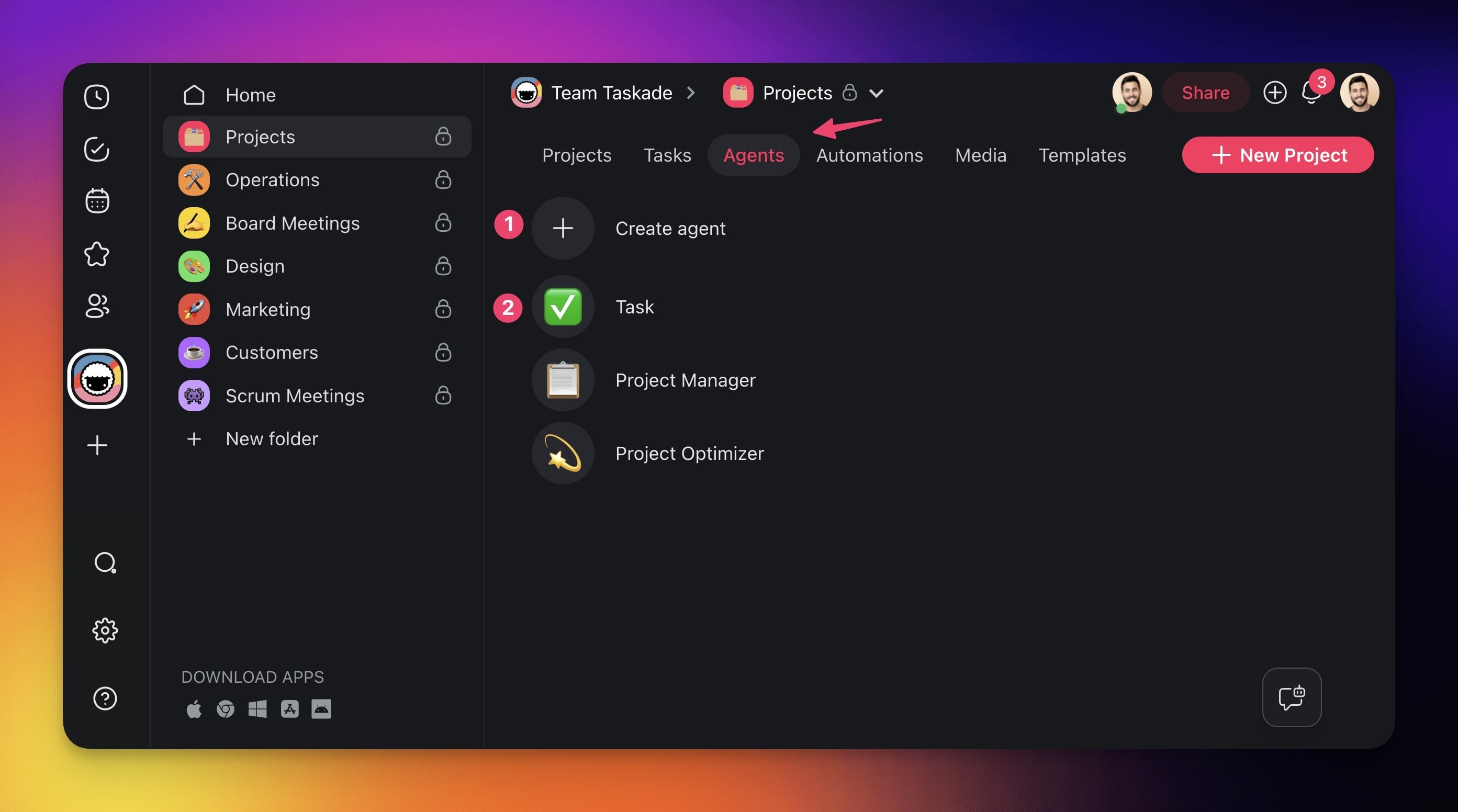
- Go to the **Agents** tab at the top of your workspace/folder.
- **(1) Select an existing agent** or **(2) create** a **new one.**
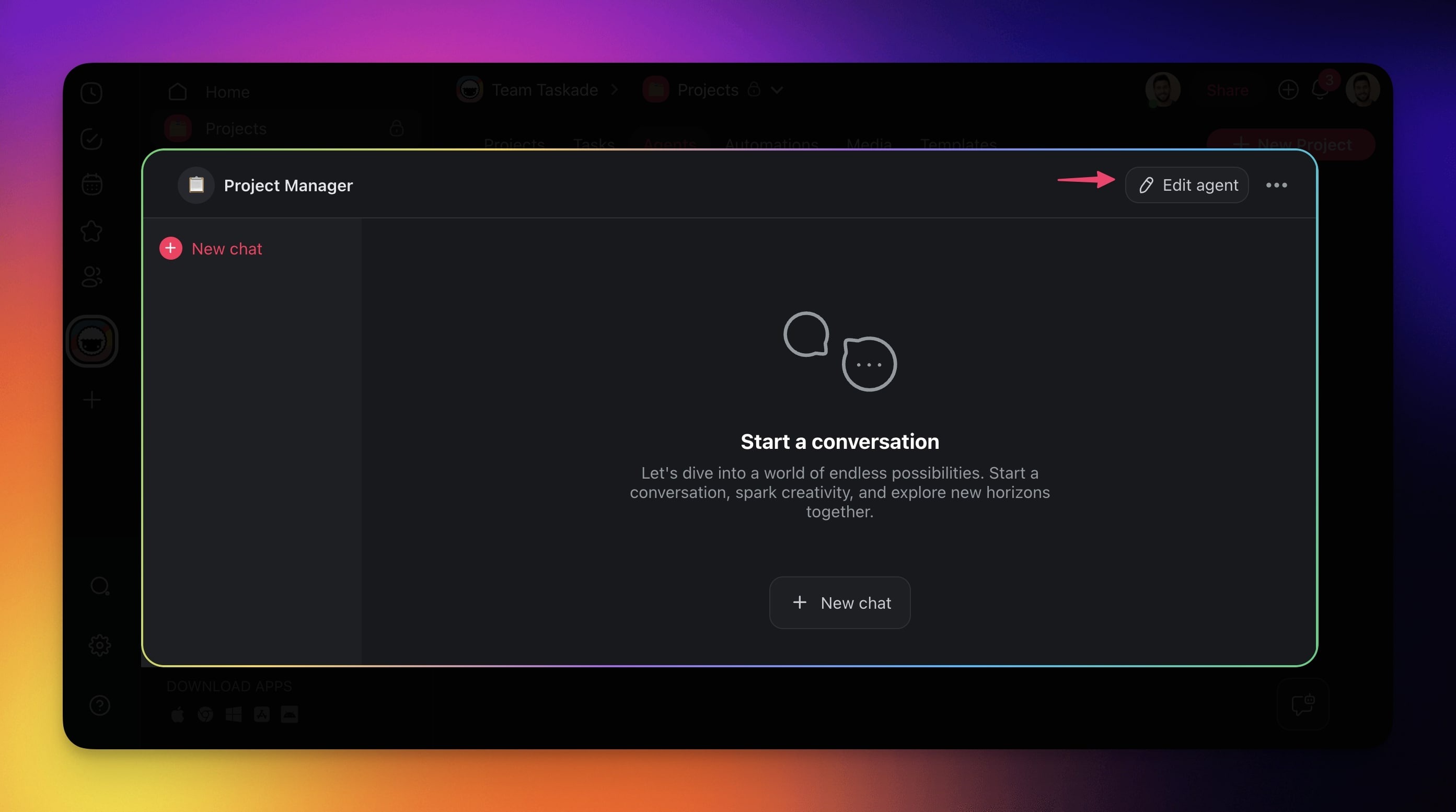
- Click ✏️ **Edit agent** in the top-right corner.
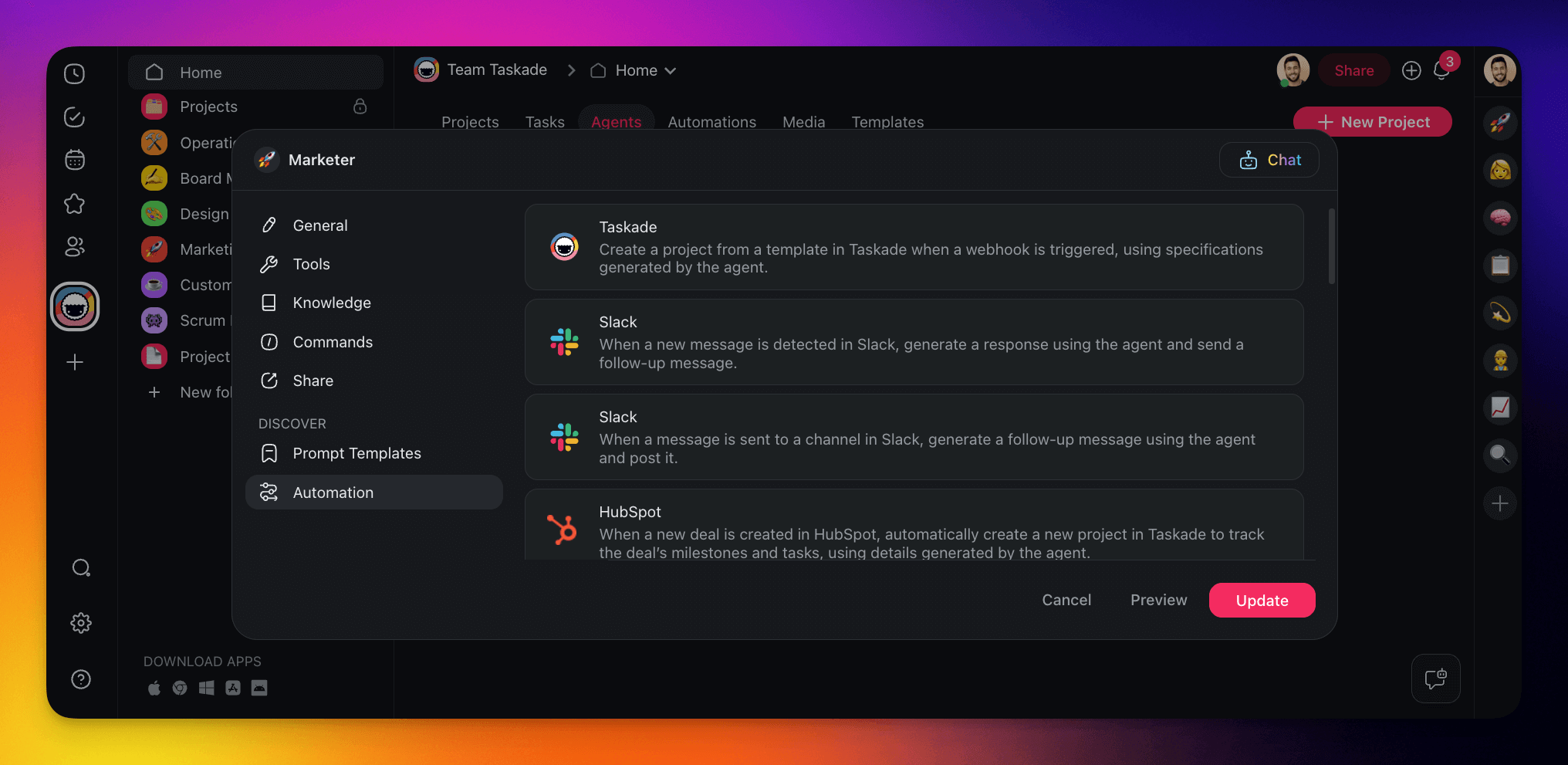
- Go to the **Automation** tab on the left.
- **Choose** one of the available **connectors** to instantly create an automation flow.
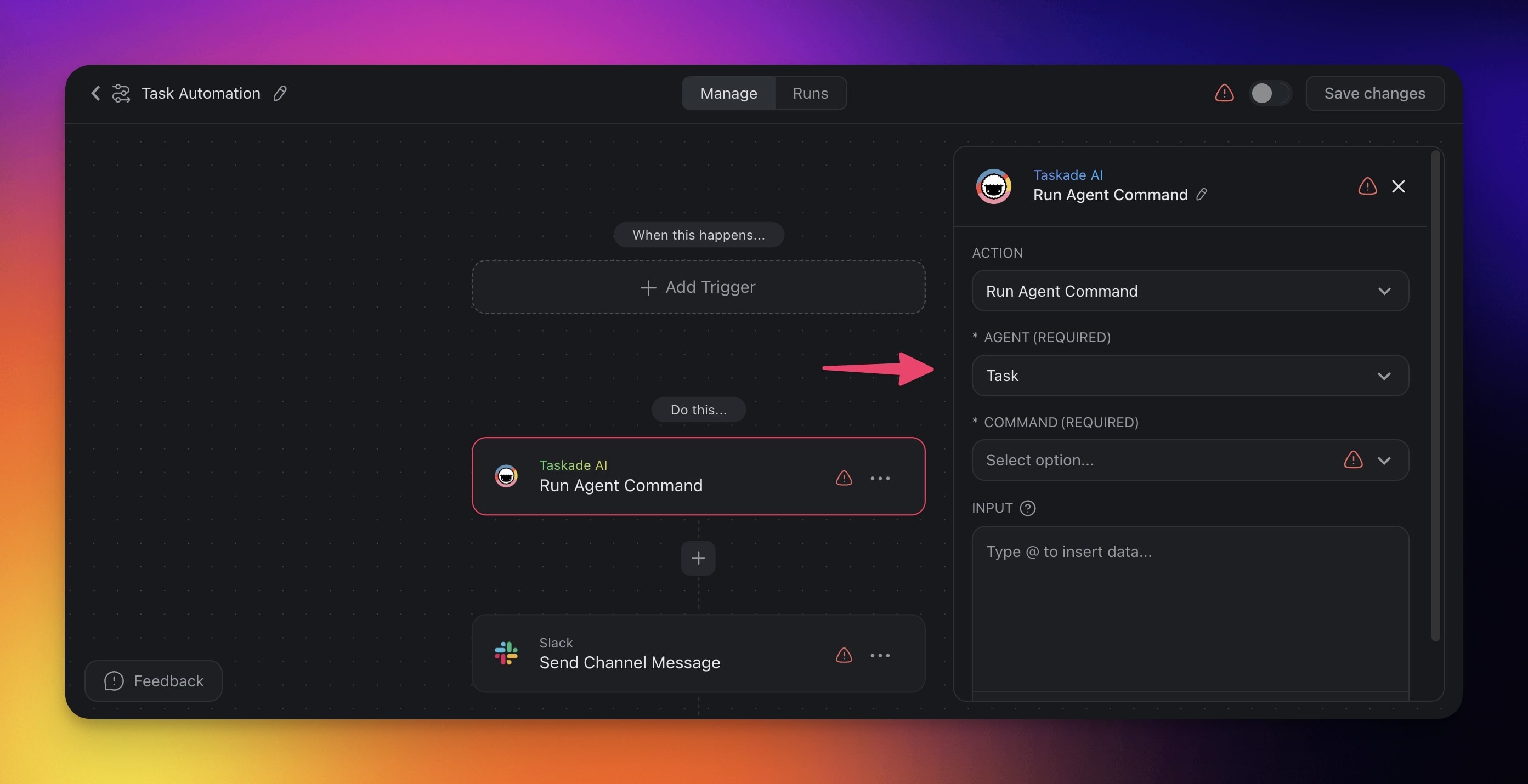
- **Finish** setting up your **agent automation** in the creator.
> **💡 Note**: Visit our [Getting Started Automation guide](https://www.taskade.com/learn/automation/automations-execution) to learn more.
---
## Agent vs. Standard Automation
Taskade offers two types of automations. Here is when to use each:
| Feature | Standard Automation | Agent Automation |
| --- | --- | --- |
| Logic | Fixed rules: if this, then that | AI decides what to do based on context |
| Best for | Repetitive, predictable tasks | Tasks that need judgment or language understanding |
| Setup | Select trigger → choose actions → done | Select trigger → configure agent instructions → choose actions |
| Example | "When a task is completed, move it to Done" | "When a support email arrives, read it, classify priority, and draft a reply" |
| Flexibility | Follows exact rules every time | Adapts to different inputs and contexts |
> 💡
>
> **Rule of thumb:** If you can describe the task as a simple if/then rule, use a standard automation. If the task requires reading, understanding, or making decisions, use an agent automation.
### Build an Agent Automation
Here is a complete walkthrough to create an agent automation that drafts email replies from support tickets:
**Step 1: Create the automation**
1. Go to your workspace and click the **Automations** tab
2. Click **+ Add Automation**
3. Choose a trigger. For this example, select **Email Trigger** (fires when a new email arrives)
**Step 2: Add an AI Agent action**
1. Click **+ Add Action** after your trigger
2. Select **Ask an agent** from the action list
3. Choose which AI agent handles the task
4. Write clear instructions for the agent, for example:
*"Read the incoming support email. Classify the priority as urgent, normal, or low. Draft a helpful reply that addresses the customer's question. Keep the tone friendly and professional."*
**Step 3: Add follow-up actions**
1. Add a **Branch** action to route based on priority
2. For "urgent" → add a **Send Slack Message** action to alert the team
3. For all paths → add a **Send Email** action with the agent's drafted reply
**Step 4: Test and activate**
1. Toggle the automation **On** to activate it
2. Send a sample email to the inbox that the trigger watches
3. When the new run shows in the **Runs** tab, open it
4. Review the agent's output in that run
5. If the output is not right, adjust the agent's instructions
6. Send another sample email to check the change
### Write Effective Instructions
The agent's instructions determine how well your automation performs. Here are three proven patterns:
| Pattern | Template | When to Use |
| --- | --- | --- |
| Classify & Route | "Read the input. Classify it as [category A / B / C]. Output only the category name." | Ticket triage, lead scoring, content tagging |
| Extract & Summarize | "Read the input. Extract: [field 1], [field 2], [field 3]. Format as a brief summary." | Email parsing, form processing, data entry |
| Draft & Respond | "Read the input. Draft a [type] response. Keep tone [formal/casual]. Include [key points]." | Support replies, follow-ups, acknowledgments |
> 💡
>
> **Tip:** Be specific in your instructions. Instead of "handle the email," write "read the email, identify the main question, and draft a 2-3 sentence reply." The more specific your instructions, the more consistent the agent's output.
### Use Automation Actions in Chat
Beyond pre-built automation workflows, your agents can use **individual automation actions as one-off tools** during conversations. This means agents do not need a full workflow to take action. They can do things on the fly.
**What agents can do in a single chat message:**
| Action | Example |
| --- | --- |
| Send an email | "Send a follow-up email to john@example.com with the meeting summary" |
| Post to Slack | "Post this week's report to the #marketing Slack channel" |
| Create a spreadsheet row | "Add this lead to the Google Sheets CRM" |
| Create a GitHub issue | "Create a bug report in our GitHub repo for this issue" |
| Send a Discord message | "Notify the team on Discord that the deployment is ready" |
**How to enable it:**
1. Open your agent's settings
2. Go to the **Tools** tab
3. Enable the specific automation actions you want your agent to use
4. Your agent will ask for your approval before executing any action (human-in-the-loop)
### Let Taskade EVE Build It
Taskade EVE can assemble complete agent-automation workflows from a single prompt. Describe what you want:
- *"Create a support agent that escalates urgent tickets to Slack"*
- *"Build a sales agent that logs qualified leads to Google Sheets"*
- *"Make a content agent that posts to Slack when a draft is ready for review"*
Taskade EVE will configure the agent, enable the right tools, and connect the automation actions, all in one step.
---
### Related guides
- [Custom AI Agents](https://www.taskade.com/learn/agents/custom-agents): Build the agents that power these automations
- [Agent Tools](https://www.taskade.com/learn/agents/agent-tools): The built-in toolkit agents can call
- [Automations Overview](https://www.taskade.com/learn/automation/automations-execution): The full automation interface
- [Multi-Agents](https://www.taskade.com/learn/agents/multi-agents): Chain specialist agents inside one workflow
- [Taskade EVE Assistant](https://www.taskade.com/learn/agents/eve-assistant): Build agents and automations with one prompt