# 17 Best AI YouTube Description Generators 2026 (Free Tiers)
> 17 AI YouTube description generators sorted by what you feed them: a topic, a transcript, or the video itself. Free plans, prices, and chapter rules checked.
- Source: https://www.taskade.com/blog/youtube-description-generators
- Published: 2026-11-22
- Author: Taskade Team
The best AI YouTube description generator is the one that reads your video, not just your title. Tools that start from a topic, such as vidIQ, Ahrefs and Hootsuite, write a clean first draft in seconds, but they cannot write real chapters because they never see the timestamps. Tools that read the transcript or the video file, such as Descript, quso.ai, Claude and Taskade, can. We sorted 17 tools by that one difference and checked every free plan on November 7, 2026.
> **TL;DR:** We sorted **17 AI YouTube description generators by what you feed them**: a topic (vidIQ, Ahrefs, Hootsuite, VEED), a transcript (ChatGPT, Claude, Taskade), or the video file (Descript, quso.ai, Riverside). Only tools that read the transcript can write real chapters. Free plans checked November 7, 2026. Draft one now with the free [AI video description generator](https://www.taskade.com/generate/marketing/youtube-video-description).
*Cover photo: YouTube's first office sat on the second floor of this San Mateo building until October 2006. Photo: Coolcaesar via Wikimedia Commons, CC BY-SA 3.0.*
On April 23, 2005, YouTube co-founder Jawed Karim uploaded the site's first video, "Me at the zoo". It runs 19 seconds. More than twenty years later, its description box still changes. When we opened it on November 7, 2026, it held links to two talks about microplastics and three chapters: `00:00 Intro`, `00:05 The cool thing`, `00:17 End`.
By YouTube's own rule, a chapter must run at least 10 seconds, so two of those three are too short to count. That small detail is the whole story of this guide. A description is the one part of a video you can still change after you publish, and the rules for what YouTube does with it are precise. A generator that does not know those rules writes text that looks right and quietly fails.
---
## Quick Answer: The Best AI YouTube Description Generator by What You Have
**The best tool depends on what you can hand it: a topic, a transcript, or the video file.** Topic tools are fastest and mostly free. Transcript and video tools are the only ones that can write chapters with real times.
| If you have... | Start with | Why |
|---|---|---|
| Only a title or topic, and 30 seconds | [vidIQ](https://vidiq.com/ai-description-generator/), [Ahrefs](https://ahrefs.com/writing-tools/youtube-video-description-generator) or [Hootsuite](https://www.hootsuite.com/social-media-tools/youtube-video-description-generator) | Free, fast, keyword-aware first drafts |
| The transcript | [Claude](https://claude.ai), [ChatGPT](https://chatgpt.com) or the Taskade [AI video description generator](https://www.taskade.com/generate/marketing/youtube-video-description) | An accurate summary plus chapters from real timestamps |
| The video file, and you edit in the same tool | [Descript](https://www.descript.com) | Transcript, chapters and a description draft from one upload |
| Long videos you also cut into Shorts | [quso.ai](https://quso.ai) or [Opus Clip](https://www.opus.pro) | Chapters and clips from one pass |
| Only chapters, nothing else | YouTube Studio automatic chapters, or [Bannerbear](https://www.bannerbear.com/tools/video/free-online-youtube-chapter-generator/) | Free, and Bannerbear needs no account |
| A channel that uploads every week | [Taskade](https://www.taskade.com/automate/youtube/youtube-description-generator) | A transcript-to-draft automation, an agent that knows your channel, and one review queue |
```mermaid
graph TD
Q1{"Do you have the transcript
or the video file?"} -->|No, only a topic| R1["vidIQ, Ahrefs or Hootsuite"]
Q1 -->|Yes| Q2{"Do you edit the video
in the same tool?"}
Q2 -->|Yes| R2["Descript or quso.ai"]
Q2 -->|No| Q3{"Do you upload
every week?"}
Q3 -->|No| R3["ChatGPT or Claude
with a pasted transcript"]
Q3 -->|Yes| R4["Taskade: automation plus agent"]
style Q1 fill:#0d1b2a,color:#7dd3fc,stroke:#38bdf8,stroke-width:1.5px
style Q2 fill:#0d1b2a,color:#7dd3fc,stroke:#38bdf8,stroke-width:1.5px
style Q3 fill:#0d1b2a,color:#7dd3fc,stroke:#38bdf8,stroke-width:1.5px
style R1 fill:#1a140a,color:#ffb74d,stroke:#e65100,stroke-width:1.5px
style R2 fill:#11111b,color:#cdd6f4,stroke:#00d4aa
style R3 fill:#0d1a0e,color:#86efac,stroke:#22c55e,stroke-width:1.5px
style R4 fill:#2a1225,color:#ff8fa3,stroke:#ff2d60,stroke-width:2px
```
---
## What Is an AI Video Description Generator?
**An AI video description generator is a tool that writes the text under a video: a hook, a summary, chapters, links and hashtags.** On YouTube, that text box holds up to 5,000 characters. The phrase is ambiguous, though, and search results mix three different jobs under it.
| What people mean | Output | Who it is for | Covered here? |
|---|---|---|---|
| YouTube description (metadata) | The text box under the video, up to 5,000 characters | Creators, marketers | Yes, the whole guide |
| Audio description (accessibility) | A narration track that describes what happens on screen | Blind and low-vision viewers | One paragraph, below |
| Video understanding | A summary of what happens in a clip | Researchers, editors, students | One paragraph, below |
**Audio description** is a different product. YouTube Help describes it as a narration track that describes what happens on screen during natural pauses, and creators upload it under Languages in YouTube Studio as a "Descriptive audio" track ([Add audio descriptions](https://support.google.com/youtube/answer/16166822)). Help says the feature is currently available to creators with access to advanced features. A metadata generator does not make that track.
**Video understanding** is the viewer side of the same transcript. A student who wants to [turn a YouTube video into notes](https://www.taskade.com/blog/youtube-to-notes) uses the transcript to learn. A creator uses the same transcript to write the description. The input is identical, and only the output changes.
For the YouTube description itself, the input decides everything:
```
WHAT YOU FEED IT EXAMPLE TOOLS REAL CHAPTERS?
─────────────────────── ─────────────────────────────── ──────────────────
A title or topic vidIQ, Ahrefs, Hootsuite, VEED No, invented names
A transcript ChatGPT, Claude, Taskade Yes
The video file Descript, quso.ai, Riverside Yes
Your upload (native) YouTube Studio auto chapters Yes, chapters only
```
```mermaid
graph TD
V["Your video"] --> T["Route 1: type a topic
vidIQ, Ahrefs, Hootsuite, VEED"]
V --> S["Route 2: paste the transcript
ChatGPT, Claude, Taskade"]
V --> F["Route 3: upload the file
Descript, quso.ai, Riverside"]
T --> O1["Fast draft
chapter names only, no real times"]
S --> O2["Accurate summary
chapters from real timestamps"]
F --> O3["Transcript, chapters and clips
in one pass"]
O1 --> P["Edit, then paste into YouTube Studio"]
O2 --> P
O3 --> P
style V fill:#1e1e2e,color:#94a3b8,stroke:#475569
style T fill:#1a140a,color:#ffb74d,stroke:#e65100,stroke-width:1.5px
style S fill:#0d1a0e,color:#86efac,stroke:#22c55e,stroke-width:1.5px
style F fill:#0d1b2a,color:#7dd3fc,stroke:#38bdf8,stroke-width:1.5px
style O1 fill:#1a140a,color:#ffb74d,stroke:#e65100,stroke-width:1.5px
style O2 fill:#0d1a0e,color:#86efac,stroke:#22c55e,stroke-width:1.5px
style O3 fill:#0d1b2a,color:#7dd3fc,stroke:#38bdf8,stroke-width:1.5px
style P fill:#2a1225,color:#ff8fa3,stroke:#ff2d60,stroke-width:2px
```
---
## What YouTube Actually Asks For in a Description
**YouTube allows 5,000 characters in a description and shows the first few lines first, so the opening lines carry the click.** Every rule below comes from YouTube Help, read on November 7, 2026. No roundup we read in the current top results quotes these pages, which is why so many generated descriptions break them.
| Rule | Value | Source |
|---|---|---|
| Description limit | 5,000 characters | [Tips for video descriptions](https://support.google.com/youtube/answer/12948449), [Edit video settings](https://support.google.com/youtube/answer/57404) |
| Title limit | 100 characters | [Edit video settings](https://support.google.com/youtube/answer/57404) |
| What viewers see first | The first few lines, before "Show more" on a computer or "more" on a phone | [Tips for video descriptions](https://support.google.com/youtube/answer/12948449) |
| Unique per video | "Be sure that each video has a unique description" | Same page |
| Keywords | "Identify 1-2 main words" and feature them in both the title and the description | Same page |
| Default description | One field fills channel info into every new upload | Same page |
| Formatting | Bold, italic, strikethrough, and lists that start with an asterisk, plus sign or hyphen | Same page |
| Hashtags shown | Up to 3, next to the title, picked from your description | [Hashtags on YouTube](https://support.google.com/youtube/answer/6390658) |
| Hashtag cap | More than 60, and YouTube ignores every hashtag on the video | Same page |
| Tags in the description | "Adding excessive tags to your video description is against our policies on spam" | [Add tags](https://support.google.com/youtube/answer/146402) |
| Corrections | A "Correction:" line after the chapters, with a timestamp, adds a View Corrections card | [Edit video settings](https://support.google.com/youtube/answer/57404) |
### The first lines are the search snippet
YouTube Help tells creators to use "the first few lines of your description to describe your video because it's what viewers will see first." Put the hook and one of your two main words in the first sentence. Help also says that "search terms are matched with the video and the text in the description", so the opening is both the pitch and the keyword signal.
### Write once, reuse the bottom half
The default description field fills in basic channel information on every upload. Put the subscribe line, your social links, your gear list and any standing disclosure there, and let the generator write only the top half. The [YouTube SEO description](https://www.taskade.com/generate/seo/youtube-seo-description) generator writes the top half with the main words in place.
### Stuffing hurts, it does not help
Help gives one more number that generators ignore: tags "play a minimal role in your video's discovery." The title, thumbnail and description matter more, and excessive tags in the description break the spam policy. A long tail of keywords at the bottom of a description is a risk, not a ranking trick.
---
## YouTube Chapters: The Rules a Generator Has to Pass
**YouTube shows chapters only when the first timestamp is 00:00, the list has at least three timestamps in ascending order, and each chapter runs 10 seconds or longer.** Those rules come from YouTube Help's [video chapters](https://support.google.com/youtube/answer/9884579) page, read on November 7, 2026.
Three more facts from the same page matter for anyone who generates chapters:
- **Automatic chapters are on by default.** The "Allow automatic chapters" box "will be checked for all new uploads." Help adds that not all videos are eligible, and not all eligible videos get automatic chapters.
- **Manual chapters win.** Timestamps you add to the description "override automatic video chapters."
- **Some videos cannot have chapters.** Chapters are unavailable if the channel has an active strike, or if the content may be inappropriate for some viewers.
This is where the input decides the quality. A topic-only generator has no timestamps. It can only invent chapter names and guess at times, which fails the moment a viewer clicks one. Real chapters need a transcript with times, or the video itself. The [YouTube chapter markers](https://www.taskade.com/convert/youtube/youtube-to-chapter-markers) converter and the [chapter timestamps automation](https://www.taskade.com/automate/youtube/youtube-chapter-timestamps) both start from the transcript for that reason.
```mermaid
graph TD
A["Timestamps in the description"] --> B{"First timestamp is 00:00?"}
B -->|No| X1["No chapters shown"]
B -->|Yes| C{"3 or more timestamps,
in ascending order?"}
C -->|No| X2["No chapters shown"]
C -->|Yes| D{"Every chapter is
10 seconds or longer?"}
D -->|No| X3["No chapters shown"]
D -->|Yes| E{"No active strike, and the video
suits all viewers?"}
E -->|No| X4["Chapters not available"]
E -->|Yes| OK["Chapters appear in the player"]
style A fill:#1e1e2e,color:#94a3b8,stroke:#475569
style B fill:#0d1b2a,color:#7dd3fc,stroke:#38bdf8,stroke-width:1.5px
style C fill:#0d1b2a,color:#7dd3fc,stroke:#38bdf8,stroke-width:1.5px
style D fill:#0d1b2a,color:#7dd3fc,stroke:#38bdf8,stroke-width:1.5px
style E fill:#0d1b2a,color:#7dd3fc,stroke:#38bdf8,stroke-width:1.5px
style X1 fill:#1a0d0d,color:#ef9a9a,stroke:#b71c1c,stroke-width:1.5px
style X2 fill:#1a0d0d,color:#ef9a9a,stroke:#b71c1c,stroke-width:1.5px
style X3 fill:#1a0d0d,color:#ef9a9a,stroke:#b71c1c,stroke-width:1.5px
style X4 fill:#1a0d0d,color:#ef9a9a,stroke:#b71c1c,stroke-width:1.5px
style OK fill:#0d1a0e,color:#86efac,stroke:#22c55e,stroke-width:1.5px
```
What each input can and cannot produce:
| You feed it | Hook and summary | Real chapters | Keywords | Voice between videos |
|---|---|---|---|---|
| A topic | Yes, generic | No, it never sees timestamps | Yes, if you add them | No |
| A transcript | Yes, accurate | Yes | Yes | Only if the tool keeps memory |
| The video file | Yes, accurate | Yes | Yes | Only if the tool keeps memory |
| An automation plus an agent | Yes, accurate | Yes | Yes | Yes, the agent keeps the brief |
A format tip: Help writes the first stamp as `00:00`. Many creators write `0:00`, and chapter tools such as Bannerbear write `m:ss`, or `h:mm:ss` past one hour.
---
## Is the Free Plan Actually Free?
**Most description generators are free to try, but only the topic tools stay free without a cap you can see.** The tools that read your video meter the work in minutes, credits or exports, because transcribing a video costs them real compute.
Facts checked on 2026-11-07, on each vendor's own page:
| Tool | Free plan | What runs out first |
|---|---|---|
| vidIQ | 150 AI credits every month | Credits, and "a set number of daily runs" with no number published |
| Ahrefs | Free with an Ahrefs Free account | No limit published |
| Hootsuite | Free web tool | No limit published, signup not stated |
| VEED | Free tool, "No credit card required" | No limit published |
| Canva Magic Write | "Up to 25 uses in total" on Canva Free | A lifetime cap, not a monthly one |
| Descript | 60 media minutes a month, 100 AI credits one-time | Credits, and descriptions and chapters are "Limited" |
| quso.ai | 75 credits a month, 1 credit about 1 minute of video | Minutes, plus a watermark and 7-day retention |
| Opus Clip | One clip a day, 3-day export limit | The description writer is not on Free |
| Bannerbear chapters | Free, no account, "no limit on the number of videos" | Your browser's memory on long videos |
| ChatGPT | "Limited messages with uploads" | Uploads, and about 12 pages of text per input |
| Claude | "Limited usage every 5 hours and every week" | The 5-hour window |
| Jasper | No free plan, a 7-day trial | The trial |
| Taskade | 3 Taskade Genesis apps, 1 AI agent, 10 automation runs a billing period | AI credits: Free starts with 0 |
The honest pattern: free general assistants are the most generous way to work from a transcript you already have. The paid video editors earn their price when you want the transcript, the edit and the description in one place.
```mermaid
xychart-beta
title "Entry paid plan, monthly billing (USD, checked Nov 7, 2026)"
x-axis "Tool" [Opus Clip Starter, vidIQ Boost, Claude Pro, Taskade Pro, Descript Hobbyist, quso.ai Lite, Jasper Pro]
y-axis "USD per month" 0 --> 80
bar [15, 19, 20, 20, 24, 29, 69]
```
Annual billing lowers several of these: vidIQ Boost is $199 a year, Claude Pro $17 a month, Taskade Pro $10 a month, Descript Hobbyist $16 a month and Jasper Pro $59 a seat a month. quso.ai charges 12 times the monthly price for a year, so it has no annual discount.
---
## How We Compared These Tools
We are a vendor too, so here is exactly how this comparison was built:
- **Every price and free plan** was checked on the vendor's own page on **November 7, 2026**. TubeBuddy, VEED, Riverside and ChatGPT prices were re-checked on November 12, 2026. Where a page did not render a price or publish a limit, we say so instead of quoting a third-party number.
- **Tools are grouped by input**, not ranked on one scale. A chapter tool and a topic writer are not competitors.
- **We compared, we did not run a bake-off.** We did not run one transcript through every tool, because several gate the description step behind accounts, credits or paid plans. We describe what each vendor says the tool produces.
- **YouTube's rules come from YouTube Help**, not from a blog post.
- **Taskade appears last**, in the workflow group, because that is where it fits.
- **Every entry names at least two real strengths.**
Each tool was checked against the same five questions:
| Question | What counts as a yes | Where we looked |
|---|---|---|
| What do you feed it? | A topic, a transcript, or the video file | Tool page |
| Can you draft on $0? | A description you can keep, with no card | Pricing page |
| Does it write chapters from real timestamps? | It reads the transcript or the video | Tool page and docs |
| Does it keep your channel voice between videos? | Saved brand voice, memory, or an agent | Tool page |
| What does the entry paid plan cost? | A published price | Pricing page |
---
## Topic-In Generators: Fast First Drafts
These tools take a title, a topic or a few keywords. They are the fastest way to a first draft, and the weakest way to chapters.
### 1. [vidIQ](https://vidiq.com/ai-description-generator/): Best Free Generator With an SEO Score
[vidIQ](https://vidiq.com) is a YouTube growth suite, and its description generator is one of many tools that share one credit pool.
**Input:** a video title or a short topic prompt. You can connect your channel "for tailored descriptions."
**Key features:** a keyword-rich draft "scored for SEO, clarity, and engagement"; copy-ready text; a matching script, title or tags in one click.
**Free plan (checked Nov 7, 2026):** the pricing page lists "150 AI Credits every month." The tool page says free users get "a set number of daily runs" and gives no number. No credit card is needed.
**Pros:**
- The SEO score gives a quick check before you paste
- One suite covers titles, tags, ideas and descriptions
**Cons:**
- It never sees the video, so chapters are guesses
- The daily run cap is not published
**Pricing:** Boost $19/month or $199/year, MAX $49/month or $468/year (one-channel US list prices).
**Bottom line:** the best free start if you already use vidIQ for keyword research.
### 2. [TubeBuddy](https://www.tubebuddy.com): Best Inside YouTube Studio via the Browser Extension
[TubeBuddy](https://www.tubebuddy.com) is a browser extension that adds tools to the YouTube Studio pages you already use. It has no standalone description generator. Its description help is spread across features.
**Input:** your existing video, title and tags, inside Studio.
**Key features:** AI agents in TubeBuddy, where the SEO agent suggests keywords and "an optimized description you can use"; A/B tests on descriptions; bulk processing that appends a new link to every description at once.
**Free plan (checked Nov 7, 2026):** a free plan exists, and the pricing page names no free features. TubeBuddy's own blog says free users can try the title generator for five titles, and full use needs the Legend plan.
**Pros:**
- Works where you upload, with no copy-paste between tabs
- Bulk edits fix a whole back catalog in one pass
**Cons:**
- No single "write my description" button
- The pricing page says Pro, Star and Legend are for individual creators only
**Pricing:** Pro is $12 a month billed yearly ($144 a year), and Legend is $26.39 a month billed yearly ($316.68 a year). Enterprise has custom pricing (checked 2026-11-12).
**Bottom line:** the right fit if you live in Studio and want to test and bulk-edit descriptions you already have.
### 3. [Ahrefs](https://ahrefs.com/writing-tools/youtube-video-description-generator): Best Free Generator for Multiple Variants
[Ahrefs](https://ahrefs.com) is an SEO platform with a set of free writing tools, and its YouTube description writer is one of them.
**Input:** a "Describe this video..." box with a 2,048-character limit.
**Key features:** a writing tone menu; a language menu; "3 variants" per run; an "Add hashtags" option.
**Free plan (checked Nov 7, 2026):** "Try it for free with an Ahrefs Free account." The page publishes no usage limit.
**Pros:**
- Three variants per run make it easy to mix the best lines
- 2,048 characters is room for a short outline, not just a title
**Cons:**
- Needs an Ahrefs account
- An outline is not a transcript, so chapter times stay guesses
**Pricing:** free tool. Paid Ahrefs plans are for its SEO suite and were not part of this check.
**Bottom line:** the best free option when you want options to choose from, not one draft.
### 4. [Hootsuite](https://www.hootsuite.com/social-media-tools/youtube-video-description-generator): Best Free Generator With a Built-In CTA Field
[Hootsuite](https://www.hootsuite.com) is a social media management suite, and its free YouTube description generator is a single web form.
**Input:** language, category, call to action, topic, keywords and viewer benefit.
**Key features:** five languages, "English, French, German, Italian, or Spanish"; a call to action field built into the form; the page says it is "Powered by the latest version of ChatGPT."
**Free plan (checked Nov 7, 2026):** a free web tool. The page states no usage cap and no signup rule. It warns that the tool "may display inaccurate or offensive material."
**Pros:**
- The CTA field makes every draft end with an ask
- The viewer benefit field pushes the hook toward the viewer
**Cons:**
- No transcript input, so no real chapters
- Paid Hootsuite plans are a social suite, priced well above a writing tool
**Pricing:** free tool. Hootsuite's plans page says paid plans start at $99 for Standard (checked Nov 7, 2026).
**Bottom line:** the best free form if you want the call to action written for you.
### 5. [VEED](https://www.veed.io/tools/script-generator/youtube-description-generator): Best for Mix-and-Match Description Ideas
[VEED](https://www.veed.io) is an online video editor, and its description generator sits beside its script and subtitle tools.
**Input:** two fields, "Video Topic" and "Keywords."
**Key features:** "a set of YouTube descriptions" per run that you can combine into one; copy to clipboard; content filters on unsafe prompts.
**Free plan (checked Nov 7, 2026):** "Our free tool," with "No credit card required." The page publishes no usage cap.
**Pros:**
- Several drafts per run, easy to blend
- The same account edits the video and adds subtitles
**Cons:**
- Topic only, so no real chapters
- Paid plans are priced per user
**Pricing:** Creator is $12 and Pro is $22 per user a month, billed yearly. Enterprise has custom pricing (checked 2026-11-12).
**Bottom line:** a good free brainstorm when you want a few angles before you write.
### 6. [Canva](https://www.canva.com/magic-write/) Magic Write: Best When the Same Tool Makes Your Thumbnail
[Canva](https://www.canva.com) is a design platform, and Magic Write is its general AI text generator, "powered by OpenAI."
**Input:** a prompt you write, inside any Canva doc or design.
**Key features:** drafts copy, outlines and lists; sits next to the thumbnail, channel art and end screens you already design in Canva.
**Free plan (checked Nov 7, 2026):** the Magic Write page says Canva Free users get "up to 25 uses in total." The pricing page now describes a shared monthly AI allowance on Free with no number.
**Pros:**
- Thumbnail, channel art and description text in one tool
- Pro is one of the cheapest paid plans on this list
**Cons:**
- A general text tool, not built for YouTube rules
- The Free cap is lifetime, not monthly
**Pricing:** Canva Pro US$144/year for one person. Pro, Teams and nonprofit plans get "up to 250 queries per month."
**Bottom line:** the convenient pick when the thumbnail and the description come from one session.
---
## Transcript-In and Video-In Generators: Accurate Chapters
These tools read the transcript or the video file. They are slower and usually metered, and they are the only ones that can place a chapter at the right second.
### 7. [Descript](https://www.descript.com/tools/youtube-description-generator): Best All-in-One Editor That Writes the Description
[Descript](https://www.descript.com) is a video and podcast editor that works from the transcript, and Underlord is its AI co-editor.
**Input:** a recording or an uploaded file. You add the topic, the audience and "1-3 target keywords."
**Key features:** the tool page promises "a description draft with a summary, CTAs, hashtags, and timestamped chapters you can edit"; text-based editing; show notes and summaries from the same transcript.
**Free plan (checked Nov 7, 2026):** 60 media minutes a month, 100 AI credits "(one-time)", 720p export with a watermark. Publish (show notes and video descriptions) and Add chapters are marked "Limited." The tool page says 100 AI credits a month, so the two pages disagree. We quote the pricing page.
**Pros:**
- Chapters come from the real transcript
- The edit and the description live in one project
**Cons:**
- The Free plan limits the description and chapter features
- Free exports carry a watermark
**Pricing:** Hobbyist $16/month billed annually or $24 monthly; Creator $24 or $35; Business $50 or $65.
**Bottom line:** the best paid pick if you already edit in Descript.
### 8. [Riverside](https://riverside.com): Best for Podcasts and Interviews You Also Post to YouTube
[Riverside](https://riverside.com) is a remote recording studio with an editor and an AI clip tool. For a video podcast, its show notes become the YouTube description.
**Input:** a Riverside recording.
**Key features:** separate-track recording; Magic Clips; "Magic clips & show notes" and "Unlimited transcriptions" on Pro.
**Free plan (checked Nov 7, 2026):** 2 hours of multi-track recording one-off, 720p, a Riverside watermark and Magic Clips. Show notes and transcriptions are listed from Pro.
**Pros:**
- Separate-track recording for guests in different places
- Show notes from the same transcript save a second step
**Cons:**
- No plan names a "YouTube description" or chapters output
- Show notes need a paid plan
**Pricing:** Pro is $24 a month billed annually ($288 a year), and Grow is $34 ($408 a year). The pricing page FAQ gives monthly prices of $29 and $39, but a plan card showed $35 and $45 to our checker on 2026-11-12, so confirm the monthly price at checkout.
**Bottom line:** the natural pick for interview shows that publish full episodes on YouTube.
### 9. [quso.ai](https://quso.ai): Best for Chapters and Shorts From One Long Video
[quso.ai](https://quso.ai) is a repurposing tool that turns long videos into clips, captions and chapters.
**Input:** a video file or link.
**Key features:** "Chapters & short videos" from one pass; captions and edits; a credit meter where "One credit ≈ one minute of processed video."
**Free plan (checked Nov 7, 2026):** 75 credits a month, 720p "with a quso.ai watermark", chapters and short videos included, and "7 days data retention."
**Pros:**
- Chapters are on the Free plan
- One upload feeds both the long video and the Shorts
**Cons:**
- Free files disappear after 7 days
- The pricing page does not name a description output
**Pricing:** Lite $29/month, Essential $39, Growth $49. A year costs 12 times the monthly price, so there is no annual discount.
**Bottom line:** the best value if chapters and Shorts matter more than a written summary.
### 10. [Opus Clip](https://www.opus.pro): Best for Short-Form Clip Descriptions
[Opus Clip](https://www.opus.pro) cuts long videos into short clips for YouTube Shorts and other short-form feeds. It writes a title, a description and hashtags for each clip, not for the long video.
**Input:** a long video, by upload or link.
**Key features:** AI clipping; caption templates; a "Clip title & description & hashtag generator."
**Free plan (checked Nov 7, 2026):** "Post one clip every day for free", with a 3-day export limit and watermarked caption templates. The description generator is not on Free.
**Pros:**
- Each clip ships with its own short description
- One long upload becomes many Shorts
**Cons:**
- Not a long-form description writer
- The description writer starts on a paid plan
**Pricing:** Starter $15/month, Pro $29/month, Business on custom pricing.
**Bottom line:** keep it for Shorts, and use another tool for the long video's description.
### 11. YouTube Studio: Best Free Source of Automatic Chapters
[YouTube Studio](https://studio.youtube.com) is where every description ends up, and it already does part of the job for free.
**Input:** your upload.
**Key features:** automatic chapters, on by default for new uploads; manual chapters that override them; Ask Studio, an AI assistant that brainstorms ideas and gives feedback on scripts you paste in.
**Free plan (checked Nov 7, 2026):** free. Help says Ask Studio runs only in a web browser on a computer, although TechCrunch reported an iOS and Android expansion on September 23, 2026. It is not available to Official Artist Channels, Made for Kids channels, or creators under 18.
**Pros:**
- Chapters with no extra tool and no copy-paste
- Ask Studio gives feedback on a script before you upload
**Cons:**
- No YouTube Help page describes a feature that writes the description
- Not every video gets automatic chapters
**Pricing:** free.
**Bottom line:** turn on automatic chapters, then write the description somewhere else.
### 12. [Bannerbear](https://www.bannerbear.com/tools/video/free-online-youtube-chapter-generator/): Best Free Chapter-Only Tool
[Bannerbear](https://www.bannerbear.com) is an image and video automation company, and its free YouTube chapter generator runs entirely in your browser.
**Input:** a video file on your computer.
**Key features:** local processing with WebAssembly and WebGPU, where "Nothing is uploaded to our servers"; about one chapter per minute and a quarter of speech, from 3 to 20 chapters; each chapter opens a trim tool to save it as a clip.
**Free plan (checked Nov 7, 2026):** free, no account, "no limit on the number of videos." Files go up to 5 GB and 1 hour, and the page says it works best up to about 20 minutes.
**Pros:**
- Private: the video never leaves your machine
- No signup and no cap on videos
**Cons:**
- Chapters only, no summary or hook
- The first run downloads three AI models, so it is slow
**Pricing:** free. An alternative, [ScreenApp](https://screenapp.io/features/ai-youtube-chapter-generator), takes a YouTube link, includes 2 transcriptions to try and recordings up to 45 minutes on Free, and costs $19/month billed annually or $30 monthly for Pro.
**Bottom line:** the cleanest free way to get real chapter times.
---
## General AI Assistants: Free and Flexible
These assistants are not built for YouTube, which is their strength. Paste a transcript, state the rules, and they write exactly the format you ask for.
### 13. [ChatGPT](https://chatgpt.com): Best Free Assistant for a Pasted Transcript
[ChatGPT](https://chatgpt.com) is OpenAI's assistant. For descriptions, it is a blank page that follows instructions.
**Input:** a transcript you paste or upload, plus your prompt.
**Key features:** any format you describe; rewrites on request; projects and memory to keep context between chats.
**Free plan (checked Nov 7, 2026):** "Unlimited text chats subject to abuse guardrails" and "Limited messages with uploads." The pricing page puts the free input maximum at about 12 pages of text.
**Pros:**
- Free and fast for short and medium transcripts
- Follows a strict format, chapter rules included
**Cons:**
- A long transcript can exceed the free input size
- No YouTube rules unless your prompt brings them
**Pricing:** Go is $8 a month, Plus $20 and Pro from $100 in the US (checked 2026-11-12).
**Bottom line:** the most flexible free option if you already have the transcript.
### 14. [Claude](https://claude.ai): Best Free Assistant for Long Transcripts and Channel Voice
[Claude](https://claude.ai) is Anthropic's assistant. Its free plan meters use in a rolling window rather than per upload.
**Input:** a pasted or uploaded transcript, plus your prompt and a sample of past descriptions.
**Key features:** long inputs; a written style guide you paste once per chat; drafts you can refine line by line.
**Free plan (checked Nov 7, 2026):** "Limited usage every 5 hours and every week." The page says the limit depends on the model, the chat length and file size.
**Pros:**
- Two or three past descriptions in the prompt give it your channel voice to copy
- Published prices for both monthly and annual billing
**Cons:**
- Heavy use hits the 5-hour window
- No YouTube rules unless your prompt brings them
**Pricing:** Pro $20 monthly or $17/month billed annually ($200 up front); Max from $100/month.
**Bottom line:** the free assistant to use when voice matters and the transcript is long.
### 15. [Gemini](https://gemini.google.com): Best Free Assistant That Reads a Public YouTube URL
[Gemini](https://gemini.google.com) is Google's own assistant app. Its YouTube feature works from a link, not a paste.
**Input:** a public YouTube URL.
**Key features:** Gemini Apps Help says it "uses public information from YouTube" to understand a video's content ([Find & ask about YouTube content](https://support.google.com/gemini/answer/16622858)).
**Free plan (checked Nov 7, 2026):** Help states no plan rule. It requires that you sign in and keep Keep Activity on, and the feature is not available in Live chats.
**Pros:**
- No transcript step for a public video
- Works on someone else's public video, which helps research
**Cons:**
- Help says it uses public YouTube information, so a private draft is out of reach
- Help does not say whether it reads exact timestamps
**Pricing:** free to start; paid Google AI plans not checked here.
**Bottom line:** useful after you publish, less useful before.
---
## Writing Suites With a YouTube Template
### 16. [Jasper](https://www.jasper.ai): Best for Marketing Teams With a Brand Voice
[Jasper](https://www.jasper.ai) is an AI writing platform for marketing teams, with brand voice settings shared across a team.
**Input:** a brief, plus your saved brand voice.
**Key features:** brand voice and style guides; templates for marketing copy; team workspaces.
**Free plan (checked Nov 7, 2026):** no free plan. "Most people get started with a 7-day free trial on the Pro plan."
**Pros:**
- One brand voice across YouTube, blog and email copy
- Built for teams with review steps
**Cons:**
- No free plan
- Topic in, so no real chapters
**Pricing:** Pro $59/seat/month billed yearly or $69 monthly; Business on custom pricing with a 12-month commitment.
**Bottom line:** worth it only if a team already writes all its marketing in Jasper.
A correction for older lists: several roundups still describe a free Copy.ai plan with free words. On November 7, 2026, the [Copy.ai pricing page](https://www.copy.ai/prices) listed no free plan. Its self-serve Chat plan is $29 monthly or $24/month billed annually.
---
## Workflow Tools: From Upload to Draft Without Copy-Paste
### 17. Taskade: Best for a Channel That Uploads Every Week
[Taskade](https://www.taskade.com/) is a workspace where projects, [AI agents](https://www.taskade.com/agents) and [automations](https://www.taskade.com/automate) share the same data. It offers a free [AI video description generator](https://www.taskade.com/generate/marketing/youtube-video-description) for one-off drafts, and automations that start a draft when a video goes live.
**Input:** a transcript, a title, or a YouTube URL. The built-in "Transcribe a YouTube video" step returns the transcript with timestamps.
**Key features:** an agent that keeps your channel brief; a YouTube "New Video" trigger; one review table for every draft; free generators for [video titles](https://www.taskade.com/generate/content-creators/youtube-video-headline) and [hashtags](https://www.taskade.com/generate/content-creators/hashtag-for-content-creators).
**Free plan (checked Nov 7, 2026):** 3 Taskade Genesis apps, 1 AI agent, 10 automation runs a billing period, and 2 workspace members. Free starts with 0 AI credits. On Free, you earn free AI credits with referrals and invites, and you can upgrade any time.
**Pros:**
- One draft queue for the whole channel
- The agent keeps the same voice from video to video
**Cons:**
- The YouTube trigger needs a paid plan, and you paste the final text into Studio
- AI steps use credits
**Pricing:** Pro $10/month billed annually, or $20 monthly.
**Bottom line:** the best fit when the description is a weekly job, not a one-off.
---
## Master Comparison: All 17 Tools
Facts checked on 2026-11-07. TubeBuddy, VEED, Riverside and ChatGPT prices checked on 2026-11-12.
| Tool | You feed it | Free plan | Entry paid price | Best for |
|---|---|---|---|---|
| vidIQ | Title or topic | 150 AI credits a month | Boost $19/mo or $199/yr | SEO-scored drafts |
| TubeBuddy | Your video in Studio | Yes, features not listed | Pro $12/mo yearly ($144/yr) | Working inside Studio |
| Ahrefs | Topic, up to 2,048 chars | Free account, no cap published | Free tool | Three variants per run |
| Hootsuite | Topic, keywords, CTA | Free tool | Free tool, suite from $99 | CTA and 5 languages |
| VEED | Topic, keywords | Free, no card | Creator $12/user/mo yearly | Idea variants |
| Canva Magic Write | Prompt | 25 uses in total | Pro US$144/yr | Thumbnail and text together |
| Descript | Video file | 60 min/mo, 100 AI credits one-time | Hobbyist $16/mo annual, $24 monthly | Edit plus description |
| Riverside | Recording | 2 hours one-off, watermark | Pro $24/mo annual, monthly price varies on the page | Podcasts on YouTube |
| quso.ai | Video file | 75 credits/mo, watermark | Lite $29/mo | Chapters plus Shorts |
| Opus Clip | Long video | 1 clip a day, no description writer | Starter $15/mo | Shorts captions |
| YouTube Studio | Your upload | Free | Free | Native chapters |
| Bannerbear | Video file | Free, no account | Free | Chapters only |
| ChatGPT | Pasted transcript | Limited uploads | Go $8/mo | Flexible prompts |
| Claude | Pasted transcript | Limited per 5 hours and week | Pro $17/mo annual, $20 monthly | Long transcripts |
| Gemini | Public YouTube URL | Plan rule not stated | Not checked | Reading a public video |
| Jasper | Brief, brand voice | No, 7-day trial | Pro $59/seat/mo yearly, $69 monthly | Brand-voice teams |
| Taskade | Transcript, URL or trigger | 3 apps, 1 agent, 10 runs, 0 AI credits to start | Pro $10/mo annual, $20 monthly | Weekly channel workflow |
---
## Worked Example: A Description From a Real Taskade Upload
**Here is a full description audit on one real upload from the Taskade channel, [youtube.com/@taskade](https://www.youtube.com/@taskade).** The video is "How Taskade Works: Projects, Agents, Automations and Apps in One Loop", published November 5, 2026, and 5 minutes 26 seconds long. Its description is about 1,300 characters, about a quarter of the cap.
[How Taskade Works: Projects, Agents, Automations and Apps in One Loop](https://www.youtube.com/embed/D7Y-eKg8Mto?rel=0)
### Step 1: Get the transcript
Download the subtitles from YouTube Studio, or use the [YouTube to transcript converter](https://www.taskade.com/convert/youtube/youtube-to-transcript). Keep the timestamps. Every chapter below comes from them.
### Step 2: Draft the top half
Give the transcript, the main words and the call to action to the [AI video description generator](https://www.taskade.com/generate/marketing/youtube-video-description), or to an agent that already knows your channel. Ask for a two-line hook, a short summary, chapters and three hashtags.
### Step 3: Check the chapters against the rules
The published description, annotated with the rule each block passes:
```
BLOCK WHAT THE PUBLISHED DESCRIPTION SAYS RULE IT PASSES
─────────────────────── ────────────────────────────────────────────────── ─────────────────────────
Line 1 (the hook) Projects remember. Agents reason. Automations run. First lines show first
Apps show it.
Line 2 (main words) This video walks through the four parts of a 1-2 main words in title
Taskade workspace, and how each one feeds the next. and description
Call to action Start yours: taskade.com/create (with UTM tags) Real, tracked link
Chapters 0:00 Hook Starts at 0:00
0:20 Projects 7 stamps, ascending
1:03 Agents Shortest chapter 18 s
1:56 Automations
3:06 Apps
4:08 The loop
5:08 Start
What you see One line per chapter, in plain words Unique per video
Good to know Plan facts, stated once Honest claims
Credits Music credit Credit collaborators
Hashtags (last line) #taskade #aiapps #nocode Up to 3 shown by title
```
| Check | Result | Rule source |
|---|---|---|
| First timestamp is 0:00 | Pass | Video chapters Help page |
| At least three timestamps, ascending | Pass, seven | Same page |
| Every chapter 10 seconds or longer | Pass, shortest is 18 seconds | Same page |
| Hook in the first lines | Pass | Tips for video descriptions |
| Main words in title and description | Pass: projects, agents, automations, apps | Same page |
| Under 5,000 characters | Pass, about 1,300 | Edit video settings |
| Three hashtags or fewer | Pass, three | Hashtags Help page |
Two other uploads on the same channel show what the rules catch. "From Tasks to Systems", a 46-second trailer, lists nine chapters, several 3 to 4 seconds long. By the 10-second rule, those are too short to qualify, so the timestamps work as a list, not as chapters. The App Factory trailer's description runs to the 5,000-character cap, and its last sentence stops mid-line. A generator that counts characters and checks chapter lengths prevents both.
### Step 4: Paste into Studio and preview
Paste the approved text into YouTube Studio, then check how it looks in search, on the watch page and on a phone, which is the final check YouTube Help recommends.
---
## Automate Descriptions for Every Upload
**A description automation watches your channel, transcribes each new video, and hands the transcript to an AI agent that writes a draft for review.** The creator approves the draft and pastes it into Studio. Nobody starts from a blank box again.
In Taskade, the two paths differ only in the trigger:
- **Paid plan path:** the YouTube "New Video" trigger, then the built-in ["Transcribe a YouTube video"](https://www.taskade.com/learn/automation/transcribe-youtube) step, then an agent step that drafts the description, then a new row in a Videos project. YouTube is a premium integration, so this trigger needs a paid plan ([YouTube integration guide](https://www.taskade.com/learn/connect/youtube-integration)).
- **Free path:** the RSS "New Item In Feed" trigger on your channel feed, `https://www.youtube.com/feeds/videos.xml?channel_id=` plus your channel ID, then the same transcribe and agent steps ([RSS integration guide](https://www.taskade.com/learn/connect/rss-integration)). The Taskade channel feed returned 200 with its latest uploads on November 7, 2026. Free includes 10 automation runs a billing period, and the agent step needs AI credits.
```mermaid
sequenceDiagram
autonumber
participant C as Creator
participant Y as YouTube
participant A as Taskade automation
participant G as AI agent
participant P as Videos project
C->>Y: Publish a new video
Y-->>A: New Video trigger (paid plan) or RSS item (Free)
A->>A: Transcribe a YouTube video
A->>G: Send transcript, title and channel brief
G-->>A: Hook, summary, chapters, links, hashtags
A->>P: Add a row with status Draft
P-->>C: Notify the reviewer
C->>Y: Paste the approved description in Studio
```
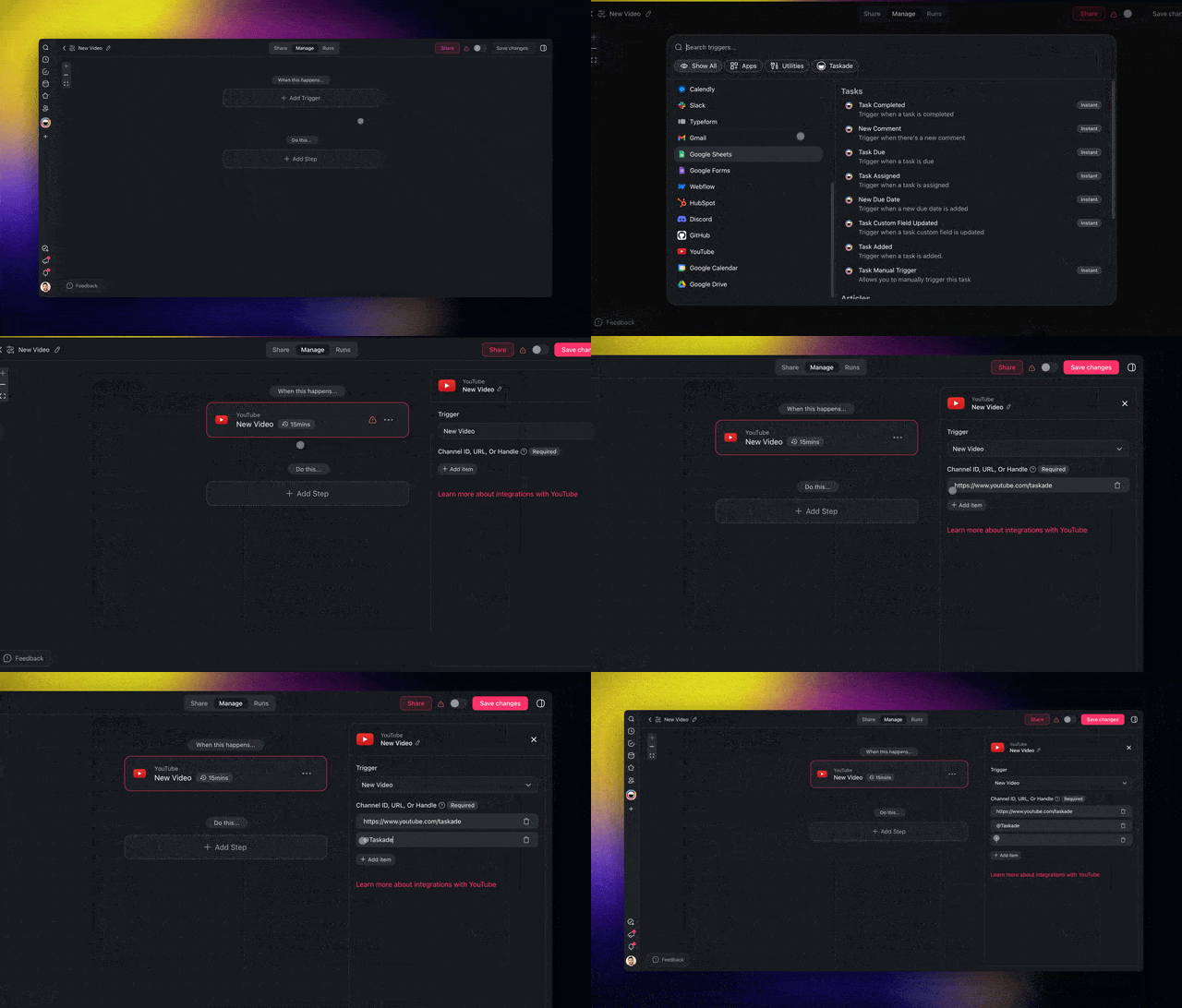
*One YouTube trigger can watch several channels at once.*
The [YouTube description automation](https://www.taskade.com/automate/youtube/youtube-description-generator) template wires these steps for you. For the longer story of feeds as triggers, see [how to automate YouTube and RSS feeds](https://www.taskade.com/blog/automate-youtube-rss-feeds).
---
## Build Your Own Description App With Taskade Genesis
**Taskade Genesis builds a description studio from one prompt: a videos table, an agent that drafts, and an automation that starts each draft.** Paste this prompt into the [AI app builder](https://www.taskade.com/ai/apps), or use the "Build your description studio" link at the end of this article, which opens Taskade Genesis with the prompt filled in:
```
Build a YouTube description studio: a Videos table with title, URL, transcript, target keyword, status and final description. Add an AI agent that writes a two-line hook, timestamped chapters that start at 0:00, a links block and three hashtags from each transcript. Add an automation that transcribes each new video URL added to the table and asks the agent for a draft to review.
```
A prompt build uses AI credits, and Free starts with 0. On Free, you earn free AI credits with referrals and invites, and you can upgrade any time. On Free, the app counts as one of your 3 Taskade Genesis apps, and its agent is your 1 agent. Ask Taskade EVE to change a field, a prompt or a step after it builds.
Or clone a ready-made kit from the [Taskade App Factory](https://www.taskade.com/apps), checked live on November 7, 2026:
- [YouTube Description Generator](https://www.taskade.com/apps/all/youtube-description-generator-sffb9icuqgemyegn): 4 projects, 1 AI agent and 3 automations, with chapters and a channel block
- [Video Metadata Generator](https://www.taskade.com/apps/all/video-metadata-generator-tthti4kadyqx2pax): a metadata desk with a chapter checker
- [Video Title Generator](https://www.taskade.com/apps/all/video-title-generator-gxy0u23l5igedifp): titles with a title test log
Each of these kits holds automations, and a Free workspace cannot import a kit with automations. Cloning any of them needs a paid plan. On Free, build your own with the prompt above once you have earned AI credits.
---
## Copy-Paste Prompts for YouTube Descriptions
**A good description prompt names the main word, the call to action and the chapter rules, and gives the transcript.** Each prompt below works in any assistant or agent. Replace the bracketed parts.
**Tutorial video:**
```
Write a YouTube description from the transcript below. Main words: [main word 1], [main word 2]. Put a two-line hook first, with main word 1 in the first sentence. Then a 3-line summary of what the viewer can do after watching. Then chapters from the transcript times: start at 00:00, at least 3, ascending, each 10 seconds or longer. Then my links, then 3 hashtags. Stay under 5,000 characters. Transcript: [paste]
```
**Product launch:**
```
Write a YouTube description for a product launch video. Lead with what the viewer can now do, not with the company name. Include one link with UTM tags: [link]. Add chapters from the transcript times (start at 00:00, at least 3, ascending, 10 seconds or longer each). End with 3 hashtags that match the video. Transcript: [paste]
```
**Podcast episode:**
```
Turn this episode transcript into a YouTube description and show notes. First line: the single most useful idea from the guest. Then 2 lines on who the guest is. Then chapters at each topic change (start at 00:00, ascending, each 10 seconds or longer). Then the links the guest mentioned, then credits. Transcript: [paste]
```
**YouTube Short:**
```
Write a description for a YouTube Short under 60 seconds. One sentence that says what happens, with the main word [main word]. One call to action. 3 hashtags that relate directly to the video. No chapters. Script: [paste]
```
**Channel description:**
```
Write a YouTube channel description. First sentence: who the channel is for and what they get. Then the upload schedule and the 3 main topics. Then one call to action to subscribe. Plain words, no keyword lists. Past video titles: [paste]
```
More starting points: the [YouTube Shorts idea generator](https://www.taskade.com/generate/influencers/youtube-shorts-idea) and the [AI script generators](https://www.taskade.com/blog/ai-script-generators) roundup for the script that comes before the description.
---
## Common Mistakes AI Descriptions Make
**Most AI description errors come from the input, not the writing.** Each mistake below has a one-line fix.
### Invented chapters
A topic tool writes chapter names with made-up times. Give the tool a transcript with timestamps, or delete the chapters and let YouTube's automatic chapters handle it.
### The same description on every video
YouTube Help asks for "a unique description" on each video. Keep the shared lines in the default description field, and let the generator write only the unique top half.
### Keyword and hashtag stuffing
A long keyword list at the bottom breaks YouTube's spam policy, and more than 60 hashtags makes YouTube ignore every one. Use one or two main words and three hashtags.
### A sponsor disclosure only in the description
The FTC's [Disclosures 101 for Social Media Influencers](https://www.ftc.gov/business-guidance/resources/disclosures-101-social-media-influencers) says a video disclosure belongs in the video itself, "not just in the description," and that a disclosure after a MORE click is likely to be missed. Put "ad" or "sponsored" in the first lines, and say it on camera.
### Descriptions that run past the cap
A generator that appends links, credits and plan notes can hit 5,000 characters. YouTube keeps the first 5,000, so the last line is the one you lose. Ask for a character count with every draft.
---
## What Changed for YouTube Descriptions in 2026
**YouTube moved its AI help toward ideas, thumbnails and titles in 2026, and left the description to the creator.** Here is what changed, with the source for each line.
| Date | Change | Source |
|---|---|---|
| August 2026 | YouTube starts to gradually deprecate the Inspiration tab, and points creators to Ask Studio for ideas | [Inspiration tab Help page](https://support.google.com/youtube/answer/15575509) |
| September 23, 2026 | Ask Studio expands to iOS and Android, and Studio announces titles and thumbnails generated from a video's content | [TechCrunch](https://techcrunch.com/2026/09/23/youtube-releases-new-ai-features-for-creators-within-its-studio-app/) |
| November 7, 2026 | Ask Studio's Help page names ideas, channel insights and script feedback, not description writing | [Ask Studio Help page](https://support.google.com/youtube/answer/16291691) |
| November 7, 2026 | Opus Clip lists its clip description generator on paid plans only | [Opus Clip pricing](https://www.opus.pro/pricing) |
| November 7, 2026 | Jasper and Copy.ai list no free plan | Vendor pricing pages |
The gap is clear. YouTube now helps with the title and the thumbnail from the video's content, but no Help page describes a feature that writes the description. That job still belongs to the creator and the tools above.
---
## Why We Built the Description Workflow Differently
**A generator writes one description, and a channel needs a system.** The description, the title, the chapters, the Shorts and the blog post all come from the same transcript. So the transcript belongs in a workspace where an agent can reuse it, not in a browser tab you close.
That is the design choice behind Taskade's approach. A transcript lands in a project. An [agent](https://www.taskade.com/blog/what-are-ai-agents) that holds your channel brief reads it and drafts the description. The same transcript feeds the [Shorts repurposing automation](https://www.taskade.com/automate/youtube/youtube-shorts-repurposing) and a blog draft. One upload becomes several assets, and every draft waits in one review queue. The [content repurposing tools](https://www.taskade.com/blog/ai-content-repurposing-tools) roundup covers the wider version of the same idea.
```mermaid
graph TD
U["New upload"] --> T["Transcript with timestamps"]
T --> D["YouTube description
hook, chapters, links"]
T --> S["Shorts captions"]
T --> B["Blog post draft"]
T --> N["Newsletter blurb"]
D --> R["One review queue"]
S --> R
B --> R
N --> R
style U fill:#1e1e2e,color:#94a3b8,stroke:#475569
style T fill:#0d1a0e,color:#86efac,stroke:#22c55e,stroke-width:1.5px
style D fill:#0d1b2a,color:#7dd3fc,stroke:#38bdf8,stroke-width:1.5px
style S fill:#0d1b2a,color:#7dd3fc,stroke:#38bdf8,stroke-width:1.5px
style B fill:#0d1b2a,color:#7dd3fc,stroke:#38bdf8,stroke-width:1.5px
style N fill:#0d1b2a,color:#7dd3fc,stroke:#38bdf8,stroke-width:1.5px
style R fill:#2a1225,color:#ff8fa3,stroke:#ff2d60,stroke-width:2px
```
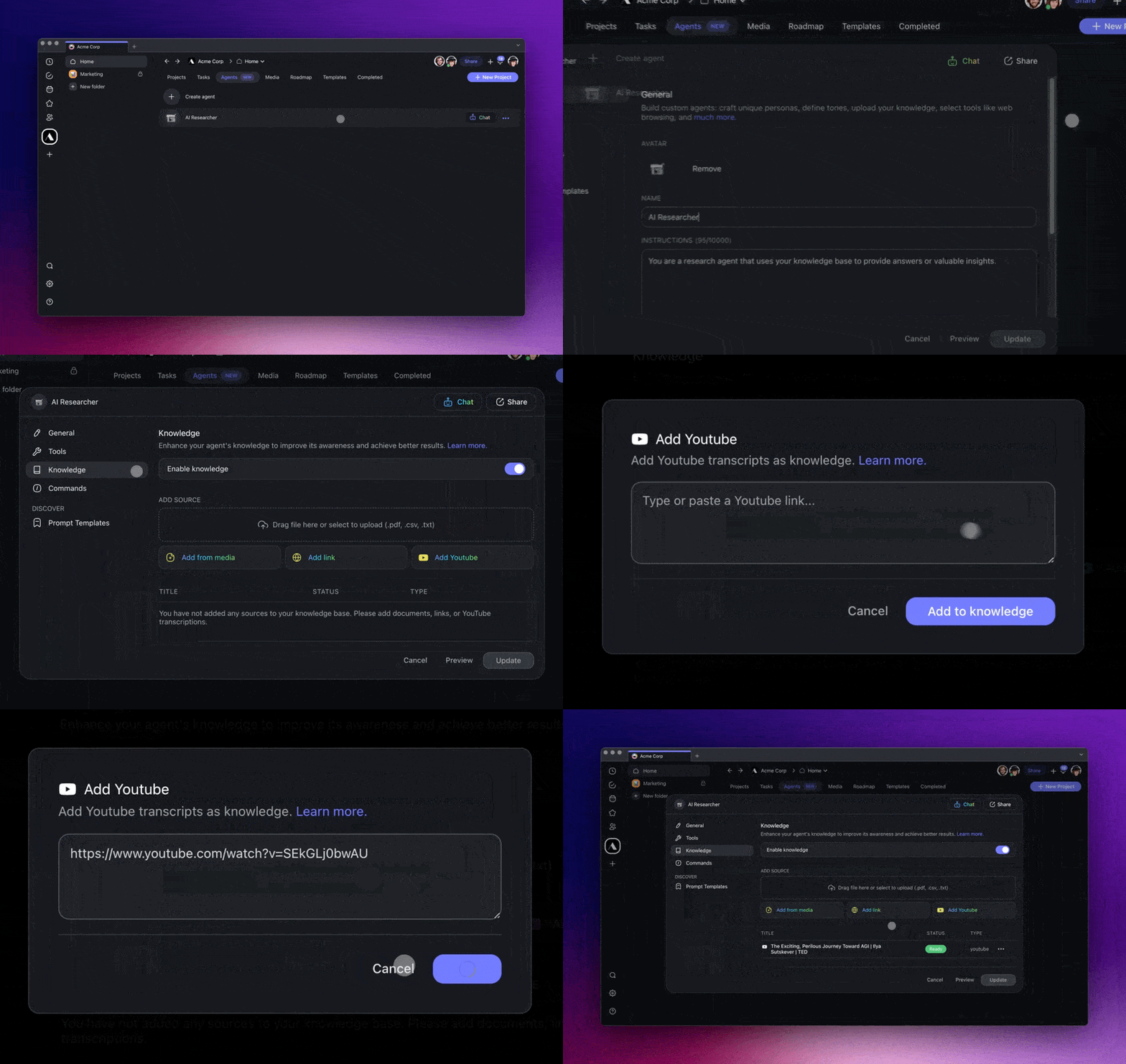
*An agent can take a YouTube video as a knowledge source and answer from it.*
---
## AI YouTube Description Generator FAQ
### What is the best AI YouTube description generator in 2026?
It depends on what you can give it. For a free draft from a title, vidIQ, Ahrefs and Hootsuite are the fastest. For accurate chapters, use a tool that reads the transcript or the video, such as Descript, Claude or ChatGPT. For a channel that uploads every week, Taskade drafts each description from the transcript with an automation and an AI agent, and you approve it before it goes live.
### What is the best free YouTube description generator?
vidIQ, Ahrefs, Hootsuite and VEED all write a description for free from a topic. vidIQ's free plan includes 150 AI credits a month, and Ahrefs returns three variants per run with a free Ahrefs account. For free chapters, YouTube Studio turns on automatic chapters for new uploads by default, and Bannerbear builds a chapter list in your browser with no account. Free plans were checked on November 7, 2026.
### What is an AI video description generator?
An AI video description generator writes the text under a video: a hook, a short summary, chapters, links and hashtags. On YouTube that text can run up to 5,000 characters, and viewers see the first few lines before they click more. The same phrase can also mean audio description, an accessibility narration track that describes what happens on screen.
### Can AI write YouTube chapters and timestamps?
Yes, if it reads the transcript or the video. YouTube shows chapters when the first timestamp is 00:00, the list has at least three timestamps in ascending order, and each chapter runs 10 seconds or longer. A tool that only sees your title cannot know where the topic changes, so it can only guess chapter names.
### How long should a YouTube description be?
YouTube allows up to 5,000 characters. The first few lines matter most, because viewers see them before they click more. Put the hook and one or two main words first, then the summary, chapters, links and hashtags. Many tutorial descriptions land between 200 and 500 words, which is editorial advice, not a YouTube rule.
### Does a YouTube description help SEO?
Yes. YouTube Help says search terms are matched with the video and the text in the description. It recommends a unique description for every video and one or two main words that appear in both the title and the description. It also says excessive tags in the description are against its spam policies.
### How many hashtags should a YouTube description have?
Three is the practical number. YouTube shows up to three hashtags next to the video title, picked from the ones in your description. If a video has more than 60 hashtags, YouTube ignores all of them. Every hashtag must relate directly to the video.
### Can I use ChatGPT or Claude to write YouTube descriptions?
Yes. Paste the transcript, name the main keyword and the call to action, and list the chapter rules in the prompt. Both have free plans with usage limits, and ChatGPT's free plan caps a single input at about 12 pages of text. The draft is only as accurate as the transcript, so check chapter times against the video before you publish.
### Can I automate YouTube descriptions for every upload?
Yes. In Taskade, an automation starts when a new video goes live, transcribes it with a built-in step, and asks an AI agent to draft the description into a review table. The YouTube New Video trigger needs a paid plan, and a channel RSS feed works as the trigger on Free. The agent step uses AI credits. You paste the approved text into YouTube Studio yourself.
### Does Taskade have a free YouTube description generator?
Yes. The free AI video description generator on Taskade drafts a hook, chapters, a call to action, links and hashtags from a title, outline or transcript, and saves the draft to a project you can edit. Each draft uses AI credits, and Free starts with 0. The Free plan includes 3 Taskade Genesis apps, 1 AI agent and 10 automation runs a billing period. On Free, you earn free AI credits with referrals and invites, and you can upgrade any time.
### Can I build my own YouTube description app?
Yes. Taskade Genesis builds a working app from one prompt, for example a videos table, an AI agent that drafts descriptions from each transcript, and an automation that starts a draft for every new video. You can also clone the YouTube Description Generator kit from the Taskade App Factory. That kit holds automations, so cloning it needs a paid plan.
---
## The Verdict
For a free first draft from a title, **vidIQ**, **Ahrefs** or **Hootsuite**. For real chapters, a transcript tool: **Descript** if you edit there, **Claude** or **ChatGPT** if you paste, **Bannerbear** if you want chapters only. For Shorts, **Opus Clip** or **quso.ai**.
For a channel that uploads every week, stop writing from a blank box. Let an automation transcribe each upload and an agent draft the description for your review. **[Draft your next description free →](https://www.taskade.com/generate/marketing/youtube-video-description)**
---
## Related Reading
- [Free ChatGPT Alternative](https://www.taskade.com/compare/free-chatgpt-alternative)
- [Free Canva Alternative](https://www.taskade.com/compare/free-canva-alternative)
- [Free Jasper Alternative](https://www.taskade.com/compare/free-jasper-alternative)
## Further Reading
- [Best YouTube to Notes AI](https://www.taskade.com/blog/youtube-to-notes): the viewer side of the same transcript
- [AI Script Generators](https://www.taskade.com/blog/ai-script-generators): write the video before you describe it
- [AI Content Repurposing Tools](https://www.taskade.com/blog/ai-content-repurposing-tools): one video, many formats
- [Automate YouTube and RSS Feeds](https://www.taskade.com/blog/automate-youtube-rss-feeds): feeds as automation triggers
- [What Are AI Agents?](https://www.taskade.com/blog/what-are-ai-agents): the agents that keep your channel voice
## Sources
- [Tips for video descriptions](https://support.google.com/youtube/answer/12948449), [Video chapters](https://support.google.com/youtube/answer/9884579), [Edit video settings](https://support.google.com/youtube/answer/57404), [Hashtags on YouTube](https://support.google.com/youtube/answer/6390658), [Add tags](https://support.google.com/youtube/answer/146402), [Inspiration tab](https://support.google.com/youtube/answer/15575509), [Ask Studio](https://support.google.com/youtube/answer/16291691), [Add audio descriptions](https://support.google.com/youtube/answer/16166822): YouTube Help, read November 7, 2026
- [Find & ask about YouTube content](https://support.google.com/gemini/answer/16622858): Gemini Apps Help
- [YouTube releases new AI features for creators within its Studio app](https://techcrunch.com/2026/09/23/youtube-releases-new-ai-features-for-creators-within-its-studio-app/): TechCrunch, September 23, 2026
- [Disclosures 101 for Social Media Influencers](https://www.ftc.gov/business-guidance/resources/disclosures-101-social-media-influencers): Federal Trade Commission
- [vidIQ pricing](https://vidiq.com/pricing/), [Descript pricing](https://www.descript.com/pricing), [quso.ai pricing](https://quso.ai/pricing), [Opus Clip pricing](https://www.opus.pro/pricing), [Riverside pricing](https://riverside.com/pricing), [Claude pricing](https://claude.com/pricing), [ChatGPT pricing](https://chatgpt.com/pricing), [Jasper pricing](https://www.jasper.ai/pricing), [Copy.ai pricing](https://www.copy.ai/prices), [Canva pricing](https://www.canva.com/pricing/), [ScreenApp pricing](https://screenapp.io/pricing): vendor pages, checked November 7, 2026. Riverside and ChatGPT prices were re-checked November 12, 2026
- [TubeBuddy pricing](https://www.tubebuddy.com/pricing), [VEED pricing](https://www.veed.io/pricing): vendor pages, checked November 12, 2026
- [Me at the zoo](https://www.youtube.com/watch?v=jNQXAC9IVRw) and the [Taskade channel](https://www.youtube.com/@taskade): descriptions read November 7, 2026
- [YouTube headquarters photo](https://commons.wikimedia.org/wiki/File:Youtubeheadquarters.jpg): Coolcaesar, Wikimedia Commons, CC BY-SA 3.0
> ▲ ■ ● A description is the one part of a video you can still change after you hit publish. Write it from the transcript, keep the voice in an agent, and let an automation start the next one. Memory feeds Intelligence, Intelligence triggers Execution. [Build your description studio →](https://www.taskade.com/create)
[](https://www.taskade.com/)