# Workflow Generator (Beta), Project AI Chat Assistant, Record & Upload Audio / Video, and More!
> Introducing Taskade Workflow Generator powered by GPT-4. Automatically generate task lists, mind maps, and workflows from any objective. Plus AI Chat Assistant and audio/video uploads.
- Source: https://www.taskade.com/blog/workflow-generator-ai-chat
- Published: 2023-05-01
- Updated: 2026-04-06
- Author: John Xie
Hi Taskaders! 👋
We're excited to share another round of exciting updates to speed up your workflow. Dive in and experience the future of AI-powered productivity!
> **TL;DR:** The Workflow Generator Beta and Project AI Chat Assistant shipped in May 2023 marked Taskade's pivot from AI helper to AI workflow builder. Today Taskade ships [Automations with branching, looping, and filtering](https://www.taskade.com/automate), spans multiple project views, frontier AI models from top AI labs, and 100+ [integrations](https://www.taskade.com/integrations) — and [Taskade Genesis](https://www.taskade.com/create) builds entire workflows from a single prompt.
> **Then → Now:** Workflow Generator Beta + Project AI Chat (2023) → today's [Automations with branching, looping, filtering](https://www.taskade.com/automate) plus the [Taskade Genesis workflow builder](https://www.taskade.com/create) and [AI Agents v2](https://www.taskade.com/agents).
| Workflows | 2023 H1 | Today (2026) |
|---|---|---|
| Generator | v4.60 Workflow Generator Beta | [AI Workflow Generator](https://www.taskade.com/learn/automation/workflow-generator) + [Genesis prompts](https://www.taskade.com/learn/genesis/first-prompt) |
| AI Chat | Project AI Chat Assistant | [Agent Chat](https://www.taskade.com/learn/agents/agent-chat) + [project Agents](https://www.taskade.com/learn/agents) |
| Logic | Linear task lists | [Branching](https://www.taskade.com/learn/automation/branch-action), [Looping](https://www.taskade.com/learn/automation/loop-action), [Filtering](https://www.taskade.com/learn/automation/filter-data) |
| Media | Audio + video record/upload | [Media Tab](https://www.taskade.com/learn/agents/media-tab) + [Media commands](https://www.taskade.com/learn/agents/media-commands) |
```mermaid
flowchart TD
P[Text Prompt
2023 Beta] --> WG[Workflow Generator]
WG --> S[Generated Steps]
S --> E[Execute in project]
S -.evolves.-> A[Automations v2
branching · looping · filters]
A --> G[Taskade Genesis
Living workflows]
style P fill:#0d1b2a,color:#7dd3fc,stroke:#38bdf8,stroke-width:1.5px
style A fill:#1a0d24,color:#ce93d8,stroke:#6a1b9a,stroke-width:1.5px
style G fill:#2a1225,color:#ff8fa3,stroke:#ff2d60,stroke-width:2px
```
## 🧭 Under the Hood: From Prompt to Living Workflow
The May 2023 Workflow Generator was a single-step pipeline: prompt in, task list out. Three years later, the same instinct powers an end-to-end system with branching, memory, and live execution.
```
┌─────────────────────────────────────────────────────────────┐
│ 2023 Workflow Generator (Beta) │
│ │
│ [Prompt] ──▶ [ GPT-4 ] ──▶ [ Task list / Mind map ] │
│ │
│ (one-shot · linear · single model · no memory) │
└─────────────────────────────────────────────────────────────┘
│
▼
┌─────────────────────────────────────────────────────────────┐
│ 2026 Taskade Genesis + Automations v2 │
│ │
│ [ Prompt ] │
│ │ │
│ ▼ │
│ ┌─────────┐ ┌─────────┐ ┌───────────┐ │
│ │ Agents │──▶│ Tools │──▶│ Workspace │ │
│ │ (15+ M) │ │ 33 BI │ │ DNA │ │
│ └─────────┘ └─────────┘ └───────────┘ │
│ │ │ │ │
│ ▼ ▼ ▼ │
│ ┌─────────────────────────────────────┐ │
│ │ Branching · Looping · Filtering │ ◀── Automations │
│ └─────────────────────────────────────┘ │
│ │ │
│ ▼ │
│ [ Living, deployed app ] │
└─────────────────────────────────────────────────────────────┘
```
Where this landed today — every link is a hop back to the modern equivalent:
- [AI Workflow Generator](https://www.taskade.com/ai/apps) — the evolved builder
- [Automations](https://www.taskade.com/automate) with [branching](https://www.taskade.com/learn/automation/branch-action), [looping](https://www.taskade.com/learn/automation/loop-action), and [filters](https://www.taskade.com/learn/automation/filter-data)
- [AI Agents v2](https://www.taskade.com/agents) — built-in tools, persistent memory, public embedding
- [Taskade Genesis](https://www.taskade.com/create) — one prompt, one living app
- [Community Gallery](https://www.taskade.com/apps) — clone what others built
- [Templates](https://www.taskade.com/templates) for instant starting points
- [Integrations](https://www.taskade.com/integrations) — 100+ apps wired in
- [Learn Taskade](https://www.taskade.com/learn/automation) for step-by-step guides
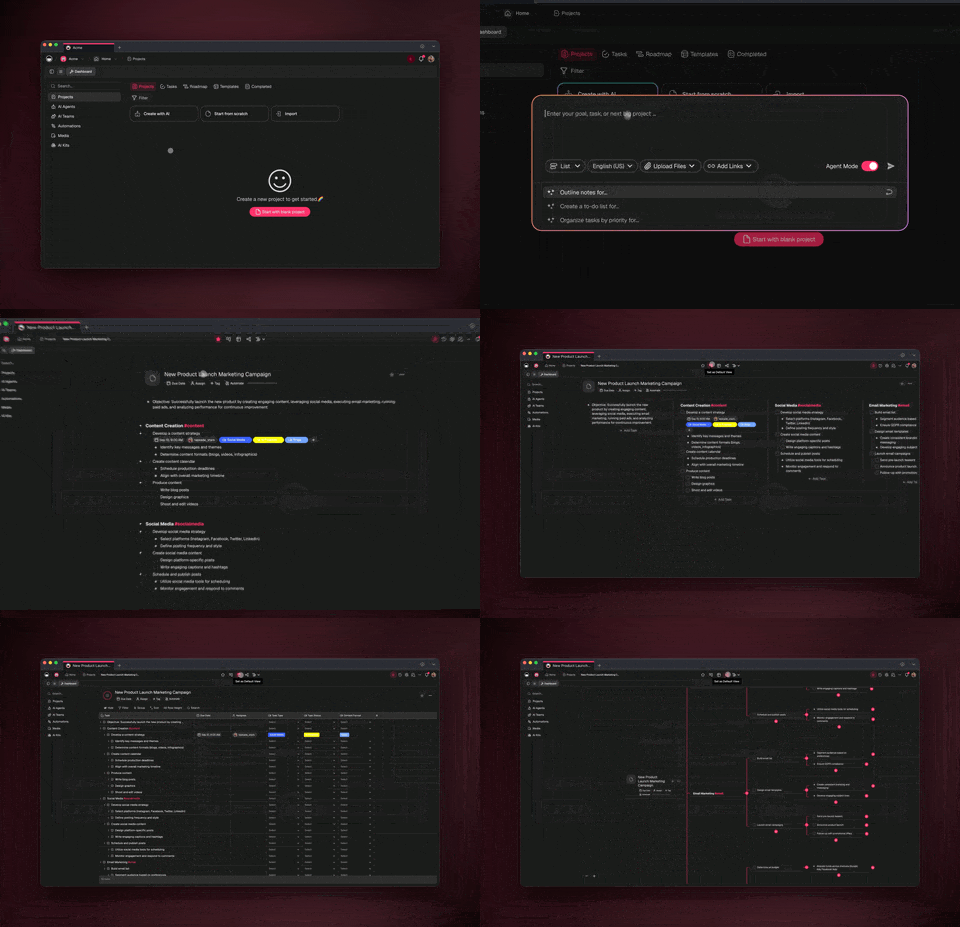
## **Workflow Generator now in Beta!**
Transform the way you craft projects and templates with Taskade. We're excited to offer you a sneak peek of the latest Taskade AI update, powered by GPT-4.
Automatically generate task lists, mind maps, and workflows based on any objective. (Example: create a product design sprint)
[Click here early access and tweet @Taskade 'GenAI' for an exclusive beta!](https://twitter.com/Taskade/status/1652915895071838208)
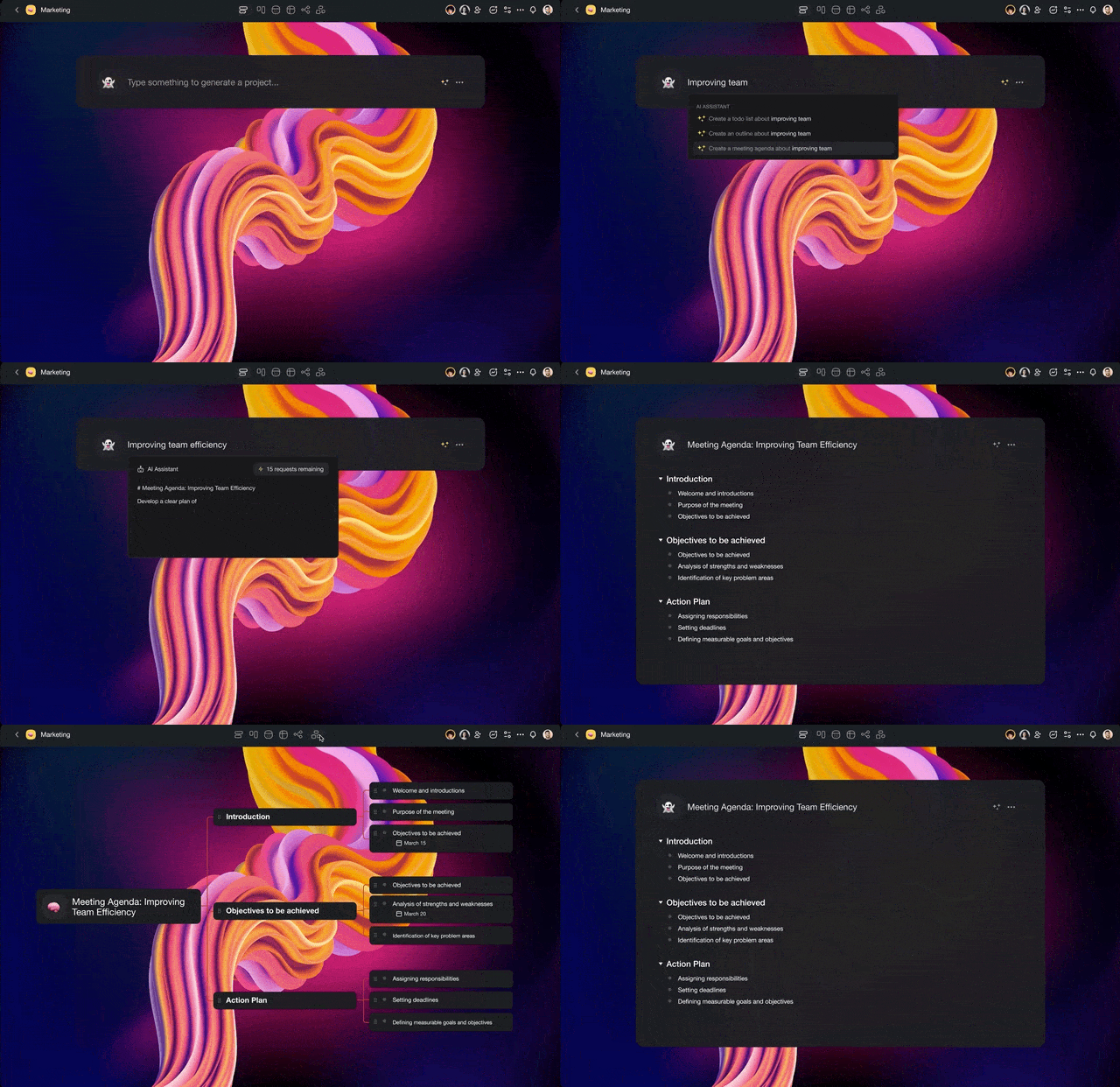
aidemo
## Project AI Chat Assistant
Now available inside every project chat. Boost your productivity and bring the magic of ChatGPT directly to you, no matter where you are in Taskade.
Whether you're brainstorming ideas or coordinating tasks, remember that you have a powerful AI Chat Assistant available right inside your projects. [Learn more](https://www.taskade.com/learn/projects/ai-chat).
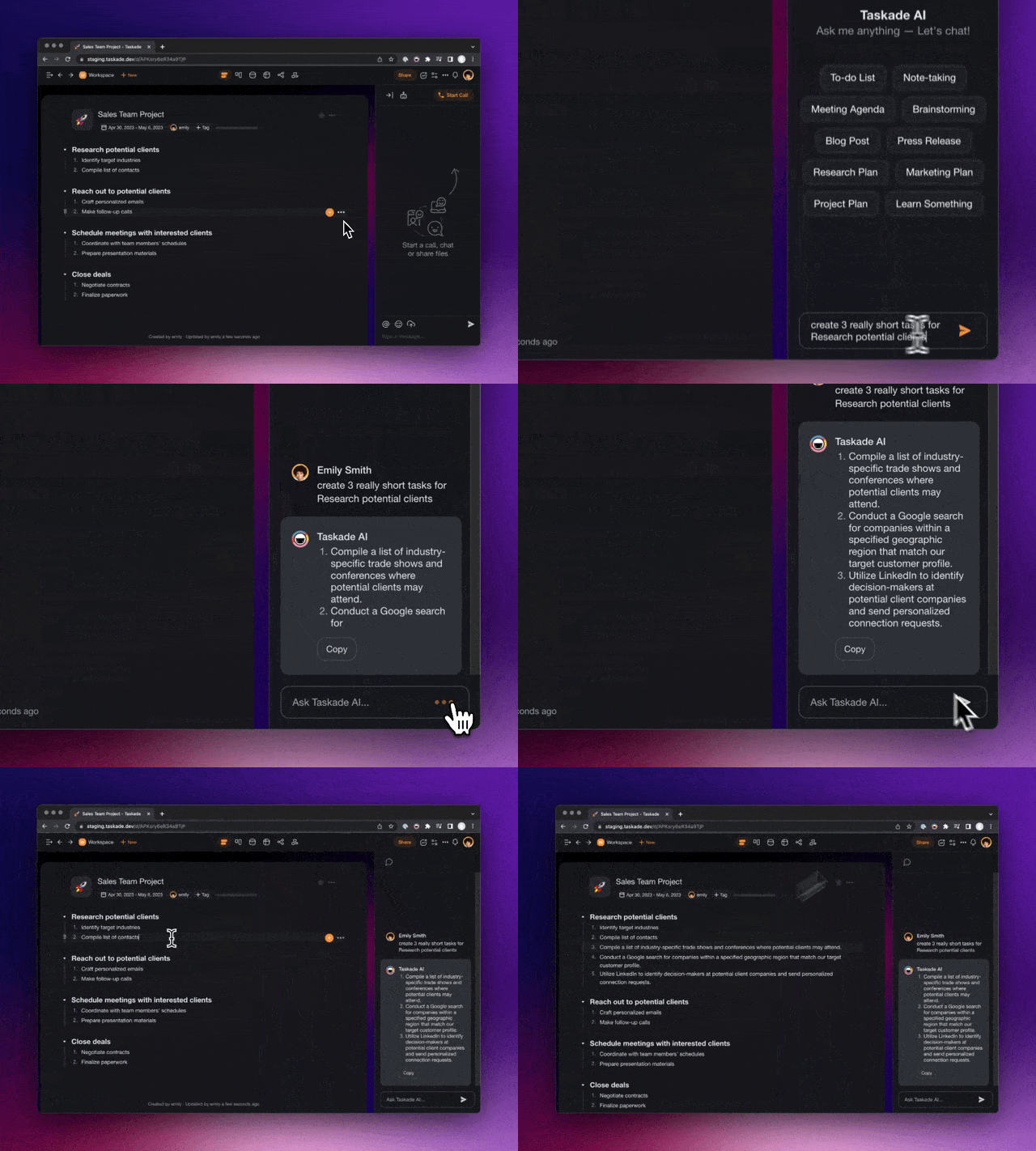
project ai
## Record & Upload Audio / Video
Quickly record, share audio/video with your team in chat, tasks, and comments. Easily capture audio from any source with real-time wavelengths. Snap photos, and record videos with any built-in cameras. [Learn more](https://www.taskade.com/learn/projects/template-gallery).
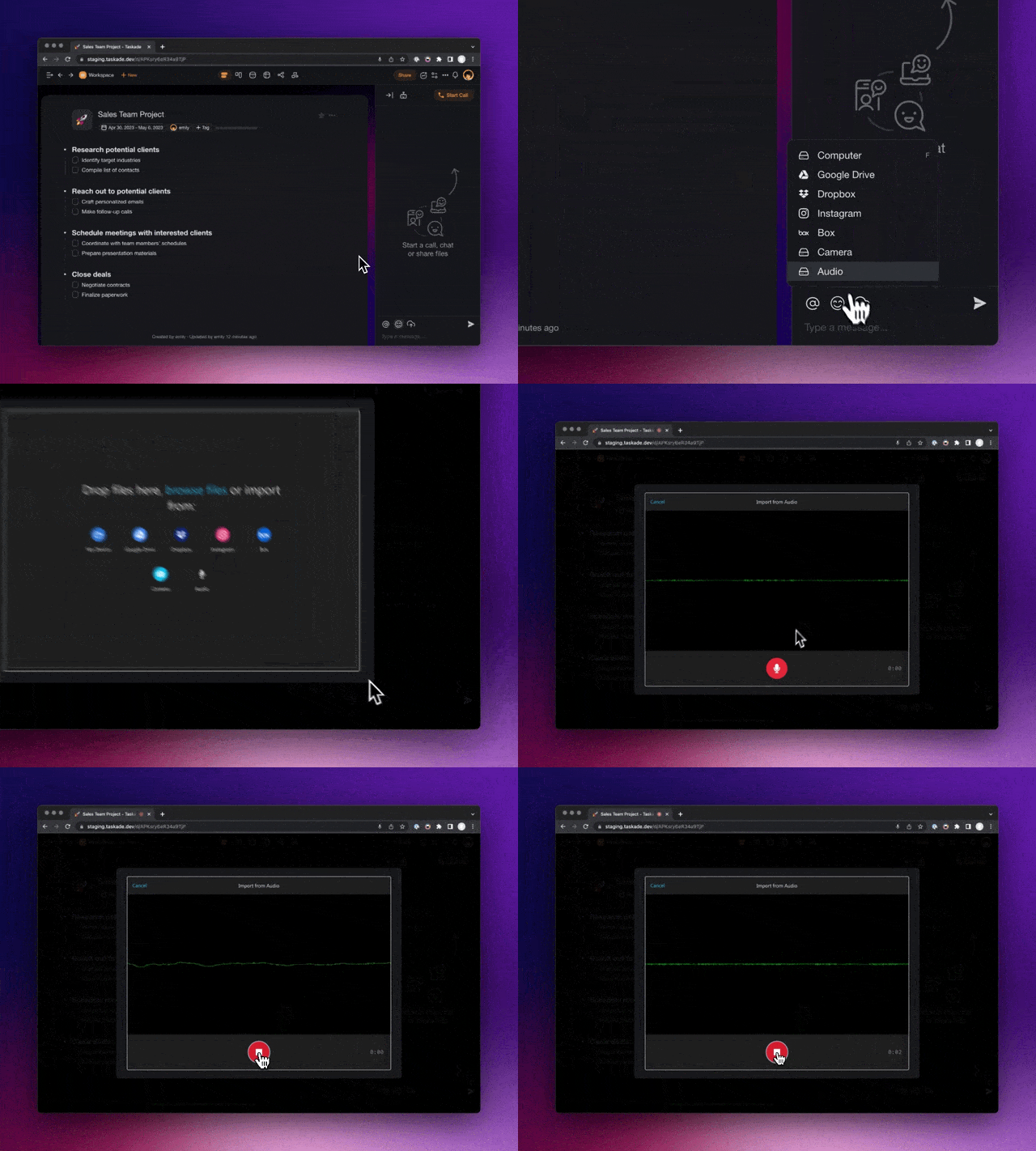
project audio
## **️Other Improvements:**
- New: [Taskade AI](https://www.taskade.com/ai/apps) gets major upgrade with LangChain integration!
- New: Toggle AI Assistant by pressing space at the start of a task
- New: Enhanced Video Chat and Calling with full upgrade
- New: Turn AI Chat Messages into new projects seamlessly
- New: Filter search results by "Assigned to" for task tracking
- New: Interact with AI directly using the /assistant input box
- New: Explore [AI Generators](https://www.taskade.com/generate) and [AI Templates](https://www.taskade.com/templates) for your project
- New: Enterprise orgs can now set folder visibility for specific people groups
- New: Added Weekly support for Recurring Templates
- Improved: [Schedule Templates](https://www.taskade.com/learn/projects/schedule-templates) performance and optimizations
- Improved: Export to PDF and Print View now include add-on context
- Improved: Better [Import and Export](https://www.taskade.com/learn/import), and markdown transformations
- Improved: Refined markdown pasting to fit Taskade's data structure
- Fixed: Restored missing fold icon for sub-tasks in Action View
- Various bug fixes and performance improvements
Have any questions? Visit our [Help Center](https://www.taskade.com/learn) or [let us know](https://www.taskade.com/contact). 😊
— Team Taskade 🐑
## Frequently Asked Questions
### What is the Taskade Workflow Generator beta?
The Workflow Generator is a GPT-4 powered tool that automatically creates task lists, mind maps, and complete project workflows from any objective. Describe what you want to accomplish in natural language and the AI generates a structured project plan instantly.
### How does the Project AI Chat Assistant work in Taskade?
The AI Chat Assistant lives inside every project chat. It provides ChatGPT-powered brainstorming, task coordination, and content generation directly within the context of your project — so you can get AI help without leaving the conversation.
### Can I record and upload audio and video in Taskade?
Yes. Taskade supports audio and video recording directly in chat, tasks, and comments. Capture audio from any source with real-time wavelength visualization, take photos, or record video with your built-in camera, then share with your team instantly.
### Does the Workflow Generator support AI templates?
Yes. The Workflow Generator includes a library of AI templates and generators for common project types. Browse categories like marketing, project management, and content creation, or write your own custom prompt for a fully personalized workflow.