# /Slash Command, Calendar View, New Notifications, and More!
> New slash commands (/) for quick actions like adding due dates and changing formats. Dedicated Calendar View for better task scheduling. Improved notifications and email deep-linking to specific items.
- Source: https://www.taskade.com/blog/slash-command-calendar-view-quick-add
- Published: 2022-04-04
- Updated: 2026-04-07
- Author: John Xie
Hi Taskaders 🎉
We've worked hard to make Taskade work better for you! Here's what's new:
> **TL;DR:** April 2022 introduced the slash-command menu, the Calendar view, due-date reminders, and a desktop Quick Add. Today the same `/` invokes [built-in agent tools](https://www.taskade.com/agents), the [Calendar](https://www.taskade.com/learn/projects/calendar-view) is one of the [project views](https://www.taskade.com/learn/projects/project-views), and reminders feed [Automations](https://www.taskade.com/automate) inside [Taskade Genesis](https://www.taskade.com/create) apps.
> **Then → Now:** Slash commands in 2022 → today's [AI Agent tools](https://www.taskade.com/agents) invoked the same way, plus the [full multi-view](https://www.taskade.com/templates) project workspace.
| Speed-up | 2022 H1 | 2026 |
| --- | --- | --- |
| Slash commands | v4.12 (Jun 2022) Quick Actions menu | [agent tools](https://www.taskade.com/learn/agents/agent-tools) invoked via slash |
| Calendar | v4.5–v4.9 dedicated [Calendar view](https://www.taskade.com/learn/projects/calendar-view) | Calendar + [Gantt](https://www.taskade.com/learn/projects/gantt-view) + [Table](https://www.taskade.com/learn/projects/custom-fields) + 5 more |
| Notifications | New per-channel toggles | Smart notifications + [agent inbox](https://www.taskade.com/learn/agents/agent-inbox) |
| Quick Add | Desktop hotkey added | [Quick Add](https://www.taskade.com/learn/projects/add-widget) feeds [Automations](https://www.taskade.com/automate) |
```mermaid
sequenceDiagram
autonumber
actor User
participant Editor
participant SlashMenu as Slash Menu
2022 Quick Actions
participant Action as Action
2026 — agent tools
User->>Editor: types "/"
Editor->>SlashMenu: open menu
SlashMenu->>Action: pick command
Action-->>User: result inline
Note over SlashMenu,Action: same keystroke · vastly more power
```
### What's behind the slash in 2026
```text
/ ──▶ ┌─────────────────────────────────┐
│ Built-in tools │
│ • date • assign • reminder │
│ • table • chart • format │
│ • search • web • email │
│ Agent tools │
│ • call agent · run automation │
│ • search community gallery │
│ Custom tools (your own) │
└─────────────────────────────────┘
```
### Hub & spoke
- Hubs: [AI Agents](https://www.taskade.com/agents) · [Automations](https://www.taskade.com/automate) · [Taskade Genesis](https://www.taskade.com/create) · [Templates](https://www.taskade.com/templates) · [Downloads](https://www.taskade.com/downloads)
- Spokes: [Learn — Calendar view](https://www.taskade.com/learn/projects/calendar-view) · [Learn — Gantt view](https://www.taskade.com/learn/projects/gantt-view) · [Learn — agent tools](https://www.taskade.com/learn/agents/agent-tools) · [Learn — Quick Add](https://www.taskade.com/learn/projects/add-widget) · [Learn — agent inbox](https://www.taskade.com/learn/agents/agent-inbox)
- Related: [Calendar drag & drop](https://www.taskade.com/blog/calendar-drag-drop-search-filters-browse-templates-and-more) · [Quick Add shortcut + mobile widget](https://www.taskade.com/blog/quick-add-shortcut-mobile-widget)
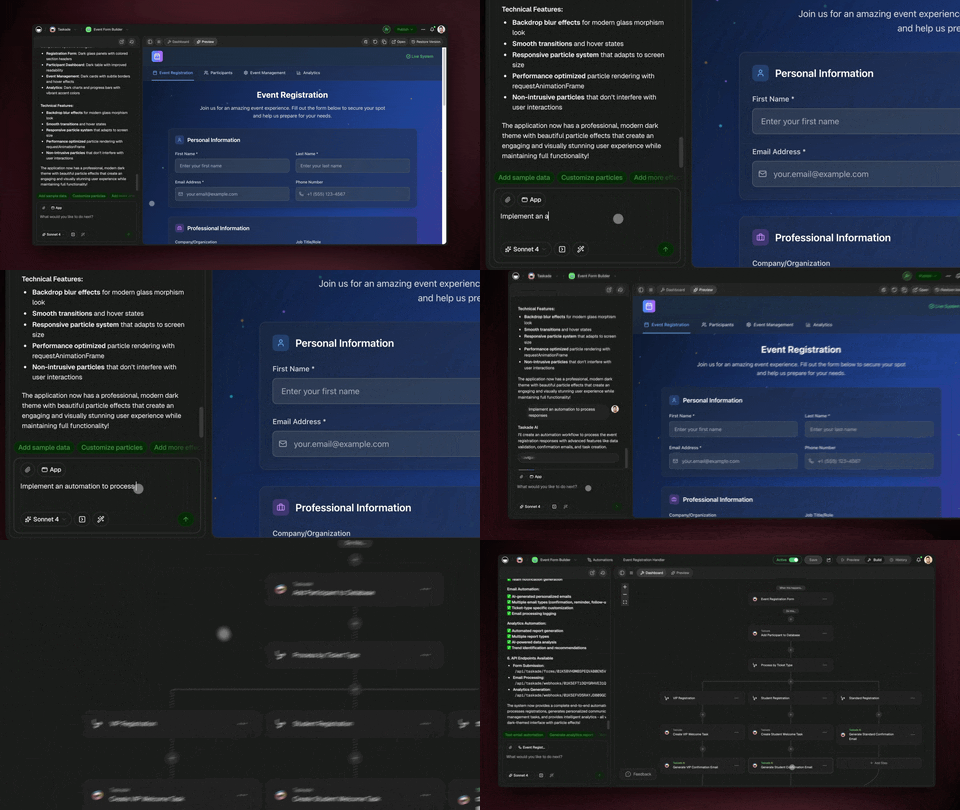
https://youtu.be/IQFOghseUtU
## **************************⚡️ /Slash Command**************************
Type "/" to view and filter commands. Add due dates, change formats, create new blocks and much more. Speed up your workflow without touching your mouse. [Learn more](https://www.taskade.com/learn/projects/slash-commands).
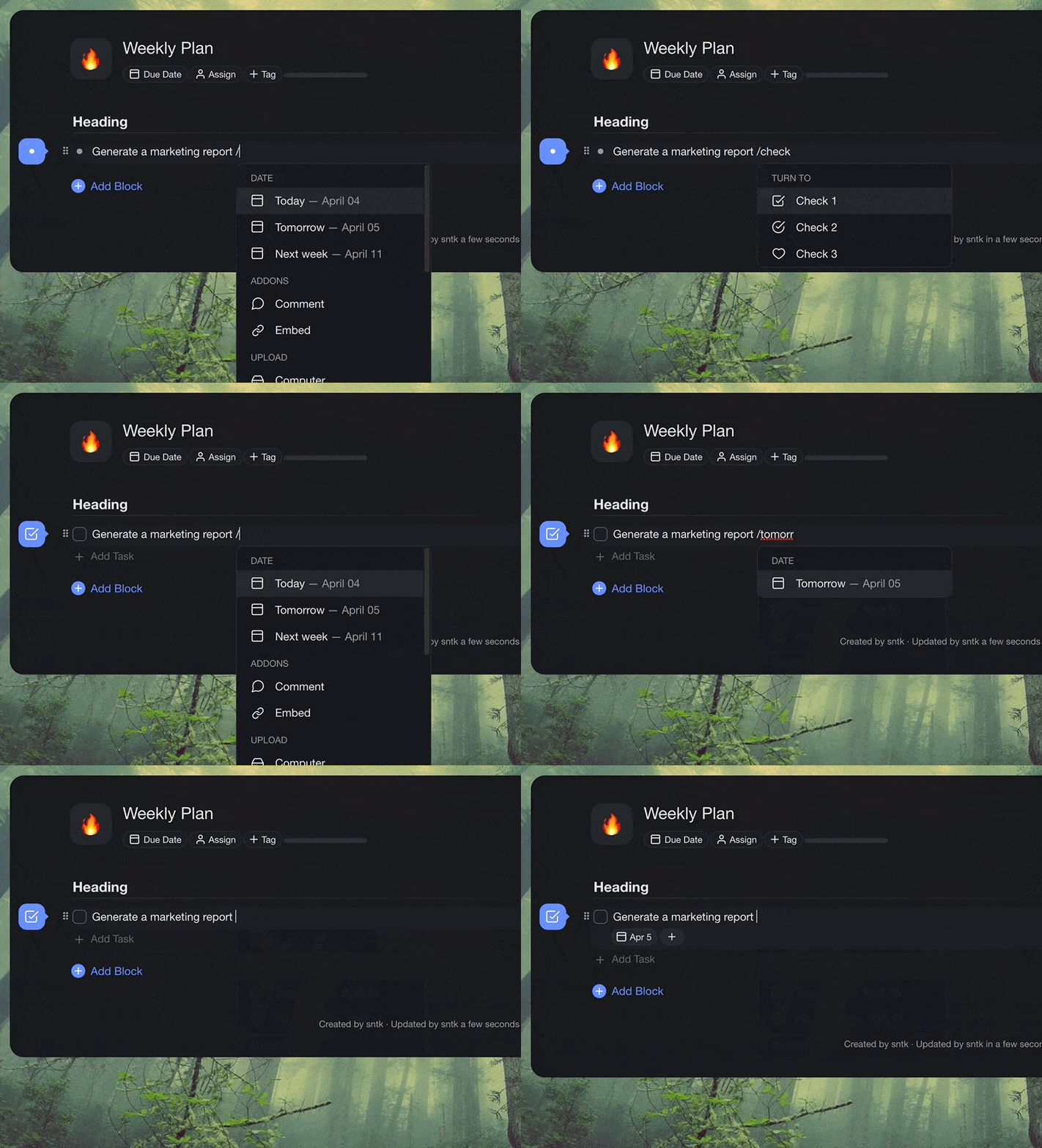
taskade slash command
## ******⚡️ Calendar View******
The long-awaited project Calendar is finally here! Create and edit tasks, drag to prioritize, and visualize them using the month, week, or day view. A new way to plan with your team in real-time. [Learn more](https://www.taskade.com/learn/projects/calendar-view).
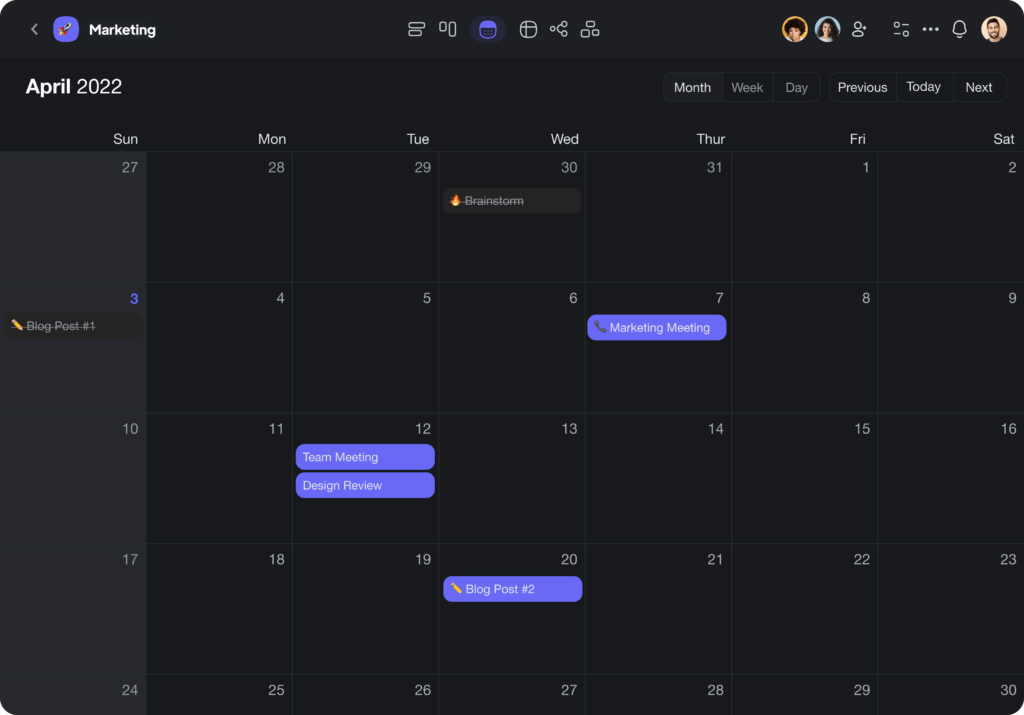
Taskade Calendar View
## ******************⚡️ New Reminders******************
You can now add reminders to your due dates and get notified minutes or hours in advance. In addition, an option to remove notifications.
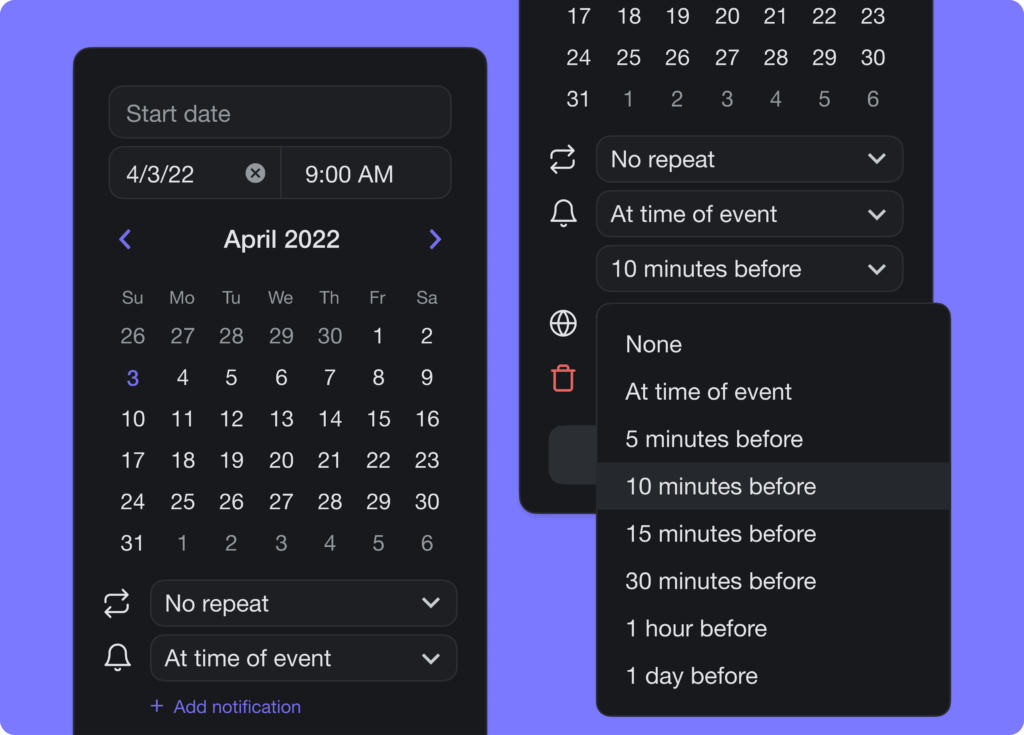
Taskade Reminders and Notifications
## ********************⚡️ Quick Add for Desktop********************
[Taskade for Desktop](https://www.taskade.com/downloads) now supports quick add in the menu bar. In addition, you can access the feature directly by heading over to [taskade.com/add](https://www.taskade.com/add). Give it a try!
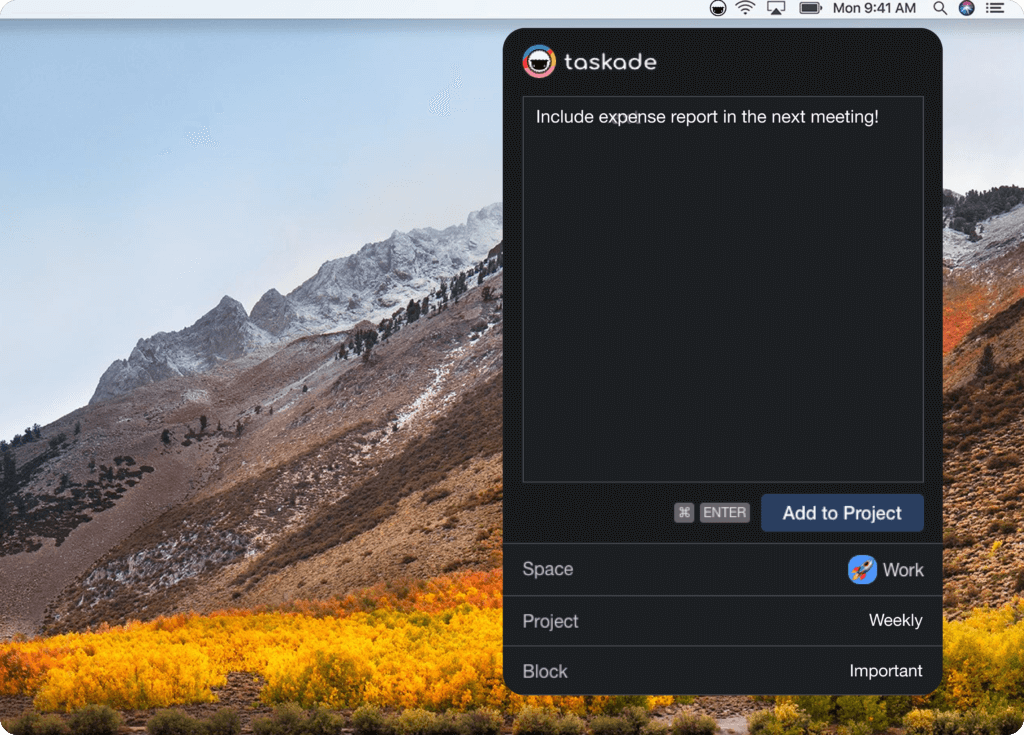
Taskade Quick Add widget
## ************🎉 Other Improvements************
- [Taskade for Desktop](https://www.taskade.com/downloads) v4.2.1 Update:
- New: Tabs now display workspace and folder color
- Improved tab management and organization
- Drag and move tabs across windows
- Re-open all tabs on the app restart
- [Taskade for Mobile](https://www.taskade.com/downloads) v3.3.27 Update:
- Improved tablet workspace tabs performance
- Improved sharing to Taskade
- Fixed highlighted task colors
- New: Embed any links — You can now add any links to a task as a bookmark. [Supported embed links](https://www.taskade.com/learn/projects/embed-taskade) will continue to load preview in-app.
- New: Quick Formatting — Try the new /slash command to format your tasks.
- Added support for numbered and lettered lists at the top block level.
- Moved project settings to the top right corner of the project menu.
- Upload files for free from Google Drive, Dropbox, and more!
- Bug fixes and performance improvements.
| Thanks again for supporting Taskade, and as always, don’t hesitate to [reach out](https://www.taskade.com/contact) or visit our [help center](https://www.taskade.com/learn) if you need help. We’re here for you! 😊 — Team Taskade 🐑 P.S. Want to help us improve Taskade? You can also [suggest a feature](https://www.taskade.com/feedback). |
| --- |
| |
## Frequently Asked Questions
### What are slash commands in Taskade?
Slash commands let you type '/' in the project editor to access a menu of quick actions — add due dates, change block formats, insert embeds, assign members, and more. They replace mouse-driven menus with a keyboard-first workflow for faster project editing.
### Does Taskade have a project-level Calendar View?
Yes. The Calendar View displays a project's tasks with due dates in a visual month, week, or day layout. You can create and edit tasks directly in the calendar, drag items to reschedule, and collaborate with your team in real-time on the same calendar.
### Can I set reminders for task due dates in Taskade?
Yes. When adding a due date to a task, you can set reminders to be notified minutes or hours before the deadline. Reminders are delivered via push notification, email, and in-app alerts so you never miss an important task.
### Does Taskade support Quick Add on the desktop app?
Yes. The Taskade desktop app (Mac, Windows, Linux) includes Quick Add in the menu bar for instant task capture without opening the main app window. You can also access it at taskade.com/add in a web browser.