# Quick Add Shortcut, Mobile Widget, Drag Icon ⋮⋮ Menu, and More!
> Quick Add shortcut (Cmd+K) adds tasks from anywhere in Taskade. New mobile Quick Add widgets for iOS and Android. Drag the ⋮⋮ icon to open a context menu on every task and node.
- Source: https://www.taskade.com/blog/quick-add-shortcut-mobile-widget
- Published: 2022-06-28
- Updated: 2026-04-07
- Author: John Xie
Hi Taskaders 🎉
We've worked hard to make Taskade work better for you! Here's what's new:
> **TL;DR:** June 2022 added the global Quick Add shortcut (Cmd/Ctrl+K), iOS/Android Quick Add widgets, and the ⋮⋮ drag-icon menu — capture primitives that today live on as voice and AI quick-capture across [6 platforms](https://www.taskade.com/downloads), feeding [Automations](https://www.taskade.com/automate) and [AI Agents](https://www.taskade.com/agents) inside [Taskade Genesis](https://www.taskade.com/create) apps.
> **Then → Now:** Quick-add widgets in 2022 → today's AI quick-capture across mobile and desktop, with auto-routing into projects, agents, or automations.
| Mobile capture | 2022 | 2026 |
| --- | --- | --- |
| Quick add | Desktop hotkey + [mobile widget](https://www.taskade.com/learn/projects/add-widget) | Same widget + voice + AI structuring |
| Drag icon menu | New ⋮⋮ context menu | Same menu + [agent bulk commands](https://www.taskade.com/learn/agents/bulk-commands) |
| Capture target | Single project | Any project + auto-routed by [Automations](https://www.taskade.com/automate) |
| Platform | iOS / Android | 6 platforms with synced widgets |
```mermaid
flowchart LR
W[Mobile widget
or Cmd-K overlay]:::pink --> C[Capture
text · voice]:::teal
C --> R{Route 2026}:::blue
R --> P[Project]:::teal
R --> A[Automation]:::pink
A --> AG[Agent acts
built-in tools]:::pink
AG --> G[Genesis app updated]:::teal
classDef pink fill:#2a1225,color:#ff8fa3,stroke:#ff2d60,stroke-width:2px
classDef teal fill:#11111b,color:#cdd6f4,stroke:#00d4aa
classDef blue fill:#0d1b2a,color:#7dd3fc,stroke:#38bdf8,stroke-width:1.5px
```
### A 2026 voice quick-capture in 4 seconds
```text
tap widget ──▶ "Add follow-up call with Lin tomorrow 3pm"
│
▼
┌──────────────────┐
│ AI structures: │
│ task: call Lin │
│ due: tomorrow │
│ time: 15:00 │
│ project: CRM │
└────────┬─────────┘
▼
Automation: Slack ping owner
▼
Agent: prep call notes
```
### Hub & spoke
- Hubs: [Downloads](https://www.taskade.com/downloads) · [Automations](https://www.taskade.com/automate) · [AI Agents](https://www.taskade.com/agents) · [Taskade Genesis](https://www.taskade.com/create) · [Community Gallery](https://www.taskade.com/apps)
- Spokes: [Learn — Quick Add widget](https://www.taskade.com/learn/projects/add-widget) · [Learn — mobile widgets](https://www.taskade.com/learn/projects/mobile-widgets) · [Learn — agent bulk commands](https://www.taskade.com/learn/agents/bulk-commands) · [Learn — keyboard shortcuts](https://www.taskade.com/learn/projects/keyboard-shortcuts)
- Related: [Slash command + Calendar view](https://www.taskade.com/blog/slash-command-calendar-view-quick-add) · [Widgets, zoom, resize chat](https://www.taskade.com/blog/mobile-widgets-zoom-resize-chat)
## **************************⚡️ Quick Add Shortcut**************************
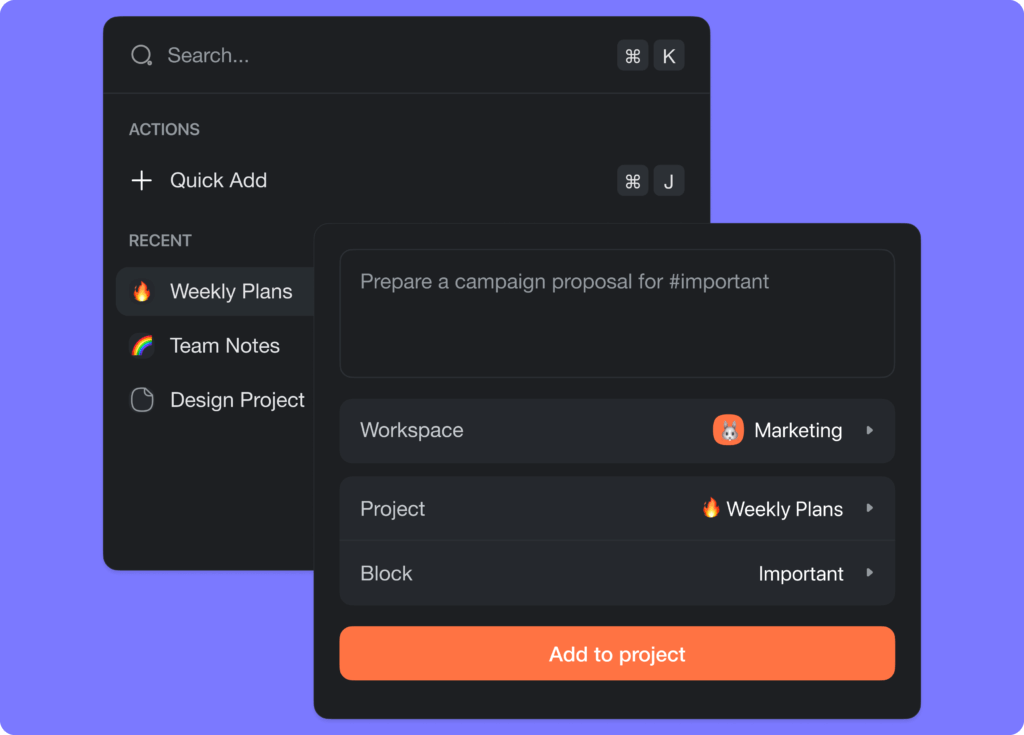
You can now add a task or note to a project anywhere in Taskade. Simply open the quick menu using **⌘ + K** or **CTRL + K** in our web and desktop app. [Learn more](https://www.taskade.com/learn/projects/quick-add).
taskade quick add
## ******⚡️ Quick Add Mobile Widget******
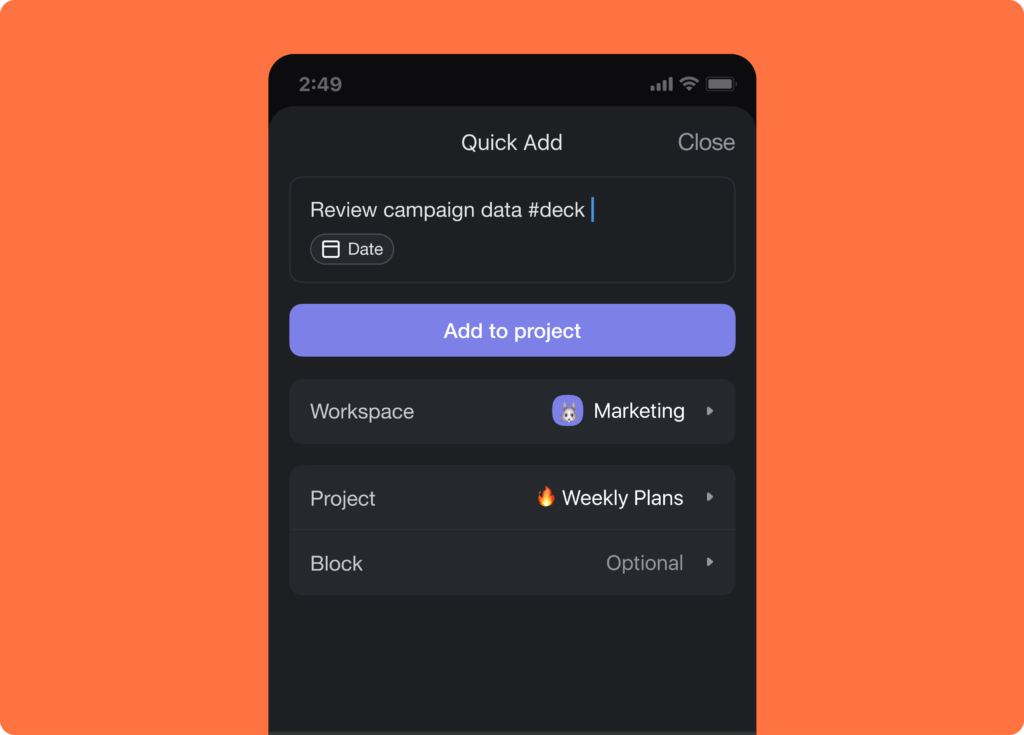
The new Quick Add widget for iOS & Android will allow you to quickly add a task or note to any projects within Taskade. [Learn more](https://www.taskade.com/learn/projects/mobile-widgets).
taskade quick task widget
## ******************⚡️ Drag Icon ⋮⋮ Menu******************
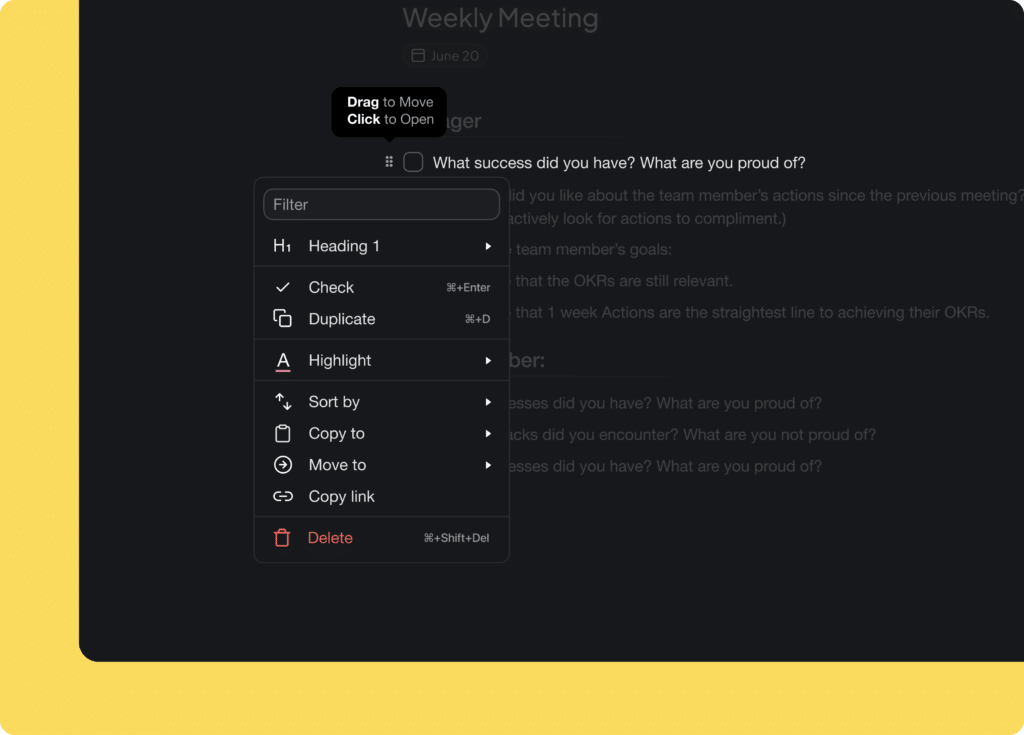
You can now click on the **⋮⋮** drag icon to open the new dropdown menu on the left of each task and node. [Learn more](https://www.taskade.com/learn/projects/drag-menu).
drag icon menu
## ************🎉 Other Improvements************
- [Taskade for Desktop](https://www.taskade.com/downloads) v4.2.5 Update:
- General performance improvements and bug fixes
- [Taskade for Mobile](https://www.taskade.com/downloads) v3.3.32 Update:
- New: Time Sensitive Notifications for due dates and reminders
- New: Time Sensitive Notifications when @mentioned in comments
- New: Notifications now support and display profile avatars
- New: Quick Add Widget to capture tasks and notes instantly
- Improved project sharing and workspace invites
- Bug fixes and performance improvements
- New: 🔍 Search Tasks now allows you to check off tasks
- New: 📝 Preview PDFs in task attachments, comments, and chat
- New: ➕ Quick Add shortcut added to workspace dashboard header
- Calendar View: Drag-n-drop tasks to stack tasks
- Calendar View: Added project title and more menu
- Calendar View: Added time display to the monthly view
- Global Calendar: Added time display to the monthly view
- Editor: Improved pasting from Google Sheets and Microsoft Word
- Editor: Removed floating formatting menu left of tasks to simplify UI
- Editor: Improved drag-n-drop behavior in Mind Map View
- Improved email notifications and reminders for Tasks Due
- Only the project owner or admin can set the default project view
- Sign up, login page, and meta image inverted to dark mode
- Bug fixes and performance improvements
| Thanks again for supporting Taskade, and as always, don’t hesitate to [reach out](https://www.taskade.com/contact) or visit our [help center](https://www.taskade.com/learn) if you need help. We’re here for you! 😊 — Team Taskade 🐑 P.S. Want to help us improve Taskade? You can also [suggest a feature](https://www.taskade.com/feedback). |
| --- |
| |
## Frequently Asked Questions
### What is the Quick Add shortcut in Taskade?
Quick Add (Cmd+K on Mac, Ctrl+K on Windows) is a global shortcut that lets you add a task or note to any project from anywhere in Taskade — without navigating away from your current screen. It works on web, desktop, and mobile apps for instant task capture.
### Does Taskade have a mobile widget for adding tasks?
Yes. The Quick Add widget for iOS and Android lets you create tasks and notes directly from your phone's home screen. Tap the widget, type your task, select a project, and it's instantly saved to Taskade — perfect for capturing ideas on the go.
### What is the Drag Icon menu in Taskade?
The Drag Icon (⋮⋮) menu appears to the left of each task and node. Click it to access a dropdown with options for formatting, adding due dates, assigning members, duplicating, deleting, and more. You can also drag the icon to reorder items within your project.
### Can I add tasks from anywhere in Taskade without navigating to a project?
Yes. The Quick Add shortcut (Cmd/Ctrl+K) opens an overlay from any screen in Taskade. Type your task, select the target project and location, and submit — all without leaving your current workspace, calendar, or dashboard view.