# One Prompt, a Working System: Twelve App Kits on TSK-1 (July 2026)
> Twelve live app kits, a four-level TSK-1 intelligence ladder, and a free plan to start. Clone a working system in one click, or describe your own.
- Source: https://www.taskade.com/blog/one-prompt-working-system
- Published: 2026-07-23
- Updated: 2026-09-24
- Author: John Xie
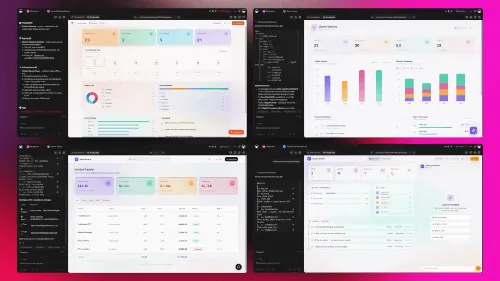
Taskade just got faster and smarter. Every app you build now runs on **TSK-1**, the [Taskade System Kernel](https://www.taskade.com/blog/introducing-tsk-1), and twelve live app kits went up alongside it. Each one is a working system, not a blank template: connected projects, [AI agents](https://www.taskade.com/agents), and [automations](https://www.taskade.com/automate) already wired together, cloneable in one click. [Build yours with AI](https://www.taskade.com/create) or [clone a working one](https://www.taskade.com/apps) in a click.
> **TL;DR:** One prompt now returns a whole running system. [Taskade Genesis](https://www.taskade.com/ai/apps) ships **twelve live app kits** across six categories, all running on [TSK-1](https://www.taskade.com/wiki/genesis/tsk-1), which adapts across four levels from instant edits to full workflows and systems with **Auto** as the default. On Free, you earn free AI credits as you go, and you can upgrade any time. [Clone one free](https://www.taskade.com/apps).
[](https://www.taskade.com/create)
## What Does One Prompt, a Working System Mean?
One prompt, a working system means you describe the work in plain language and get back a live app with the pieces already connected. Projects hold your data, [agents](https://www.taskade.com/agents) reason over it, and [automations](https://www.taskade.com/automate) keep running after you close the tab. Most AI tools generate a file and stop. Taskade returns something that is already operating, which is the difference [AI app builders with memory](https://www.taskade.com/blog/best-ai-app-builders) make.
The frame the whole release turns on is a collapse, not an addition. What used to take a chain of people, tools, and handoffs now takes one description.
| Before | After |
|---|---|
| 10 people | 1 prompt |
| 10 tools | 1 workspace |
| 10 handoffs | 1 living system |
Better, faster, smarter. That collapse is only possible because the pieces share one backbone: connected projects, where a job already knows its customer and an invoice already knows its deal. The loop below is **Workspace DNA**, the same architecture behind every app in the [run-your-whole-business wave](https://www.taskade.com/blog/run-whole-business).
```mermaid
graph LR
A[Ten people
Ten tools
Ten handoffs] -->|one prompt| B[One workspace]
B --> M[Memory
Connected projects]
M --> I[Intelligence
AI agents reason]
I --> E[Execution
Automations run]
E --> M
style A fill:#1e1e2e,color:#94a3b8,stroke:#475569
style B fill:#1a140a,color:#ffb74d,stroke:#e65100,stroke-width:2px
style M fill:#2a1225,color:#ff8fa3,stroke:#ff2d60,stroke-width:2px
style I fill:#0d1b2a,color:#7dd3fc,stroke:#38bdf8,stroke-width:2px
style E fill:#0d1a0e,color:#86efac,stroke:#22c55e,stroke-width:2px
```
## Start From a Working System. Clone It.
Six live systems went up first, and every one of them is running right now. These are not screenshots of a concept. Each share link opens a real [Taskade Genesis](https://www.taskade.com/ai/apps) app you can clone in one click, point at your own data, and use the same day, which is exactly what [Taskade Genesis Apps Live](https://www.taskade.com/blog/genesis-apps-live) described.
| Live system | What it does | Clone it |
|---|---|---|
| **Neon CRM Dashboard** | Leads, deals, and live analytics in one pipeline | [Clone →](https://www.taskade.com/app/neon-crm-dashboard-nsrm12wns3e1cgni) |
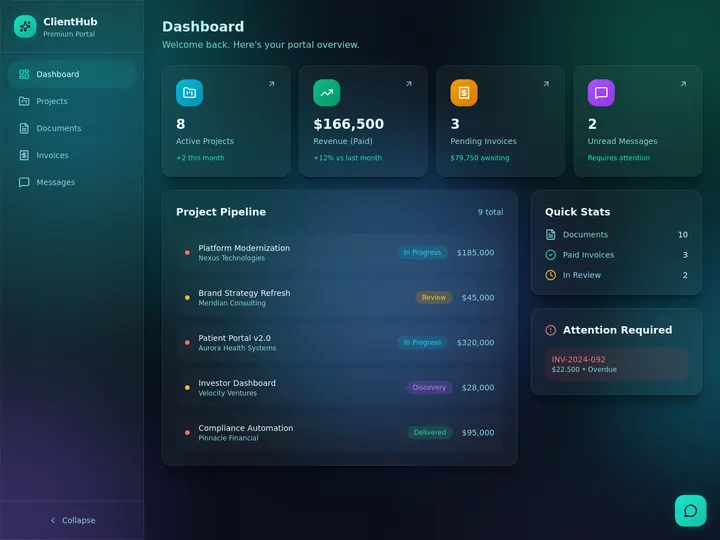
| **Client Portal Nexus** | Branded, self-serve, a login per client | [Clone →](https://www.taskade.com/app/client-portal-nexus-1s4lv2y3jb9z7zpf) |
| **Sales Agent Studio** | An AI teammate that never clocks out | [Clone →](https://www.taskade.com/app/sales-agent-studio-uo9fc7tfidydkdw9) |
| **Inventory Management Dashboard** | SKUs, stock levels, and low-stock alerts | [Clone →](https://www.taskade.com/app/inventory-management-dashboard-94o8cjl33yz7z8ke) |
| **Onboarding Guide Portal** | Day one to day thirty, hands-free | [Clone →](https://www.taskade.com/app/onboarding-guide-portal-cjom1t44r0lf9diu) |
| **Customer Health Dashboard** | Spot churn before it happens | [Clone →](https://www.taskade.com/app/customer-health-dashboard-564685gvoq7j7oua) |
[](https://www.taskade.com/app/neon-crm-dashboard-nsrm12wns3e1cgni)
The **Neon CRM Dashboard** above is the client-to-cash spine, and it is [free to clone](https://www.taskade.com/app/neon-crm-dashboard-nsrm12wns3e1cgni). Because it runs on connected projects, the contact, the deal, and the invoice are one linked record rather than three copies you reconcile by hand. The full walkthrough is in [Taskade as a CRM](https://www.taskade.com/learn/genesis/crm), and more starting points live under [CRM templates](https://www.taskade.com/templates/crm).
[](https://www.taskade.com/app/client-portal-nexus-1s4lv2y3jb9z7zpf)
**Client Portal Nexus** is the same idea pointed outward. Each client signs in, and you match their records to that login so they see only what is theirs, on your own domain if you want it there. Custom domains unlock on Pro and above, and client sign-in through App Users works on every plan. The step-by-step is in [build a customer portal](https://www.taskade.com/learn/genesis/build-customer-portal). For the published-app version of the whole flow, read [clone, login, automate](https://www.taskade.com/blog/clone-login-automate).
[](https://www.taskade.com/app/sales-agent-studio-uo9fc7tfidydkdw9)
**Sales Agent Studio** is what an agent looks like when it lives inside a working app instead of a chat window. It reads the connected projects around it, so it already knows the pipeline it is scoring. [AI Agents v2](https://www.taskade.com/blog/agent-teams-automate-workflows) ship with **built-in tools**, including web search, file analysis, custom slash commands, and persistent memory. Browse more starting points in [sales agents](https://www.taskade.com/agents/sales).
## Six More Kits. Six Categories.
Six more kits went up the same day, one per category, and each clones in a single click. Together with the six above, that is twelve working systems covering the shapes most small operations actually run, which is the same [app kit](https://www.taskade.com/blog/new-app-kits-agents-workflows) pattern extended across more verticals.
| Category | Kit | What it does | Clone it |
|---|---|---|---|
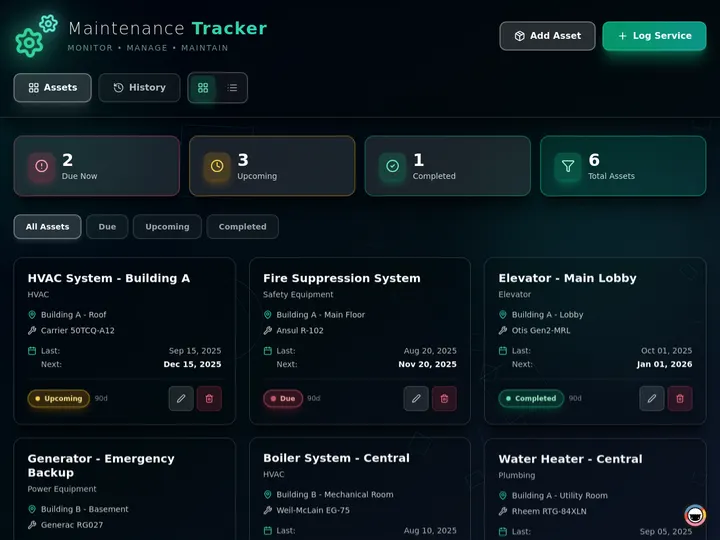
| Field service | **Maintenance Tracker** | Assets, schedules, service history | [Clone →](https://www.taskade.com/app/maintenance-tracker-dashboard-v5l82aobz6lep3zd) |
| Finance | **Invoice Generator** | Bill it, track it, chase it | [Clone →](https://www.taskade.com/app/invoice-generator-v71ywf2zs5bu9a5m) |
| Education | **Class Booking Portal** | Registrations, waitlists, attendance | [Clone →](https://www.taskade.com/app/class-booking-portal-cpl9dz85yx75foxo) |
| Compliance | **License Manager** | Renewals flagged before they lapse | [Clone →](https://www.taskade.com/app/license-manager-dashboard-rlfk7lsd3kxtla1z) |
| Operations | **BusinessPro** | HR, finance, and ops in one suite | [Clone →](https://www.taskade.com/app/business-pro-qj99usafgb2yu1m2) |
| Retail | **Simple Store Manager** | Catalog, orders, back office | [Clone →](https://www.taskade.com/app/simple-store-manager-ujtqojrsimcct6io) |
[](https://www.taskade.com/app/maintenance-tracker-dashboard-v5l82aobz6lep3zd)
[](https://www.taskade.com/app/invoice-generator-v71ywf2zs5bu9a5m)
The **Invoice Generator** closes the money loop the CRM opens, and it is the same primitive behind [automated invoices, licenses, and calculators](https://www.taskade.com/blog/invoices-licenses-calculator). **Class Booking Portal** follows the pattern in [book classes and schedule clients](https://www.taskade.com/blog/book-classes-schedule-clients). Every one of them fires across [100+ bidirectional integrations](https://www.taskade.com/integrations), where triggers pull events in and actions push data back out. Start from [invoice templates](https://www.taskade.com/templates/invoice) or a [sales automation](https://www.taskade.com/automate/sales) if you would rather adapt than build from scratch.
## One Model. On Autopilot.
You never pick a model. Set AI to **Auto** and TSK-1 adapts to every task: fast when you need speed, deep when you need reasoning. This is the intelligence layer underneath every app on this page, and it coordinates **frontier models from top AI labs** so you can stay on the outcome instead of the setting.
| Level | Best for |
|---|---|
| **TSK-Instant** | Fast edits |
| **TSK-Standard** | Everyday tasks |
| **TSK-Thinking** | Multi-agent planning |
| **TSK-Reasoning** | Workflows and systems |
Auto is the default, and for almost everyone it is the only setting they will ever touch. The kernel reads the shape of the task and chooses the depth.
```mermaid
graph TD
T[Your task] --> K[TSK-1 Auto
reads the task,
picks the depth]
K --> A[TSK-Instant
fast edits]
K --> B[TSK-Standard
everyday tasks]
K --> C[TSK-Thinking
multi-agent planning]
K --> D[TSK-Reasoning
workflows and systems]
style T fill:#1a140a,color:#ffb74d,stroke:#e65100,stroke-width:2px
style K fill:#2a1225,color:#ff8fa3,stroke:#ff2d60,stroke-width:2px
style A fill:#0d1b2a,color:#7dd3fc,stroke:#38bdf8,stroke-width:1.5px
style B fill:#0d1a0e,color:#86efac,stroke:#22c55e,stroke-width:1.5px
style C fill:#1a0d24,color:#ce93d8,stroke:#6a1b9a,stroke-width:1.5px
style D fill:#11111b,color:#cdd6f4,stroke:#00d4aa
```
The naming matters more than it looks. A model writes a sentence; a kernel runs a system. For what the name means and why we chose it, read [introducing Taskade TSK-1](https://www.taskade.com/blog/introducing-tsk-1), the reference page on [AI models in Taskade Genesis](https://www.taskade.com/learn/genesis/ai-models), or the [TSK-1 wiki entry](https://www.taskade.com/wiki/genesis/tsk-1).
## Your Autonomous Workspace
TSK-1 conducts the intelligence. **Workspace DNA** is what keeps it running. Memory, intelligence, and execution, each one something you can point at inside your workspace today, and Taskade Genesis ships the result:
- **▲ Projects remember.** Your data, docs, and context stay connected and always in reach. This is the [memory layer](https://www.taskade.com/blog/memory-workflows-payments).
- **■ Agents reason.** Train agents and embed them in your apps and workflows, so they read the same live records your team sees. See [types of memory in AI agents](https://www.taskade.com/blog/ai-agent-memory).
- **● Workflows run.** [Automations](https://www.taskade.com/blog/agentic-workflows-explained) power your apps and workspace around the clock, across every connected tool.
- **▷ Apps ship.** Built by TSK-1. Publish live apps powered by your workspace.
```
▲ Projects remember
│
▼
■ Agents reason
│
▼
● Workflows run
│
▼
▷ Apps ship ──▶ and the work they do
▲ becomes new memory
└──────────────────────┘
```
The loop, stated plainly: memory feeds intelligence, intelligence triggers execution, execution updates memory. That is the whole argument behind the [Workspace DNA architecture](https://www.taskade.com/blog/workspace-dna-architecture), and it is why an app built here keeps getting better at your business instead of drifting out of date. It is also the reason [AI-generated apps break](https://www.taskade.com/blog/why-ai-generated-apps-break) when the generator hands you a frozen artifact and walks away.
## Start Free. Keep Building.
Free starts with **no AI credits**. You earn free AI credits with referrals and invites, and you can upgrade any time.
| How | What you get |
|---|---|
| **Refer a friend** | Earn credits |
| **Invite a teammate** | Earn credits |
| **Upgrade to a paid plan** | A monthly credit allowance that renews |
Move to a paid tier whenever the work outgrows Free — paid plans include a recurring monthly credit allowance, and they also unlock auto top-up. The [billing FAQ](https://www.taskade.com/learn/account/billing-faq) covers how balances and top-ups work.
## What It Costs to Run the Whole System
Every app on this page can be cloned and run free. You upgrade when you want client sign-in on your own domain, not to unlock the building itself.
| Plan (annual billing) | Price | Best for |
|---|---|---|
| **Free** | $0 | Building and cloning live apps |
| **Pro** ★ | $10/mo billed annually | Up to 10 users, the popular choice, up to 10 custom domains |
| **Business** | $25/mo billed annually | Unlimited custom domains |
The math is simple. One Pro seat at [$10/month billed annually](https://www.taskade.com/pricing) costs less than an hour of the help a small operator would otherwise hire to keep ten tools in sync, and the [Pro plan](https://www.taskade.com/pricing) is what turns an internal dashboard into a client-facing portal on your own domain. Max at $100/month billed annually and Enterprise at $250/month billed annually sit above that for larger teams. Monthly billing is available on every paid tier.
## Describe It. Run It Live.
One prompt. One living system. Connected projects remember the data, [AI agents](https://www.taskade.com/agents) reason over it, and [automations](https://www.taskade.com/automate) keep everything moving across [100+ integrations](https://www.taskade.com/integrations). Start in [Taskade Genesis](https://www.taskade.com/create) and describe the work you actually do, or [clone a live one](https://www.taskade.com/apps) and have it running before your coffee is cold.
- **[Introducing Taskade TSK-1 →](https://www.taskade.com/blog/introducing-tsk-1)**, what the kernel is and why it is not just another AI model.
- **[Run Your Whole Business in One App →](https://www.taskade.com/blog/run-whole-business)**, the ops dashboard, CRM, and client portal pattern in full.
- **[Set It Once, It Runs While You Work →](https://www.taskade.com/blog/set-it-once)**, the automation half of the same wave.
- **[Clone, Login, Automate →](https://www.taskade.com/blog/clone-login-automate)**, taking a cloned app to a live one with client sign-in.
## Frequently Asked Questions
### What does one prompt, a working system mean in Taskade?
You describe the work in plain language and [Taskade Genesis](https://www.taskade.com/ai/apps) returns a live app with the pieces already connected: projects that hold your data, [agents](https://www.taskade.com/agents) that reason over it, and [automations](https://www.taskade.com/automate) that keep running after you close the tab. There is no export step, no hosting to set up, and no second tool to reconcile.
### What are the TSK-1 intelligence levels?
TSK-1 adapts across four levels. **TSK-Instant** handles fast edits, **TSK-Standard** handles everyday tasks, **TSK-Thinking** handles multi-agent planning, and **TSK-Reasoning** handles full workflows and systems. The higher rungs open up as you move up plans. Auto is the default, so the kernel reads each task and picks the depth for you. More detail lives in [AI models in Taskade Genesis](https://www.taskade.com/learn/genesis/ai-models).
### Do I have to pick an AI model?
No. TSK-1 runs on Auto and routes each task across frontier models from top AI labs. Power users can still pin a specific model, but most people never open the setting because the sensible default is already chosen. The reasoning behind that design is in [introducing Taskade TSK-1](https://www.taskade.com/blog/introducing-tsk-1).
### What can I clone from the Community Gallery?
Live, working apps across sales, field service, finance, education, compliance, operations, and retail. A CRM, a client portal, an inventory dashboard, an invoice generator, a class booking portal, and more. Each one clones in one click, points at your own data, and runs the same day. [Browse the gallery](https://www.taskade.com/apps).
### Does the Free plan include AI credits?
No. On Free, you earn free AI credits with referrals and invites, and you can upgrade any time. Paid plans include a monthly credit allowance.
### How much does Taskade cost?
Taskade has a free plan. Paid tiers are Pro at $10/month billed annually (the popular choice, up to 10 users), Business at $25/month billed annually, Max at $100/month billed annually, and Enterprise at $250/month billed annually. Custom domains unlock on Pro and above, and client sign-in works on every plan. See [pricing](https://www.taskade.com/pricing) for the full breakdown.
### Are these app kits real apps or just templates?
They are real, live apps. Every share link opens a working Taskade Genesis app with its projects, agents, and automations already connected, which is the whole point of [Taskade Genesis Apps Live](https://www.taskade.com/blog/genesis-apps-live). Clone it, point it at your own data, and it runs. Nothing has to be assembled from a blank template first.
### What is Workspace DNA?
Workspace DNA is the three-layer loop behind every Taskade Genesis app. Projects remember your data and context, [AI agents](https://www.taskade.com/agents) reason over that context, and [automations](https://www.taskade.com/automate) execute across [100+ bidirectional integrations](https://www.taskade.com/integrations). Execution updates memory, which feeds intelligence again. The full teardown is in the [Workspace DNA architecture](https://www.taskade.com/blog/workspace-dna-architecture).
---
**▲ ■ ● Memory · Intelligence · Execution**
The three-layer architecture behind every Taskade Genesis app, connected projects remember, agents think, automations run. Clone any live system above to feel the loop close itself, or [build your own](https://www.taskade.com/create) on the same primitives.