# Multiselect Tasks, Reorder Shortcut, Project Activity
> We have another exciting update for Taskade this week. Enjoy! 🎉 ## ⚡️ Multiselect Tasks: Style & Format You can now highlight, bold, _italici...
- Source: https://www.taskade.com/blog/multiselect-tasks-reorder-shortcut-project-activity
- Published: 2020-10-29
- Updated: 2026-04-06
- Author: John Xie
We have another exciting update for Taskade this week. Enjoy! 🎉
> **TL;DR:** The 2020 multiselect, keyboard reorder, and project-activity-in-chat upgrades planted the roots of today's collaborative editing — now spread across [multiple project views](https://www.taskade.com/templates) including Board, Table, and Gantt, [frontier AI models](https://www.taskade.com/agents), and [100+ integrations](https://www.taskade.com/integrations). [Taskade Genesis](https://www.taskade.com/create) turns prompts into living apps where every action streams into the [Community Gallery](https://www.taskade.com/apps).
> **Then → Now:** Project-activity-in-chat became today's full activity feeds across [Board/Table/Gantt views](https://www.taskade.com/templates) — see [Learn Taskade: Projects](https://www.taskade.com/learn/projects/activity-feed).
| Dimension | 2020 (this release) | Today (2026) |
|---|---|---|
| Bulk ops | Manual multiselect format + reorder | Bulk ops + [AI agents auto-organizing](https://www.taskade.com/agents) tasks |
| Reorder | Cmd+Shift+Arrow keyboard | Drag, keyboard, agent commands, [automation move-task](https://www.taskade.com/learn/automation/move-task) |
| Activity stream | Completed tasks in chat | Full [activity feed](https://www.taskade.com/learn/projects/activity-feed) + agent run logs |
| Views | List + Mind Map + Org Chart + Calendar sync | [multiple project views](https://www.taskade.com/learn/projects/project-views): List, Board, Calendar, Table, Mind Map, Gantt, Org Chart |
| Intelligence | None (no AI yet) | [Frontier models](https://www.taskade.com/agents) suggest reorderings |
```mermaid
flowchart LR
A["Select tasks
(multiselect)"]:::primary --> B["Bulk action
format / reorder / complete"]:::teal
B --> C["Activity stream
(project chat)"]:::blue
C --> D["Done"]:::green
classDef primary fill:#2a1225,color:#ff8fa3,stroke:#ff2d60,stroke-width:2px
classDef teal fill:#11111b,color:#cdd6f4,stroke:#00d4aa
classDef blue fill:#0d1b2a,color:#7dd3fc,stroke:#38bdf8,stroke-width:1.5px
classDef green fill:#0d1a0e,color:#86efac,stroke:#22c55e,stroke-width:1.5px
```
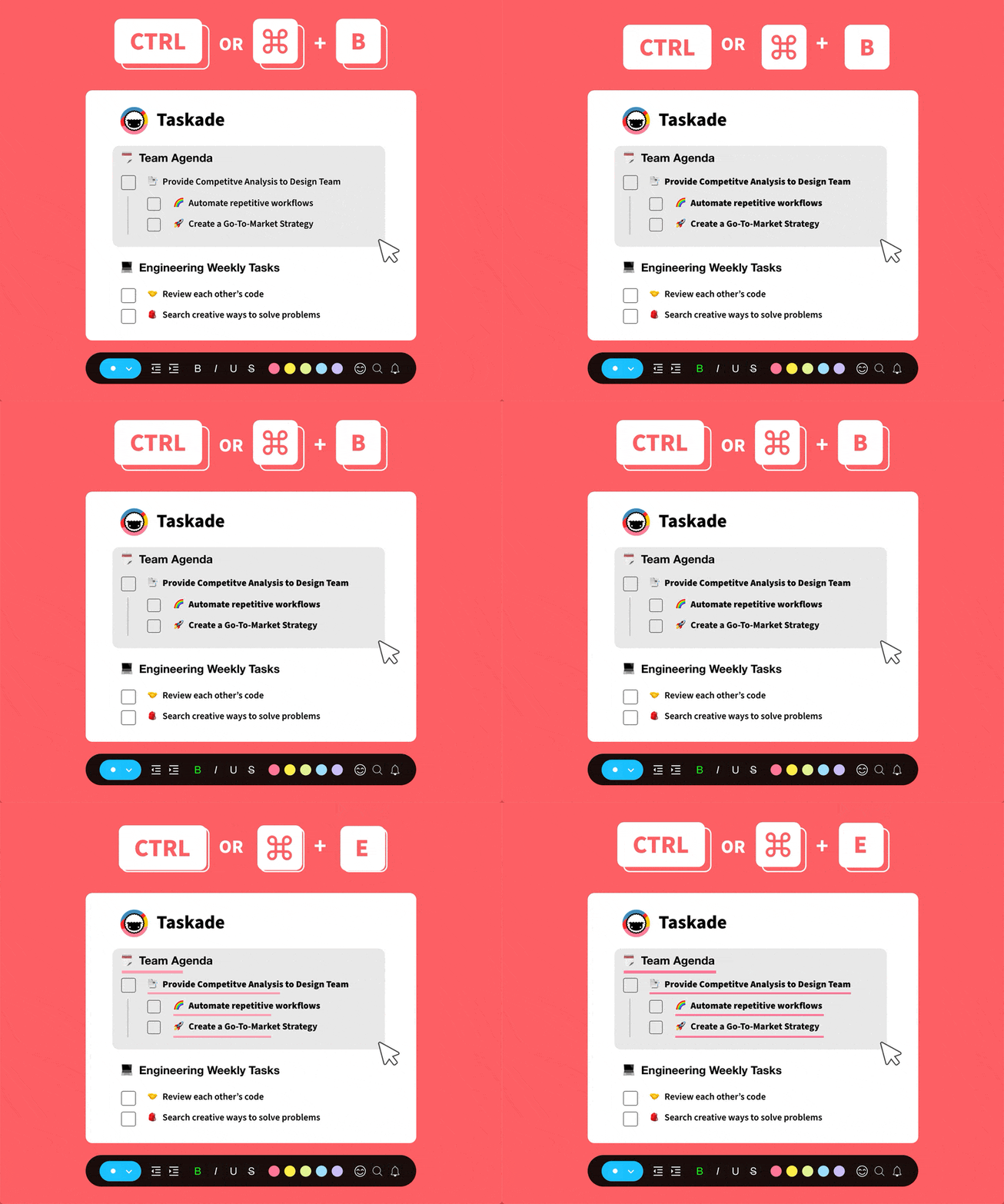
## ******⚡️ Multiselect Tasks: Style & Format******
You can now highlight, **bold**, _italicize_, underline, and complete multiple tasks. In addition, you can change the format (✅ ⏺ 📝) of multiple blocks.
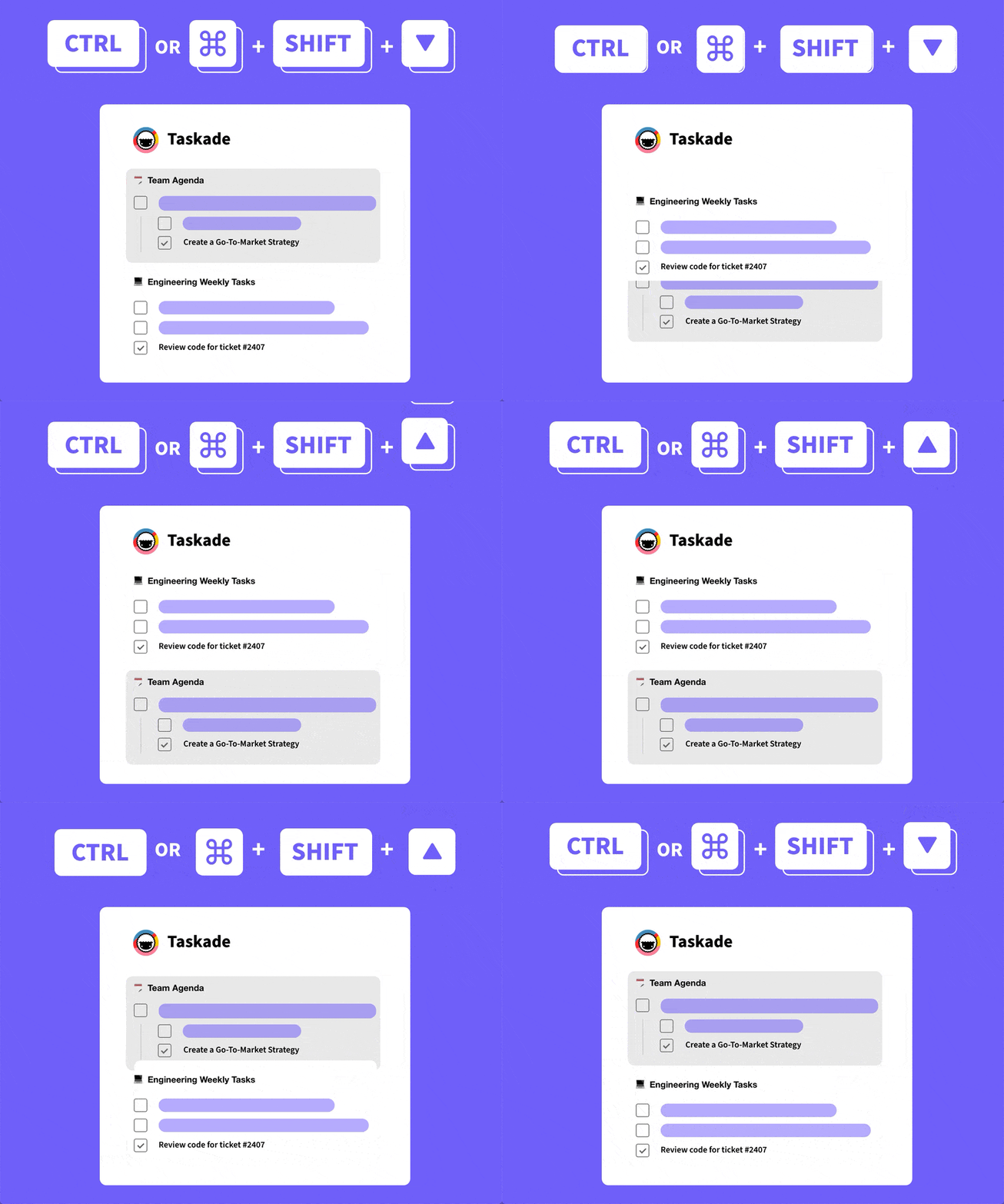
## ****⚡️ Reorder Tasks with Keyboard Shortcuts****
Press **Ctrl** or **⌘** + **Shift** + **↑ ↓** on your keyboard to reorder tasks and blocks.
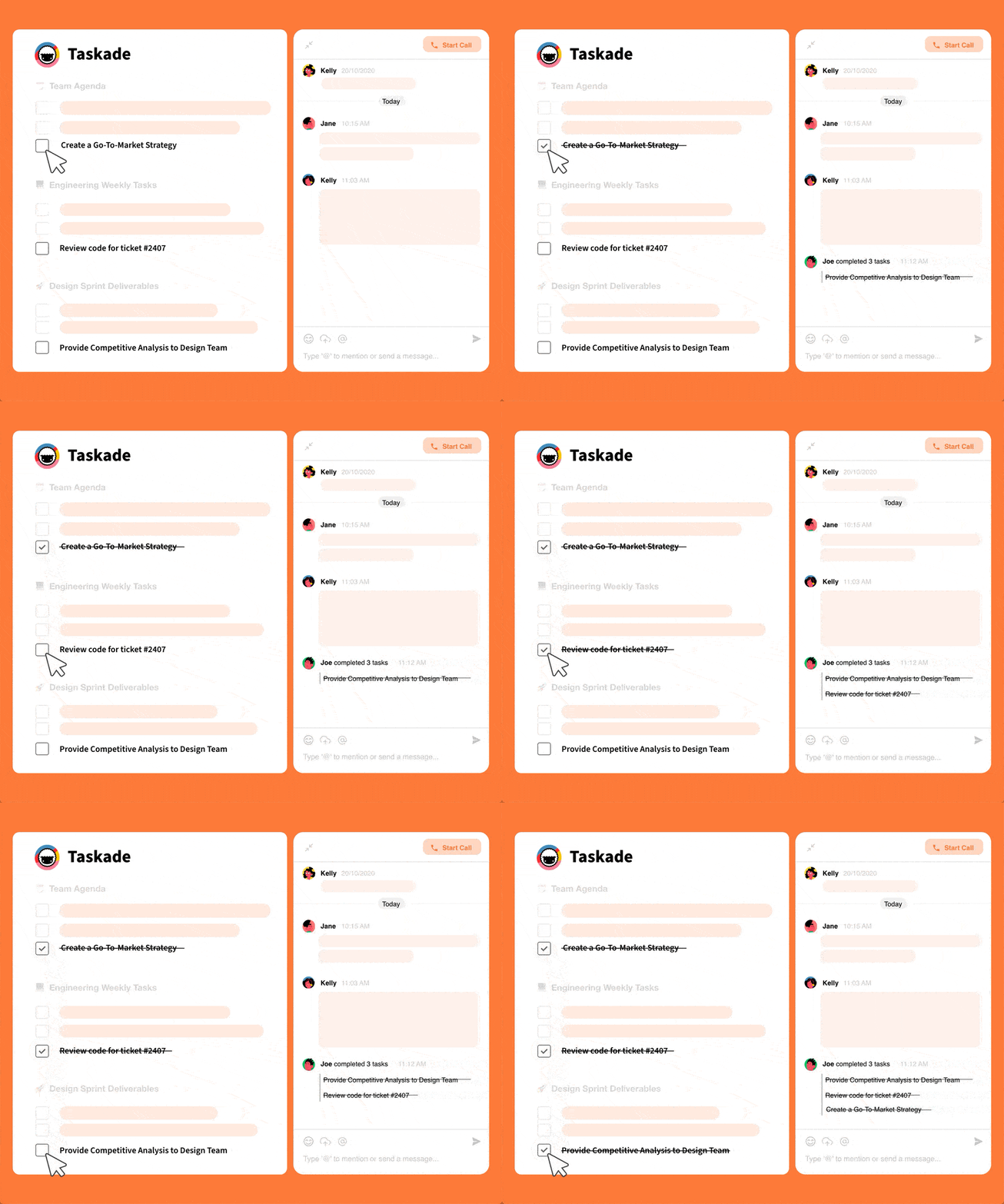
## ******⚡️ Project Activity in Chat******
Your **completed tasks** will now show up in chat so you and your team can have full visibility on when a task is completed and who checked it off. Today, [AI Agents](https://www.taskade.com/agents) and [Automations](https://www.taskade.com/automate) add the same activity stream — see [Learn Taskade: Automation](https://www.taskade.com/learn/automation/triggers).
## ⌨️ Reorder Without Touching the Mouse
The October 2020 release was a love letter to keyboard-first power users. The keymap below still ships in 2026, identical, across web, desktop, and mobile.
```
┌──────────────────────────────────────────────────────┐
│ Shift + ↑ / ↓ ......... extend selection │
│ ⌘ / Ctrl + Shift + ↑ .. move selection up │
│ ⌘ / Ctrl + Shift + ↓ .. move selection down │
│ ⌘ / Ctrl + B / I / U .. bold / italic / underline │
│ ⌘ / Ctrl + Enter ..... complete checkbox │
│ ⌘ / Ctrl + Z ......... undo │
│ ⌘ / Ctrl + Shift + Z . redo │
└──────────────────────────────────────────────────────┘
```

**Related Reading:**
- [Best Task Management Software and Tools](https://www.taskade.com/blog/best-task-management-tools)
- [Build Effective Remote Teams with Atomic Habits](https://www.taskade.com/blog/build-effective-remote-teams-with-atomic-habits)
- [Multi-Select Enhancements](https://www.taskade.com/blog/multi-select-enhancements-streamlined-workspace-filtering) — July 2020 prequel
- [Undo, Redo, Project Changelog](https://www.taskade.com/blog/undo-redo-project-changelog) — safety net for bulk edits
- [Learn Taskade: Keyboard Shortcuts](https://www.taskade.com/learn/projects/keyboard-shortcuts) · [Multiselect](https://www.taskade.com/learn/projects/bulk-assign)
- Today, [AI agents](https://www.taskade.com/agents), [automations](https://www.taskade.com/automate), and [Taskade Genesis](https://www.taskade.com/create) extend bulk ops with intelligence.
Thanks again for supporting Taskade, and as always, don’t hesitate to [reach out](https://www.taskade.com/contact) if you need help. We’re here for you! 😊
— Team Taskade 🐑
## Frequently Asked Questions
### Can I format multiple tasks at once in Taskade?
Yes. Multiselect lets you highlight, bold, italicize, underline, and complete multiple tasks simultaneously. You can also change the block format (task, bullet, paragraph) for multiple items at once, saving time when styling or reorganizing large project sections.
### Is there a keyboard shortcut to reorder tasks in Taskade?
Yes. Press Cmd/Ctrl + Shift + Up/Down arrow keys to move selected tasks up or down in the project. This keyboard shortcut lets you reorder tasks without using the mouse, keeping you in a fast, keyboard-driven workflow.
### Does Taskade show completed tasks in project chat?
Yes. When a task is completed, it automatically appears in the project chat feed with a timestamp and the name of the person who checked it off. This gives the entire team real-time visibility into task progress without checking the project directly.
### Can I select multiple tasks with the keyboard in Taskade?
Yes. Hold Shift and use the Up/Down arrow keys to select multiple consecutive tasks. Once selected, you can apply formatting, reorder them, or mark them as complete — all from the keyboard for maximum efficiency.