# How to Build a CRM Without Code in 2026 (With AI, Free to Start)
> How to build a CRM with AI in 2026: the exact prompt, the pipeline schema, the follow-up automation and a second-account test. No code, free to start.
- Source: https://www.taskade.com/blog/build-crm
- Published: 2026-05-25
- Updated: 2026-11-07
- Author: Taskade Team
To build a CRM with AI, write down the stages a deal walks and the fields you track, paste them into an AI app builder as one prompt, then check the schema, add one follow-up rule and test the app with a second account. This guide gives you the exact prompt, the schema, the test and the plan limits. It uses [Taskade Genesis](https://www.taskade.com/create), and it also covers four other ways to build a CRM without code.
> **TL;DR:** One detailed prompt in Taskade Genesis builds a working CRM: deal, contact and company tables, a pipeline Board, a lead form, an AI agent and a follow-up automation. Test it with a second account first. Free has 3 apps and starts with 0 AI credits. Pro is $10 a month billed annually. [See plans and prices](https://www.taskade.com/pricing)
*Facts checked on 2026-11-07. Taskade plan limits come from the [pricing page](https://www.taskade.com/pricing). Vendor prices come from each vendor's own pricing page on that date.*
This page is the how-to. To compare tools before you build, read [AI CRM builder tools compared](https://www.taskade.com/blog/ai-crm-builders). To buy a ready-made CRM instead, read [the best AI CRM software for small business](https://www.taskade.com/blog/best-ai-crm-software). For the idea behind CRMs that act on their own, read [what an agentic CRM is](https://www.taskade.com/blog/agentic-crm). For the money question, read [what building your own CRM costs next to Salesforce](https://www.taskade.com/blog/build-own-crm-vs-salesforce).
## How to build a CRM with AI: the quick answer
You can build a CRM with AI the same day, and you do not need code. The CRM captures leads from a public form, moves each deal through stages that you name, and creates a follow-up task when a deal goes quiet. An AI agent scores each lead and drafts the follow-up. In Taskade, Gmail and Slack steps in automations need a paid plan. The click path for the Table view is in [Taskade as a CRM](https://www.taskade.com/learn/genesis/crm).
```mermaid
graph TD
A["Write your stages
and fields"] --> B["Paste one prompt
into Taskade Genesis"]
B --> C["Check the schema:
tables, fields, views"]
C --> D["Add the follow-up rule
and the AI agent"]
D --> E["Second-account test
before launch"]
E --> F["Import contacts
and invite the team"]
style A fill:#1e1e2e,color:#94a3b8,stroke:#475569
style B fill:#2a1225,color:#ff8fa3,stroke:#ff2d60,stroke-width:2px
style C fill:#0d1b2a,color:#7dd3fc,stroke:#38bdf8,stroke-width:1.5px
style D fill:#0d1a0e,color:#86efac,stroke:#22c55e,stroke-width:1.5px
style E fill:#1a140a,color:#ffb74d,stroke:#e65100,stroke-width:1.5px
style F fill:#2a1225,color:#ff8fa3,stroke:#ff2d60,stroke-width:2px
```
**Plan gates (checked 2026-11-07):** Free includes 3 Taskade Genesis apps, 2 workspace members, 1 agent and 10 automation runs per billing period, and it starts with 0 AI credits. Gmail, Slack and Google Calendar steps need a paid plan. Webhooks and a custom domain need Pro and up. SSO needs Business and up.
## Build it in Taskade
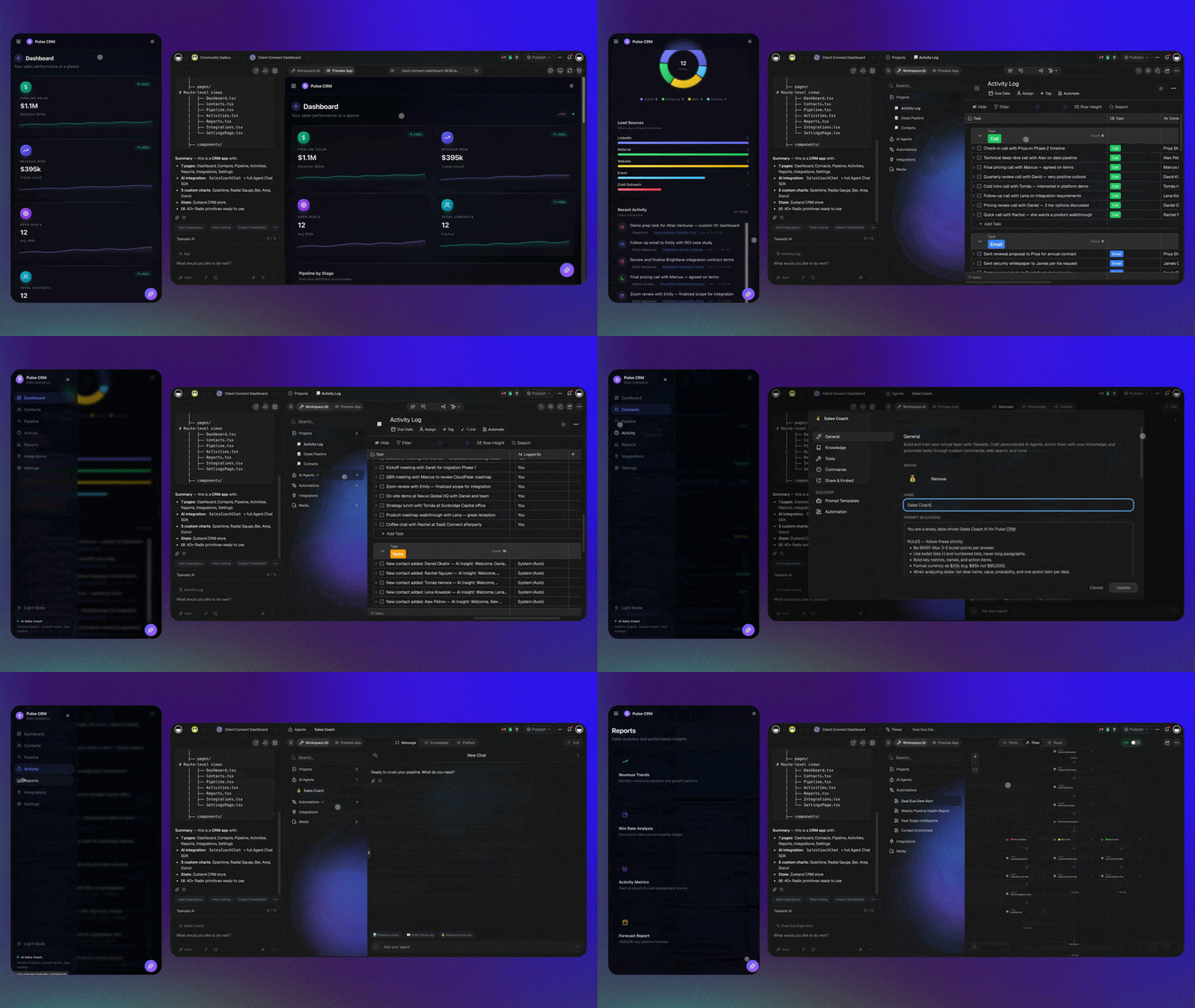
Taskade Genesis builds the CRM as a live app: tables for deals, contacts, companies and activities, a pipeline Board, a lead form, an AI agent and an automation. Prompts that build or change the app use [AI credits](https://www.taskade.com/learn/genesis/model-credits). Free starts with 0 AI credits, and Pro includes 50,000 a month. Hand edits to stages, fields and records use none.
This video from the Taskade "One Prompt, One App" series builds a CRM from a single prompt:
[One Prompt, One App Challenge, Day 1: CRM](https://www.youtube.com/embed/mQgDiqf6ybs?rel=0)
### Step 1: Paste the CRM prompt into Taskade Genesis
Open [Create](https://www.taskade.com/create) and paste the prompt below. Change the stage names, the ideal-customer line and the fields to match your business before you send it. Each line answers one question the builder would otherwise guess at.
```text
Build a sales CRM for a small B2B services team.
Projects:
- Deals: title, company, contact, email, value (number),
stage (New, Qualified, Proposal, Won, Lost), owner, source,
next_step, next_touch (date), last_touched (date), lost_reason.
- Contacts: name, email, phone, company, role, linked deals.
- Companies: name, website, industry, employee_count.
- Activities: deal, type (call, email, meeting, note), summary, date.
Views:
- A Board of Deals grouped by stage.
- A Table of Contacts with filters by company and role.
- A Calendar of Deals by next_touch.
Lead capture:
- A public lead form (name, email, company, what they need)
that creates a Deal in New with source = form.
AI agent "Deal Assistant":
- Scores each new Deal from 1 to 5 against our ideal customer:
B2B services companies with 10 to 200 employees.
- Writes a two-line summary of the deal from the form and notes.
- Drafts the next follow-up email. It never sends email itself.
Automation:
- Every morning, find Deals in New, Qualified or Proposal with
last_touched more than 3 days ago. Ask Deal Assistant for a
follow-up draft and create a task for the deal owner.
Dashboard page:
- Deals by stage, pipeline value by owner, and deals with no
touch in 7 days.
```
If you would rather start from a working app, clone one from the [CRM kits in the Taskade App Factory](https://www.taskade.com/apps/crms). On Free, [clone Sales Flow Tracker](https://www.taskade.com/apps/all/sales-flow-tracker-mv687sf8te07v3wy): it holds 8 projects, 1 AI agent and no automations, so it fits the Free plan. [Sales Pipeline Dashboard](https://www.taskade.com/app/sales-pipeline-dashboard-j1n0746e1z0olf6r) holds 3 projects, 1 AI agent and 1 automation, so cloning it needs a paid plan. A clone counts as 1 of the 3 apps on Free.

### Step 2: Check the pipeline schema it built
Open each project in Table view and compare it with the schema below. Rename any field the builder named differently. Delete any field that nobody will fill in. A CRM fails when a field is empty on most records, because the dashboard and the agent then work from gaps.
| Project | Field | Type | Why it exists |
|---|---|---|---|
| Deals | title | Text | The name your team says out loud |
| Deals | value | Number | Pipeline value by stage and owner |
| Deals | stage | Single select | Drives the Board and every stage rule |
| Deals | owner | Assignee | One person answers for each deal |
| Deals | source | Single select | Shows which channel brings deals that close |
| Deals | next_touch | Date | Puts the deal on the Calendar |
| Deals | last_touched | Date | Finds deals that went quiet |
| Deals | lost_reason | Single select | Turns lost deals into lessons |
| Contacts | name, email, role | Text | Who you talk to on each deal |
| Companies | industry, employee_count | Select, Number | Lets the agent score fit |
| Activities | type, summary, date | Select, Text, Date | The history the agent reads |
The same records open in multiple project views, such as List, Board, Table and Calendar, so you switch views without rebuilding anything. Read [database projects](https://www.taskade.com/wiki/projects/database-projects) and [custom fields](https://www.taskade.com/wiki/projects/custom-fields) for how fields and links work.
### Step 3: Add the follow-up rule, then run a second-account test
Open **Automations** and check the morning rule from the prompt. Run it once by hand and confirm that it creates one task for each quiet deal. To send the draft from Gmail or post it to Slack, add that step after a [Wait for approval](https://www.taskade.com/learn/automation/approval-step) step, so a person reads each message before it goes out. Gmail and Slack steps need a paid plan.
Then run the second-account test before anyone else uses the CRM:
1. Publish the app. Open the lead form in a private browser window and submit a test lead.
2. Confirm that a Deal appears in New with source = form, and that the agent wrote a score and a summary.
3. Sign in with a second account and check what it can see and edit.
4. If each client or rep must see only their own records, match records to the login with an owner field, then test the second account and one account that matches nothing. Sign-in confirms who the visitor is. It does not hide other records until you set up that match. See [App Users](https://www.taskade.com/learn/genesis/app-users).
5. Delete the test records, then import your real contacts from a CSV.
Workspace members get role-based access from Owner to Viewer. Give reps edit access to Deals and give a manager view access to the dashboard. Free includes 2 workspace members, and Pro includes up to 10.
## What does a CRM built with AI include?
A CRM built with AI includes the same five records as any CRM (contacts, companies, deals, activities and tasks) plus two working parts that act on them: an AI agent that reads the records and an automation that runs on a schedule or an event. The AI writes the data model from your description, so you skip the table-by-table setup.
```mermaid
erDiagram
COMPANY ||--o{ CONTACT : employs
CONTACT ||--o{ DEAL : "is on"
DEAL ||--o{ ACTIVITY : logs
DEAL ||--o{ TASK : drives
AGENT ||--o{ ACTIVITY : writes
DEAL {
string title
number value
string stage
string owner
date next_touch
date last_touched
}
CONTACT {
string name
string email
string role
}
ACTIVITY {
string type
string summary
date occurred
}
TASK {
string action
string owner
date due
}
```
You read this diagram once to understand the shape of a CRM. You never draw it. When you tell Taskade Genesis to "track deals from inbound demo to won, with a contact and a company on each deal", it builds this model, then adds the views, the agent and the automation on top.
| Part | What it does | Where it lives in Taskade | Workspace DNA layer |
|---|---|---|---|
| Tables | Store deals, contacts, companies and activities | Projects | Memory |
| Views | Show the same records as a Board, Table or Calendar | Project views | Memory |
| Lead form | Turns a website visitor into a Deal | The published app | Memory |
| AI agent | Scores leads, summarizes deals, drafts follow-ups | [AI agents](https://www.taskade.com/agents) | Intelligence |
| Automation | Runs the follow-up rule and logs the result | [Automations](https://www.taskade.com/automate) | Execution |
| Dashboard | Rolls up stage, value and quiet deals | An app page | Memory |
A spreadsheet stores rows, and a person has to remember the follow-up. A CRM built with AI stores the rows and also does the follow-up work:
```text
A SPREADSHEET A CRM BUILT WITH AI
────────────── ───────────────────
stores contacts ──▶ stores and scores contacts
you remember to follow up ──▶ an agent drafts the follow-up
you update the stage ──▶ an automation flags quiet deals
you build every column ──▶ you describe it once
one grid ──▶ Board, Table and Calendar views
```
## How do you write a CRM prompt that builds the right app?
A CRM prompt that builds the right app names five things: the records, the stages, the views, the lead source and the rules. A prompt that says only "build me a CRM" makes the builder guess each of those, and a guess gives you a generic app that you then fix one prompt at a time.
| Prompt part | Weak version | Strong version |
|---|---|---|
| Records | "Track customers" | "Deals, Contacts, Companies, Activities, with these fields" |
| Stages | "A pipeline" | "New, Qualified, Proposal, Won, Lost" |
| Views | "Make it visual" | "A Board by stage, a Table of contacts, a Calendar by next_touch" |
| Lead source | "Get leads in" | "A public form that creates a Deal in New with source = form" |
| AI agent | "Use AI" | "Score 1 to 5 against our ideal customer and draft a follow-up. Never send." |
| Rules | "Remind me" | "Every morning, task the owner on deals untouched for 3 days" |
Three prompts for common businesses, written in the same shape:
| Business | Stages | Agent job | Rule |
|---|---|---|---|
| Agency | Inquiry, Discovery call, Proposal sent, Signed, Lost | Summarize the discovery call notes and draft the proposal email | Task the owner 2 days after a proposal with no reply |
| Real estate agent | New lead, Showing booked, Offer, Under contract, Closed | Match the buyer's budget and area to the listings table | Remind the agent the day before each showing |
| Home services | Quote requested, Site visit, Quote sent, Booked, Done | Draft the quote email from the site-visit notes | Nudge quotes with no answer after 3 days |
Keep the first prompt to one sales motion. Add a second motion, such as renewals or partners, after the first one works. For more prompt patterns, the [AI sales and CRM dashboards](https://www.taskade.com/blog/ai-sales-crm-dashboards) guide shows ten dashboard layouts, and the [fundraising tracker guide](https://www.taskade.com/blog/ai-investor-crm-fundraising-tracker) shows the same method for an investor pipeline.
## How does the AI agent work the pipeline?
The AI agent works the pipeline in two ways: it reacts when a new lead arrives, and it drafts the next step when a deal goes quiet. The automation decides when the agent runs. The agent decides what to write. A person decides what to send. That split keeps the agent useful and keeps a person in charge of what customers read.
```mermaid
sequenceDiagram
actor Lead
participant Form as Lead form
participant CRM as Deals table
participant Agent as Deal Assistant
participant Auto as Morning automation
participant Owner as Deal owner
Lead->>Form: Submits name, email and need
Form->>CRM: Creates a Deal in New
CRM->>Agent: New deal to score
Agent->>CRM: Writes score and two-line summary
Auto->>CRM: Finds deals untouched for 3 days
Auto->>Agent: Asks for a follow-up draft
Agent->>Owner: Draft and a task
Owner->>Lead: Reviews and sends the message
```
Each stage carries one clear rule. Write the rules down before you build them, because each rule becomes one automation step or one line in the agent's instructions.
| Stage | Entry trigger | Agent does | Automation does |
|---|---|---|---|
| New | Form entry or import | Scores fit, writes a summary | Assigns an owner |
| Qualified | Owner moves the card | Drafts the first personal touch | Sets next_touch to 2 days out |
| Proposal | Owner moves the card | Summarizes needs and open questions | Creates a reminder task |
| Quiet (any open stage) | No touch in 3 days | Drafts a short nudge | Creates a task for the owner |
| Won | Owner moves the card | Drafts the kickoff note | Creates onboarding tasks |
| Lost | Owner moves the card | Logs the lost reason | Sets a re-touch date in 90 days |
A deal then moves forward through a lifecycle that the rules manage:
```mermaid
stateDiagram-v2
[*] --> New: form entry
New --> Qualified: score 3 or more
Qualified --> Proposal: needs confirmed
Proposal --> Won: signed
Proposal --> Lost: declined
Won --> [*]
Lost --> [*]
```
A quiet deal does not change stage. The morning rule finds it by the last_touched date and asks the owner to act, so the Board stays honest. Read [What Are AI Agents?](https://www.taskade.com/blog/what-are-ai-agents) for how agents use tools and memory, and the [speed-to-lead guide](https://www.taskade.com/blog/speed-to-lead) for a response-time rule on new leads.
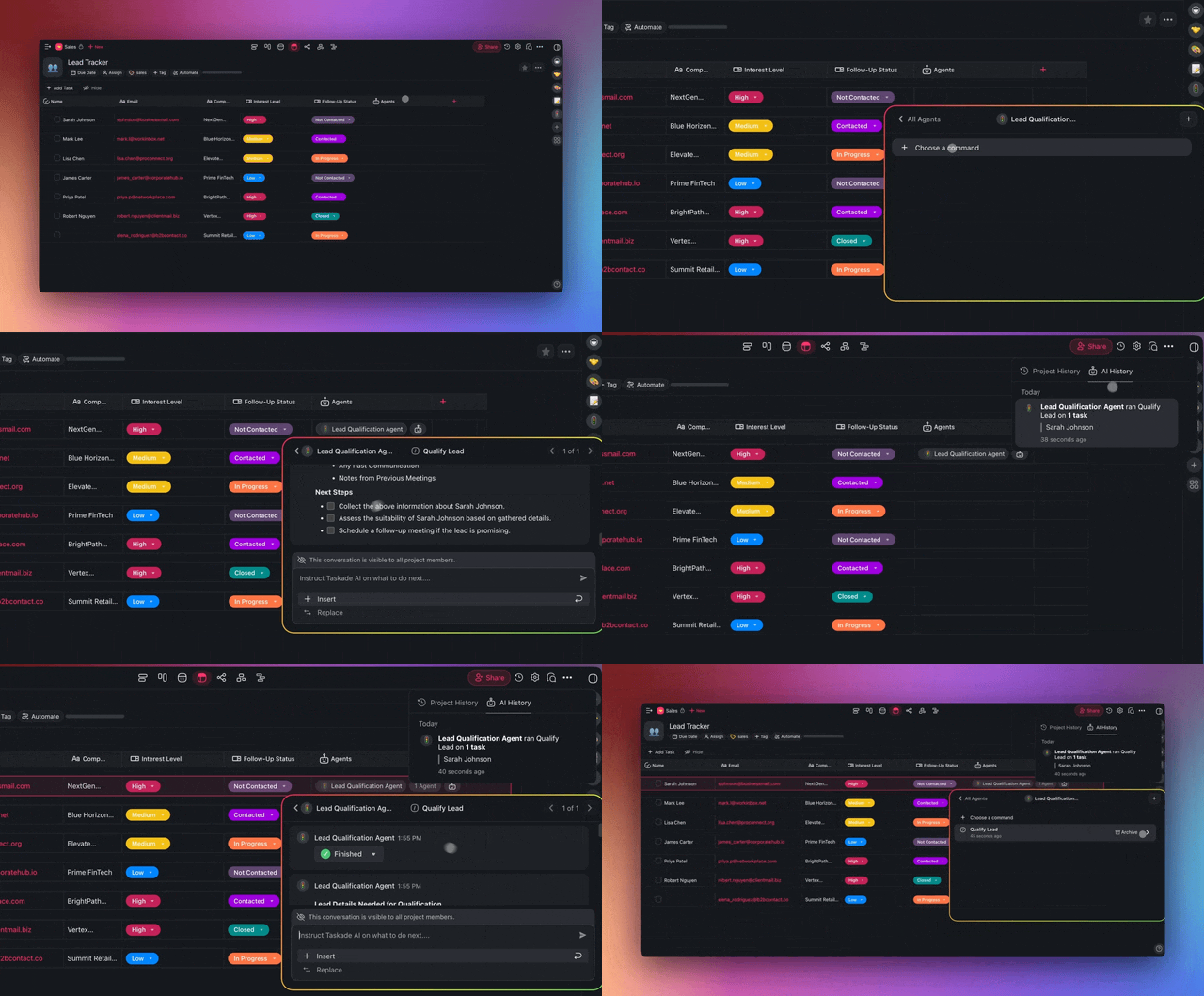
## How do you connect email, calendar and Slack?
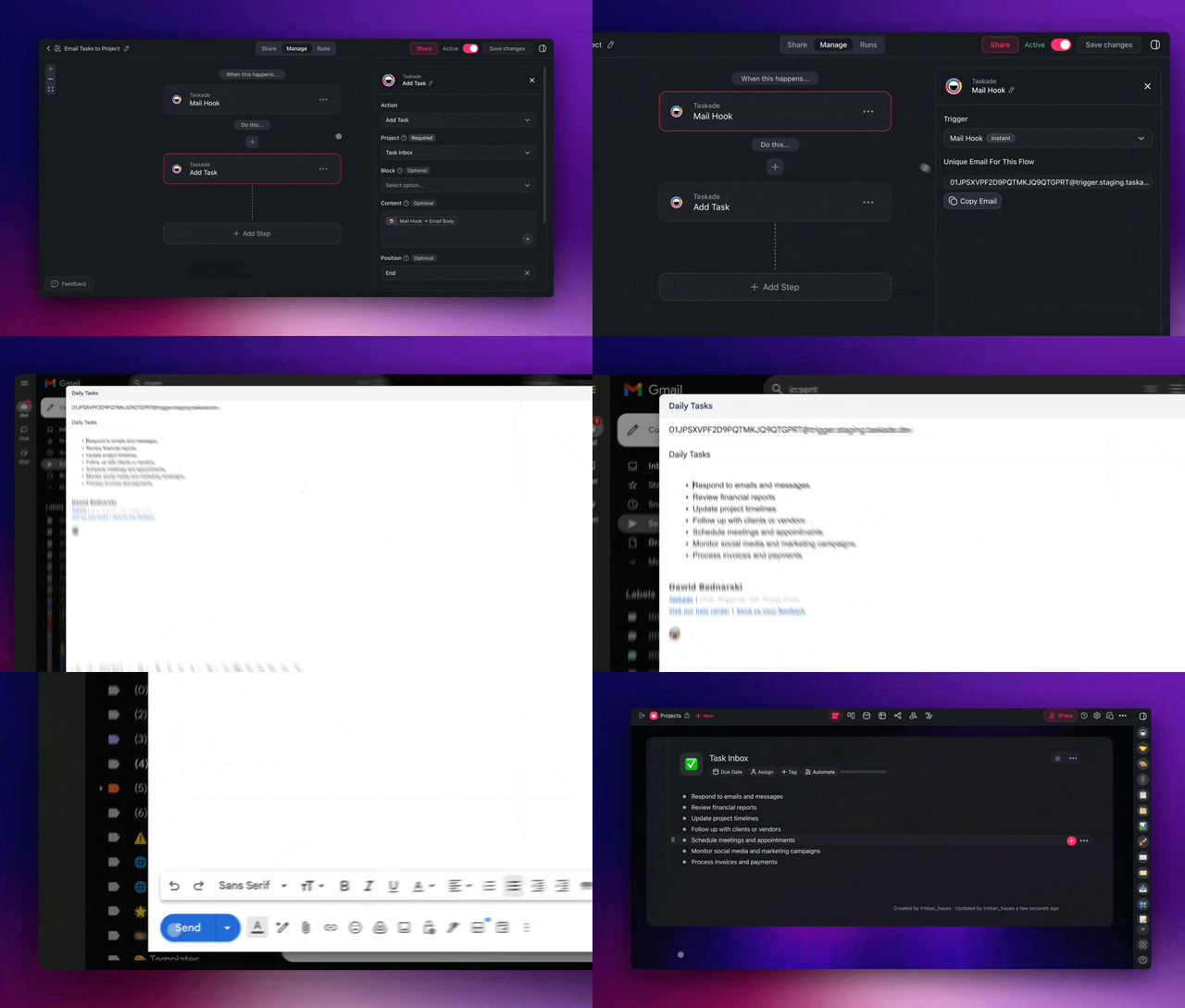
You connect email, calendar and Slack through automation steps, and each connection works in both directions: a trigger pulls an event in, and an action pushes work out. Taskade has [100+ integrations](https://www.taskade.com/integrations). On Free, automations run the built-in steps plus HTTP Request, RSS, Pushover and MCP Client. Gmail, Slack, Google Sheets, Google Calendar and Stripe are premium integrations that need a paid plan.
| Tool | Pulls in (trigger) | Pushes out (action) | Plan |
|---|---|---|---|
| Lead form in your app | New entry | Create a Deal | Every plan |
| Schedule | Every morning | Find quiet deals, create tasks | Every plan (counts as runs) |
| Gmail | New email from a contact | Send the approved follow-up | Paid plan |
| Google Calendar | Meeting booked | Log an activity, set next_touch | Paid plan |
| Slack | Message in a channel | Post the new-lead alert | Paid plan |
| Stripe | Invoice paid | Move the Deal to Won | Paid plan |
| Webhook | Event from your own system | Create or update a record | Pro and up |
A daily schedule uses about 30 runs a month, more than the 10 runs that Free includes in a billing period. Pro includes 1,000 runs a month. For connector details, read the [CRM integration guide](https://www.taskade.com/wiki/integrations/crm), and for the invoice side of a won deal, read [how to build an invoice app](https://www.taskade.com/blog/build-invoice-app).
## How do you test a CRM before your team uses it?
You test a CRM by acting as each person who touches it: a lead who fills in the form, a rep who works a deal and a second account that should see less. Most CRM problems show up in the first hour of that test, not in the build. The second-account step matters most, because sign-in confirms who someone is and does not by itself hide records.
```mermaid
flowchart TD
A["Submit a test lead
from a private window"] --> B{"Deal in New with
score and summary?"}
B -->|No| C["Fix the form mapping
or the agent instructions"]
B -->|Yes| D["Sign in with a
second account"]
D --> E{"Sees only what
you intended?"}
E -->|No| F["Match records to the login
with an owner field"]
E -->|Yes| G["Run the morning rule once"]
F --> D2["Retest: second account
plus an unmatched account"]
G --> H["Delete test data,
import real contacts"]
style A fill:#0d1b2a,color:#7dd3fc,stroke:#38bdf8,stroke-width:1.5px
style D fill:#1a140a,color:#ffb74d,stroke:#e65100,stroke-width:1.5px
style F fill:#1a0d24,color:#ce93d8,stroke:#6a1b9a,stroke-width:1.5px
style H fill:#2a1225,color:#ff8fa3,stroke:#ff2d60,stroke-width:2px
```
| Test | How to run it | Pass when |
|---|---|---|
| Lead form | Submit from a private window | A Deal appears in New with source = form |
| Agent score | Submit a fit lead and a poor-fit lead | The scores differ and the summary is accurate |
| Quiet-deal rule | Set last_touched 4 days back, run the rule | One task appears for the owner |
| Approval | Add a Gmail step after Wait for approval | Nothing sends until a person approves |
| Second account | Sign in as a teammate or a test client | It sees and edits only what you intended |
| Unmatched account | Sign in with an email on no record | It sees an empty state, not the full table |
| Export | Export the Deals table | Every field arrives in the file |
If the CRM faces clients, add a [custom domain](https://www.taskade.com/learn/genesis/custom-domains) on Pro and up so the form sits on your own address. Client logins work on every plan, Free included.
## Which views does a CRM need?
A CRM needs a view for each question your team asks: what is due today, where each deal stands, when the next touch falls and which records need a bulk edit. In Taskade the same records open in each view, so a rep, a manager and a founder each see the pipeline their own way without a second copy of the data.
| View | Pipeline question | Who opens it |
|---|---|---|
| List | What is due today? | Reps who clear follow-ups |
| Board | Where does each deal stand? | Anyone who watches deal flow |
| Calendar | When is the next touch or close date? | Reps and schedulers |
| Table | Which records need a bulk edit or a filter? | Ops and data cleanup |
| Mind Map | How do the people on an account connect? | Account-based sellers |
| Gantt Chart | Which long deals are slipping? | Managers who track long cycles |
| Org Chart | Who sits on the buying committee? | Sellers on large accounts |
Gantt Chart, Actionsheet and Org Chart need a paid plan. List, Board, Table, Calendar and Mind Map work on every plan.
## How do you report on the pipeline without a BI tool?
You report on the pipeline with two parts that the CRM already has: views that are always live, and an AI agent that writes the summary on a schedule. A dashboard page shows the numbers. The agent turns them into three sentences that a manager reads on Monday morning.
| Question | Where the answer comes from | Effort after setup |
|---|---|---|
| What is in each stage right now? | The Board | None, it is always live |
| What is the pipeline value by owner? | The Table, grouped and summed | One saved filter |
| Which deals went quiet? | The dashboard page, last_touched over 7 days | None |
| What changed this week? | An agent summary on a weekly schedule | One automation |
| Why did we lose deals this quarter? | The lost_reason field, grouped | One saved filter |
A weekly summary is one automation run and one AI step each week, so it fits Pro easily. On Free, the 10 runs per billing period and 0 starting AI credits limit how often the agent can write it.
## How do you move from a spreadsheet or another CRM?
You move from a spreadsheet or another CRM in four steps: export, clean, import and run both side by side for a week. The import is the easy part. The cleanup decides whether the new CRM starts with trusted data or with the same gaps the old one had.
| Step | What to do | Watch out for |
|---|---|---|
| 1. Export | Download contacts, deals and notes as CSV files | Notes and activity history often export as separate files |
| 2. Clean | Merge duplicate contacts, map old stages to your new stage names | A stage with no clear meaning, such as "Follow up" |
| 3. Import | Import each CSV into the matching project in Table view | Dates in mixed formats, and value fields stored as text |
| 4. Run side by side | Work new deals in the new CRM for one week, keep the old one read-only | Two sources of truth after the week ends |
From HubSpot, Pipedrive or Salesforce, export the deals and contacts reports to CSV and map the columns to the fields in Step 2. For a real migration from a real estate CRM, read the [LionDesk migration guide](https://www.taskade.com/blog/liondesk-crm-migration).
## What can you build on the Free plan?
On the Free plan you can build or clone a small CRM, edit it by hand and run a few automations. Free is a real starting point for one or two people. A team that wants AI drafts on every lead, Gmail follow-ups and a daily rule needs a paid plan. Pro is the plan we suggest for a small sales team.
| What you want | Free | Pro ($10/mo billed annually) |
|---|---|---|
| Taskade Genesis apps | 3 | Unlimited |
| Workspace members | 2 | Up to 10 |
| AI agents | 1 | Unlimited |
| AI credits for prompts and agent drafts | 0 to start (earn by referrals and invites) | 50,000 a month |
| Automation runs | 10 per billing period | 1,000 a month |
| Gmail, Slack, Google Calendar steps | No | Yes |
| Webhook trigger | No | Yes |
| Custom domain | No | Up to 10 |
| Clone a kit that holds automations | No | Yes |
On Free, you earn free AI credits with referrals and invites, and you can upgrade any time. Business is $25 a month billed annually and adds SSO. Max is $100 and Enterprise is $250 a month, both billed annually. Monthly billing is $20 for Pro, $50 for Business, $200 for Max and $500 for Enterprise. Full details are on the [pricing page](https://www.taskade.com/pricing).
## Other ways to build a CRM without code
Four other tools can hold a CRM without code, and each one is the better pick for a certain team. Before you choose, export the spreadsheet you keep today and write down the stages a deal walks. Those two lists fit every option below. Prices were checked on each vendor's pricing page on 2026-11-07.
| Option | Free plan | Paid from | Better fit when |
|---|---|---|---|
| [Google Sheets](https://workspace.google.com/pricing) | Yes, with a personal Google account | $7 a user a month (Business Starter) | One person tracks a short list and sends each follow-up by hand |
| [HubSpot](https://www.hubspot.com/pricing/crm) free CRM | Yes, up to 2 users and 1,000 contacts | Starter lists at $20 a seat a month | You want the standard contact and deal model that sales hires already know |
| [Airtable](https://www.airtable.com/pricing) | Yes, for individuals and very small teams | $20 a seat a month (Team, billed annually) | You want to design every field, view and interface yourself |
| [Notion](https://www.notion.com/pricing) | Yes | $10 a seat a month (Plus). Notion Agent is on Business at $20 | Your CRM notes sit next to docs and a wiki |
| Taskade Genesis | Yes, 3 apps and 0 AI credits to start | $10 a month (Pro, billed annually) | You want the form, pipeline, AI agent and follow-ups in one app |
A spreadsheet is the cheapest start, and it stays the right tool until follow-ups slip. HubSpot is the safer pick when you plan to add its email sequences and sales tools later, and its new-customer Starter offers on 2026-11-07 were $7 a seat billed annually and $10 month to month. Airtable gives you the most control over the data model. Notion is strongest when the CRM is mostly notes. For a side-by-side of ten builders, read [AI CRM builder tools compared](https://www.taskade.com/blog/ai-crm-builders), and for Airtable in detail, read [Taskade vs Airtable](https://www.taskade.com/compare/free-airtable-alternative).
## Should you build a CRM or buy one?
Build a CRM when your sales process does not match a standard B2B funnel, when you want the form, pipeline, agent and follow-ups in one app, or when per-seat prices grow faster than your team. Buy one when you need a dialer, call recording, territory and quota tools, or a deep app marketplace. Many teams do both: a bought CRM stays the record for finance, and a built app is where reps work each day.
```mermaid
graph TD
A["Do you need a dialer, call recording
or territory management?"] -->|Yes| B["Buy: a sales suite
such as HubSpot or Pipedrive"]
A -->|No| C["Does your process match
a standard sales funnel?"]
C -->|Yes, and the team is large| D["Buy, or run a built app
beside the bought CRM"]
C -->|No, or the team is small| E["Build: one prompt,
then test and import"]
E --> F["Taskade Genesis, Airtable,
or Notion"]
style E fill:#2a1225,color:#ff8fa3,stroke:#ff2d60,stroke-width:2px
style B fill:#0d1b2a,color:#7dd3fc,stroke:#38bdf8,stroke-width:1.5px
style D fill:#0d1b2a,color:#7dd3fc,stroke:#38bdf8,stroke-width:1.5px
style A fill:#1e1e2e,color:#94a3b8,stroke:#475569
style C fill:#1e1e2e,color:#94a3b8,stroke:#475569
```
| Question | Points to build | Points to buy |
|---|---|---|
| Team size | 1 to 25 people | 50 or more reps with a full-time admin |
| Sales process | Custom stages, services, bookings, partners | A standard SDR-to-AE funnel |
| Phone work | Calls logged by hand | Built-in dialer and call recording needed |
| Compliance | Standard business data | Audited controls your customers require |
| Budget shape | One plan for the team | Per-seat budget already approved |
For the full cost math against Salesforce, which repriced its main editions on 2026-09-03, read [build your own CRM vs Salesforce cost](https://www.taskade.com/blog/build-own-crm-vs-salesforce). For the buyer's list, read [best AI CRM software for small business](https://www.taskade.com/blog/best-ai-crm-software).
## Limitations: when a Taskade CRM is not the right fit
A Taskade Genesis CRM is a strong fit for a small team that wants one app for leads, deals and follow-ups. Pick a different tool in these cases:
- **You need a phone dialer, call recording or email deliverability tools.** A sales suite such as HubSpot Sales Hub, Close or Pipedrive includes them, and Taskade does not.
- **You run a large sales team with territories, quotas and a full-time admin.** Salesforce is made for that shape, with forecasting and approval rules that admins already know.
- **You want Gmail follow-ups on the Free plan.** Gmail steps in automations need a paid plan.
- **You plan to rebuild the app with prompts every day.** Each prompt to Taskade EVE uses AI credits. Hand edits to stages, fields and records use none.
- **You want the agent to email customers with no review.** You can build that, but this guide does not recommend it. Keep a Wait for approval step before any step that sends a message.
## Who builds a CRM with AI, and what do they build?
The people who build a CRM with AI are mostly owners and operators of small teams, not CRM administrators. If you can describe how a deal moves from "new lead" to "won", you can specify the system that runs it.
| Team | Build path | What the CRM does for them |
|---|---|---|
| Solo founder | Clone a [fundraising tracker](https://www.taskade.com/blog/ai-investor-crm-fundraising-tracker) and reshape it | Tracks investors and drafts updates |
| Small sales team | The prompt in Step 1 | The agent scores inbound, the rule chases quiet deals |
| Agency | The agency prompt, plus a [client portal](https://www.taskade.com/blog/build-client-portal) | Client deals and delivery in one workspace |
| Service business | The home-services prompt, plus a [booking system](https://www.taskade.com/blog/build-booking-system) | Quotes, bookings and reminders in one place |
| Real estate agent | The real estate prompt, then a CSV import from the old CRM | Buyers, showings and offers on one Board |
## Sources
- Taskade plans and limits: [taskade.com/pricing](https://www.taskade.com/pricing), checked 2026-11-07.
- HubSpot free CRM limits and Starter prices: [hubspot.com/pricing/crm](https://www.hubspot.com/pricing/crm), checked 2026-11-07.
- Airtable Team and Business prices: [airtable.com/pricing](https://www.airtable.com/pricing), checked 2026-11-07.
- Notion plan prices and Notion Agent: [notion.com/pricing](https://www.notion.com/pricing), checked 2026-11-07.
- Google Workspace Business Starter price: [workspace.google.com/pricing](https://workspace.google.com/pricing), checked 2026-11-07.
- Salesforce Sales Cloud editions and prices: [salesforce.com/sales/pricing](https://www.salesforce.com/sales/pricing/), checked 2026-11-07. The 2026-09-03 launch date of the Core, Advanced and Max editions: [Salesforce Ben](https://www.salesforceben.com/salesforce-announces-3-replacement-editions-bundling-ai-slack-and-security/).
## Frequently Asked Questions
### How do I build a CRM with AI?
Write down the stages a deal walks and the fields you track, then paste them into an AI app builder as one prompt. In [Taskade Genesis](https://www.taskade.com/create) that prompt returns a working CRM: deal, contact and company tables, a pipeline Board, a lead form, one AI agent and one automation. You then check the schema, add the follow-up rule and test the app with a second account before your team uses it.
### Can I build a CRM without code?
Yes. A no-code CRM is a set of tables, views and rules, and an AI builder writes all three from plain English. You never write code or wire database tables by hand. You do still decide the stages, the fields and who sees what, because those choices make the CRM useful. Hand edits to stages, fields and records use no AI credits.
### Can AI build me a CRM in one prompt?
Yes, for a first working version. One detailed prompt in Taskade Genesis builds the tables, the Board, the lead form, the AI agent and the automation in one pass. Most teams then send two to five short follow-up prompts to rename fields or add a dashboard. A vague prompt such as 'make me a CRM' builds a generic app, so name your stages and fields.
### Can I build a CRM with AI for free?
You can start free. The Taskade Free plan includes 3 Taskade Genesis apps, 2 workspace members, 1 agent and 10 automation runs per billing period. Free starts with 0 AI credits, so prompts that build or change the app need AI credits you earn or a paid plan. On Free, you earn free AI credits with referrals and invites, and you can upgrade any time. Pro is $10 a month billed annually ($20 monthly).
### Can I clone a CRM instead of building one?
Yes. The Taskade App Factory lists live CRM kits that you clone in one click. On Free, pick a kit with no automations and at most 1 agent, such as Sales Flow Tracker, because the Free plan cannot import a kit that holds automations. Kits with automations, such as Sales Pipeline Dashboard, need a paid plan to clone.
### What fields should a CRM have?
Start with five records: deals, contacts, companies, activities and tasks. A deal needs a title, a value, a stage, an owner, a source, a next-touch date and a last-touched date. A contact needs a name, an email, a company and a role. Add a lost reason field on day one, because it is the field teams wish they had kept when they review lost deals.
### How do I test a CRM before my team uses it?
Run a second-account test. Submit the public lead form from a private browser window, then sign in with a second account and check what it can see and edit. Sign-in confirms who the visitor is. If each person must see only their own records, match records to the login, then test with a second account and one account that matches no records.
### Do I need a paid plan for Gmail follow-ups?
Yes. Gmail, Slack, Google Sheets and Google Calendar are premium integrations in Taskade automations, and they need a paid plan. Free runs the built-in steps plus HTTP Request, RSS, Pushover and MCP Client. Webhook triggers and a custom domain need Pro and up, and SSO needs Business and up.
### How long does it take to build a CRM with AI?
A first version takes one prompt and a few minutes of build time. A version your team trusts usually takes an afternoon: an hour to write the stages and fields, a few prompts to adjust the app, a CSV import and a second-account test. The decisions take longer than the build.
### Is a CRM built with AI secure?
A Taskade Genesis CRM runs on secure infrastructure with role-based access from Owner to Viewer, and on Pro and up you can export the whole app and its data as a bundle. Client logins work on every plan. Sign-in confirms who the visitor is. You match their records to that login, and you test it with a second account.
### When should I buy a CRM instead of building one?
Buy when you need a phone dialer, call recording, territory and quota management, or a deep app marketplace, or when you run a large sales team with a full-time admin. HubSpot, Pipedrive and Salesforce are built for those jobs. Build when your process does not match a standard sales funnel, or when you want the form, pipeline, agent and follow-ups in one app.
## Related reading
- [AI CRM builder tools compared](https://www.taskade.com/blog/ai-crm-builders): ten builders side by side, with prices and trade-offs
- [Best AI CRM software for small business](https://www.taskade.com/blog/best-ai-crm-software): the buyer's list of ready-made CRMs
- [What is an agentic CRM?](https://www.taskade.com/blog/agentic-crm): how AI agents change what a CRM does
- [Build your own CRM vs Salesforce cost](https://www.taskade.com/blog/build-own-crm-vs-salesforce): the per-seat math for 2026
- [Build a business app without code](https://www.taskade.com/blog/build-business-app): the same prompt-to-app method for any internal tool
- [AI app templates](https://www.taskade.com/ai/apps): more starting points for the apps around a CRM
You bring the sales process. Taskade Genesis builds the system that runs it: Memory keeps every contact, Intelligence drafts the next step, and Execution runs the follow-up.
▲ ■ ● Memory · Intelligence · Execution. [Build your CRM from one prompt](https://www.taskade.com/create), or browse CRM kits in the [Taskade App Factory](https://www.taskade.com/apps).