# Asana vs Taskade Genesis: The 2026 AI Workflow Showdown
> Asana teaches agile methodology in its help docs then asks you to sign up. Taskade Genesis embeds the methodology as a running system from a single prompt. Here's the 2026 breakdown.
- Source: https://www.taskade.com/blog/asana-vs-taskade
- Published: 2026-05-05
- Author: Taskade Team
> **TL;DR:** Asana's glossary explains agile methodology in meticulous detail, then asks you to sign up and configure it yourself. Taskade Genesis embeds the methodology as a running system from a single prompt, multiple views, embedded AI agents, and reliable automation workflows included. Pricing starts free, with Pro from $10/month billed annually, vs Asana's $10.99/user/month. [Try Taskade Genesis free →](https://www.taskade.com/create)
---
## Workspace DNA: The Loop Asana's Methodology Cannot Close
Asana excels at capturing what needs to happen and who owns it. But the gap between "task assigned" and "task executed" still requires a human. Taskade Genesis closes that gap with Workspace DNA, the self-reinforcing loop where your data, your AI agents, and your automations run together as a single system.
```mermaid
flowchart LR
M[Memory
Projects + Knowledge]
I[Intelligence
AI Agents v2]
E[Execution
Automations]
M --> I
I --> E
E --> M
style M fill:#2a1225,color:#ff8fa3,stroke:#ff2d60
style I fill:#0d1b2a,color:#7dd3fc,stroke:#38bdf8
style E fill:#0d1a0e,color:#86efac,stroke:#22c55e
```
Applied to Asana's domain: Asana covers Memory (tasks, assignees, due dates) and partial Execution (Rules that react to status changes within the platform). It has no autonomous Intelligence layer. Asana AI suggests and assists; it does not execute. Taskade Genesis agents execute: when a sprint retrospective is due, the agent synthesizes feedback, generates the action list, assigns owners, and updates the Gantt, the methodology runs as code, not as a checklist to fill in.
## Why This Comparison Is Different
Asana is one of the most thoughtfully designed project management platforms in the industry. Its help center content is genuinely excellent, detailed methodology guides on OKRs, sprints, cross-functional planning, and team rituals. **Asana teaches you how to work better. Then it asks you to implement that methodology manually, one task at a time.**
This is the structural gap: Asana gives you the knowledge and the container. Taskade Genesis gives you the running system.
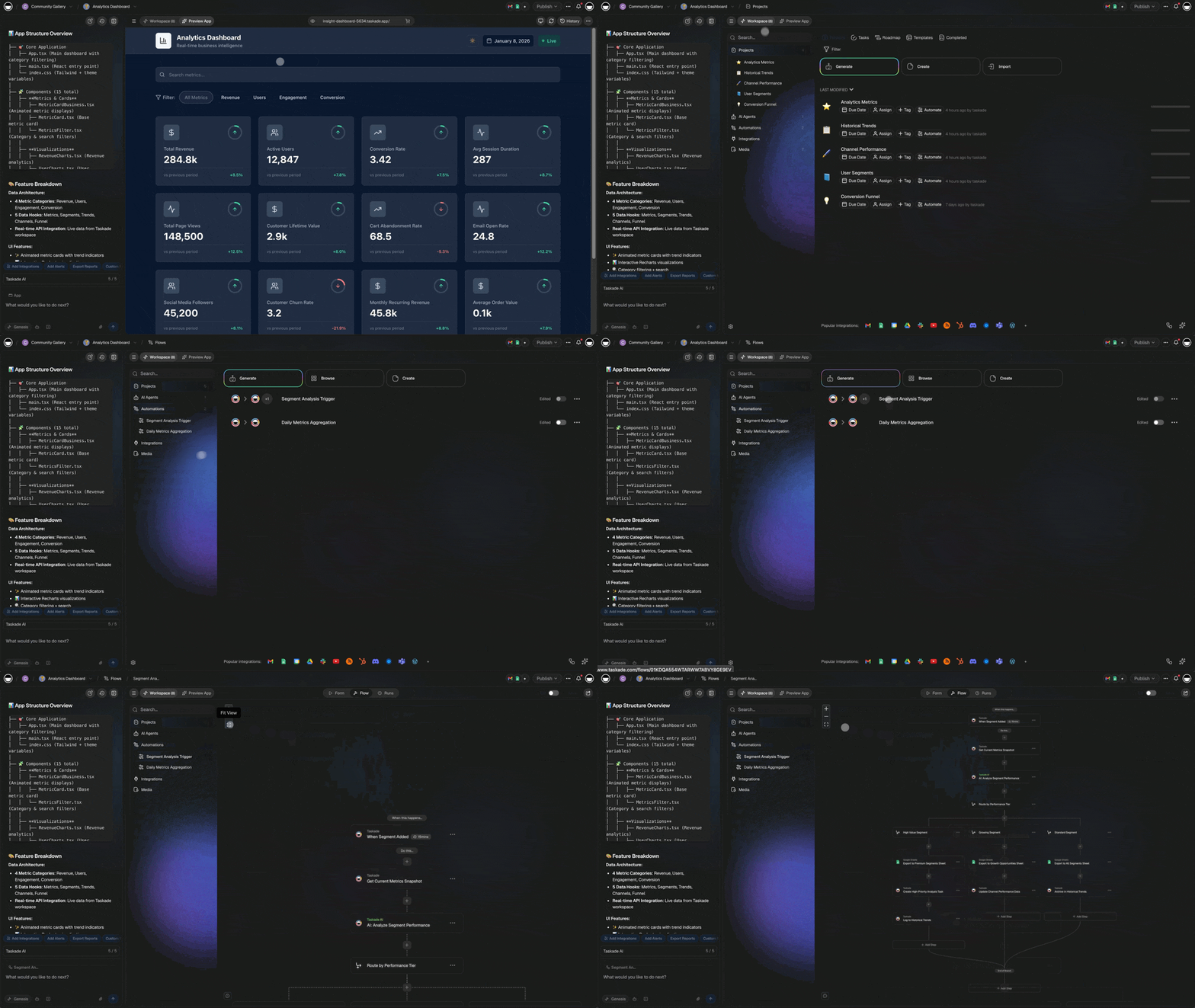
When you read Asana's guide on sprint retrospectives and then prompt EVE, "build a sprint retrospective workflow with an AI agent that synthesizes team feedback and generates an action item list", Taskade Genesis builds the project structure, configures the agent, sets up the automations, and deploys a shareable app. The methodology is operational in minutes, not days of configuration.
The second structural difference is views. Asana has 4 core views (List, Board, Timeline, Calendar). Taskade Genesis has 7, including Mind Map (unique for brainstorming) and Org Chart (unique for hierarchy visualization). Neither exists in Asana. For teams that need to move fluidly between idea generation and execution tracking, these two views are not optional extras.
The third difference is AI. Asana AI is assistive. It helps you manage projects faster. Taskade Genesis agents are autonomous. They execute work when triggered.
## Quick Comparison Table
| Dimension | Asana | Taskade Genesis |
|---|---|---|
| Core model | Project and task tracker | Workspace DNA (Memory + Intelligence + Execution) |
| Project views | 4 (List, Board, Timeline, Calendar) + Workload (Business+) | Multiple (List, Board, Calendar, Table, Mind Map, Gantt, Org Chart) |
| Mind Map view | ❌ | ✅ |
| Org Chart view | ❌ | ✅ |
| AI features | Asana AI (assistive, rule-based AI Studio) | Embedded autonomous agents, built-in tools, frontier models |
| AI autonomy | Responds when asked | Runs on triggers, events, and schedules |
| Automation reach | In-Asana Rules | 100+ bidirectional external integrations |
| External app deployment | ❌ | ✅ Custom domains, public URLs |
| Free tier | ✅ Up to 10 users (limited) | ✅ Unlimited viewers, earn free AI credits |
| Starter pricing | $10.99/user/month (annual) | Free |
| Advanced pricing | $24.99/user/month (annual) | $10/month, ≤10 seats (annual) |
| Business pricing | Custom | $25/month, unlimited seats |
| Taskade App Factory | ❌ | ✅ 150,000+ cloneable apps |
## Taskade Genesis Capabilities at a Glance
```
┌─────────────────────────────────────────────────────────────────────┐
│ TASKADE GENESIS CAPABILITIES │
├─────────────────────────────────────────────────────────────────────┤
│ Memory Multiple project views (List/Board/Calendar/ │
│ Table/Mind Map/Gantt/Org Chart) · RBAC · │
│ workspace-scoped knowledge bases │
│ │
│ Intelligence AI Agents v2 · built-in tools · frontier models │
│ from top AI labs · custom slash commands · │
│ persistent agent memory · multi-agent │
│ collaboration │
│ │
│ Execution Durable workflow execution · 100+ bidirectional │
│ integrations · branching/looping/retries · agent │
│ call primitive · ask_ai_structured (typed JSON) │
│ │
│ Interface Genesis Auth (OIDC/SSO) · custom domains · │
│ password protection · App Users (beta) · │
│ Taskade App Factory · Stripe Connect for creators │
└─────────────────────────────────────────────────────────────────────┘
```
## What Is Asana?
Asana was founded in 2008 by Dustin Moskovitz and Justin Rosenstein, former Facebook engineers, and went public in 2020. It is one of the most established work management platforms globally, used by more than 130,000 paying organizations including Amazon, Spotify, and The New York Times.
Asana's core product is a task and project tracker: lists, boards, timelines, and calendars connected by assignees, due dates, dependencies, and custom fields. Its strength is structure, Asana enforces clear ownership (every task has one assignee), clear deadlines, and clear progress visibility. Project health reporting, portfolio views, and workload balancing make Asana a strong choice for operations and program management teams.
In 2023-2024, Asana launched Asana AI (smart task suggestions, auto-generated briefs) and AI Studio (a rule-based workflow builder with AI action steps). These additions meaningfully improve the product for teams that want AI-assisted project management without leaving Asana.
Asana's pricing runs from Free (up to 10 users, limited features) to Starter at $10.99/user/month, Advanced at $24.99/user/month, and Enterprise at custom pricing on annual billing. Advanced features like Workload view, portfolio management, and AI Studio require the $24.99 Advanced tier.
## What Is Taskade Genesis?
Taskade Genesis is the AI app builder on [Taskade](https://www.taskade.com/), a workspace platform built on Workspace DNA: the self-reinforcing loop of Memory (Projects), Intelligence (Agents), and Execution (Automations). Genesis turns that loop into a deployed app from a natural-language prompt to Taskade EVE, the Taskade Genesis meta-agent.
EVE builds apps across all three Workspace DNA layers simultaneously. A sprint planning workspace prompt produces a project with the right structure, an AI agent configured to run standup summaries and flag blockers, and automation workflows that update stakeholders when sprint status changes. The methodology runs as a system, not as a template to manually populate.
Taskade's project views, List, Board, Calendar, Table, Mind Map, Gantt, and Org Chart, are all connected to the same live agent and automation layer. Switching views doesn't switch contexts; the system continues executing regardless of which view is active.
Deployed Taskade Genesis apps get shareable URLs, custom domains, and password protection. They can be published to the [Taskade App Factory](https://www.taskade.com/apps) for others to clone and adapt. Pricing: Free ($0), Pro ($10/month, ≤10 seats, billed annually), Business ($25/month, unlimited), Max ($100/month). See [/pricing](https://www.taskade.com/pricing).
## 5 Key Differences
### 1. View Count and Mind Map: Asana's Missing Dimension
Asana's 4 core views are excellent for execution tracking. But the path from idea to project, the brainstorming and planning phase where a concept becomes a structured set of tasks, has no native home in Asana. Teams typically use a whiteboard tool (Miro, FigJam) or a separate doc, then manually transcribe the output into Asana tasks.
Taskade's Mind Map view closes this gap. You can brainstorm in Mind Map, branch ideas into sub-items, and convert any node into a project task in the same workspace. The Org Chart view visualizes team hierarchies and role assignments in a way that Asana's list-based assignee model does not support.
For capacity planning, which is fundamentally about understanding who owns what and how much bandwidth each person has, the combination of Org Chart and Gantt views provides context that Asana's Workload view (Business+ plan, $24.99/user/month) approximates but doesn't match structurally.
This Team Capacity Planner demonstrates the Taskade view to Workspace DNA connection, switching between Gantt and Org Chart while agents monitor team load in the background:
[Team Capacity Planner, Taskade Genesis](https://www.taskade.com/app/team-capacity-planner-qttq6maivthotsm4)
**[Clone this Capacity Planner](https://www.taskade.com/create)** and add your team's current projects. See [Founder Operating System 2026](https://www.taskade.com/blog/founder-operating-system) for how to build a full operating system around this layer.
### 2. Sprint Tracking: Methodology as a Running System
Asana's sprint templates are among the best in the industry. The Asana guide on Scrum sprint planning is genuinely comprehensive. It explains sprint ceremonies, backlog refinement, velocity tracking, and retrospective formats with precision. Then it asks you to set up all of that manually in Asana.
Taskade Genesis takes the methodology step and makes it operational. Describe your sprint parameters to EVE, team size, sprint length, velocity target, ceremonies, and Genesis builds a structured sprint workspace with an AI agent pre-configured to run standups, track velocity, and surface blockers. The methodology is the system, not just the guide.
Here is a Sprint Tracker built on exactly that model:
[Sprint Tracker, Taskade Genesis](https://www.taskade.com/app/neon-task-management-dashboard-711t4lvklewvz1dd)
**[Clone this Sprint Tracker](https://www.taskade.com/create)** and have your Scrum agent run tomorrow's standup automatically. Explore more at [/templates](https://www.taskade.com/templates).
### 3. HR Workflows: From Form Submission to Running Onboarding
Asana has strong HR workflow templates, onboarding checklists, performance review trackers, and recruitment pipelines. These work well as manual tracking tools. When a new hire arrives, a coordinator fills in the onboarding checklist; when a review cycle starts, managers update their direct reports' entries.
Taskade Genesis can automate the intake and execution layer of these workflows. An AI agent watches for a Google Forms submission (new hire form) → creates an onboarding project from the template → assigns tasks to HR, IT, and the hiring manager → sends a Slack welcome → and tracks completion. The coordinator monitors rather than manages.
This HR Dashboard shows what the automated version looks like in practice:
[HR Dashboard, Taskade Genesis](https://www.taskade.com/app/hr-dashboard-ml2bqs8nmql3h3zb)
**[Clone this HR Dashboard](https://www.taskade.com/create)** and connect your intake form to the onboarding automation. Compare with [Your Workspace Is a Computer](https://www.taskade.com/blog/workspace-dna-architecture) for the broader Workspace DNA framing.
### 4. Support Workflows: Ticket Management with Embedded Intelligence
Asana is used for support ticket management, but it is not purpose-built for it. Support teams commonly build custom fields (priority, product area, SLA tier) and automation rules (assign by type, escalate if overdue) to approximate a help desk. As ticket volume grows, the manual classification and routing burden increases.
Taskade Genesis can build a support workflow where an AI agent classifies incoming tickets, routes them by priority and type, and drafts first-response messages, automating the high-volume, low-judgment work that slows support teams at scale.
This Support Workflow Manager was built for exactly this pattern:
[Support Workflow Manager, Taskade Genesis](https://www.taskade.com/app/support-workflow-manager-s4pf46i9wi60h0rv)
**[Clone this Support Workflow](https://www.taskade.com/create)** and configure the AI agent to match your product taxonomy. See [/agents](https://www.taskade.com/agents) for the full agent capability reference.
### 5. Content Operations: From Calendar Tracker to Automated Pipeline
Asana's content calendar templates track article status across stages. They answer "what is each piece in?" and "who owns it?", essential visibility for an editorial team. Automations can notify editors when a draft is ready for review or move items when status changes.
Taskade Genesis takes the next step: automating the production pipeline itself. An agent can summarize a draft, check it against a style guide, push an approved piece to a CMS webhook, update the calendar status, and notify the distribution team, triggered automatically when the "approved" status is set.
This Content Workflow app shows the automated content pipeline in action:
[Content Workflow, Taskade Genesis](https://www.taskade.com/app/content-workflow-hvu1z1ab0fyp9dkh)
**[Clone this Content Workflow](https://www.taskade.com/create)** and see how it compares to your current Asana editorial board. Browse [/automate](https://www.taskade.com/automate) for automation templates that connect to your publishing stack.
## When to Choose Asana
Asana is the better choice when:
- **You need strong portfolio and workload management** for large programs with many interdependent projects, Asana's portfolio view and workload balance are best-in-class
- **Your team has complex task dependencies** where Gantt-style timeline and dependency tracking are the primary interface (Asana Timeline is excellent)
- **You operate in an enterprise environment** where Asana's SOC 2 compliance, SAML SSO, data residency options, and enterprise support are required
- **Your team is large and non-technical**: Asana's intuitive task model ("one task, one owner, one due date") is the lowest-friction system for broad organizational adoption
- **You use Asana's reporting extensively**, custom dashboards, portfolio status, and milestone tracking are mature and polished
- **You are deeply integrated with Asana via API** and have existing automation rules and third-party integrations built on the Asana data model
Asana is a proven, enterprise-grade platform with a decade of product refinement. Teams that have built their operations around Asana's model have no urgent reason to migrate unless AI-agent autonomy or external app deployment are active requirements.
## When to Choose Taskade Genesis
Taskade Genesis is the better choice when:
- **You want AI agents that execute work autonomously**, not just suggest tasks or generate briefs on request
- **You need Mind Map or Org Chart views** for brainstorming, ideation, and hierarchy visualization that Asana does not provide
- **Your team is budget-sensitive**: Taskade Genesis Pro at $10/month (≤10 seats) is 25× cheaper than Asana Advanced at $24.99/user/month for a 10-person team
- **You want to build apps for external users**, clients, customers, vendors, with custom domains and no additional seat licensing
- **Your automation needs span external systems**: Slack, Gmail, Stripe, GitHub, Calendly, Salesforce, not just in-Asana rules
- **You want the methodology to run, not just organize**: Genesis embeds agile, content ops, HR, and support workflows as running systems from a single prompt
- **You need multiple project views with no view ceiling**: List, Board, Calendar, Table, Mind Map, Gantt, and Org Chart (Timeline is the scrolling component inside Gantt, not a separate view), all connected to the same live agent layer
- **You want role-based access that maps cleanly to cross-functional teams**: Owner to Viewer, with every level defined by what it can do
- **Your AI needs span multiple model providers**, frontier models from top AI labs, with per-agent model selection so different agents in the same app can use different LLMs
- **You want the Workspace DNA loop**: Memory feeds Intelligence, Intelligence triggers Execution, Execution creates new Memory, methodology as a self-sustaining system
Read more: [Best AI App Builder Demos You Can Clone Today](https://www.taskade.com/blog/ai-app-demos) | [AI Agents](https://www.taskade.com/agents) | [Taskade App Factory](https://www.taskade.com/apps) | [Workspace DNA](https://www.taskade.com/wiki/dna) | [Automations](https://www.taskade.com/automate) | [Templates](https://www.taskade.com/templates) | [Founder OS](https://www.taskade.com/blog/founder-operating-system)
## Pricing Comparison
| Plan | Asana | Taskade Genesis |
|---|---|---|
| Free | Up to 10 users, limited features | Unlimited viewers, earn free AI credits |
| Starter | $10.99/user/month (annual) | Free |
| Advanced | $24.99/user/month (annual) | $10/month total, ≤10 seats (annual) |
| Business | Custom | $25/month, unlimited seats |
| Max | — | $100/month, max AI capacity |
| Enterprise | Custom | $250/month, custom SLA |
| AI agents | AI Studio (Advanced+) | Included from Free |
| External app users | Internal only | Unlimited, included |
| Mind Map view | ❌ | ✅ Included |
**10-seat cost comparison (annual):**
- Asana Advanced: $24.99 × 10 × 12 = $2,999/year
- Taskade Genesis Pro: $10/month = $120/year
- Difference: 25× cheaper with more AI capability
## Migration: How to Move From Asana to Taskade Genesis
1. **Export your Asana projects**: Project menu → Export → CSV (includes tasks, assignees, due dates, custom fields, and sections)
2. **Import into Taskade**, use Taskade's CSV import to recreate the project structure; task sections map to list sections or board columns
3. **Prompt EVE for the app layer**, describe your project's purpose and workflow logic; EVE wraps the imported project in a Taskade Genesis app with agents and automations
4. **Recreate your automation rules**: Asana Rules (if/then conditions) map directly to Taskade automation trigger-action pairs, with the option to add AI agent steps
5. **Extend with external integrations**, connect Slack, Gmail, GitHub, and other tools via Taskade's 100+ bidirectional connectors
6. **Configure role-based access**: Taskade's RBAC (Owner to Viewer) maps to Asana's permission model
See the [free Asana alternative comparison](https://www.taskade.com/compare/free-asana-alternative) for a structured breakdown, and explore [/learn](https://www.taskade.com/learn) for step-by-step Taskade setup guides.
## FAQ
### Is Taskade Genesis a good Asana alternative?
Yes. Taskade Genesis is a strong Asana alternative for teams that want AI agents running inside their workflows, not just suggesting tasks. Genesis offers multiple project views (including Mind Map and Org Chart that Asana lacks), embedded autonomous agents, reliable automation workflows across 100+ integrations, and pricing that starts free, with Pro from $10/month billed annually, vs Asana Starter at $10.99/user/month. Taskade EVE, the Taskade Genesis meta-agent, can recreate your Asana project structure from a prompt in minutes.
### How many project views does Taskade have compared to Asana?
Taskade has multiple project views: List, Board (Kanban), Calendar, Table, Mind Map, Gantt, and Org Chart. Asana has 4 core views: List, Board, Timeline (Gantt-style), and Calendar, plus Workload on Business/Enterprise plans. Taskade's Mind Map is unique for brainstorming and ideation. Org Chart is unique for visualizing team hierarchies. Neither exists in Asana.
### Does Asana have AI agents?
Asana has Asana AI and an AI Studio (rule-based workflow builder with AI steps). These features help automate assignment, generate task drafts, and summarize project status. They are helpful but not autonomous. Taskade Genesis agents are embedded at app creation, run on automation triggers from 100+ external integrations, maintain persistent memory, and operate with built-in tools across frontier AI models.
### What is the pricing difference between Asana and Taskade Genesis?
Asana Starter costs $10.99/user/month (annual billing); Advanced costs $24.99/user/month. A team of 10 on Asana Advanced is $2,999/year. Taskade Genesis Pro is $10/month total (≤10 seats, annual), $120/year for the same team size. That is a 25× price difference for the 10-seat comparison. Asana's AI features and advanced automations require the higher tiers; Taskade includes AI agents starting on the Free plan.
### Can Taskade Genesis reproduce Asana's methodology templates?
Yes, and it goes further. Asana has excellent methodology templates that you configure manually. Taskade Genesis can build a project structure from a methodology description, EVE sets up the structure, views, agent, and automations in one step. The methodology becomes a running system, not a template to fill in.
### How do Asana automations compare to Taskade automations?
Asana Rules are in-project trigger-action automations. They are powerful within Asana but limited to the Asana ecosystem. Taskade automations are bidirectional across 100+ external integrations, triggers pull from Slack, Gmail, Stripe, GitHub, Calendly; actions push to Salesforce, Notion, Sheets, HubSpot, Webhooks. Taskade automations also support AI agent steps that reason about data mid-workflow.
### Does Taskade work for team capacity planning like Asana Workload?
Yes. Taskade includes a Team Capacity Planner app (cloneable from Genesis) that tracks workload distribution, sprint capacity, and resource allocation with AI agent insights. Asana Workload is available on Business and Enterprise plans ($24.99/user/month and above). Taskade's capacity planning is included in the Pro plan at $10/month total for ≤10 seats.
### Can I use Taskade for HR and support workflows like Asana?
Yes. Taskade Genesis can build HR dashboards, onboarding workflows, support ticket managers, and recruitment trackers, with embedded AI agents that route tickets, summarize candidate profiles, and trigger follow-up automations. Asana has templates for these workflows, but they are static containers. Taskade Genesis apps are running systems that execute work as it arrives.
### How do I migrate from Asana to Taskade?
Export your Asana projects as CSV (Project → Export → CSV). In Taskade, import the CSV to recreate the task structure. Then prompt EVE in Genesis to wrap the project in an app with agents and automations, describe the workflow logic and EVE configures it. Reconnect your integrations (Slack, Google Workspace, GitHub) via Taskade's 100+ connector library. Most Asana project structures can be rebuilt and enhanced with AI in under an hour.
## Get Started
Asana gives you the methodology and the container. Taskade Genesis gives you the methodology as a running system, from prompt to deployed app, with embedded agents, multiple project views, and reliable automation workflows included.
Start free at [/create](https://www.taskade.com/create), explore cloneable Taskade Genesis apps in the [Taskade App Factory](https://www.taskade.com/apps), or browse [agent templates](https://www.taskade.com/agents) to see what your methodology-as-a-system could look like.
---
## Migration Workflow: Asana → Taskade Genesis
```mermaid
sequenceDiagram
participant U as Your Team
participant T as Taskade Genesis
participant A as Asana
U->>T: Describe app in plain English
T->>T: EVE generates app (projects + agents + automations)
T->>U: Live URL in 3-7 minutes
U->>A: Export your data
A-->>U: CSV / JSON
U->>T: Import to new Genesis app
T->>U: Migrated app + agents + flows in one place
```
Asana CSVs include tasks, assignees, due dates, custom fields, and sections, everything maps cleanly to Taskade projects. Once imported, prompt EVE to wrap the data in an app with the automation logic that Asana Rules approximated but could not extend beyond the Asana ecosystem. Add your Slack, Gmail, and CRM integrations in one step.
Explore [cloneable Genesis demos](https://www.taskade.com/blog/ai-app-demos), [Founder OS](https://www.taskade.com/blog/founder-operating-system), [AI Agents](https://www.taskade.com/agents), [Automations](https://www.taskade.com/automate), [Templates](https://www.taskade.com/templates), and the [Taskade App Factory](https://www.taskade.com/apps) for your first living methodology system.