# Best AI Task Managers: 7 Tools to Boost Productivity (2026)
> The best AI task managers combine intelligent automation with traditional project management. Compare Taskade, Todoist, Things 3, TickTick, Any.do, Motion, and ClickUp for 2026.
- Source: https://www.taskade.com/blog/ai-task-manager
- Published: 2025-01-08
- Updated: 2026-04-08
- Author: Dawid Bednarski
Umberto Eco once called lists the antidote to chaos. He would likely find today's AI task managers intriguing -- tools that do not just store lists but actively think about what belongs on them, in what order, and when to act.
In 2026, the best AI task managers combine intelligent automation with proven [productivity methods](https://www.taskade.com/blog/supercharge-your-workflow-with-these-classic-productivity-methods). They generate tasks from your notes, prioritize based on deadlines and workload, and execute routine workflows without manual intervention.
This guide compares the 7 best AI task managers, with detailed analysis of how each handles AI-powered task management.
> **TL;DR:** Taskade is the leading AI task manager with autonomous agents, multiple project views, and 100+ integrations, free to start with Pro from $10/month billed annually. For personal scheduling, Motion and Todoist are strong alternatives. 150,000+ apps built on Taskade Genesis prove the platform scales. [Try it free -->](https://www.taskade.com/signup)
## What Are AI Task Managers?
AI task managers are software tools that use artificial intelligence to organize, prioritize, and automate tasks. Unlike traditional to-do lists, AI task managers learn from your work habits, offer tailored productivity insights, and adapt the experience to your work style.
AI task managers use machine learning algorithms to analyze past activities, spot patterns, and predict what tasks come next. They also use [natural language processing (NLP)](https://www.taskade.com/blog/nlp-guide) to understand your commands, making it possible to create and organize tasks conversationally.
The key difference in 2026: the best AI task managers now include autonomous [AI agents](https://www.taskade.com/agents) that do not just respond to commands but proactively manage your workflow. They detect overdue items, suggest reprioritization, and trigger [automations](https://www.taskade.com/automate) without human prompting.
```mermaid
graph TD
subgraph Traditional["Traditional Task Manager"]
A["Manual Task Creation"] --> B["Manual Prioritization"]
B --> C["Manual Status Updates"]
C --> D["Manual Reminders"]
end
subgraph AI["AI Task Manager (2026)"]
E["AI Generates Tasks"] --> F["AI Prioritizes Dynamically"]
F --> G["Agents Update Status"]
G --> H["Automations Execute"]
H --> E
end
style A fill:#1e1e2e,color:#94a3b8,stroke:#475569
style B fill:#1e1e2e,color:#94a3b8,stroke:#475569
style C fill:#1e1e2e,color:#94a3b8,stroke:#475569
style D fill:#1e1e2e,color:#94a3b8,stroke:#475569
style E fill:#11111b,color:#cdd6f4,stroke:#00d4aa
style F fill:#0d1b2a,color:#7dd3fc,stroke:#38bdf8,stroke-width:1.5px
style G fill:#0d1a0e,color:#86efac,stroke:#22c55e,stroke-width:1.5px
style H fill:#2a1225,color:#ff8fa3,stroke:#ff2d60,stroke-width:2px
style Traditional fill:#1a140a,stroke:#3a2a1a
style AI fill:#0a1a14,stroke:#1b3d2a
```
## How to Choose the Right AI Task Manager
### Integration with Existing Tools
Your AI task manager should connect seamlessly with your current software -- calendars, emails, [project management apps](https://www.taskade.com/blog/best-ai-project-management-tools), and communication tools. Taskade offers [100+ bidirectional integrations](https://www.taskade.com/integrations) across 10 categories. And to bring your workspace into Claude Desktop or Cursor over Taskade's hosted MCP server, read the [full MCP explainer](https://www.taskade.com/blog/mcp).
### Automation Capabilities
Automation is what separates AI task managers from traditional tools. Look for event-driven [workflows](https://www.taskade.com/automate) that can trigger actions across your toolchain, not just basic reminders. The best tools let you build [custom automation flows](https://www.taskade.com/blog/advanced-automation-workflows) without code.
### Multiple Project Views
Different tasks benefit from different visualizations. A to-do list view works for personal tasks, but team projects need boards, calendars, and dependency charts. Taskade offers [multiple project views](https://www.taskade.com/learn/projects/project-views): List, Board, Calendar, Table, Mind Map, Gantt, and Org Chart.
### Security and Data Privacy
Using AI-powered features should not mean sacrificing privacy. Your AI task manager should prioritize data security and never train models on your sensitive information. Look for tools with role-based access (Owner to Viewer) to control who sees what.
## 7 Best AI Task Managers in 2026
### Quick Comparison
| Tool | AI Depth | Views | Integrations | Team Support | Starting Price |
|------|----------|-------|--------------|--------------|---------------|
| **Taskade** | Autonomous agents, built-in tools | Multiple views | 100+ | Real-time + video | Free / $10/mo |
| **Todoist** | AI Assistant add-on | 3 views | 80+ via API | Shared projects | Free / $5/mo |
| **Things 3** | None (manual only) | 3 views | Shortcuts only | No | $49.99 one-time |
| **TickTick** | Basic AI suggestions | 4 views | Calendar sync | Shared lists | Free / $3.99/mo |
| **Any.do** | AI task suggestions | 3 views | Limited | Shared lists | Free / $5.99/mo |
| **Motion** | AI scheduling | Calendar focus | Google/Outlook | Team calendar | $19/mo |
| **ClickUp** | ClickUp Brain add-on | 15+ views | 200+ | Full PM suite | Free / $7/mo |
### 1. Taskade
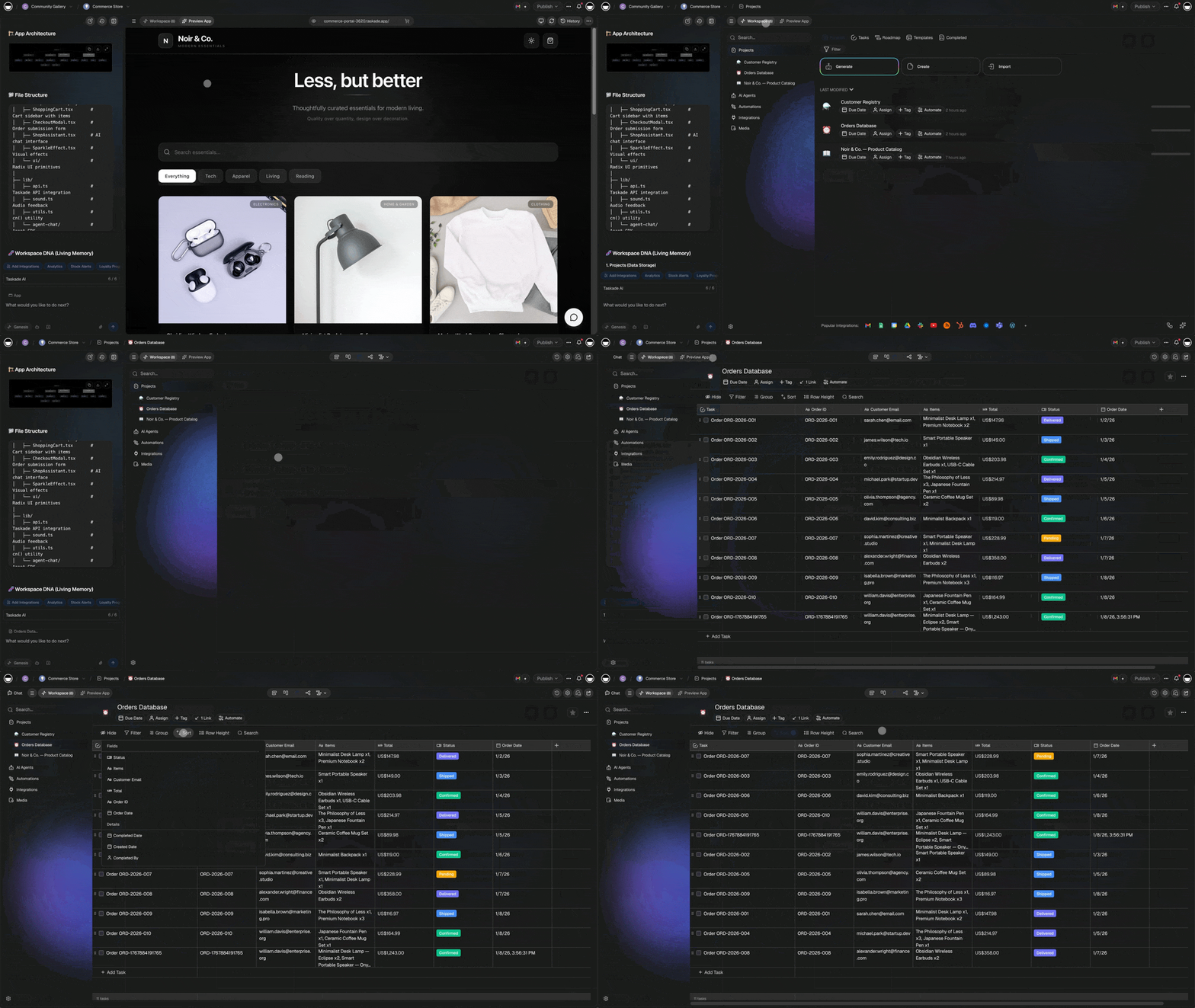
Taskade is an all-in-one AI task manager built for both individuals and teams. It combines autonomous [AI agents](https://www.taskade.com/agents) with comprehensive [task and project management](https://www.taskade.com/blog/ai-task-management-tools-for-small-business) in a single workspace.
What sets Taskade apart: AI agents do not just assist -- they act. They create tasks from your meeting notes, prioritize your backlog based on deadlines and dependencies, and execute multi-step workflows autonomously. Each agent has [persistent memory](https://www.taskade.com/learn/agents/knowledge) that compounds over time.
https://www.youtube.com/watch?v=bnDe3qpMHNw
#### Key AI Features
| Feature | What It Does |
|---------|-------------|
| [Custom AI Agents](https://www.taskade.com/learn/agents/custom-agents) | Build specialized agents with built-in tools, custom knowledge, and persistent memory |
| [AI Project Studio](https://www.taskade.com/learn/projects/create-project) | Generate complete projects with tasks, subtasks, and dependencies from a single prompt |
| [Workflow Automation](https://www.taskade.com/learn/automation/triggers) | Build event-driven automation flows with 100+ integrations (Slack, Gmail, HubSpot, Shopify) |
| [AI Assistant](https://www.taskade.com/learn/agents/ai-chat) | Use /ai commands for contextual task generation, prioritization, and editing in any project |
| [Multiple Project Views](https://www.taskade.com/learn/projects/project-views) | Visualize tasks as List, Board, Calendar, Table, Mind Map, Gantt, or Org Chart |
https://www.youtube.com/watch?v=cf2QZpkhqQM
#### Additional Task Management Features
- **Cross-platform support**: Manage tasks with AI on desktop, tablet, and smartphone
- **File Management**: Upload unlimited files and link them directly to tasks
- **Reminders and Due Dates**: Automated alerts for deadlines and milestones
- **Real-time collaboration**: Shared workspaces with RBAC (Owner to Viewer)
- **Communication tools**: Built-in video calls, chat, and screen sharing
- **Calendar Sync**: Integrate with Google Calendar and Outlook
- **Offline Mode**: Create and edit tasks offline with automatic syncing
Visit Taskade's [pricing page](https://www.taskade.com/pricing) for a full breakdown of AI features and plans.
[**Start managing tasks with AI agents -->**](https://www.taskade.com/signup)
#### Taskade Plans and Pricing
| Plan | Price (Annual) | Key Features |
|------|---------------|--------------|
| **Free** | $0 | AI agents, basic views, basic automation |
| **Pro** | $10/mo | Up to 10 seats, full AI + automation |
| **Business** | $25/mo | Unlimited seats, advanced controls |
### 2. Todoist
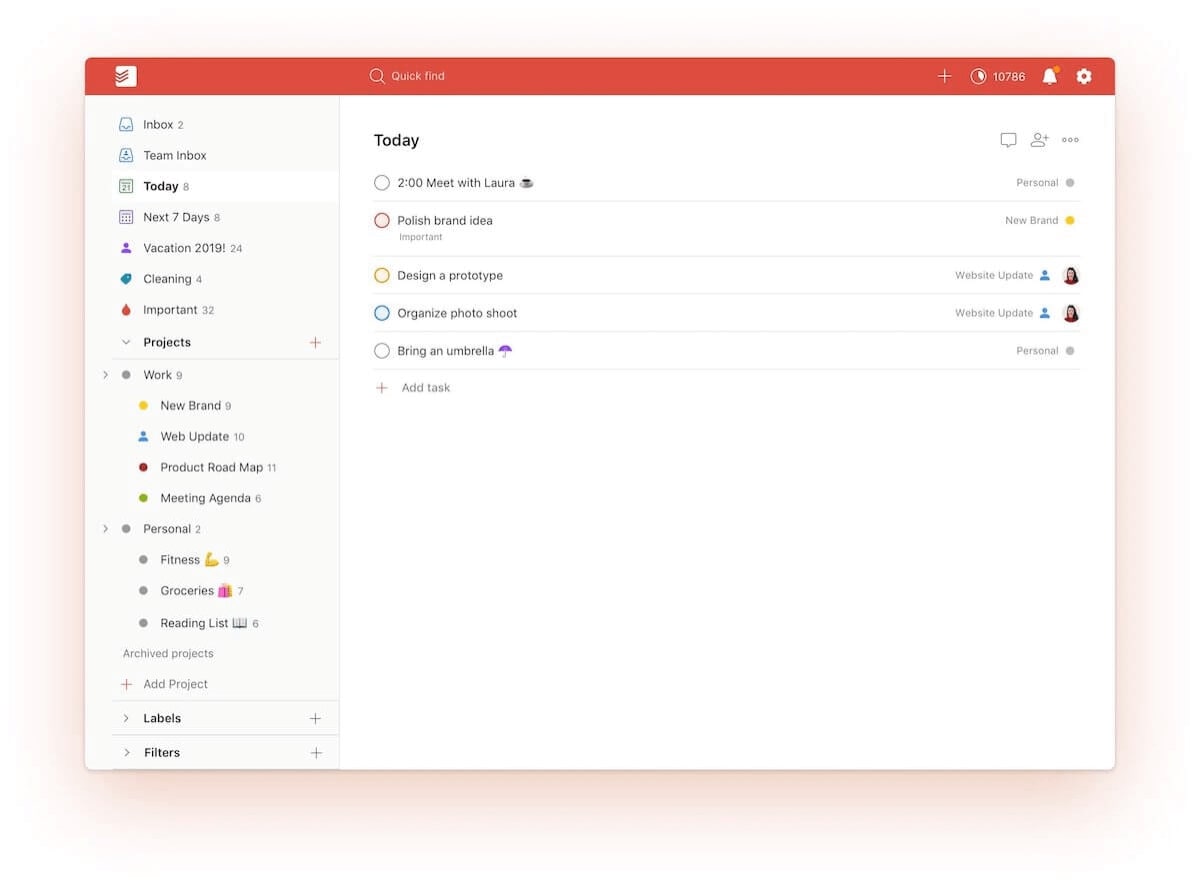
[Todoist](https://www.taskade.com/compare/free-todoist-alternative) is one of the most established task managers, known for its clean interface and natural language input. While Todoist launched before the AI era, it now offers an AI Assistant integration for task suggestions and organization.
Todoist excels at simplicity. Its quick-add feature understands natural language ("Meeting with Sarah tomorrow at 3pm #work p1") and creates properly tagged, prioritized tasks instantly. The app works reliably across every platform.
The limitation: Todoist's AI is an add-on, not a core architecture. It can suggest tasks and break them into subtasks, but it cannot run autonomous workflows or maintain persistent context across sessions.
#### Todoist Key Features
- Natural language task creation
- AI-powered task suggestions and breakdowns
- Recurring due dates with smart scheduling
- Cross-platform sync (web, iOS, Android, desktop)
- Karma system for productivity tracking
- Labels, filters, and custom views
#### Todoist Pricing
Todoist Beginner is free. Pro costs $5/month (billed annually). Business costs $8/user/month.
### 3. Things 3
Things 3 by Cultured Code is the gold standard for native Apple task management. It offers no AI features -- and that is its selling point for users who want a beautifully designed, distraction-free to-do list.
Things 3 shines with its Apple-native experience. Deep integration with Shortcuts, Handoff, and Apple Watch makes it feel like part of the operating system. The interface is among the best-designed in any productivity app.
The trade-off: no AI automation, no team collaboration, no web version, and no integrations beyond Apple Shortcuts. Things 3 is purely a personal task manager for the Apple ecosystem.
#### Things 3 Key Features
- Apple-native design with Handoff and Shortcuts support
- Areas, Projects, and Headings for hierarchical organization
- Natural language date parsing
- Quick Entry with auto-fill
- Calendar integration (read-only)
- One-time purchase, no subscription
#### Things 3 Pricing
$49.99 for Mac, $19.99 for iPad, $9.99 for iPhone. One-time purchases with no recurring fees.
### 4. TickTick
TickTick combines task management with habit tracking and a built-in Pomodoro timer. The app offers more features per dollar than most competitors, making it popular with productivity enthusiasts who want an all-in-one personal system.
TickTick's AI features are still emerging. The app offers smart date parsing and basic task suggestions, but lacks the autonomous agent capabilities of platforms like Taskade. Its strength is the breadth of built-in productivity tools.
#### TickTick Key Features
- Task management with natural language input
- Built-in Pomodoro timer and focus mode
- Habit tracking with streaks and statistics
- Calendar view with Google Calendar integration
- Eisenhower Matrix for prioritization
- Kanban board view
#### TickTick Pricing
Free tier with basic features. Premium costs $3.99/month (billed annually) with calendar integration, custom filters, and more.
### 5. Any.do
Any.do positions itself as a simple, clean task manager with AI-powered task suggestions. The app recently added an AI planning assistant that can break down goals into actionable tasks and suggest optimal scheduling.
Any.do is best for users who want a minimal task manager that gradually introduces AI features. It integrates with Google Calendar and offers basic team sharing, but lacks the depth of dedicated project management tools.
#### Any.do Key Features
- AI daily planner for task scheduling
- Natural language task creation
- Google Calendar integration
- Shared lists and task assignment
- Location-based reminders
- Minimal, focused interface
#### Any.do Pricing
Free tier available. Premium costs $5.99/month (billed annually) with AI features, color tags, and location reminders.
### 6. Motion

Motion is an AI task manager focused on intelligent time management. The app integrates tasks and calendars, automatically adjusting schedules based on priorities and deadlines. If your main pain point is figuring out *when* to do tasks, Motion is worth evaluating.
Motion's AI scheduling engine analyzes your calendar, task priorities, and deadlines to build an optimal daily schedule. When conflicts arise, it automatically reschedules lower-priority tasks.
The limitation: Motion is primarily a scheduling tool. It lacks the [project management](https://www.taskade.com/blog/best-ai-project-management-tools) depth, AI agent capabilities, and team collaboration features of platforms like Taskade or ClickUp.
#### Motion Key Features
- AI-powered daily schedule optimization
- Automatic task rescheduling on conflicts
- Calendar integration (Google, Outlook)
- Meeting scheduling assistant
- Project management basics
- Team calendar coordination
#### Motion Pricing
Individual plan starts at $19/month. Team plan starts at $12/user/month. No free tier.
### 7. ClickUp

[ClickUp](https://www.taskade.com/compare/free-clickup-alternative) is a full-featured project management platform with AI capabilities through ClickUp Brain. It offers the widest range of views and customization options, making it suitable for teams that need enterprise-grade [task management](https://www.taskade.com/wiki/productivity/task-management).
ClickUp Brain adds contextual Q&As with your projects, task summarization, subtask generation, and transcription. The AI integration is competent but adds cost as a per-seat add-on.
#### ClickUp Key Features
- ClickUp Brain for AI Q&A, summaries, and task generation
- 15+ project views including Gantt, Whiteboard, and Form
- Custom fields and statuses
- Time tracking and workload management
- Goals and OKR tracking
- Extensive integration library
#### ClickUp Pricing
Free tier with limited features. Unlimited plan costs $7/member/month. ClickUp Brain AI is an additional $7/seat/month.
## Detailed Comparison: Taskade vs Todoist vs Things 3 vs TickTick
| Capability | Taskade | Todoist | Things 3 | TickTick |
|------------|---------|---------|----------|----------|
| **AI Agents** | built-in tools, custom agents, persistent memory | AI Assistant add-on | None | Basic suggestions |
| **Automation** | 100+ integrations, event-driven flows | IFTTT, Zapier | Apple Shortcuts only | Limited |
| **Project Views** | List, Board, Calendar, Table, Mind Map, Gantt, Org Chart | List, Board, Calendar | List, Calendar, Today | List, Board, Calendar, Kanban |
| **Team Collaboration** | Real-time editing, video calls, chat | Shared projects, comments | None | Shared lists |
| **RBAC** | Role-based access (Owner to Viewer) | 2 roles | N/A | 2 roles |
| **Offline Mode** | Yes | Yes | Yes | Yes |
| **Platforms** | Web, iOS, Android, Mac, Windows, Linux | Web, iOS, Android, Mac, Windows | Mac, iOS only | Web, iOS, Android, Mac, Windows |
| **Pomodoro Timer** | Via agents | Via integration | No | Built-in |
| **Habit Tracking** | Via agents | No | No | Built-in |
| **Starting Price** | Free | Free | $49.99 one-time | Free |
```mermaid
graph LR
subgraph Personal["Best for Personal Use"]
A["Things 3
Apple-native"]
B["Todoist
Cross-platform"]
C["TickTick
Habits + Tasks"]
end
subgraph Team["Best for Teams"]
D["Taskade
AI Agents + Collaboration"]
E["ClickUp
Enterprise PM"]
end
subgraph Schedule["Best for Scheduling"]
F["Motion
AI Calendar"]
G["Any.do
Simple Planning"]
end
style A fill:#0d1b2a,color:#7dd3fc,stroke:#38bdf8,stroke-width:1.5px
style B fill:#0d1b2a,color:#7dd3fc,stroke:#38bdf8,stroke-width:1.5px
style C fill:#0d1b2a,color:#7dd3fc,stroke:#38bdf8,stroke-width:1.5px
style D fill:#2a1225,color:#ff8fa3,stroke:#ff2d60,stroke-width:2px
style E fill:#0d1a0e,color:#86efac,stroke:#22c55e,stroke-width:1.5px
style F fill:#1a0d24,color:#ce93d8,stroke:#6a1b9a,stroke-width:1.5px
style G fill:#1a0d24,color:#ce93d8,stroke:#6a1b9a,stroke-width:1.5px
style Personal fill:#0a1420,stroke:#1a2a45
style Team fill:#0a1a14,stroke:#1b3d2a
style Schedule fill:#1a140a,stroke:#3a2a1a
```
## Why Taskade Is the Best AI Task Manager
AI task managers have evolved from simple to-do lists with smart suggestions to autonomous systems that actively manage your workflow. Here is what the best AI task managers solve in 2026:
- **Organizing your workday** by automatically prioritizing tasks based on deadlines, dependencies, and workload
- **Automating repetitive workflows** with [100+ integrations](https://www.taskade.com/integrations) that connect your entire toolchain
- **Prioritizing what matters** with AI agents that analyze context and suggest optimal task ordering
- **Providing productivity insights** through persistent memory that tracks patterns over time
- **Enhancing team collaboration** with real-time editing, [video calls](https://www.taskade.com/learn/projects/enable-camera), and AI-powered coordination
- **Building custom tools** with [Taskade Genesis](https://www.taskade.com/blog/best-ai-app-builders) to create task management apps tailored to your workflow
Taskade gives you all of this in one platform. No app-switching. No integration headaches. Just AI-powered [task management](https://www.taskade.com/wiki/productivity/task-management) that actually works.
[**Create your free Taskade account -->**](https://www.taskade.com/signup)
---
## Build Custom Task Management Apps with Taskade Genesis
Clone these ready-to-use task management apps from the [Taskade App Factory](https://www.taskade.com/apps):
| App | What It Does | Clone |
|-----|--------------|-------|
| **Minimalistic ToDo App** | Clean, AI-powered task management | [Clone -->](https://www.taskade.com/app/minimalistic-to-do-app-xs3sf6v0cr8o7f9j) |
| **Neon Task Dashboard** | Visual task board with AI automation | [Clone -->](https://www.taskade.com/app/neon-task-management-dashboard-711t4lvklewvz1dd) |
| **Time Tracker** | Track time spent on tasks | [Clone -->](https://www.taskade.com/app/time-tracker-6yw3w52epymtua6p) |
| **Team Capacity Planner** | Balance workload across your team | [Clone -->](https://www.taskade.com/app/team-capacity-planner-qttq6maivthotsm4) |
Build your own AI task manager with [Taskade Genesis](https://www.taskade.com/ai/apps) -- describe what you need, and watch it come to life.
**Your living workspace includes:**
- [Custom AI Agents](https://www.taskade.com/learn/agents/custom-agents) -- The intelligence layer with built-in tools
- [Projects and Memory](https://www.taskade.com/learn/projects/start-here) -- The database layer with persistent state
- [100+ Integrations](https://www.taskade.com/integrations) -- The automation layer
**Get started:**
- [Create Your First App](https://www.taskade.com/learn/genesis/first-app) -- Step-by-step tutorial
- [Learn Workspace DNA](https://www.taskade.com/learn/genesis/faq) -- Understand the architecture
---
## Related Reading
- [Best AI Project Management Tools (2026)](https://www.taskade.com/blog/best-ai-project-management-tools) -- full PM tool comparison
- [Best AI To-Do List Apps](https://www.taskade.com/blog/best-ai-to-do-list-apps) -- focused on personal task lists
- [20 Best Todoist Alternatives](https://www.taskade.com/blog/best-todoist-alternatives) -- in-depth Todoist comparison
- [Todoist Review and History](https://www.taskade.com/blog/todoist-review) -- deep dive into Todoist
- [AI Task Management for Small Business](https://www.taskade.com/blog/ai-task-management-tools-for-small-business) -- practical guide for SMBs
- [Best AI Productivity Tools for Teams](https://www.taskade.com/blog/best-ai-productivity-tools-for-teams) -- team-focused comparison
- [How to Reduce Context Switching](https://www.taskade.com/blog/reduce-context-switching) -- productivity methodology
- [Mind Map: The Ultimate Guide](https://www.taskade.com/blog/mind-map-ultimate-guide) -- visual task organization
## Frequently Asked Questions
### What is the best AI task manager in 2026?
Taskade leads the AI task manager category with autonomous AI agents that create, prioritize, and manage tasks across multiple project views (List, Board, Calendar, Table, Mind Map, Gantt, Org Chart). It combines built-in agent tools, 100+ integrations, and persistent memory, free to start with Pro from $10/month billed annually. For pure scheduling, Motion offers strong AI calendar integration. For budget-conscious personal use, Todoist and TickTick remain solid options.
### How does an AI task manager differ from a regular task manager?
Regular task managers store and organize tasks that you create manually. AI task managers actively help by generating tasks from meeting notes, auto-prioritizing based on deadlines and workload, suggesting next actions, and automating routine workflow steps without manual intervention. The gap is widening in 2026 as AI agents can now run autonomously, maintaining and updating tasks without human prompting.
### Can AI task managers prioritize tasks automatically?
Yes. AI task managers analyze deadlines, dependencies, estimated effort, and work patterns to suggest optimal task order. Motion automatically schedules tasks into your calendar. Taskade uses AI agents that continuously reorganize priorities as conditions change, with persistent memory that compounds over time. TickTick and Todoist offer basic smart scheduling but lack autonomous agent capabilities.
### Are AI task managers suitable for teams?
Yes. The best AI task managers support team collaboration with shared workspaces, real-time editing, and AI-powered task assignment. Taskade adds multi-agent collaboration where AI agents handle coordination tasks including status updates, deadline reminders, and progress reports automatically. ClickUp and Motion also support teams but with less AI depth.
### What is the difference between Taskade and Todoist?
Todoist excels at simple, clean task management with natural language input and cross-platform sync. Taskade goes further with AI agents that autonomously create, organize, and execute tasks, plus multiple project views, real-time collaboration with video calls, and 100+ integrations. Todoist costs $5/month for Pro. Taskade is free to start, with Pro from $10/month billed annually, and significantly more AI capabilities.
### Can I use AI task managers offline?
Most AI task managers offer offline support for basic task management, with AI features requiring connectivity. Taskade supports offline mode with automatic syncing when back online. Things 3 offers the best offline experience as a native Apple app. Todoist and TickTick also support offline task creation and editing.
### How much do AI task managers cost?
AI task manager pricing ranges from free tiers to enterprise plans. Taskade offers Free and Pro ($10/month, up to 10 users). Todoist Pro is $5/month. TickTick Premium is $3.99/month. Motion starts at $19/month. Things 3 is a one-time $49.99 purchase. ClickUp offers a free tier with AI as a $7/seat/month add-on.
### What features should I look for in an AI task manager?
Look for AI-powered task generation and prioritization, multiple project views (list, board, calendar), automation capabilities, strong integrations with your existing tools, team collaboration features, cross-platform support, and data privacy controls. The best tools in 2026 also offer custom AI agents that learn from your workflow patterns.
### Can AI task managers integrate with other productivity tools?
Yes. Taskade offers 100+ integrations across 10 categories including Slack, Gmail, Google Calendar, HubSpot, GitHub, and Zapier. Motion integrates with Google and Outlook calendars. Todoist connects with popular apps through its API and IFTTT. ClickUp offers native integrations plus Zapier support.
### What is the best AI task manager for personal use?
For personal task management, Things 3 offers the cleanest native Apple experience. Todoist provides the best cross-platform simplicity. TickTick adds habit tracking and a Pomodoro timer. For users who want AI automation without team features, Taskade Free offers AI agents, basic project views, and basic automation at no cost.