# Taskade AI Automation & Agents: Build Workflows That Run Themselves (2026)
> Hi Taskaders 🚀, Exciting news – Taskade AI Automation is officially live! 🎉 Get ready to 10x your productivity and be among the first to harness the power of...
- Source: https://www.taskade.com/blog/ai-automation-agents
- Published: 2024-01-29
- Updated: 2026-06-02
- Author: John Xie
Hi Taskaders 🚀,
Exciting news – Taskade AI Automation is officially live! 🎉 Get ready to 10x your productivity and be among the first to harness the power of AI agents and automations in your workflows.
> **TL;DR:** Taskade AI Automation is live with [triggers](https://www.taskade.com/learn/automation/triggers) like webhooks, task creation, and scheduled runs. Connect [AI agents](https://www.taskade.com/agents) to Slack, Gmail, Google Sheets, WordPress, and 100+ [integrations](https://www.taskade.com/integrations) for end-to-end workflow automation. [Try it free →](https://www.taskade.com/create)
## 🤖 Welcome to Taskade AI Automation
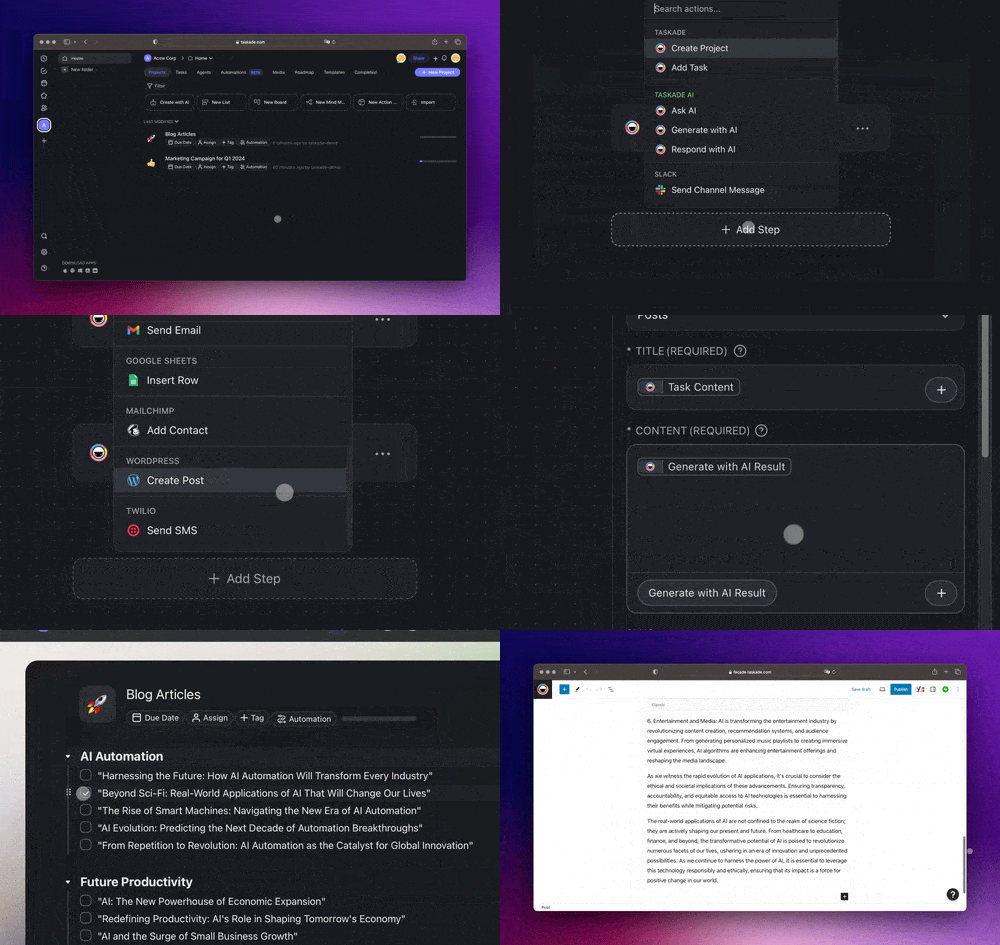
Revolutionize your workflows with [Custom AI Agents](https://www.taskade.com/learn/agents/custom-agents), your virtual team members. Build and train AI agents to answer questions, generate content, streamline processes, and more, integrating seamlessly into any workflows. [Learn more.](https://www.taskade.com/learn/automation)
### How the trigger → agent → action loop works
AI automation agents close the loop between your tools and your AI team. A [trigger](https://www.taskade.com/learn/automation/triggers) (a new form, a Slack message, a scheduled run) wakes an [AI agent](https://www.taskade.com/agents); the agent reasons over your workspace memory and decides; an action pushes the result back out to Slack, Gmail, Sheets, and 100+ [integrations](https://www.taskade.com/integrations). Every run feeds your [Projects](https://www.taskade.com/learn/projects/databases) memory, so the next run starts smarter — Taskade's Workspace DNA loop of Memory, Intelligence, and Execution.
```mermaid
graph LR
T["Trigger
form · message · schedule"] --> A["AI Agent
reasons over memory"]
A --> X["Action
Slack · Gmail · Sheets"]
X --> M["Memory
workspace updated"]
M --> T
style T fill:#0d1b2a,color:#7dd3fc,stroke:#38bdf8,stroke-width:1.5px
style A fill:#2a1225,color:#ff8fa3,stroke:#ff2d60,stroke-width:2px
style X fill:#0d1a0e,color:#86efac,stroke:#22c55e,stroke-width:1.5px
style M fill:#11111b,color:#cdd6f4,stroke:#00d4aa
```
### Traditional automation vs AI automation agents
Rule-based automation follows a fixed if-this-then-that script. AI automation agents read the actual content of each event, decide what to do, and adapt — so one workflow handles cases you never hard-coded.
| | Traditional automation | AI automation agents |
| --- | --- | --- |
| **Logic** | Fixed if-this-then-that rules | Agent reasons over each event |
| **Content handling** | Moves data as-is | Reads, summarizes, and writes new content |
| **Edge cases** | Breaks on anything unscripted | Adapts using context and memory |
| **Setup** | Map every step by hand | Describe the goal in plain language |
| **Memory** | Stateless, no recall | Persistent [workspace memory](https://www.taskade.com/wiki/ai-agents/agent-memory) across runs |
See it running — this Taskade Genesis app links every record to its underlying project, agent log, and follow-up automation:
[Client Connect Dashboard — Taskade Genesis app linking records to agent logs and automations](https://www.taskade.com/app/neon-crm-dashboard-nsrm12wns3e1cgni)
## 🤖 Automate with AI Agents
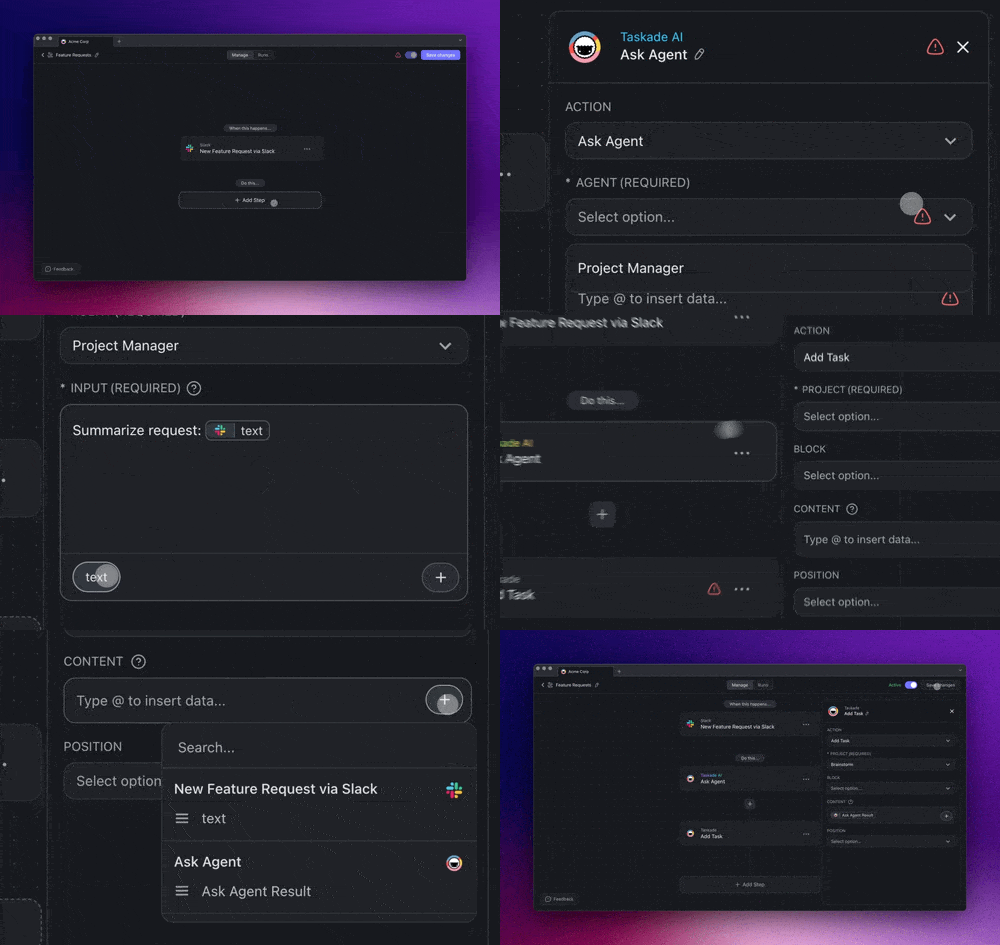
Automate your tasks, workflows, and communication with [Custom AI Agents](https://www.taskade.com/learn/agents/custom-agents). Utilize their expert knowledge and custom prompts and AI commands for smarter and more efficient task delegation and automation. [Learn more.](https://www.taskade.com/learn/agents)
## 🤖 Seamless Workflow Integrations
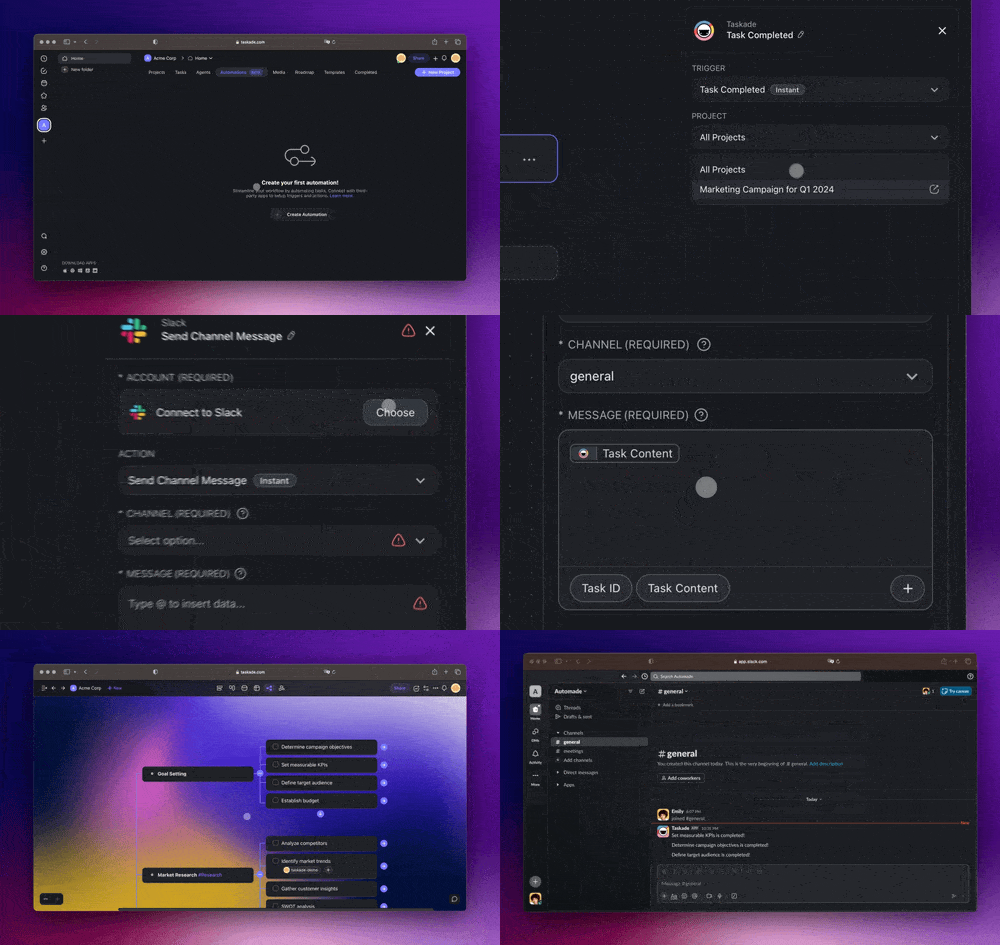
Connect effortlessly with your favorite tools like **Slack**, **Google Sheets**, **Typeform**, **WordPress**, and more to automate various aspects of your workflows. Discover limitless possibilities. [Learn more.](https://www.taskade.com/learn/connect/slack-integration)
## ⚡️ Start with Pre-made Workflows
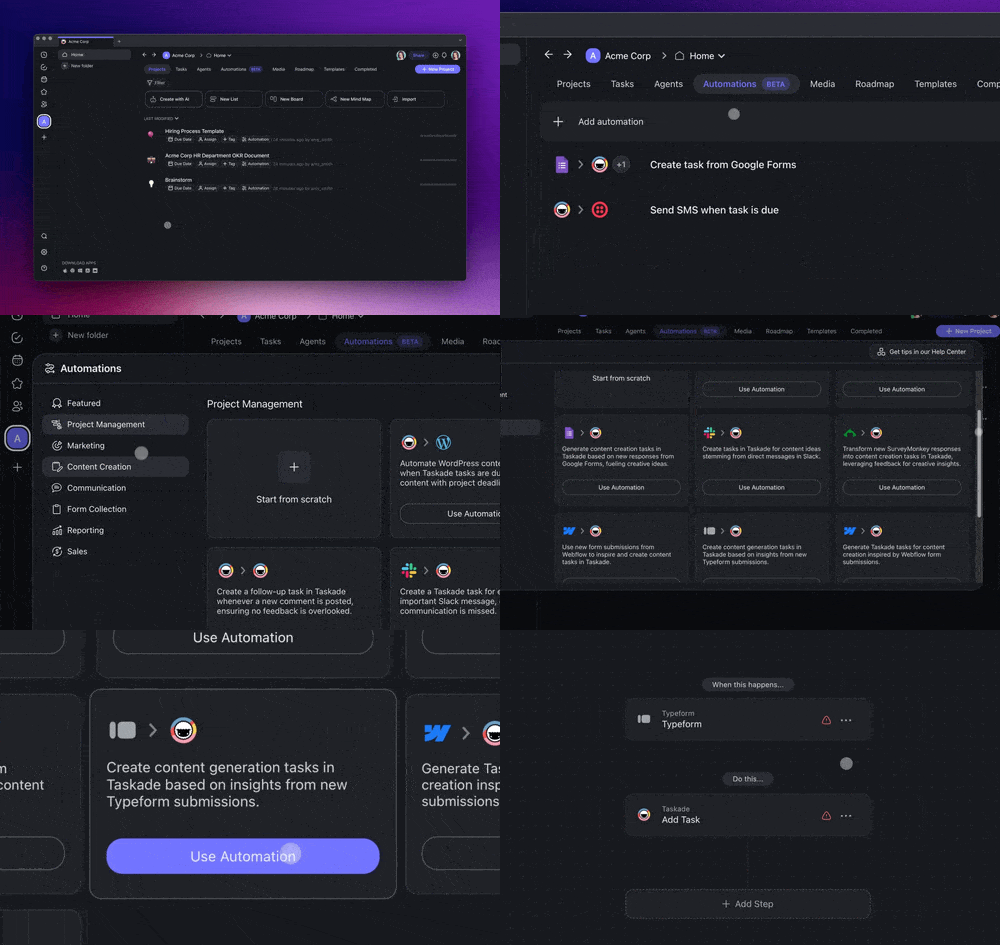
Begin your [AI automation](https://www.taskade.com/automate) journey with our range of pre-made Automation Workflows, designed for your convenience. [Learn more.](https://www.taskade.com/learn/automation)
## 💬 Chat with AI Agents in Projects
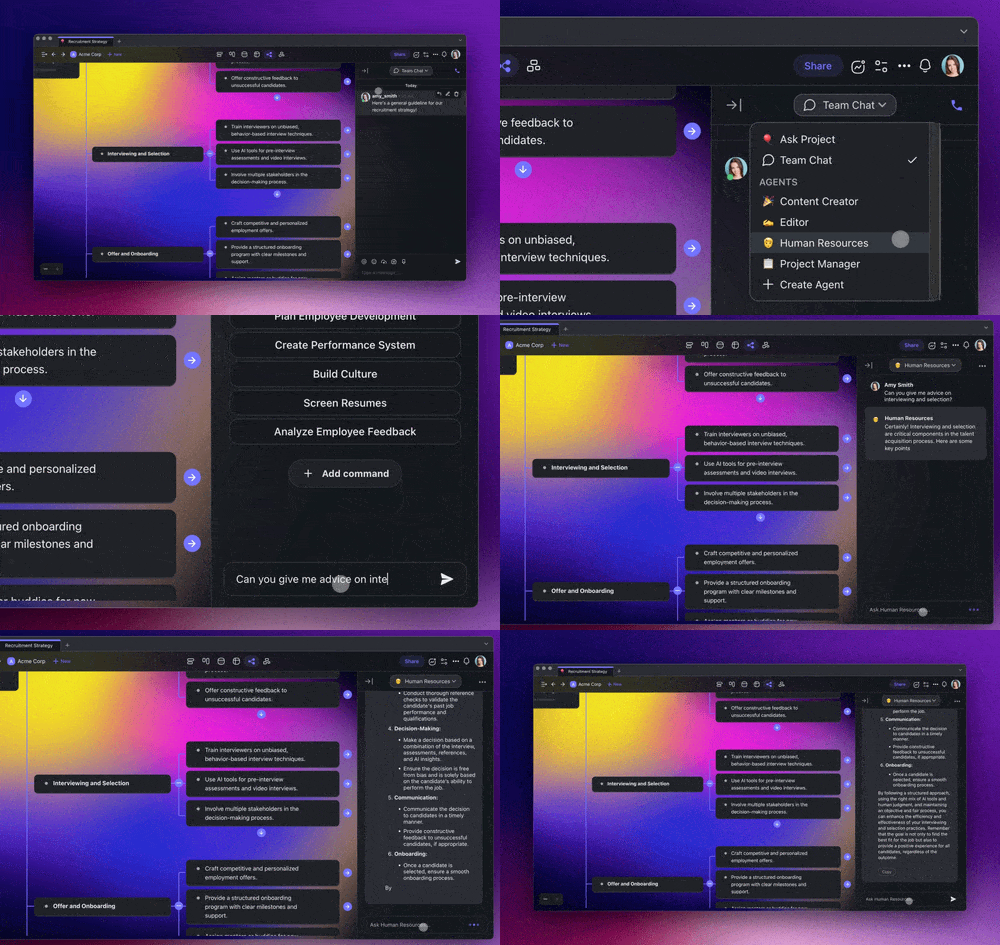
Collaborate and communicate with [Custom AI Agents](https://www.taskade.com/learn/agents/custom-agents) in your projects. Create and interact with your virtual AI team for enhanced collaboration. [Learn more.](https://www.taskade.com/learn/projects/ai-chat)
## **Other Improvements:**
- **New: [Launching Taskade AI Automation](https://www.taskade.com/automate):** Step into the future with AI-driven productivity! Simplify your workflows and get things done smarter.
- **New: [Automate with AI Agents](https://www.taskade.com/learn/automation/triggers):**
- **Ask Agent**: Get insights from your custom-trained AI Agents.
- **Run Agent Command**: Execute automations through your Custom AI Agents with your own knowledge and instructions.
- **New: [Taskade AI in Automation](https://www.taskade.com/learn/automation/triggers):**
- **Ask AI**: Get insights and suggestions directly from AI.
- **Generate with AI**: Generate content, lists, and more.
- **Respond with AI**: AI responses to streamline your workflows.
- **New: Taskade Internal [Actions](https://www.taskade.com/learn/automation/triggers) and [Triggers](https://www.taskade.com/learn/automation/triggers):**
- **Webhook Support**: Trigger workflows based on external events
- **Project Creation**: Automate the creation of new projects
- **Task Creation**: Simplify task creation with automated actions
- **Comment Notifications**: Automated alerts for new comments
- **Task Completion**: Automated alerts when tasks are completed
- **Task Due Reminders**: Automated reminders for upcoming tasks due
- **New: [External Integrations, Triggers, and Actions](https://www.taskade.com/learn/connect/slack-integration):**
- **Calendly**: Streamline your scheduling and event organization
- **Gmail** (Coming soon): Send and receive emails
- **Google Forms**: Simplify data collection from form submissions
- **Google Sheets**: Manage and analyze spreadsheet data
- **Mailchimp**: Enhance your email marketing campaigns
- **Slack**: Integrate Slack for improved team communication
- **SurveyMonkey** (Coming soon): Gather feedback effortlessly
- **Twilio**: Enhance communications with powerful Twilio integrations
- **Typeform**: Simplify data collection from survey submissions
- **Webflow**: Simplify data collection from form submissions
- **WordPress**: Automate post creation and content management
- More coming soon… **[Share your feedback here](https://www.taskade.com/feedback)**
- **New: Features for [Custom AI Agents](https://www.taskade.com/learn/agents/custom-agents):**
- Enhanced Toolbar Integration: Custom AI Agent commands are now part of the task add-on menu and multi-select toolbar
- Background [Task Management](https://www.taskade.com/wiki/productivity/task-management): Custom AI Agents now handle background tasks during multi-task selections
- **New: [AI Agents Chat in Projects](https://www.taskade.com/learn/projects/ai-chat):** Now featuring integrated agent chat for better collaboration with your virtual AI team workforce in projects.
- **New: [AI Workflow Generator](https://www.taskade.com/learn/agents/project-studio)** now supports external sources, from Web Links to YouTube, enhancing your project crafting with personalized content. Prompt Templates are also integrated for more versatility
- Enhanced AI interactions and resolved automation scheduling and chat issues for smoother workflows.
- Improved project management with upgraded settings display and added functionalities for a better user experience.
- Strengthened AI security across the platform for enhanced data and workflow protection.
- Streamlined onboarding process, making it easier and more intuitive for new users to get started with Taskade AI.
- Implemented various bug fixes and performance upgrades.
Welcome to 2024 with Taskade AI Agents and Automations! Gear up for a year filled with exciting new features and enhancements to amp up your workflow and productivity.
Remember, our [Help Center](https://www.taskade.com/learn) or [Feedback Forum](https://www.taskade.com/feedback) are always here for your questions and suggestions. Cheers to a transformative and AI-powered year at Taskade! 🚀
— Team Taskade 🐑
[](https://www.taskade.com/)
## Frequently Asked Questions
### What is Taskade AI Automation and how does it work?
Taskade AI Automation lets you build trigger-action workflows that connect AI Agents with your favorite tools. Set a trigger — like a new form submission, Slack message, or scheduled time — then chain actions such as Ask Agent, Generate with AI, or Respond with AI to automate content creation, data processing, and communication without manual effort.
### Which external tools integrate with Taskade AI Automation?
Taskade AI Automation integrates with Slack, Gmail, Google Sheets, Google Forms, WordPress, Typeform, Calendly, Mailchimp, Twilio, Webflow, SurveyMonkey, and more. Each integration provides its own set of triggers and actions that you can combine with AI-powered steps for end-to-end workflow automation.
### What are pre-made Automation Workflows in Taskade?
Pre-made Automation Workflows are ready-to-use templates that cover common use cases like content publishing, email handling, survey processing, and task creation. Select a template, connect your accounts, and the workflow runs immediately — no configuration from scratch required.
### Can Custom AI Agents be used inside Taskade Automation flows?
Yes. Two dedicated actions — Ask Agent and Run Agent Command — let you embed your custom-trained AI Agents directly into automation flows. The agent processes each trigger event using its own knowledge base and custom prompts, enabling intelligent, context-aware automation at scale.