# 12 Best AI Apps for Students You Can Clone Free (2026)
> 12 free AI apps for students in 2026: study planners, exam prep, a PDF reviewer, a cheat sheet maker and a habit tracker. Each is a live Taskade Genesis app.
- Source: https://www.taskade.com/blog/ai-apps-students-educators
- Published: 2025-12-20
- Updated: 2026-11-18
- Author: John Xie
A study app is most useful when it already knows your exam dates, your timetable and what to review next. This guide lists 12 free study kits from the Taskade App Factory that you clone and fill with your own courses: planners, exam prep, a PDF reviewer and a habit tracker.
> **TL;DR:** You do not have to build a study app from scratch. These 12 free kits from the
> [Taskade App Factory](https://www.taskade.com/apps) cover the student year: a study planner that replans missed
> sessions, exam prep with score targets, a PDF reviewer that writes mock exams, and a habit
> tracker cloned more than 100 times. Clone one and add your courses. [Browse study kits](https://www.taskade.com/apps/education)
---
## What Is an AI App for Students?
An AI app for students is a working study tool that holds your own courses, exam dates and notes, with an AI agent that plans and reviews with you. It is not a chat window that forgets you. You open it every day, and it remembers what you studied and what comes next.
Every kit in this list is a live [Taskade Genesis](https://www.taskade.com/ai/apps) app built on [Taskade](https://www.taskade.com/). Most kits combine three parts: projects that store your courses and sessions, [AI agents](https://www.taskade.com/agents) that draft plans and questions, and [automations](https://www.taskade.com/automate) that send reminders on a schedule. Taskade calls this loop Workspace DNA: memory, intelligence and execution. Two kits are lighter: the Study Timetable Maker has no AI agent, and the College Schedule Maker holds one project and nothing else.
```mermaid
graph TD
A["Courses and exam dates
your projects"]
style A fill:#0d1b2a,color:#7dd3fc,stroke:#38bdf8,stroke-width:1.5px
B["Day-by-day plan
drafted by an AI agent"]
style B fill:#2a1225,color:#ff8fa3,stroke:#ff2d60,stroke-width:2px
C["Review material
flashcards, quizzes, cheat sheets"]
style C fill:#11111b,color:#cdd6f4,stroke:#00d4aa
D["Reminders
sent by automations"]
style D fill:#1a0d24,color:#ce93d8,stroke:#6a1b9a,stroke-width:1.5px
E["Exam day
with a record of what you covered"]
style E fill:#0d1a0e,color:#86efac,stroke:#22c55e,stroke-width:1.5px
A -->|"topics and free hours"| B
B -->|"what to study today"| C
C -->|"scores and misses"| D
D -->|"the last review days"| E
```
The difference from a blank template is the sample data. Each kit opens with a full example, so you see a working plan before you type anything. You then replace the sample rows with your own courses.
---
## Quick Reference: 12 Study Apps at a Glance
The 12 study apps below are free kits by Taskade, sorted by the job a student does: plan the week, track courses and deadlines, prepare for exams, review notes and build a daily habit. Every kit page showed "Price: Free" with no PRO badge on 2026-11-18.
| # | App | Student job | What it tracks | Agent and automations |
|---|-----|-------------|----------------|-----------------------|
| 1 | [Study Planner](https://www.taskade.com/apps/all/study-planner-f1nzyiioqfmarysu) | Plan the week | Exams, topics, free hours, missed sessions | 1 agent, 2 automations |
| 2 | [Study Timetable Maker](https://www.taskade.com/apps/all/study-timetable-maker-9zlo0ghcb8vvtxh3) | Weekly timetable | Subjects, weekly hours, busy times | No agent, 1 automation |
| 3 | [Study Schedule Maker](https://www.taskade.com/apps/all/study-schedule-maker-4hyi6fxr4xzxlddy) | Plan and log hours | Timetable, hours log, streak | 1 agent, 2 automations |
| 4 | [Study Dashboard](https://www.taskade.com/apps/all/study-dashboard-l4ynhyluu6w266ji) | Track grades | Study hours, assessments, exam dates | 1 agent, 3 automations |
| 5 | [Syllabus to Calendar](https://www.taskade.com/apps/all/syllabus-to-calendar-0t47hwsxcmvpco1e) | Collect deadlines | Assignments, exams, readings | 4 agents, 4 automations |
| 6 | [College Schedule Maker](https://www.taskade.com/apps/all/college-schedule-maker-txut4tat6gymd5jq) | Pick classes | Class times, credits, clashes | No agent, no automation |
| 7 | [Exam Study Portal](https://www.taskade.com/apps/all/exam-study-portal-rgynijgln7hd8yqs) | Exam week | Study guide, flashcards, quizzes, 14-day plan | 1 agent, 1 automation |
| 8 | [Exam Prep Tracker](https://www.taskade.com/apps/all/exam-prep-tracker-stu8ctyfngpq1vda) | Test prep | Practice scores, gap to a target | 1 agent, 3 automations |
| 9 | [Licensing Exam Study Plan](https://www.taskade.com/apps/all/licensing-exam-study-plan-with-daily-concepts-m2kb0elquu8onih1) | Professional exams | Topics by weight, daily concepts | 1 agent, 3 automations |
| 10 | [PDF Reviewer Maker](https://www.taskade.com/apps/all/pdf-reviewer-maker-reviewers-and-mock-exams-cnxwe08j5irgk0kt) | Review from a PDF | Reviewers, mock exams, readiness | 2 agents, 3 automations |
| 11 | [Cheat Sheet Maker](https://www.taskade.com/apps/all/cheat-sheet-maker-2lkova6xwm3iyxdm) | Condense notes | Blocks on one printable page | 1 agent, 3 automations |
| 12 | [Habit Tracker Dashboard](https://www.taskade.com/apps/all/habit-tracker-dashboard-sfbtunz606xmukw3) | Daily habit | Habits, streaks, goals | 1 agent, 5 automations |
---
## Plan Your Study Week
Three free kits plan a study week for you. The Study Planner turns exams and free hours into a day plan that replans missed sessions. The Study Timetable Maker draws a color week grid with no AI agent. The Study Schedule Maker adds an hours log and a streak, so you see the time you actually put in.
### 1. [Study Planner](https://www.taskade.com/apps/all/study-planner-f1nzyiioqfmarysu): a plan that replans missed sessions
The Study Planner gives you a day-by-day plan for every exam, and it moves a missed session forward instead of dropping it. When a topic no longer fits before the exam, the plan warns you, so you can add hours or cut scope while there is still time.
**Best for:** students with several exams in the same few weeks. **What it tracks:** exams, topics, free hours and planned sessions. **Inside:** 7 projects, 1 AI agent called Pace, and 2 automations: recall questions and a Sunday plan email.
[Study Planner, a live Taskade Genesis app you can clone](https://www.taskade.com/app/study-planner-f1nzyiioqfmarysu)
[Clone the Study Planner](https://www.taskade.com/app/study-planner-f1nzyiioqfmarysu?action=clone&utm_source=landing_blog&utm_content=ai-apps-students-educators)
**Make it yours:** delete the sample courses, add your own exams with their dates, and set the hours you can study each day. Ask Pace to split your hardest topic into shorter sessions. [Make one from a prompt](https://www.taskade.com/convert/education/education-to-study-plan)
### 2. [Study Timetable Maker](https://www.taskade.com/apps/all/study-timetable-maker-9zlo0ghcb8vvtxh3): a weekly color timetable
The Study Timetable Maker turns your subjects, weekly hours and busy times into a color timetable for the week. It puts your hard subjects in your best hours and shows how many days remain before each exam. You can print the grid or save it as an image.
**Best for:** students who want a simple weekly grid with no AI agent. **What it tracks:** subjects, hours per week, difficulty and exam dates. **Inside:** 3 projects, no AI agent, and 1 automation: a Sunday planner email.
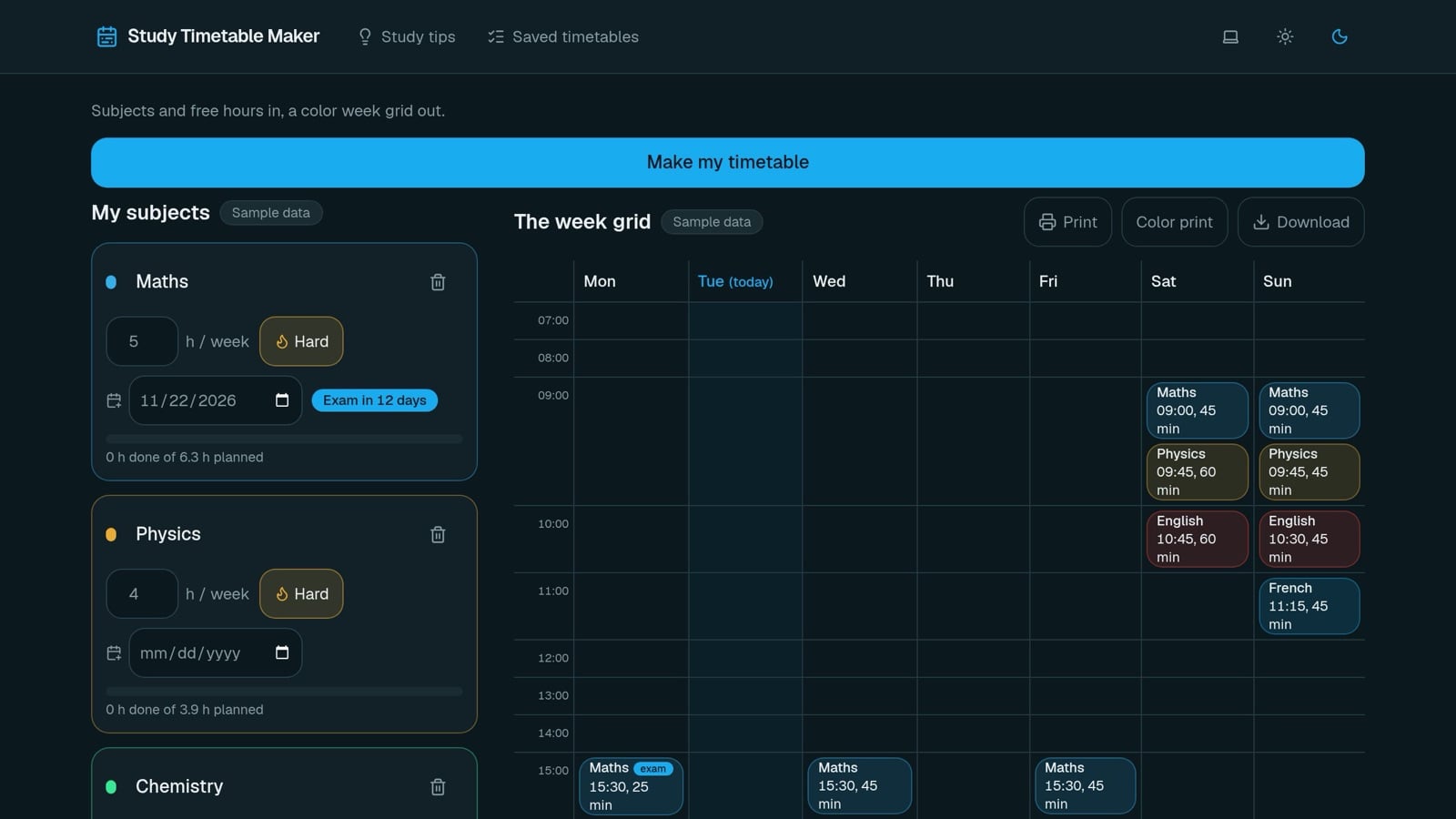
It is one of two kits in this list with no AI agent: the kit is the timetable and one Sunday email. Each subject card shows the hours done against the hours planned, so you see which subject falls behind before the weekend.
**Make it yours:** type your subjects, mark the hard ones, block your class and work hours, and press "Make my timetable". Print the color version for your desk.
### 3. [Study Schedule Maker](https://www.taskade.com/apps/all/study-schedule-maker-4hyi6fxr4xzxlddy): hours log and streak
The Study Schedule Maker makes a weekly study timetable from your subjects and exam dates, then lets you log the hours you studied and keep a streak. The hardest subject and the nearest exam get the most time, and the totals show your planned hours for the next seven days.
**Best for:** students who want a plan and a record of the time they put in. **What it tracks:** subjects, exam dates, planned hours, logged hours and the streak. **Inside:** 3 projects, 1 AI agent called Study Buddy, and 2 automations: a Monday progress alert and Sunday plan suggestions.
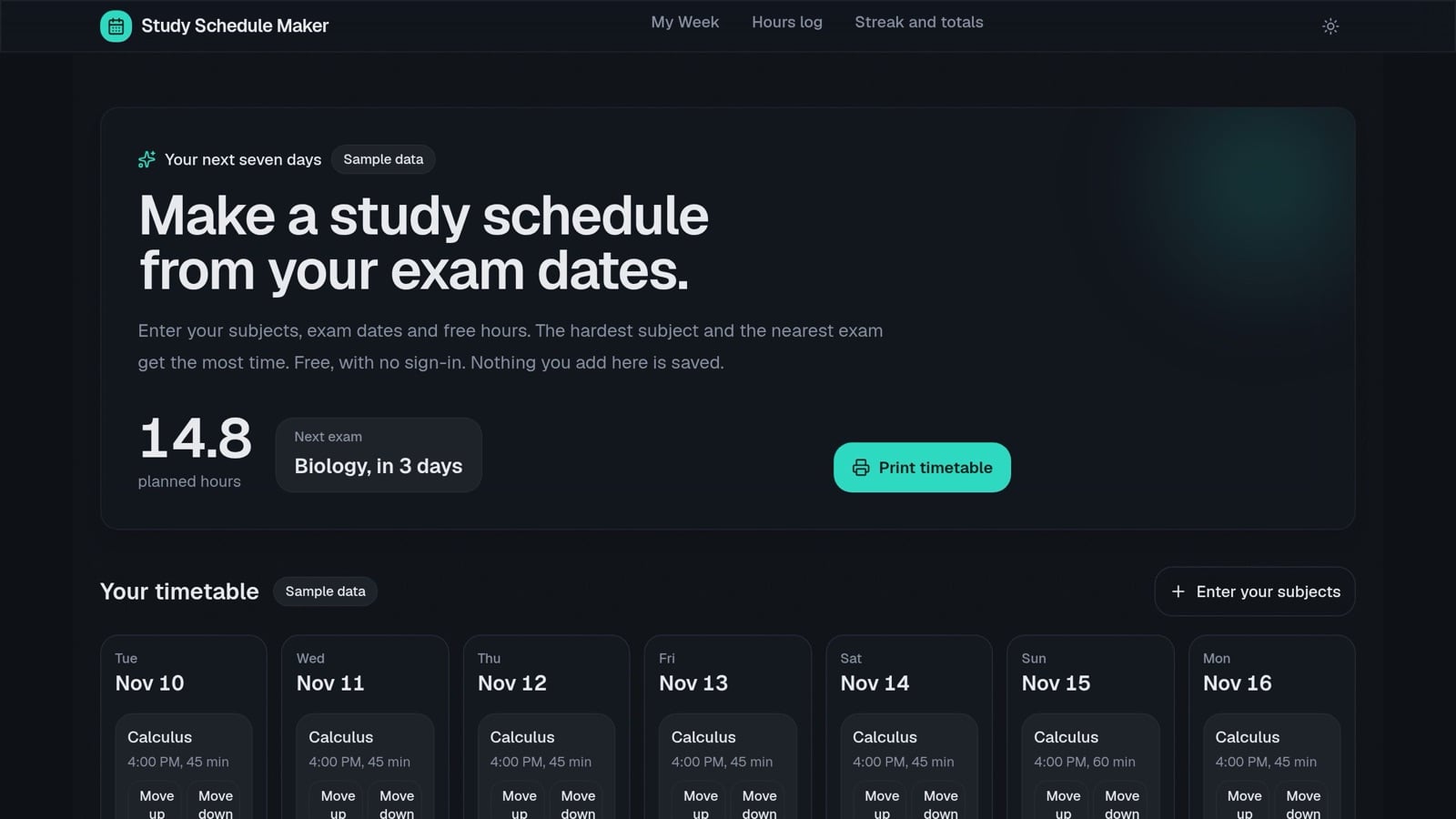
Each session card has move up and move down buttons, so you can shift a block when a class runs late. The hours log and the streak sit on their own tabs, apart from the plan.
**Make it yours:** add your subjects and exam dates, then log your first session today to start the streak. [Make one from a prompt](https://www.taskade.com/generate/ai/study-schedule)
---
## Track Courses and Deadlines
Three kits keep every course, grade and due date in one place. The Study Dashboard shows the grade you need on the final. Syllabus to Calendar puts every due date from each syllabus on one calendar. The College Schedule Maker compares class schedules before registration, so you catch a clash before it costs you a seat.
### 4. [Study Dashboard](https://www.taskade.com/apps/all/study-dashboard-l4ynhyluu6w266ji): hours, assessments and a grade-needed calculator
The Study Dashboard tracks study hours, assessments and exam dates for every course, and a calculator shows the grade you need on the work that is left. The sample course needs 95.5 on the remaining work to reach 85, so you see at a glance where a grade stands.
**Best for:** students who track grades across several courses. **What it tracks:** study hours, assessments, weights and exam dates. **Inside:** 5 projects, 1 AI agent called Study Buddy, and 3 automations: a grade-needed comment on each graded assessment, a daily due-soon email and a Sunday study goals email.
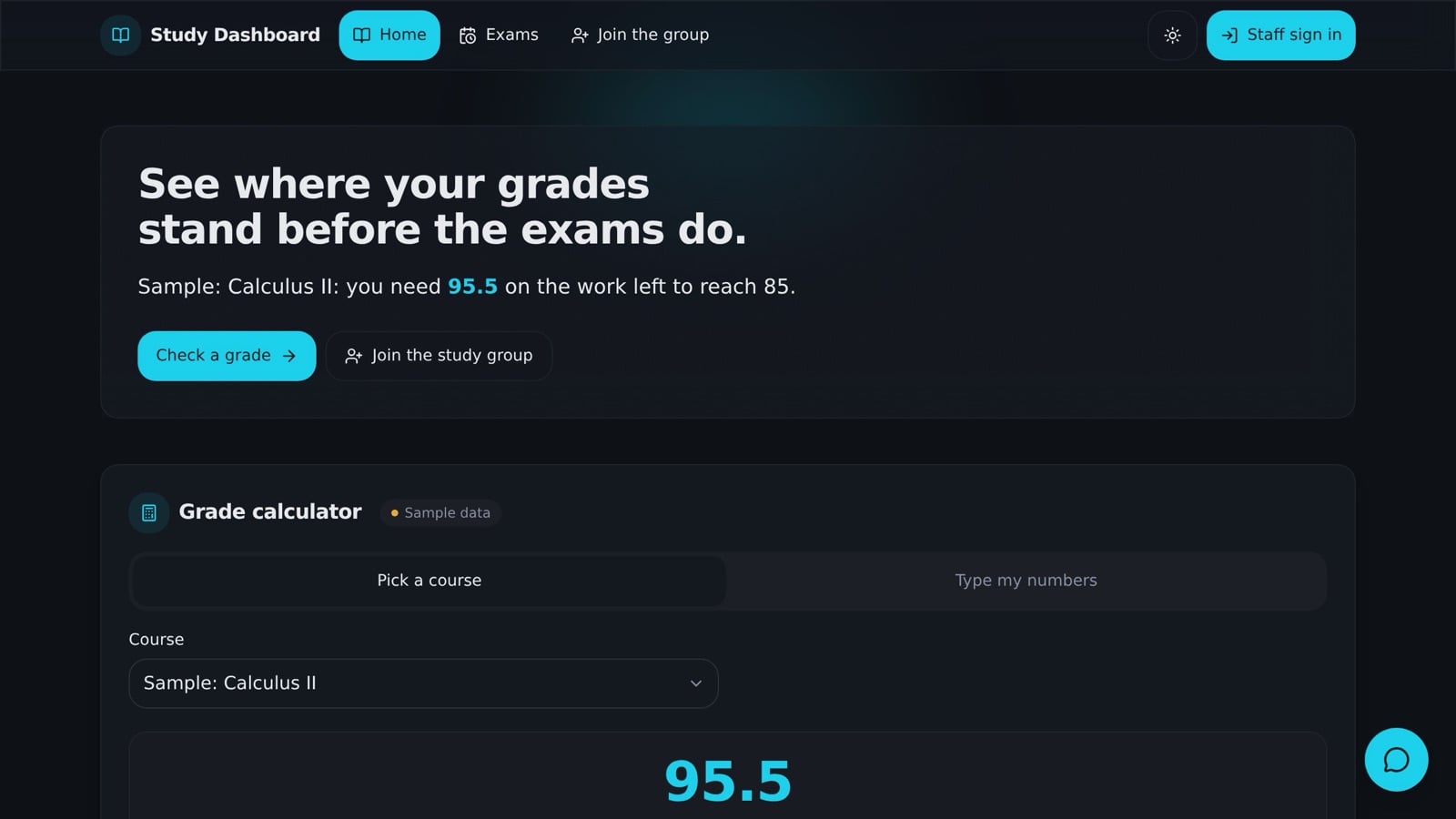
The calculator is public in the app, and its "Type my numbers" tab lets a classmate check a grade with their own numbers. For a deeper build, read about [a study planner dashboard you own](https://www.taskade.com/blog/study-planner-dashboard).
**Make it yours:** add your courses with the weight of each assessment, then enter the grades you already have. [Make one from a prompt](https://www.taskade.com/generate/dashboards/study-dashboard)
### 5. [Syllabus to Calendar](https://www.taskade.com/apps/all/syllabus-to-calendar-0t47hwsxcmvpco1e): every due date on one calendar
Syllabus to Calendar puts every assignment, exam and reading from each syllabus on one calendar, with reminders and your grade so far. You paste the schedule section of a syllabus with the term start date, and the app finds the dates, including lines such as "Week 4, Thursday".
**Best for:** students with four or five courses and a syllabus for each. **What it tracks:** assignments, exams, readings, due dates and the grade so far. **Inside:** 6 projects, 4 AI agents, including the Syllabus Reader, and 4 automations, including a two-day due reminder and Sunday week-ahead reminders.
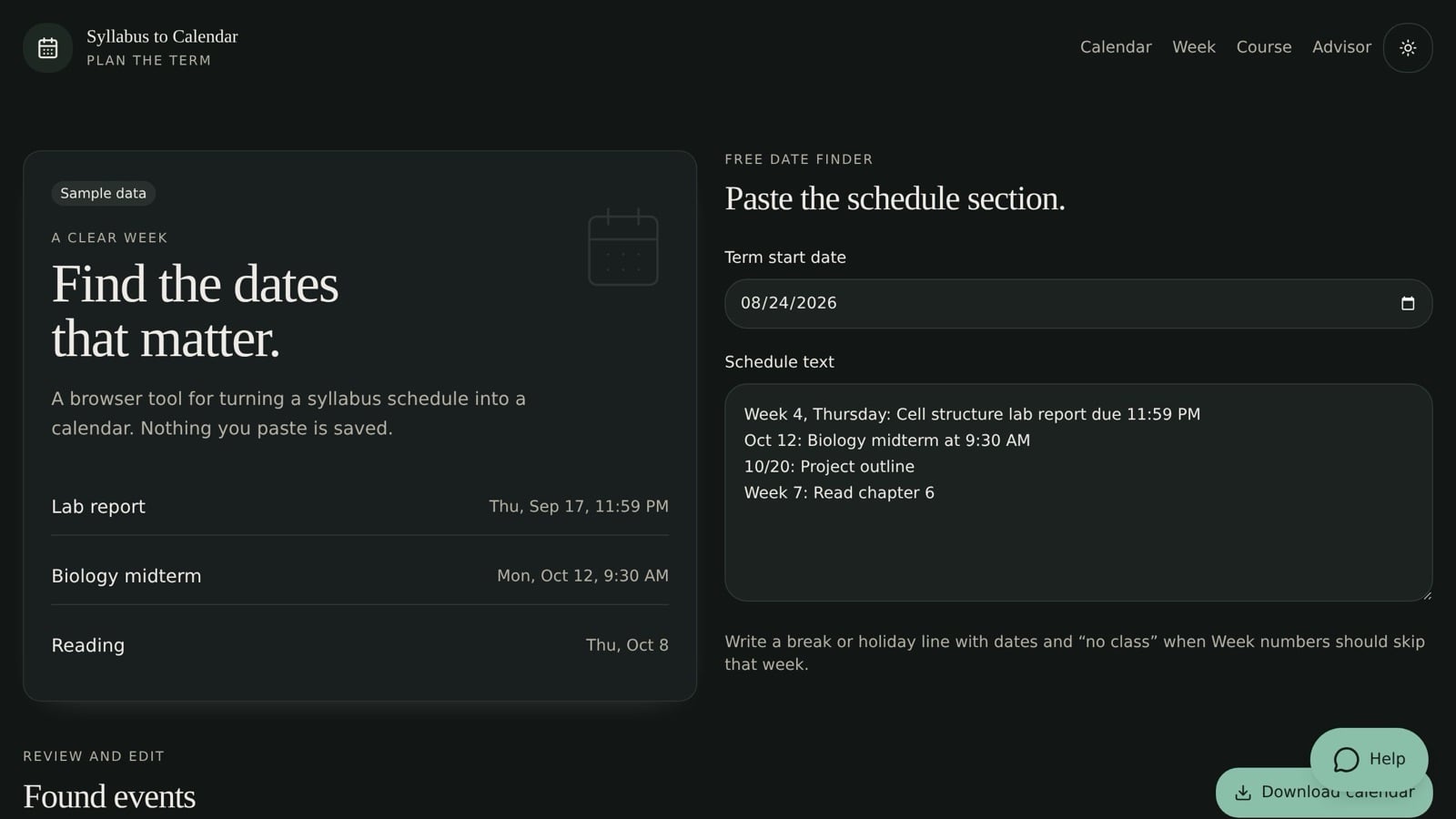
You can download the calendar as an .ics file, the standard calendar format, to add the dates to the calendar app you already use. Review the found events before you trust them: a syllabus with an unusual date format needs a check.
**Make it yours:** set your term start date, paste the schedule of your first course, and fix any date the app reads wrong.
### 6. [College Schedule Maker](https://www.taskade.com/apps/all/college-schedule-maker-txut4tat6gymd5jq): compare class schedules before registration
The College Schedule Maker shows your week, your total credits and every clash before registration opens. You type your class days and times, and it draws the week grid, counts credits and hours in class, and lists the clashes to fix. You can build three options and compare them side by side.
**Best for:** college students who pick classes each term. **What it tracks:** class days and times, rooms, credits, free days and clashes. **Inside:** 1 project, no AI agent and no automation. It is a plain schedule planner with no AI part.
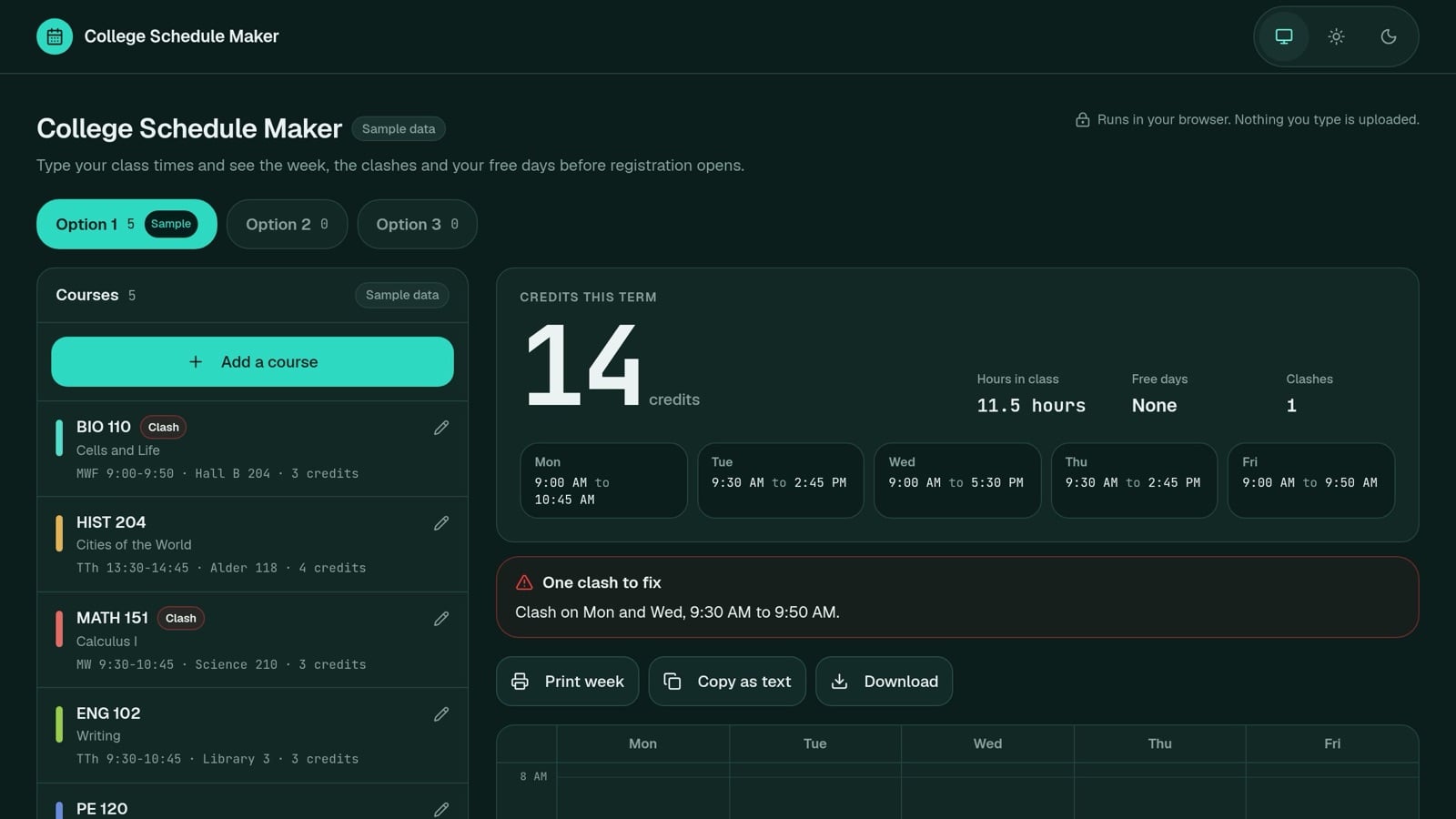
The kit runs in your browser. It is the lightest kit in this list, which makes it a quick first clone before registration week.
**Make it yours:** add the sections you want in Option 1, try a different section mix in Option 2, and keep the option with no clash and the free day you want.
---
## Prepare for Exams
Four kits cover exam preparation, from a 14-day plan to a mock exam. The Exam Study Portal combines a study guide, flashcards and quizzes. The Exam Prep Tracker shows the gap to a target score. The Licensing Exam Study Plan spreads topics by weight. The PDF Reviewer Maker writes reviewers and practice questions from a PDF.
### 7. [Exam Study Portal](https://www.taskade.com/apps/all/exam-study-portal-rgynijgln7hd8yqs): a 14-day plan with flashcards and quizzes
The Exam Study Portal tells you what to study each day before an exam, with a study guide, flashcards, practice quizzes and a 14-day plan. The Today page shows the days left, your goal score, a readiness percentage and the session to start now.
**Best for:** students in the last two weeks before one big exam. **What it tracks:** the exam date, the goal score, daily sessions, flashcards and quiz results. **Inside:** 5 projects, 1 AI agent called Study Coach, and 1 automation that makes cards and questions for each new topic.
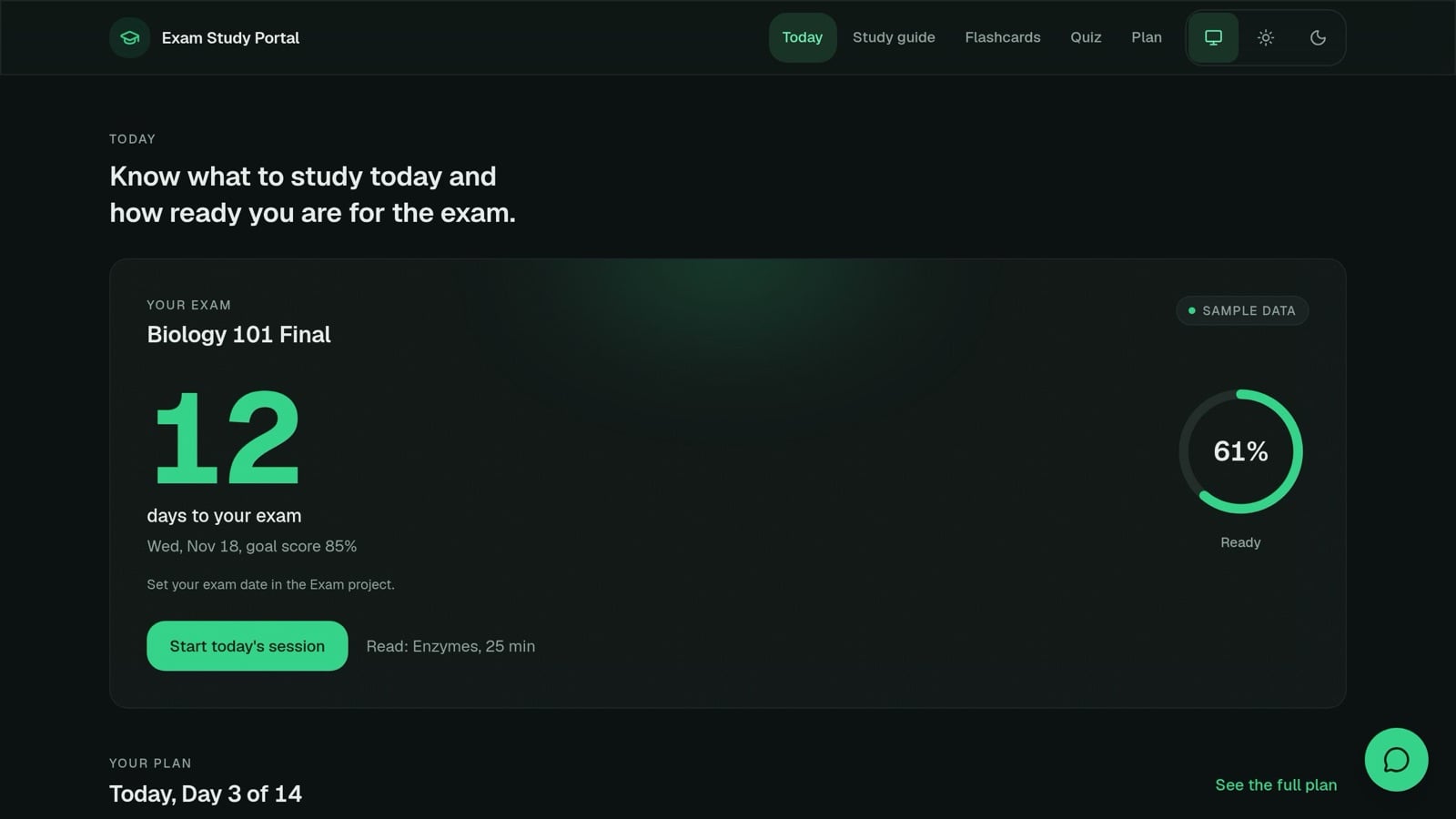
Add a topic and the automation drafts flashcards and practice questions for it. Read them against your notes, because an AI draft can be wrong. The readiness ring on the Today page shows how ready you are for the exam.
**Make it yours:** set your exam date and goal score in the Exam project, then add the topics from your course outline.
### 8. [Exam Prep Tracker](https://www.taskade.com/apps/all/exam-prep-tracker-stu8ctyfngpq1vda): score targets and the weekly gap
The Exam Prep Tracker logs your practice test scores and shows the gap to your target and the points to gain each week. You pick the test, enter a current score, a target and the test date, and the calculator shows the weekly climb you need to reach the target in time.
**Best for:** students who prepare for a standardized test with practice tests. **What it tracks:** practice scores, the target, weeks left and weak topics. **Inside:** 5 projects, 1 AI agent called Score Coach, and 3 automations: coaching after each new practice score, a Friday weekly summary email and a Monday at-risk email.
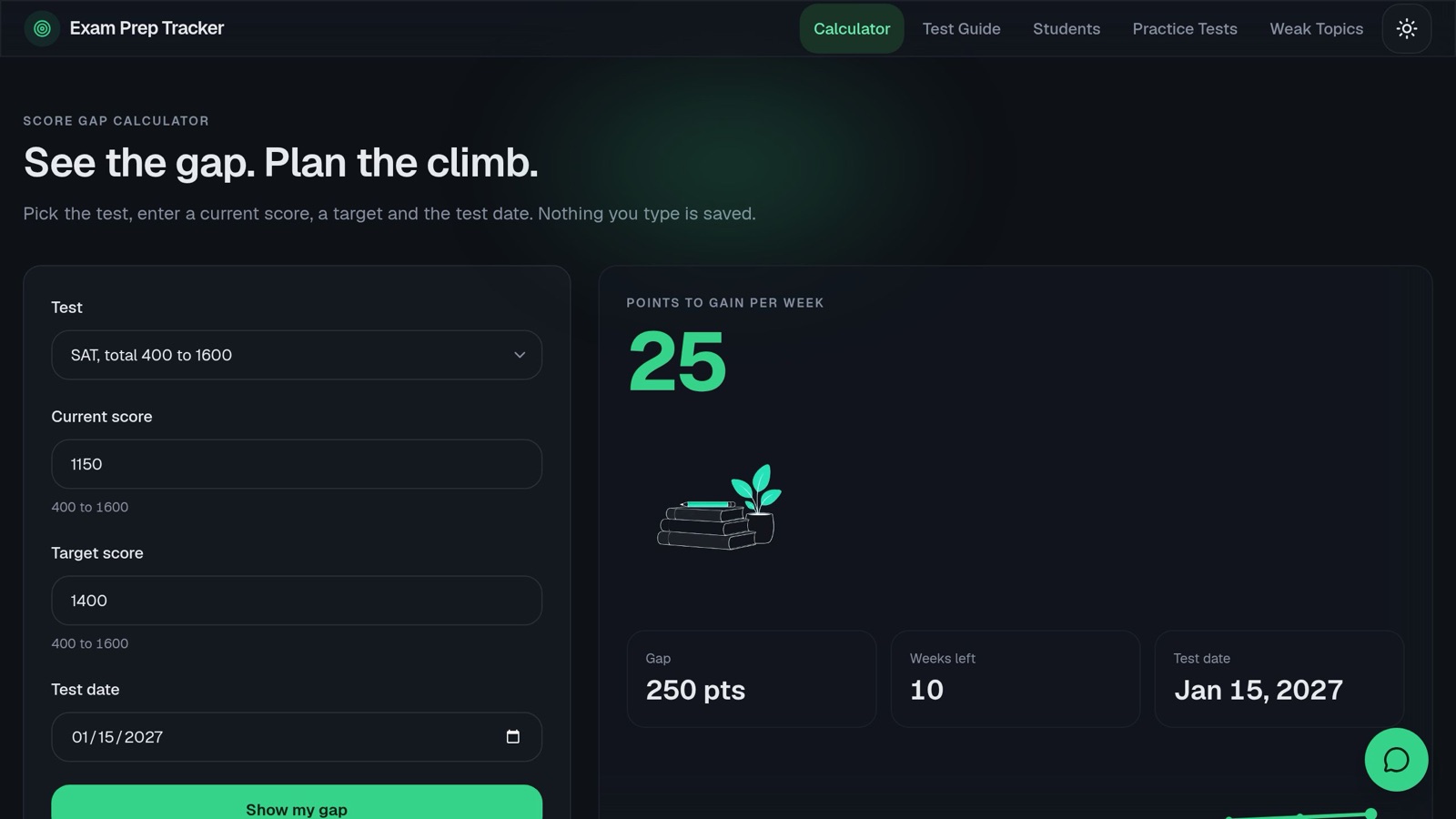
A weekly number is easier to act on than a total gap.
**Make it yours:** pick your test, enter your latest practice score and your target, and log each new practice test on the day you take it.
### 9. [Licensing Exam Study Plan](https://www.taskade.com/apps/all/licensing-exam-study-plan-with-daily-concepts-m2kb0elquu8onih1): topics spread by weight
The Licensing Exam Study Plan spreads exam topics by weight across the days left before the exam. Each day shows one concept and a check question. Weak topics return within 3 days, and the last 5 days are review only, so the plan ends with revision instead of new material.
**Best for:** working adults who prepare for a licensing or certification exam in the evenings. **What it tracks:** the exam date, weekly hours, topic weights, daily concepts and confidence. **Inside:** 5 projects, 1 AI agent called Exam Countdown Coach, and 3 automations, including daily concept drafts and a next step after a low-confidence answer.
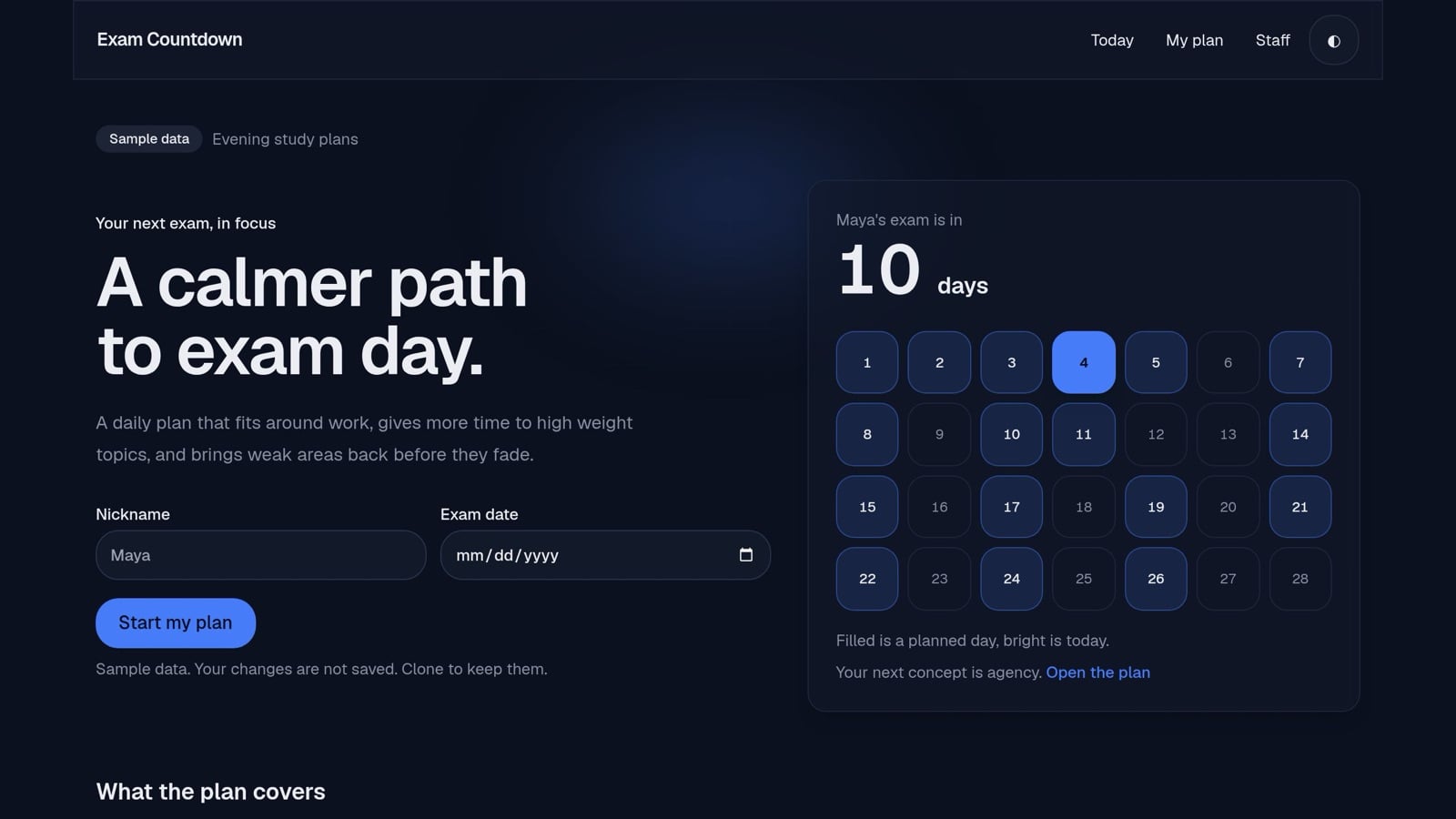
This kit has 43 clones, the second highest in this list. It starts with sample data, so you see a full countdown before you enter your own date.
**Make it yours:** enter your exam date and the hours you can study each week, then replace the sample topics with the outline of your exam.
### 10. [PDF Reviewer Maker](https://www.taskade.com/apps/all/pdf-reviewer-maker-reviewers-and-mock-exams-cnxwe08j5irgk0kt): reviewers and mock exams from a PDF
The PDF Reviewer Maker turns an uploaded PDF into topic reviewers and board-style practice questions. An AI assistant writes key points, commonly confused pairs and practice questions. You take timed mock exams, and a readiness board shows your average by subject against a 75 percent target.
**Best for:** students who prepare for a board exam from handouts and course PDFs. **What it tracks:** reviewers, practice questions, mock exam scores and readiness by subject. **Inside:** 8 projects, 2 AI agents, including the Reviewer Maker, and 3 automations, including a Saturday score update and a 30-day readiness alert.
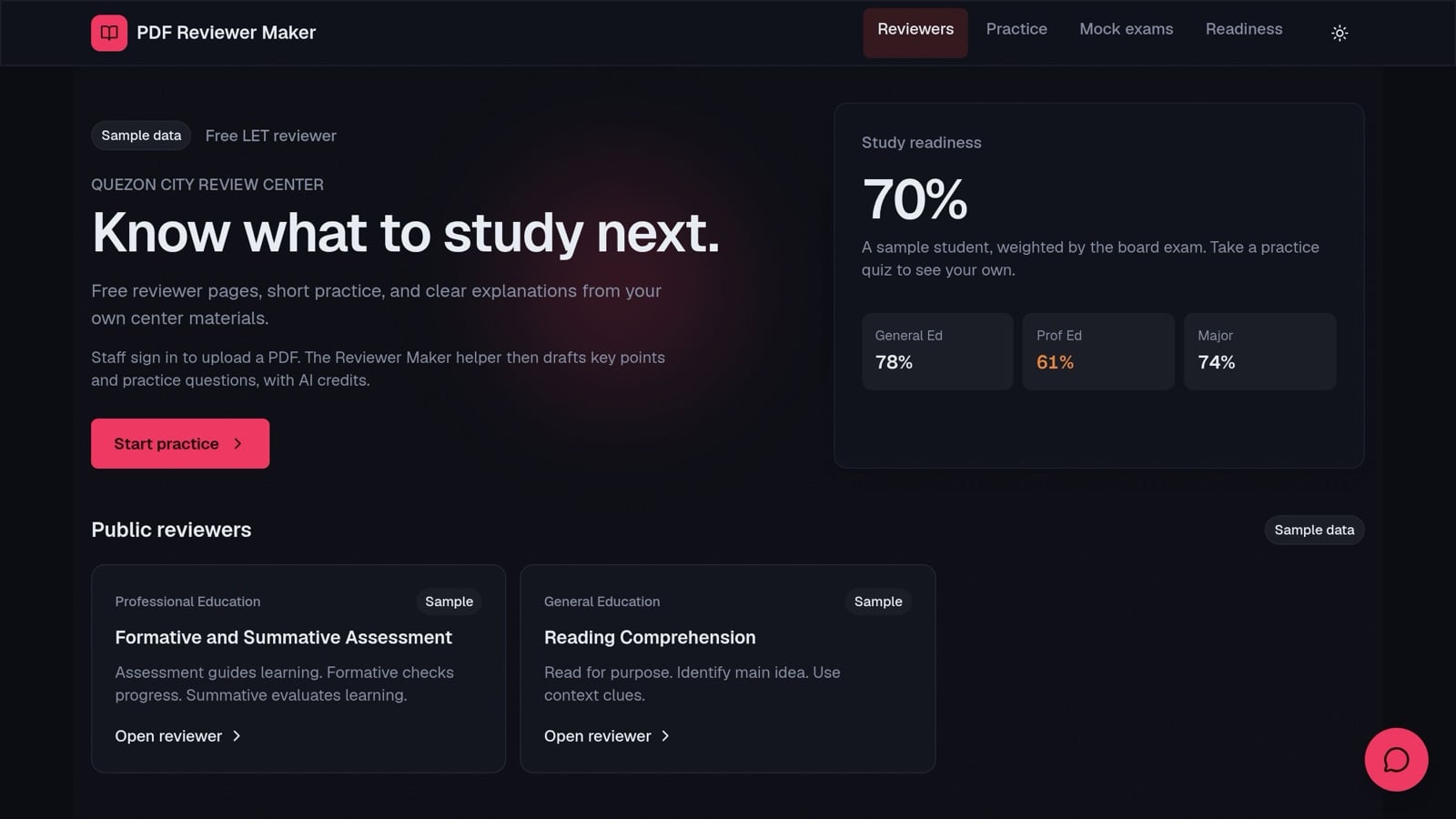
The kit was built for a review center, so it also suits a study group that shares one set of reviewers. Check every question against your course material before you rely on it. The AI drafts, and you decide what is correct.
**Make it yours:** sign in to your copy, upload one PDF chapter, and review the draft before you add it to a mock exam.
---
## Review and Remember
The Cheat Sheet Maker condenses your notes into one printable page. A one-page limit makes you choose the formulas and facts that matter most for the exam. The kit shows a fill meter, so you see how much space is left before you print on Letter or A4.
### 11. [Cheat Sheet Maker](https://www.taskade.com/apps/all/cheat-sheet-maker-2lkova6xwm3iyxdm): a one-page sheet from your notes
The Cheat Sheet Maker turns notes that you type or paste into blocks on one printable page. You pick 1 to 3 columns or front and back, and a font size from 7 to 11 pt. The fill meter shows the share of the page in use, so you cut before the sheet overflows.
**Best for:** students who bring one page of notes into an exam or review from one page. **What it tracks:** blocks, layout, font size, paper size and the topics you missed. **Inside:** 6 projects, 1 AI agent called Sheet Squeezer, and 3 automations, including an exam sheet reminder and a step that turns your misses into must-have blocks.
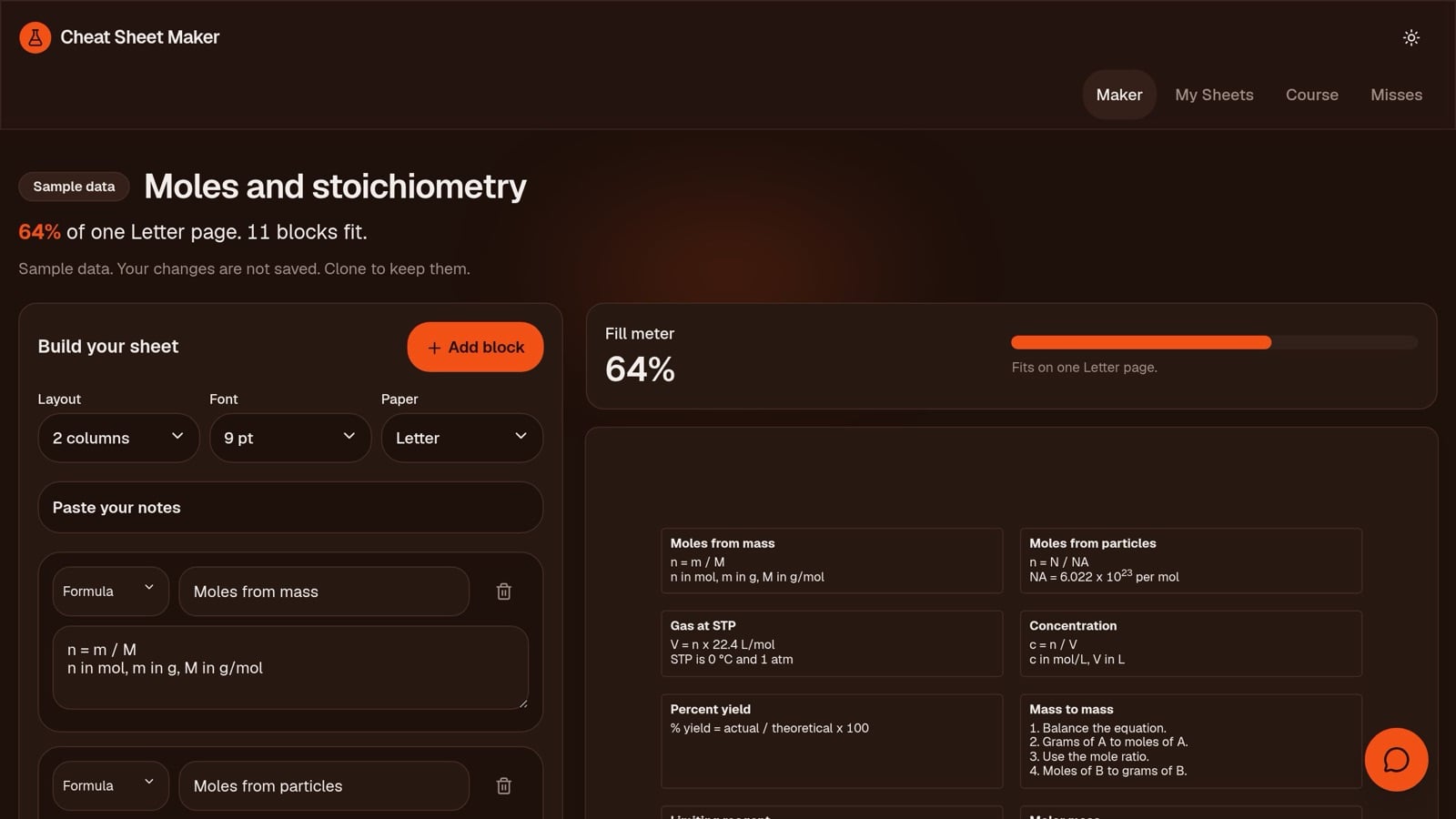
You can try the maker with no sign-in. Sign in to your copy to save sheets and share them with a class.
**Make it yours:** start a sheet for your next exam, paste your notes block by block, and print a test copy to check the font size on paper.
---
## Build the Study Habit
The Habit Tracker Dashboard is the most cloned kit in this list, with 118 clones on 2026-11-18. You check off today's habits, see your streaks grow and track your goals. A daily study block, a reading goal or language practice fits the same check-off list.
### 12. [Habit Tracker Dashboard](https://www.taskade.com/apps/all/habit-tracker-dashboard-sfbtunz606xmukw3): streaks and goals
The Habit Tracker Dashboard shows today's habits, what you finished and your longest streak, with a four-week view where a darker square means more habits done. An AI assistant called Progress Coach suggests a next step.
**Best for:** students who want study time to become a daily routine. **What it tracks:** daily habits, categories, streaks and goals. **Inside:** 3 projects, 1 AI agent called Progress Coach, and 5 automations, including a habit completion processor and a weekly progress report.
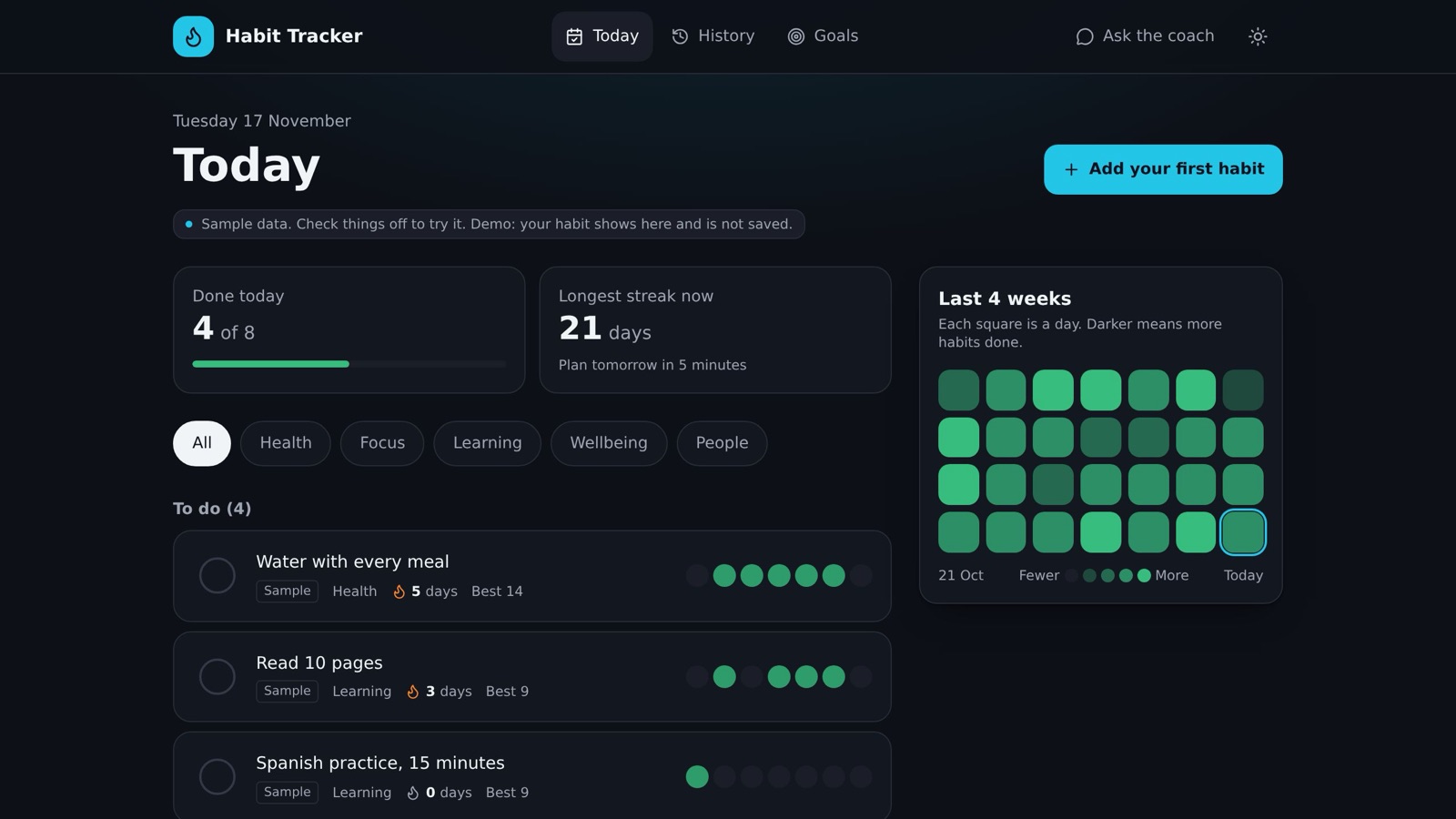
The kit page says to clone it free and then switch on the automations you want. Check the steps of each automation first, because a step that uses a premium integration needs a paid plan.
**Make it yours:** delete the sample habits, add one study habit with a daily target, and check it off tonight. [Make one from a prompt](https://www.taskade.com/generate/ai/habit-tracker)
---
## Study Kits vs Study Tools
A study kit and a single-purpose study tool solve different problems. Quizlet is built for flashcards, Notion for notes and pages, and Google Calendar for dates and reminders. A Taskade kit puts the plan, the review material and the reminders for one study job in one app that you own and edit.
| Need | Taskade kit | Quizlet | Notion | Google Calendar |
|------|-------------|---------|--------|-----------------|
| Flashcards | Exam Study Portal: flashcards and quizzes | Core strength: decks and study modes | Build your own on a page | Built for dates and reminders |
| Exam plan | Study Planner replans missed sessions | Practice modes for each study set | Templates that you fill in | Study blocks that you add as events |
| Deadlines | Syllabus to Calendar with reminders and an .ics file | Built for study sets and practice | Database with dates and a calendar view | Core strength: events and reminders |
| Works offline | Runs online, in the browser and the Taskade apps | Offline study on a paid plan | Offline pages in the desktop and mobile apps | View offline in Chrome, edit offline in the mobile app |
| Price to start | Free: each kit in this list has no price | Free account | Free plan for individuals | Free with a Google account |
Plan and offline details were read on each vendor's site or help center on 2026-11-18.
Each tool has real strengths. Quizlet suits students who want ready-made decks: it has a large shared library of study sets and a mobile app with several study modes. Notion suits students who like to design their own system: its pages and databases are flexible, and its free plan covers individuals. Google Calendar suits students who live by their calendar: reminders reach every device, and it is free with a Google account.
Choose a Taskade kit when you want the plan, the review material and an AI agent for one study job in one app. For a ranked list of planner tools, read [AI study planner tools compared](https://www.taskade.com/blog/ai-study-planners).
---
## Which Study App Fits You?
The right study app depends on the job you face this week. Use a planner when you have several exams, a deadline tool when due dates pile up, an exam kit when one test matters most, and a habit tracker when the problem is starting at all. The table and the chart below map each job to a kit.
| If you need to | Start with |
|----------------|------------|
| Plan study time for several exams | Study Planner or Study Timetable Maker |
| See every due date in one place | Syllabus to Calendar |
| Know the grade you need on the final | Study Dashboard |
| Prepare for one exam in two weeks | Exam Study Portal |
| Raise a practice test score | Exam Prep Tracker |
| Turn a PDF into practice questions | PDF Reviewer Maker |
| Study every day | Habit Tracker Dashboard |
```mermaid
graph TD
Q["What is your study problem
this week?"]
style Q fill:#2a1225,color:#ff8fa3,stroke:#ff2d60,stroke-width:2px
P["Study Planner
or Study Timetable Maker"]
style P fill:#0d1b2a,color:#7dd3fc,stroke:#38bdf8,stroke-width:1.5px
D["Syllabus to Calendar
or Study Dashboard"]
style D fill:#11111b,color:#cdd6f4,stroke:#00d4aa
X["Exam Study Portal, Exam Prep Tracker
or PDF Reviewer Maker"]
style X fill:#1a0d24,color:#ce93d8,stroke:#6a1b9a,stroke-width:1.5px
H["Habit Tracker Dashboard"]
style H fill:#0d1a0e,color:#86efac,stroke:#22c55e,stroke-width:1.5px
Q -->|"too many exams"| P
Q -->|"too many deadlines"| D
Q -->|"one big exam"| X
Q -->|"hard to start"| H
```
Start with one or two kits, such as one planner and one exam kit. Here is a first week with a study kit:
```
FIRST WEEK WITH A STUDY KIT
---------------------------------------------------------------
Day 1 Clone the kit. Read the sample data before you delete it.
Day 2 Add your courses, exam dates and free hours.
Day 3 Run the first plan. Move one block that does not fit.
Day 4 Study, then log the session or check off the habit.
Day 5 Add review material: cards, questions or a cheat sheet.
Day 6 Check the steps of one automation, then turn it on.
Day 7 Read the week. Keep what worked, cut what you skipped.
---------------------------------------------------------------
```
---
## How to Clone a Study App
You clone a study app from its kit page in the Taskade App Factory, then replace the sample data with your own. Each kit in this list has no price and no PRO badge, so it clones on the Free plan, and the copy keeps every agent of the kit. Each clone counts as one of the 3 Taskade Genesis apps that the Free plan includes.
1. Open the kit page from a heading in this guide and press "Clone to Workspace". If you have no account yet, sign up free first, and the copy goes into your workspace.
2. Open your copy and replace the sample rows with your own courses, exam dates and free hours. Most kits mark sample rows with a "Sample data" label, so you know which rows to delete.
3. Check the automations in your copy before you turn one on. Automations run on every plan, with 10 runs a billing period on Free. Gmail, Google Calendar, Google Sheets and Slack are premium integrations, so an automation step that uses one of them needs a paid plan. AI agents and AI steps use AI credits. On Free, you [earn free AI credits with referrals and invites](https://www.taskade.com/learn/account/referrals), and you can upgrade any time.
For a tour of the student setup, read [Taskade for students](https://www.taskade.com/learn/projects/for-students). To learn what a kit holds and what a clone copies, read [how kits work](https://www.taskade.com/learn/genesis/community-kits). More kits are in the [education kits](https://www.taskade.com/apps/education) and [habit kits](https://www.taskade.com/apps/habits) categories.
---
## For Teachers
This guide covers study apps for students, and teachers have a separate guide for the classroom side of school. [AI tools for teachers](https://www.taskade.com/blog/ai-tools-teachers) ranks 17 tools for lesson plans, worksheets, tutoring, grading and seating charts, so a teacher can pick one tool for each classroom job.
---
## Frequently Asked Questions
The ten answers below cover what the study kits cost, what a clone copies, which kit to start with, phones, study groups and building your own app. Each answer stands on its own, so you can read only the question you have. The plan facts describe the Free plan on 2026-11-18.
### What are the best AI apps for students in 2026?
The most useful AI apps for students plan the week, track exam prep and turn notes into review material. This guide lists 12 free study kits from the Taskade App Factory, from a study planner that replans missed sessions to a PDF reviewer that writes mock exams.
### Are these student apps free?
Yes. Each kit in this guide has no price and no PRO badge, so it clones on the Free plan, and the copy keeps every agent of the kit. Each clone counts as one of the 3 Taskade Genesis apps on the Free plan. AI agents use AI credits. On Free, you earn free AI credits with referrals and invites, and you can upgrade any time.
### What does it mean to clone an app?
Cloning makes your own copy of a working app, with its screens, its data tables and its AI agent. You fill it with your own courses and dates. Changes in your copy do not touch the original kit.
### Which app helps me plan my study week?
Start with the Study Planner kit. You enter your exams, topics and free hours, and it builds a day-by-day plan that replans missed sessions before each exam. For a simple weekly grid, the Study Timetable Maker kit needs no AI agent.
### Can an AI app make practice questions from my notes?
Yes. The PDF Reviewer Maker kit turns an uploaded PDF into topic reviewers and mock exams. Check every question against your course material before you rely on it.
### Is there a free habit tracker for studying?
Yes. The Habit Tracker Dashboard kit lets you check off today's habits, see your streaks and track goals. Its sample habits include reading and language practice, and you can add a daily study block of your own.
### Can I use these apps on my phone?
Yes. A cloned app runs in the browser on a phone, a tablet or a computer, and the Taskade apps for iOS and Android open your workspace too.
### Can I share a study app with my study group?
Yes. The Free plan includes 2 workspace members, so you can invite one classmate with role-based access from Owner to Viewer. A larger group shares the app by its link.
### Do I need to know how to code?
No. You clone the kit and type your own data. To change a screen or add a field, you describe the change to Taskade EVE in plain words, and Taskade EVE uses AI credits.
### What if I need an app that is not on this list?
Describe it in one prompt and Taskade Genesis builds it, with the data, an AI agent and automations. Building from a prompt uses AI credits. You can also browse more study kits in the Taskade App Factory.
---
## Related Reading
- [AI study planner tools compared](https://www.taskade.com/blog/ai-study-planners): 11 planner tools ranked for students
- [A study planner dashboard you own](https://www.taskade.com/blog/study-planner-dashboard): one dashboard, in depth
- [Free AI app builders](https://www.taskade.com/blog/free-ai-app-builders): build a study app of your own from a prompt
- [A free Notion alternative](https://www.taskade.com/compare/free-notion-alternative): how Taskade compares for notes and planning
[Browse every study kit](https://www.taskade.com/apps/education)
▲ ■ ● Memory · Intelligence · Execution. Your courses, your study coach and your reminders in one app.