# Types of Memory in AI Agents: Complete Guide to Agent Memory (2026)
> Understand memory in AI agents: short-term, long-term, episodic, and semantic memory explained. Learn how Taskade agents use Projects as memory for smarter conversations.
- Source: https://www.taskade.com/blog/ai-agent-memory
- Published: 2025-05-08
- Updated: 2026-11-12
- Author: Stan Chang
Remember punch cards? They were the early method for storing data in computers. While we’ve moved past perforated paper, the idea of memory in computing is still important, especially for AI systems. In this article, we’ll discuss **different types of [AI agent memory](https://www.taskade.com/wiki/taskade/taskade-agent-knowledge)** and how they work.
* * *
Like any computer system, **autonomous AI agents** store and retrieve information. They rely on various types of memory to perform objectives defined by user instructions. By learning the strengths and limitations of each memory type, you will be able to unlock your agents’ full potential.
In this article, we explore three key types of memory — **long-term memory**, **short-term memory**, and **dynamic memory** — in AI agents and how each fits into the larger picture of agent knowledge.
Check out this resource if you’re looking for a [guide to train Taskade AI Agents with Knowledge](https://www.taskade.com/blog/train-ai-agents-taskade).
[YouTube video player](https://www.youtube-nocookie.com/embed/I6hjr0w1RkE?rel=0&modestbranding=1)
Watch: How Taskade AI agents use persistent memory to automate sales emails, CRM updates, and follow-ups across your workspace.
Don’t worry, we’ll keep things friendly, so you don’t need a PhD in AI to follow along.
Let’s take a closer look at how all the pieces come together. 👇
> **TL;DR:** AI agent memory comes in three types — short-term (session context), long-term (persistent knowledge), and dynamic (live workspace feeds). Without proper memory, agents forget your preferences and repeat mistakes. Taskade Genesis uses Projects as persistent memory, giving AI agents access to your workspace knowledge across sessions with frontier models from top AI labs. [Try it free →](https://www.taskade.com/create)
* * *
## **The Physics Origin: How Memory Began with Magnets**
Before we dive into the practical memory types, here is a surprising fact: **AI memory was invented by a physicist studying magnets**.
In 1982, John Hopfield — a physicist, not a computer scientist — realized that the [Ising model](https://en.wikipedia.org/wiki/Ising_model) of magnetism could be repurposed as a memory system. In the Ising model, atoms in a block of iron carry tiny magnetic spins (up or down) that tend to align with their neighbors, settling into low-energy configurations. Hopfield replaced atoms with artificial neurons and magnetic interactions with weighted connections — and created the **Hopfield network**, the first artificial associative memory.
The key insight was **energy landscapes**. By setting the weights between neurons, Hopfield could sculpt "valleys" in the network’s energy surface around specific patterns. Feed the network a noisy or incomplete version of a stored pattern, and it naturally relaxes — like a marble rolling downhill — into the nearest valley. The network "remembers" by finding its lowest-energy state.
```mermaid
graph LR
A["Noisy Input
’p_oductivi_y’"] --> B["Hopfield Network
(energy minimization)"]
B --> C["Stored Pattern
’productivity’"]
D["Partial Input
’task m___gement’"] --> B
B --> E["Stored Pattern
’task management’"]
style B fill:#2a1225,color:#ff8fa3,stroke:#ff2d60,stroke-width:2px
```
This is the ancestor of every modern [AI memory system](https://www.taskade.com/blog/what-are-ai-agents). The Hopfield network’s associative retrieval — finding the closest stored pattern to a noisy query — is the same principle behind the **vector embeddings** and **semantic search** that power today’s AI agents. When a [Taskade agent](https://www.taskade.com/agents) searches its knowledge base to find the most relevant document for your question, it is performing a modern version of what Hopfield’s network did in 1982: rolling through an energy landscape toward the nearest stored memory.
In October 2024, Hopfield and Geoffrey Hinton received the **Nobel Prize in Physics** for this work — recognizing that the mathematics of magnets and the mathematics of AI memory are [one and the same](https://www.taskade.com/blog/how-do-llms-work).
| Era | Memory Technology | How It Works | Analogy |
|-----|------------------|-------------|---------|
| 1982 | Hopfield network | Energy minimization over neural states | Marble rolling into valley |
| 2013 | word2vec | Words mapped to vectors; similar words cluster | Fingerprints of meaning |
| 2020 | RAG (Retrieval-Augmented Generation) | Query → vector search → inject context | Librarian fetching relevant books |
| 2026 | [Workspace DNA](https://www.taskade.com/blog/agentic-workspaces) | Projects as persistent memory + live dynamic feeds | Living, growing knowledge |
Now let’s look at how modern AI agents implement these memory principles in practice.
```mermaid
graph TD
MEM["Agent Memory"] --> STM["Short-Term Memory
(Session Context)"]
MEM --> LTM["Long-Term Memory
(Persistent Knowledge)"]
MEM --> DYN["Dynamic Memory
(Live Feeds)"]
LTM --> SEM["Semantic Memory
Facts & Documents"]
LTM --> EPI["Episodic Memory
Past Interactions"]
LTM --> PROC["Procedural Memory
Learned Workflows"]
DYN --> RAG["RAG Retrieval"]
DYN --> TOOLS["Agent Tools & APIs"]
style MEM fill:#2a1225,color:#ff8fa3,stroke:#ff2d60,stroke-width:2px
style STM fill:#1e1e2e,color:#cdd6f4,stroke:#ff2d60
style LTM fill:#1e1e2e,color:#cdd6f4,stroke:#ff2d60
style DYN fill:#1e1e2e,color:#cdd6f4,stroke:#ff2d60
```
* * *
## **Cognitive Maps: How Your Brain Organizes Memory**
Before we get to practical memory types, here is a second surprise from neuroscience: **your brain organizes memories the same way it navigates physical space**.
In the 1930s, psychologist Edward Tolman proposed that rats build internal "cognitive maps" — not just stimulus-response chains, but structured spatial representations. Decades later, neuroscientists proved him right by discovering dedicated cell types in the hippocampus:
- **Place cells** fire when you are at a specific location — each one encoding "I am HERE"
- **Grid cells** fire in repeating hexagonal patterns, creating an internal coordinate system
- **Object-vector cells** encode the direction and distance to nearby objects
The breakthrough came when researchers found that **the same neural machinery activates for abstract thought**. When you compare product prices, navigate a social hierarchy, or recall which folder a document is in, your hippocampus fires the same grid cell patterns it uses for physical navigation. Your brain literally treats knowledge as a **space to be navigated**.
```
FROM SPATIAL MEMORY TO AI MEMORY
═══════════════════════════════
Biological Memory AI Agent Memory
(Hippocampus) (Vector Database)
Place Cells Embeddings
"I am at the café" "This doc is about onboarding"
↕ ↕
Grid Cells Dimensions
Hexagonal coordinate grid 768-dim vector space
↕ ↕
Path Integration Semantic Search
"Walk north 10 steps" "Find similar documents"
↕ ↕
Cognitive Map Knowledge Graph
Structured spatial memory Structured retrieval
```
This is directly relevant to how [AI agent memory](https://www.taskade.com/blog/what-are-ai-agents) works. When a Taskade agent stores a document as a **vector embedding** and later retrieves the most semantically similar entry to your query, it is performing the same operation your hippocampus does: navigating a geometric space where similar memories cluster together. The Hopfield network gave us the energy landscape. Cognitive maps gave us the coordinate system. Modern AI agent memory combines both — energy-based retrieval (finding the nearest stored pattern) within a geometrically organized space (embeddings that encode meaning as position).
* * *
## **Long-Term Memory: Persistent Knowledge Base**
What is long-term memory in AI agents?
In simple terms, it’s the AI agent’s **persistent knowledge base**, information the agent retains across sessions or chats and uses whenever you ask a question or prompt an action. Unlike short-term memory, long-term memory sticks around even once a conversation is over.
So, what can long-term memory include?
This can be any resource you use to “train” your agents, e.g., company FAQs, policy documents, customer support transcripts, project files, or even product manuals. It’s the curated knowledge you upload or connect to the agent so it can give more informed answers over time.
Of course, past interactions with the agent also fall into this category. And that means the agent can “pick up” on your unique style and communication preferences over time.
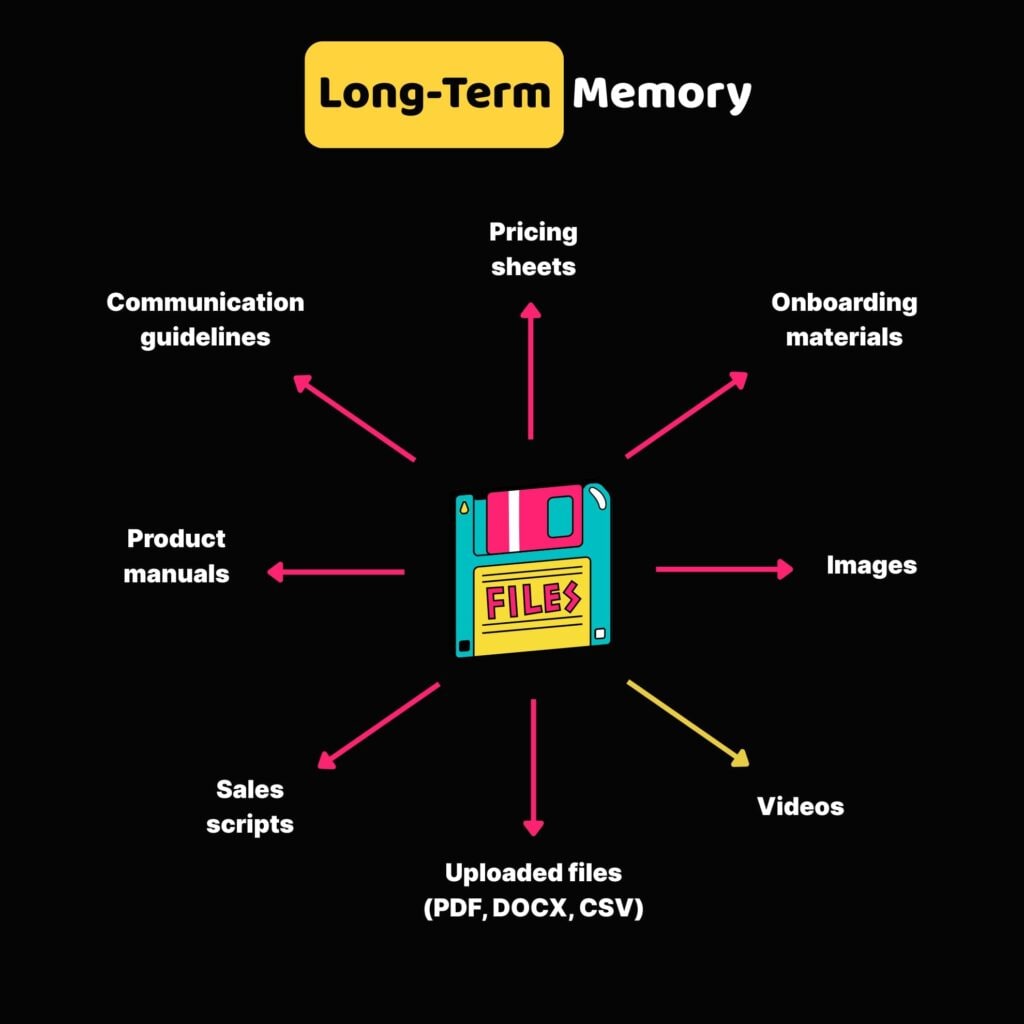
You might wonder: "How exactly does an AI remember things like past chats, notes, or documents?"
Well, one of the secret ingredients behind the scenes is a technique called **vector embeddings**.
Think of it this way: when an AI reads or stores information, like a sentence or even an image, it turns that content into a sort of **digital fingerprint** that captures its meaning. These fingerprints, called embeddings, help the AI figure out when two pieces of content are similar.
To keep track of all these fingerprints, the AI stores them in a **vector database**, a specialized system designed to organize and retrieve data based on similarity.. It also allows AI agents to search through and pull up the most relevant pieces of information for more accurate answers to your questions.
```mermaid
graph LR
Q["User Query"] --> EMB["Embed Query
into Vector"]
EMB --> SEARCH["Search Vector DB
(Nearest Neighbors)"]
SEARCH --> RANK["Rank by
Similarity"]
RANK --> CTX["Inject Context
into Prompt"]
CTX --> LLM["LLM Generates
Response"]
LLM --> STORE["Store Interaction
in Memory"]
STORE -.->|"feedback loop"| SEARCH
style Q fill:#2a1225,color:#ff8fa3,stroke:#ff2d60,stroke-width:2px
style LLM fill:#2a1225,color:#ff8fa3,stroke:#ff2d60,stroke-width:2px
```
* * *
## **Short-Term Memory: Conversation Context**
Psychologists define short-term memory as the ability to hold small amounts of information for a brief time. It’s what helps you remember a new phone number just long enough to dial it.
AI agents work in a similar way. They use short-term memory to keep track of the current conversation or task. This allows the agent to understand context and follow user instructions.
Short-term memory in AI agents includes every piece of instruction or prompt you provide as well as any piece of data (text, images, videos, sound) generated by the agent in return. However, it can also include uploaded files and documents you share within an active agent chat.
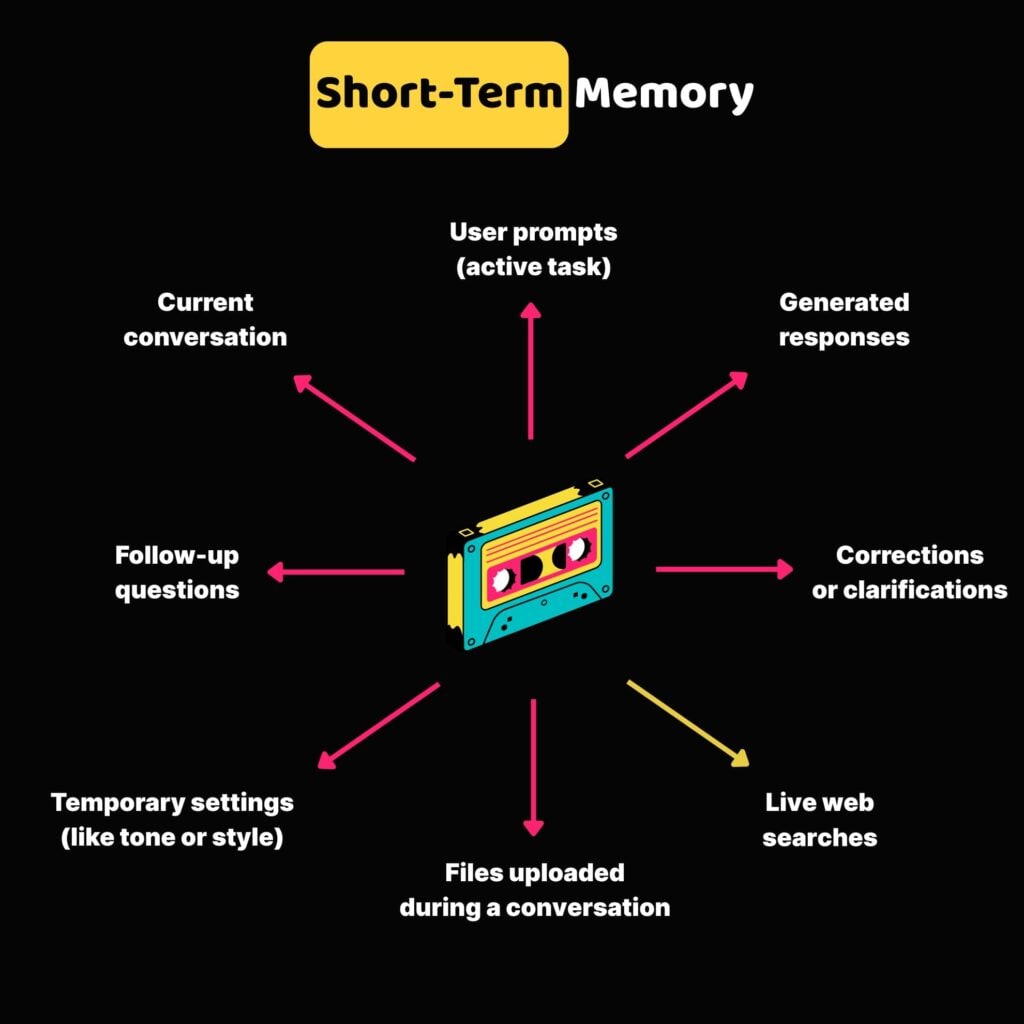
Typically, the more context you provide, the better the agent can understand and help. But there’s a catch. Short-term memory has limits. If the conversation gets too long or complicated, the agent may lose track or even “hallucinate,” making up answers that sound right but aren’t.
You know, just like the game of telephone, where a whispered message gets hilariously scrambled by the time it reaches the last person. That’s when errors begin to pile up. There are a few tricks you can use to avoid this, but we’ll get to that in a moment.
With that out of the way, let’s move on to something even more interesting.
* * *
## **Dynamic Memory: Live Knowledge Access**
Even a well-trained long-term memory can become outdated or miss newly emerging information. The good news is, the last type of agent memory combines the best of both worlds — the benefits of long-term and short-term memory — to pull in additional context on the fly when needed.
**Dynamic memory** allows AI agents to access live, real-time data from your current projects, a website, or other connected sources as they work, where they work.
Let’s say you’re writing descriptions for a new line of smart thermostats. With dynamic memory, the AI agent can pull in the latest technical specs directly from your live product database.
So when you ask it to draft product copy, it automatically includes the most current details, such as “supports Wi-Fi 6” or “compatible with Alexa,” without you having to input that manually.
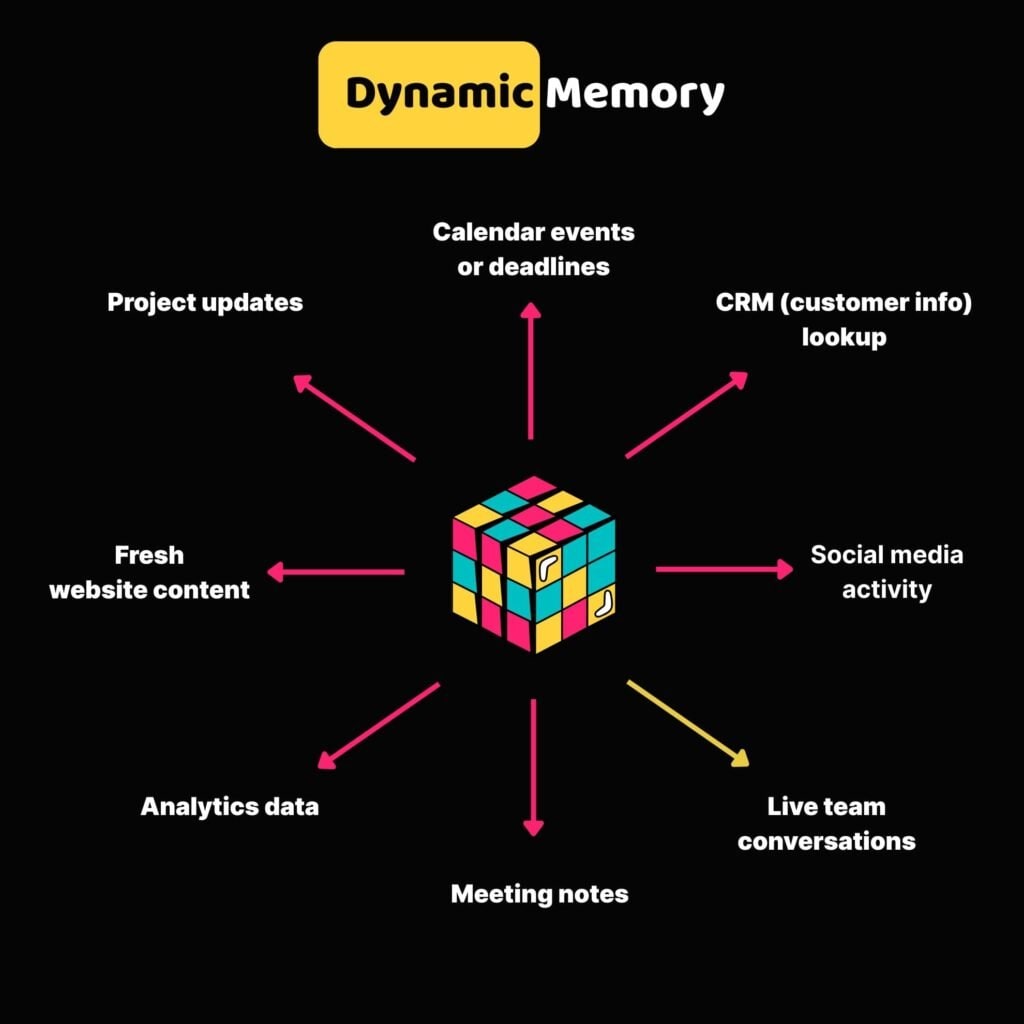
A big part of how this works is something called **Retrieval-Augmented Generation (RAG)**. Instead of relying solely on its pre-trained knowledge, the AI first **retrieves** the most relevant data from external sources and then **generates** a response that integrates that information.
Whenever the source data is updated, the AI agent can immediately incorporate that information into its responses. This minimizes the risk of outdated or inaccurate answers.
```mermaid
graph TD
subgraph Sources["Live Data Sources"]
P["Taskade Projects"]
W["Websites & Blogs"]
T["Agent Tools
(Gmail, HubSpot, etc.)"]
end
P --> INGEST["Ingest & Embed"]
W --> INGEST
T --> INGEST
INGEST --> VDB["Vector Database
(Updated in Real Time)"]
VDB --> RETRIEVE["Retrieve Relevant
Context"]
RETRIEVE --> GEN["Generate Response
with Fresh Data"]
GEN --> USER["User Gets
Up-to-Date Answer"]
style INGEST fill:#2a1225,color:#ff8fa3,stroke:#ff2d60,stroke-width:2px
style GEN fill:#2a1225,color:#ff8fa3,stroke:#ff2d60,stroke-width:2px
```
* * *
## **Managing AI Agent Memory/Knowledge in Taskade**
New to Taskade? Here’s a short introduction.
**[Taskade agents](https://taskade.com/agents)** are customizable AI assistants that help you complete tasks, answer questions, generate content, and support your projects, all inside your [Taskade workspace](https://www.taskade.com/wiki/taskade/workspace). The best part? **No coding required.** You can train and manage agents entirely through Taskade’s interface.
To get started, we need an agent. Click the button below and select **Deploy AI Agent**.
[**Generate your first AI agent! 👈**](https://www.taskade.com/create)
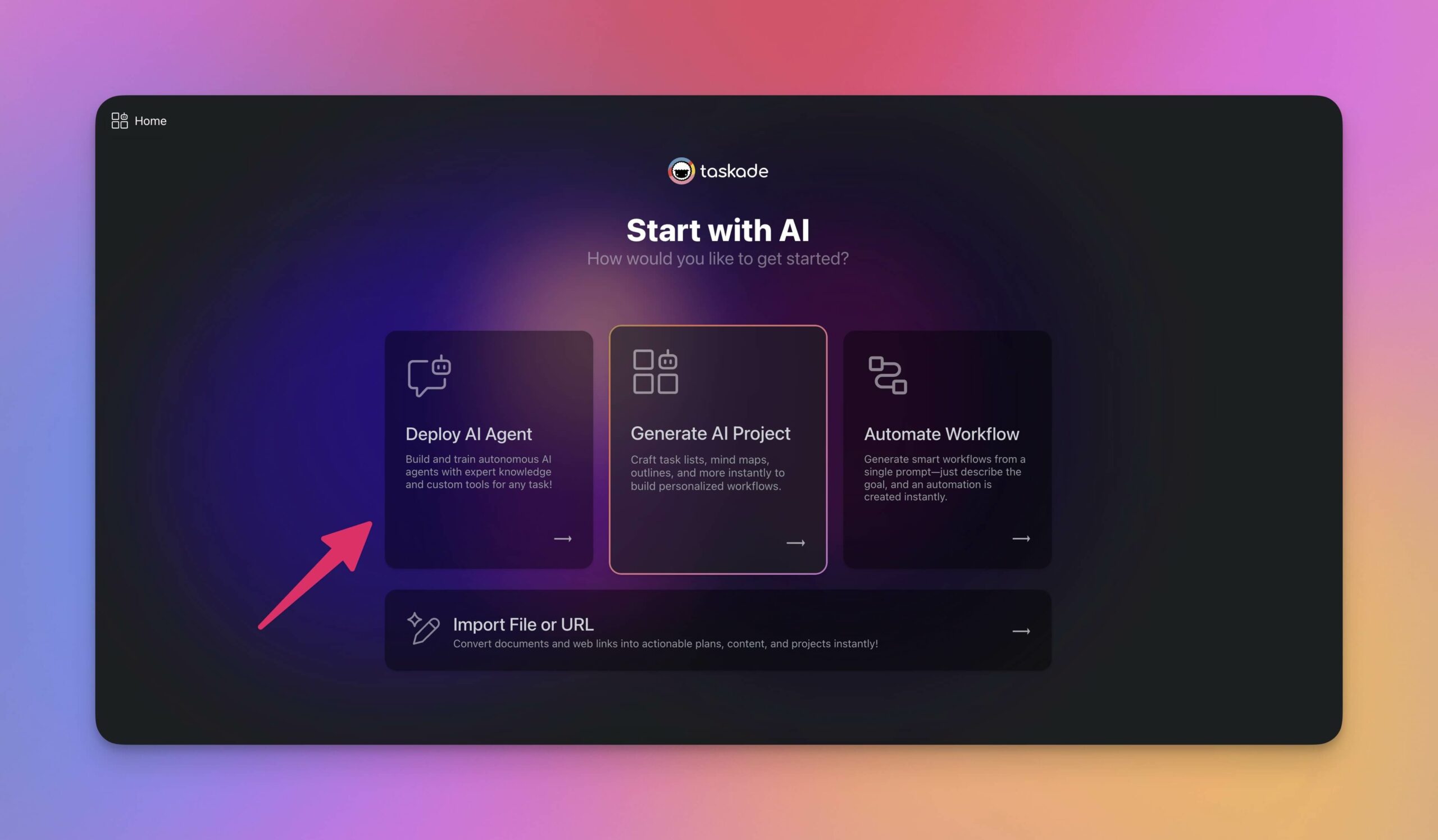
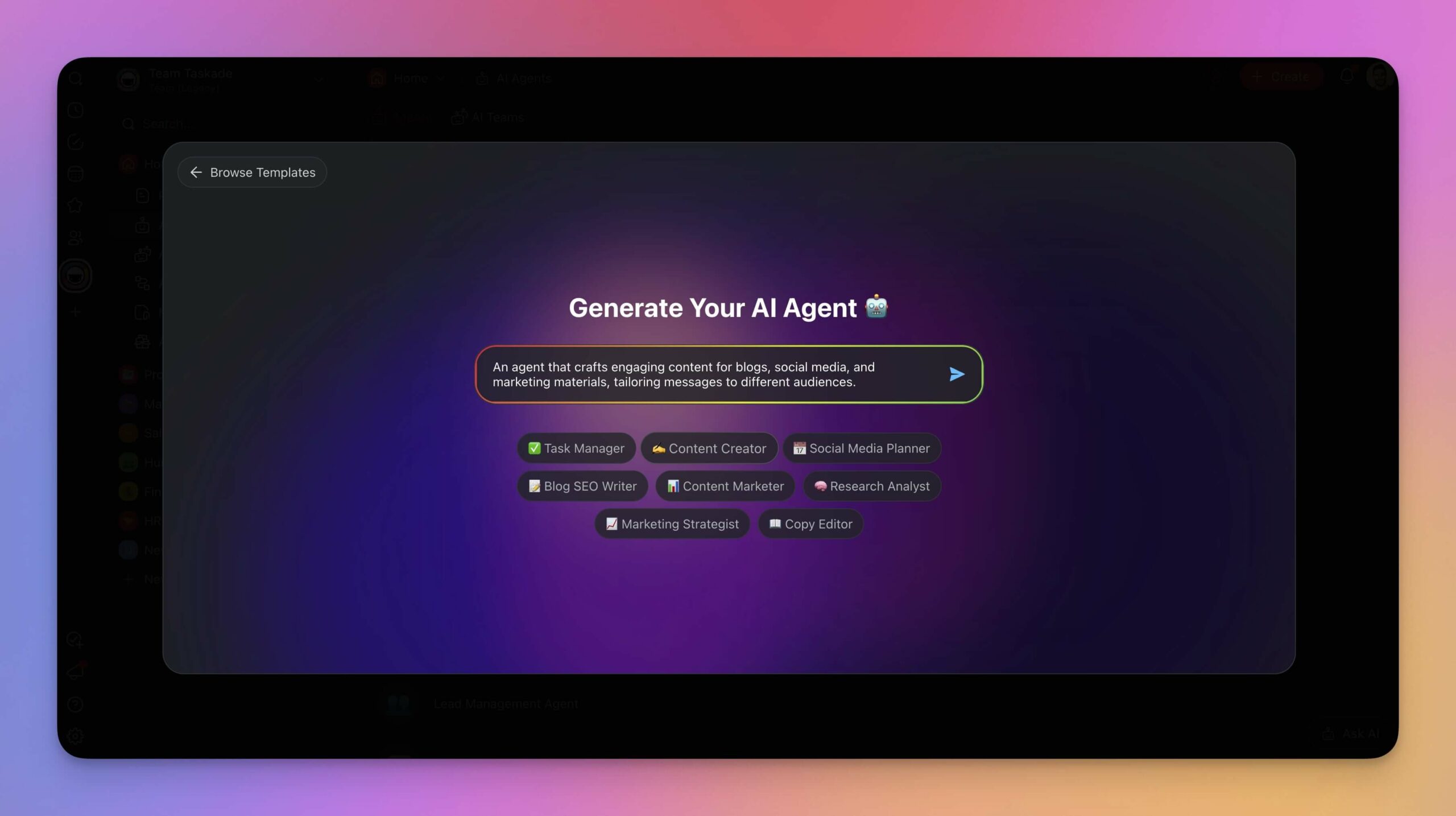
You're now in the **AI Agent Generator**. Simply explain the type of agent you want to create or what you need help with. The generator will handle the rest and create your agent in a few seconds.
Once your agent is ready, it’s time to teach it a few useful things.
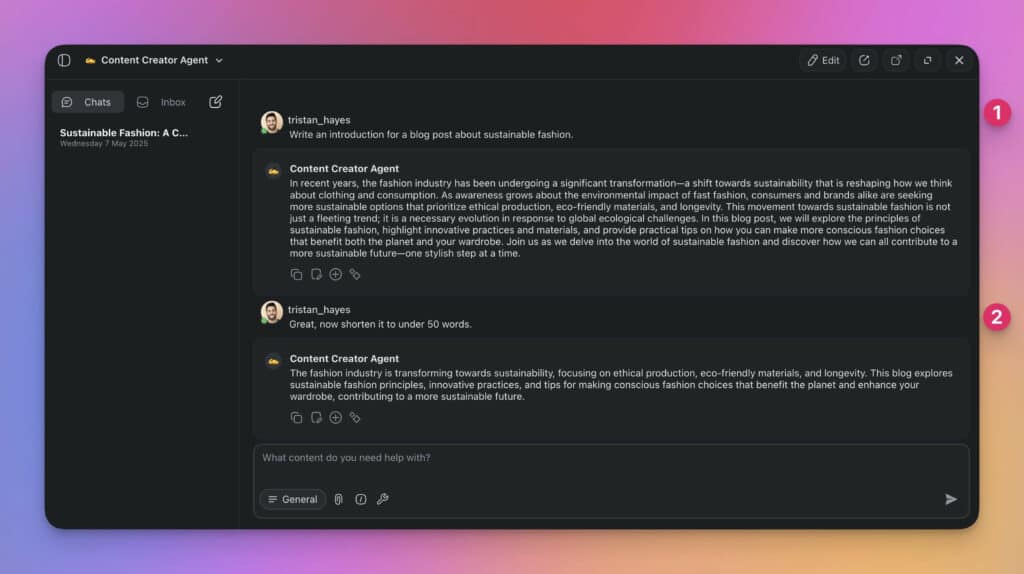
You might start by asking it to help draft an email, summarize yesterday’s meeting, or suggest tasks for a project. As you go back and forth, the agent keeps track of what you’re asking.
This is its **short-term memory** at work.
Let’s move a little deeper and add **static knowledge** to the agent's long-term memory.
One of the easiest ways to get started is by **uploading a few files & documents**. Inside the agent’s **Knowledge tab**, you will find the option to add files like PDFs, DOCX, TXT, CSV, or even presentations. For example, you might upload technical datasheets or training manuals for new team members.
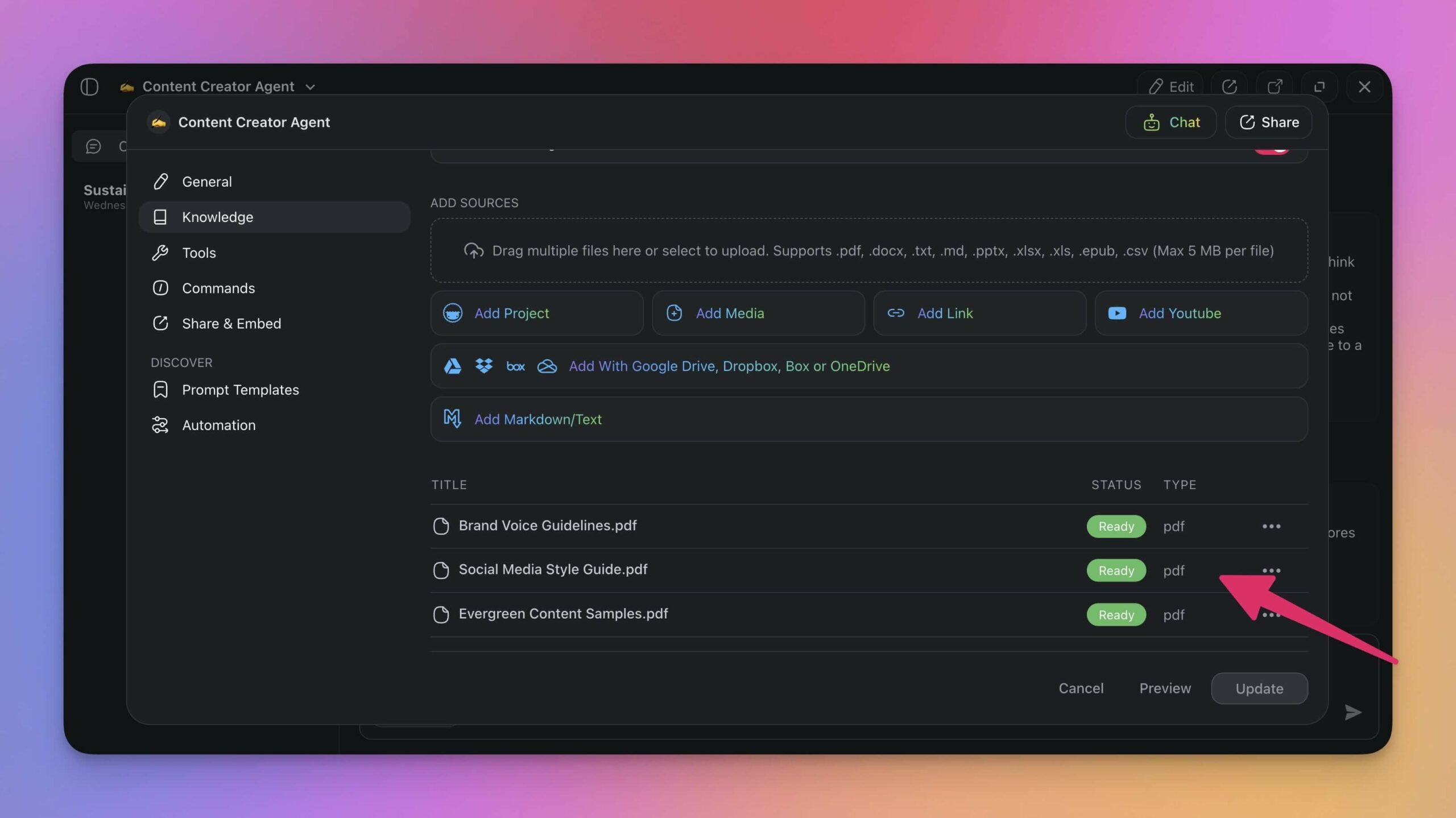
This will give your agent a solid base of practical information. You can ask the agent to reference the knowledge during conversations or let it decide if additional resources are needed.
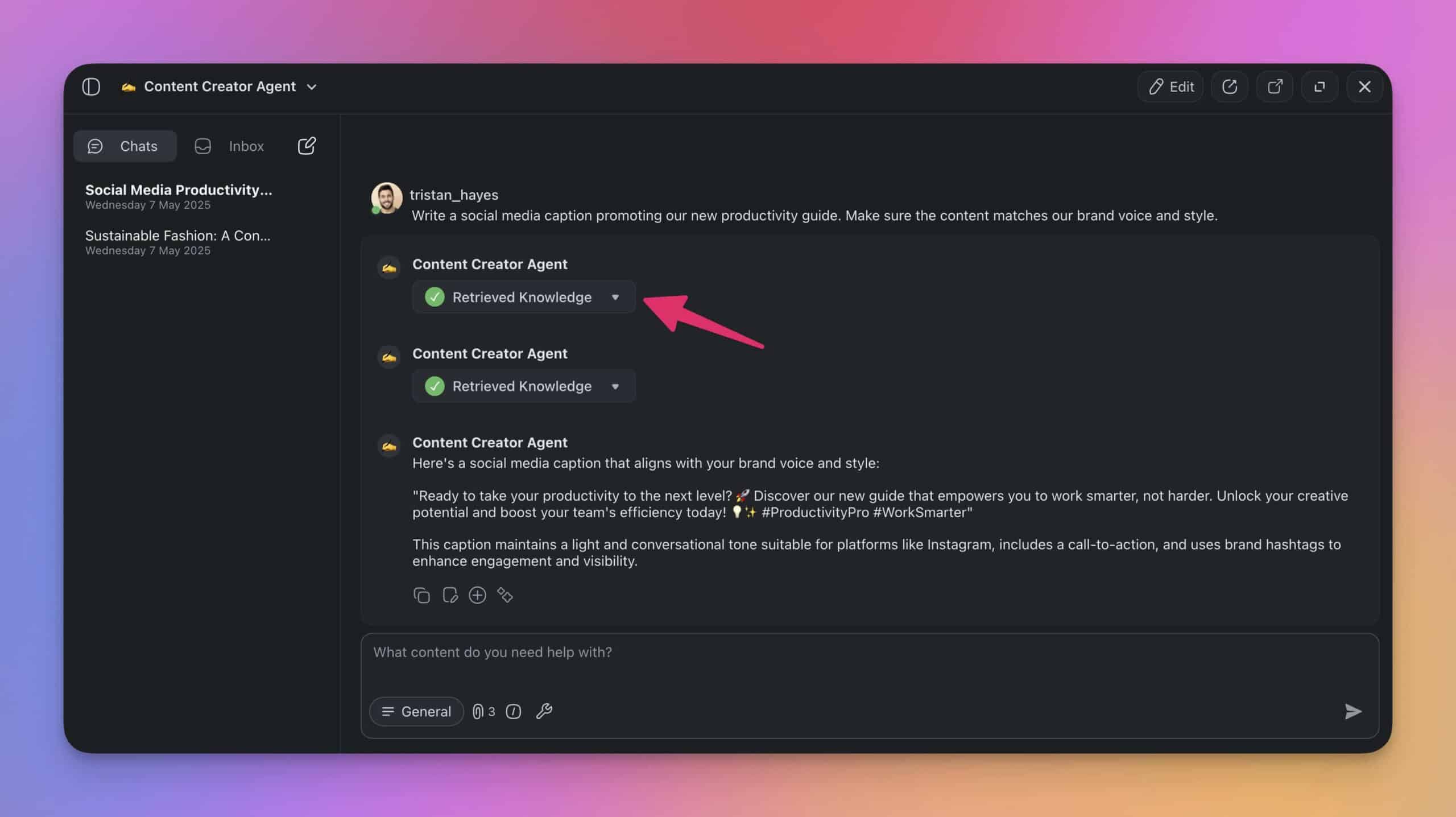
Taskade’s AI agents can also use **dynamic knowledge**. This means they can pull in live data from connected sources like websites, blogs, and even your own Taskade projects.
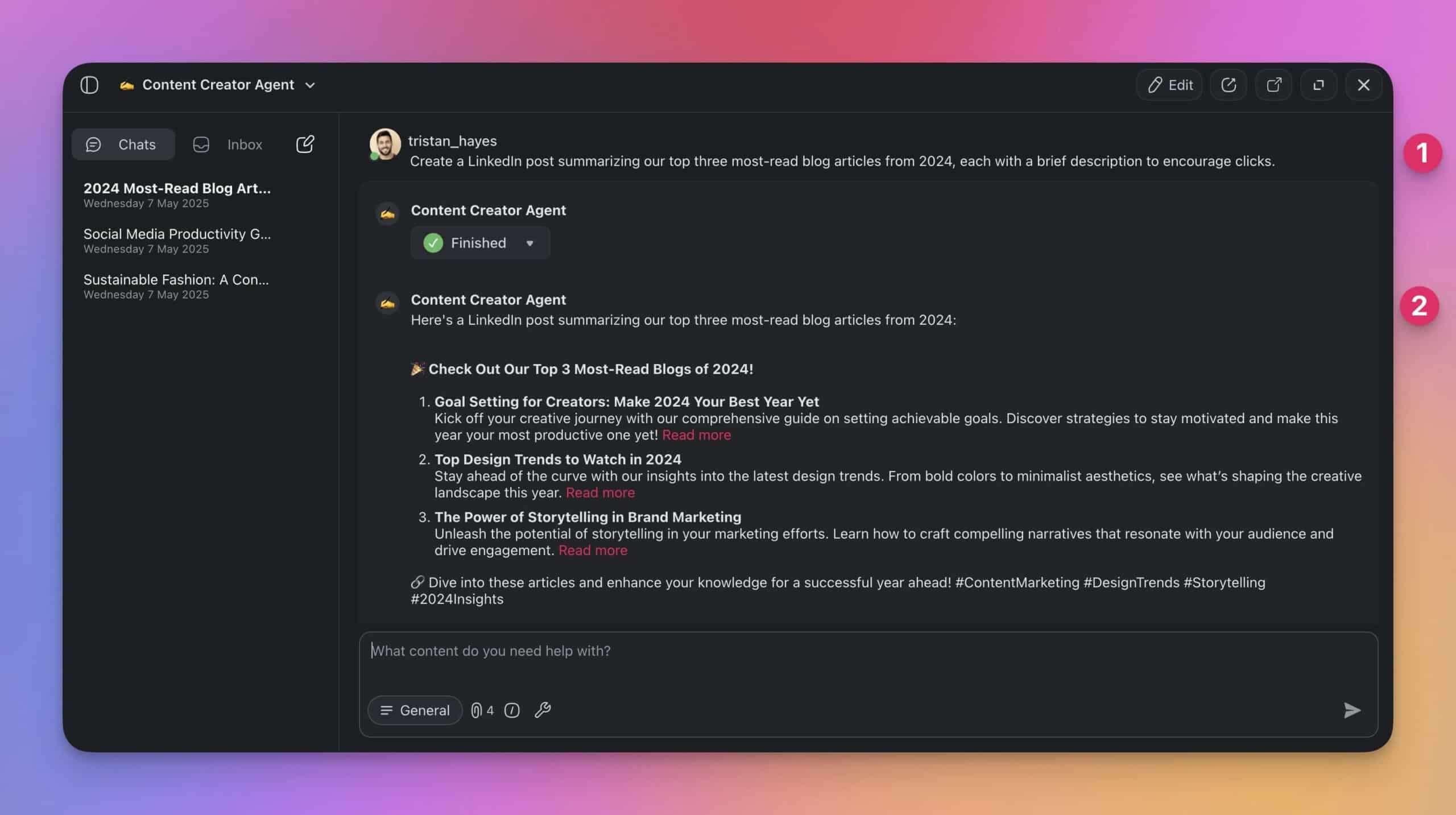
💡 **Pro Tip**: Static and dynamic knowledge make Taskade AI agents tick. But there is one more secret ingredient that helps them understand your workflow a bit better: **AI Agents Tools.**
With Agent Tools, Taskade agents can connect and "talk" to the tools and platforms you're already using like Gmail, HubSpot, WordPress, and many others. Like any good conversation, it’s a two-way exchange: the agent can both pull in relevant details when needed and send information back.
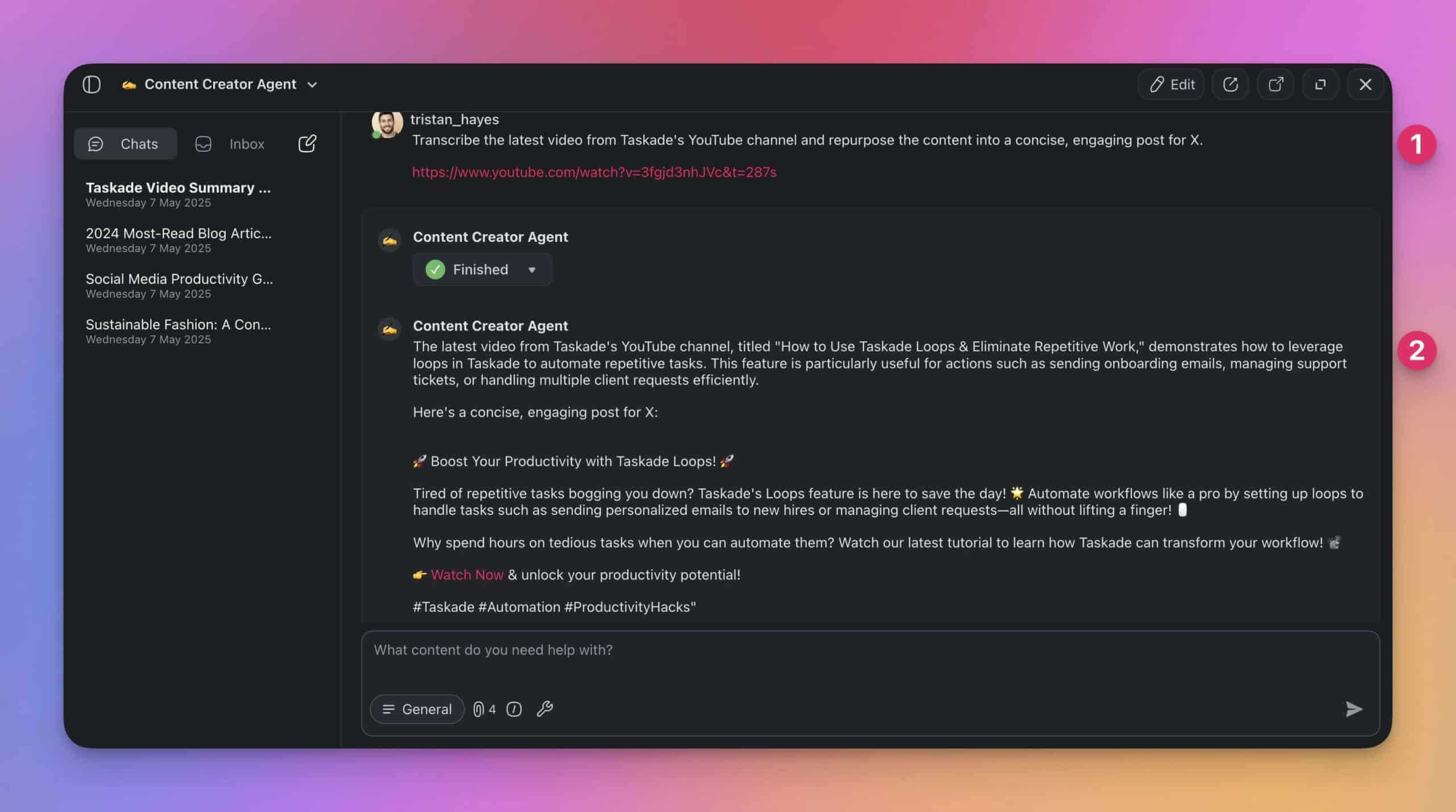
Be sure to check [the full list of Agent Tools](https://www.taskade.com/integrations#agent_tools) and Integrations to learn more.
For the best results, make sure to combine short-term conversation context, static document knowledge, dynamic web resources, live project data, and information from third-party platforms. Each will give your agent a different layer of understanding and prepare it for the tasks ahead.
```mermaid
flowchart LR
STM[Short-Term\nConversation context] --> MERGE
STAT[Static Knowledge\nuploaded files] --> MERGE
DYN[Dynamic Knowledge\nlive web + projects] --> MERGE
PROJ[Live Project Data\nworkspace DNA] --> MERGE
TOOLS[Agent Tools\nGmail, HubSpot, etc.] --> MERGE
MERGE{Agent assembles\nlayered context} --> ANS[Grounded, current\nanswer]
classDef in fill:#0d1b2a,color:#7dd3fc,stroke:#38bdf8,stroke-width:1.5px
classDef focal fill:#2a1225,color:#ff8fa3,stroke:#ff2d60,stroke-width:2px
classDef step fill:#1a0d24,color:#ce93d8,stroke:#6a1b9a,stroke-width:1.5px
classDef out fill:#0d1a0e,color:#86efac,stroke:#22c55e,stroke-width:1.5px
class STM,STAT,DYN,PROJ,TOOLS in
class MERGE focal
class ANS out
```
*The best agent answers stack five memory layers at once — session context, static files, dynamic feeds, live project data, and connected tools — into a single grounded response.*
* * *
## ****Best Practices for Managing AI Agent Memory****
### **Keep Agent Memory and Knowledge Lean**
It’s tempting to load your agent with as much data as possible.
But when it comes to training, **more isn’t always better**.
Overloading your agent with excessive or irrelevant knowledge can actually confuse it, slow down responses, and increase the chance of hallucinated or off-topic answers.
Here’s how to keep your agent’s knowledge base focused and efficient:
- ✅ Select only the most relevant documents, links, or data sources.
- ✅ Avoid adding duplicate or overlapping materials.
- ✅ Use summaries or highlights instead of full-length documents when possible.
- ✅ Provide clear, well-organized materials that match the agent’s purpose.
- ✅ Limit the scope of knowledge to what the agent actually needs to handle.
* * *
### **Leverage Multi-Agent Expertise**
You’re not limited to just one agent. Taskade lets you create multiple agents, each focused on a specific area. By dividing responsibilities, you can handle complex tasks and avoid hallucinations.
- ✅ Create agents with clear roles, such as Research Agent or Content Agent.
- ✅ Assign each agent knowledge sources that match its purpose.
- ✅ Organize and group AI agents by expertise within Taskade’s AI Teams.
- ✅ Choose the agent you want to interact with or let Taskade AI decide.
* * *
### **Monitor Memory Limits**
AI agents operate within practical memory limits. As conversations get longer or tasks become more complex, they may struggle to keep track of every detail or past turn in the discussion.
Here’s how to work effectively within those limits:
- ✅ Avoid overloading the agent with multiple unrelated requests in a single session.
- ✅ Use shorter, well-structured prompts to help the agent stay on track.
- ✅ When working on complex projects, break tasks into smaller, manageable chunks.
- ✅ Watch for signs of memory drift, like repeated questions or off-topic replies.
- ✅ Combine short-term memory with long-term memory to “anchor” agent responses.
* * *
### **Refresh and Reset When Needed**
Even with good training and memory management, agents can sometimes get stuck or go off course during extended use. Readjusting the context will help them maintain accuracy.
- ✅ Start a new conversation thread to clear short-term memory and start fresh on a topic.
- ✅ Periodically review and update the agent’s knowledge sources.
- ✅ For multi-agent setups, reduce the overlap between each agent’s expertise.
- ✅ Retrain the agent when priorities shift or when you want to add fresh context.
* * *
### **Can a Wrong Memory Make an AI Agent Worse?**
Yes. In an October 2026 MIT preprint, [Is this machine playing?](https://arxiv.org/abs/2610.07130), AI agents with 30 hours of self-written notes beat fresh agents on most tests, and a few scored worse because of notes that were wrong. The study is not peer reviewed yet. It is also a clear picture of the memory types in this guide at work.
Thirteen copies of one agent each explored a simulated island alone. Every hour the world and the conversation reset. Only the agent's files survived.
| What the agent kept | Memory type | What it held |
|---|---|---|
| An append-only event log | Episodic | What happened: each attempt, with a time and a summary |
| A notes file it could rewrite | Semantic | What it knew: routes, rules of the world, techniques |
| Small programs it wrote | Works like procedural | Reusable routines, such as one that lays blocks in a pattern |
| The live conversation | Short-term | Cleared every hour |
```mermaid
graph TD
S["New session starts"] --> R["Agent reads its notes"]
R --> W["Agent works for one hour"]
W --> N["Agent writes what it learned"]
N --> X["Reset"]
X --> G["Gone: conversation
and world state"]
X --> K["Kept: log, notes
and programs"]
K --> Q["Next session starts
from the notes"]
style S fill:#0d1b2a,color:#7dd3fc,stroke:#38bdf8,stroke-width:1.5px
style R fill:#0d1b2a,color:#7dd3fc,stroke:#38bdf8,stroke-width:1.5px
style W fill:#1e1e2e,color:#94a3b8,stroke:#475569
style N fill:#1a0d24,color:#ce93d8,stroke:#6a1b9a,stroke-width:1.5px
style X fill:#1a140a,color:#ffb74d,stroke:#e65100,stroke-width:1.5px
style G fill:#1a0d0d,color:#ef9a9a,stroke:#b71c1c,stroke-width:1.5px
style K fill:#0d1a0e,color:#86efac,stroke:#22c55e,stroke-width:1.5px
style Q fill:#2a1225,color:#ff8fa3,stroke:#ff2d60,stroke-width:2px
```
In a later one-hour test, the agents with notes placed an average of 10.3 objects on the island's highest point. Fresh agents placed 3.5. But one agent had written that jumping was useless and marked the note "verified". It never climbed a platform, in 30 hours or in the test. When the researchers deleted a different agent's false note about stacking, that agent's score went up.
Three habits follow:
- ✅ Review what your agent has saved, not only what you uploaded.
- ✅ Treat "do not try this" notes as the first ones to test again.
- ✅ Keep memory where a person can read it and edit a line. In Taskade, [projects are the memory](https://www.taskade.com/wiki/ai-agents/agent-memory), so you can.
* * *
## **Parting Words**
We’ve covered a lot of ground, but the main idea is simple: if you want your AI agents to work well, you need to understand how their memory works. The good news? You don’t have to be an expert to set things up the right way. With the right tools, you can build smarter AI agents in no time.
Here’s a quick recap of what we learned today:
- 🔑 **Long-term memory** keeps your agent’s core knowledge ready to use anytime.
- 💬 **Short-term memory** helps your agent stay focused during conversations.
- 🌐 **Dynamic memory**/**knowledge** brings in live data when your agent needs fresh info.
- 🔧 **Agent Tools** let your agents connect to other apps to pull and send data in real time.
- ✅ **To get the best results**, keep your agent’s memory clean, focused, and up to date.
Are you ready to deploy your AI workforce of the future?
[**Join Taskade and start building!** 👈](https://www.taskade.com/signup)
- - -
## 🧬 AI Apps with Memory Built with Genesis
Experience AI agents with memory in these ready-to-clone apps:
| App | What It Does | Clone |
|-----|--------------|-------|
| **Neon CRM Dashboard** | AI remembers customer interactions | [Clone →](https://www.taskade.com/app/neon-crm-dashboard-nsrm12wns3e1cgni) |
| **Client Portal Dashboard** | Context-aware client communication | [Clone →](https://www.taskade.com/share/apps/7nj4gtlug6gjqtm6) |
| **Support Rating Dashboard** | AI learns from support patterns | [Clone →](https://www.taskade.com/app/support-rating-dashboard-app-f05weamthnc7akpx) |
| **AI Prompt Evaluator** | Learns from past prompt evaluations | [Clone →](https://www.taskade.com/app/research-chat-bot-ckhj4d7yyntrkyb8) |
[**🔍 Explore All Community Apps →**](https://www.taskade.com/apps)
**[Your living workspace](https://www.taskade.com/learn/genesis/workspace-dna) includes:**
- 🤖 [Custom AI Agents](https://www.taskade.com/learn/agents/custom-agents) — The intelligence layer
- 🧠 [Projects & Memory](https://www.taskade.com/learn/projects/databases) — The database layer
- ⚡️ [100+ Integrations](https://www.taskade.com/learn/automation/automations-execution) — The automation layer
**Get started:**
- [**Create Your First App →**](https://www.taskade.com/learn/genesis/first-app) — Step-by-step tutorial
- [**Learn Workspace DNA →**](https://www.taskade.com/learn/genesis/workspace-dna) — Understand the architecture
**AI Agent Deep Dives:**
- [What Are AI Agents?](https://www.taskade.com/blog/what-are-ai-agents) — Complete guide
- [How to Build Your First AI Agent](https://www.taskade.com/blog/how-to-build-ai-agents) — 60 second tutorial
- [What Are Multi-Agent Systems?](https://www.taskade.com/blog/multi-agent-systems) — Building AI teams
- [How to Train AI Agents](https://www.taskade.com/blog/train-ai-agents-taskade) — Custom knowledge
**Genesis Deep Dives:**
- [The Origin of Living Software](https://www.taskade.com/blog/origin-of-living-software) — Where it all began
- [How Workspace DNA Works](https://www.taskade.com/blog/how-workspace-dna-works) — The architecture
- [The Anatomy of a Genesis App](https://www.taskade.com/blog/anatomy-of-genesis-app) — Memory, Agents, Automation
## Frequently Asked Questions
### What is the difference between short-term and long-term memory in AI agents?
Short-term memory (also called working memory or context window) holds information only during a single conversation session — it resets when the session ends. Long-term memory persists across sessions, storing trained knowledge, past interactions, and user preferences. Effective AI agents need both: short-term for immediate context, long-term for accumulated expertise.
### What is episodic memory in AI agents and how does it work?
Episodic memory stores specific past interactions and experiences — like a conversation log the agent can recall later. Unlike semantic memory (general knowledge), episodic memory captures the when and how of past events. This lets agents reference previous conversations, remember what worked before, and build continuity across sessions.
### Can a wrong memory make an AI agent perform worse?
Yes. In an October 2026 MIT preprint, AI agents that kept self-written notes for 30 hours generally outperformed fresh agents, but some scored worse because of false notes. One agent recorded that jumping was useless and never climbed a platform. Deleting a false note from another agent's memory raised its score. Review and prune agent memory on a schedule.
### How do AI agents store and recall past experiences?
AI agents use retrieval-augmented generation (RAG) combined with vector databases to store and recall information. When a user asks a question, the agent searches its knowledge base using semantic similarity — matching meaning, not just keywords — to find the most relevant stored context. This is why well-organized training data matters more than raw volume.
### Why does AI agent memory matter for business applications?
Memory determines whether an agent is useful or frustrating. Without persistent memory, agents forget your preferences, repeat mistakes, and require constant re-explanation. With proper long-term memory, agents accumulate expertise over time — learning your style, remembering project context, and improving responses. This is the difference between a chatbot and a genuine digital teammate.
### What is the Hopfield network and how does it relate to AI agent memory?
The Hopfield network, invented by physicist John Hopfield in 1982, was the first artificial associative memory. Inspired by the Ising model of magnetism, it stores patterns as energy minima in a neural network. When given a noisy or partial input, the network relaxes into the nearest stored pattern — like a marble rolling into a valley. This energy-minimization principle is the ancestor of modern vector embeddings and semantic search used in AI agent memory systems. Hopfield won the 2024 Nobel Prize in Physics for this work.
### How do cognitive maps relate to AI agent memory?
Cognitive maps are the brain's system for organizing memories as navigable geometric spaces. Place cells in the hippocampus fire at specific locations while grid cells provide hexagonal coordinate systems. Neuroscientists discovered that the same machinery activates for abstract thought — comparing prices, navigating social hierarchies, recalling where documents are stored. This directly parallels how AI agents use vector embeddings: documents are stored as points in high-dimensional space, and retrieval works by finding the nearest neighbors in that space. Both biological and artificial memory systems organize knowledge geometrically, making memory retrieval a form of spatial navigation.
### What is dynamic memory and how is it different from static training data?
Static training data is uploaded once and stays fixed until manually updated. Dynamic memory comes from live workspace activity — project updates, form submissions, new documents, workflow outputs — that automatically feeds back into the agent's knowledge. Dynamic memory means the agent gets smarter as your team works, without manual retraining.