# What Is an Agentic CRM? Meaning, Examples and How It Works (2026)
> An agentic CRM is a customer system where AI agents act on records, not only store them. Its meaning, how it works, 2026 examples, guardrails and how to build one.
- Source: https://www.taskade.com/blog/agentic-crm
- Published: 2026-06-24
- Updated: 2026-11-07
- Author: Taskade Team
An agentic CRM is a customer relationship system where AI agents act on customer records instead of only storing them. The agents qualify leads, draft and send follow-ups, book meetings and update records, inside rules and approvals that a person sets. Salesforce calls it a CRM where "humans and autonomous AI agents work together", and Planhat sums it up as the move from a system of record to a system of action.
> **TL;DR:** An agentic CRM uses AI agents that read a contact's context, pick the next step and do it, then log the result. In 2026 the label covers Salesforce Agentforce, HubSpot Breeze agents, monday CRM agents, Close's Chloe and CRMs you build yourself. Keep a person approving customer-facing actions. To build one, read [how to build a CRM with AI](https://www.taskade.com/blog/build-crm).
*Facts checked on 2026-11-07. Vendor prices come from each vendor's own pricing page on that date.*
This page explains the concept. To compare tools that build a CRM for you, read [AI CRM builder tools compared](https://www.taskade.com/blog/ai-crm-builders). To buy a ready-made CRM, read [the best AI CRM software for small business](https://www.taskade.com/blog/best-ai-crm-software).
---
## What Is an Agentic CRM?
An agentic CRM is a customer system where autonomous AI agents do the actual work — qualifying leads, sending follow-ups, booking appointments, and updating records — instead of merely reminding a human to do those things. Traditional CRM automation follows fixed rules you write in advance ("send template A on day 3"). An agentic CRM reads the context of each contact, decides the next best action, and executes it around the clock.
The shift is from a **filing cabinet that pings you** to a **teammate that acts**. Vendors use the term in slightly different ways. [Salesforce](https://www.salesforce.com/crm/what-is-crm/agentic-crm/) stresses humans and agents working together, [Microsoft](https://www.microsoft.com/en-us/dynamics-365/blog/business-leader/2026/06/25/agentic-crm-in-the-flow-of-work-how-ai-is-transforming-sales-and-rebuilding-customer-trust/) stresses agents that capture and update data from conversations, and [Planhat](https://www.planhat.com/crm-software/agentic-sales-crm) calls it the move from a system of record to a system of action. All of them describe the same test: does the software take the next step, or does it wait for a person?
| | Traditional CRM | CRM + Automation | Agentic CRM |
|---|---|---|---|
| **Stores contacts** | Yes | Yes | Yes |
| **Reminds you to act** | Yes | Yes | Yes |
| **Acts without you** | No | Only fixed rules | Yes — decides + executes |
| **Reads context** | No | No | Yes |
| **Books + follows up 24/7** | No | Partially | Yes |
| **You are the…** | Data-entry clerk | Rule-writer | Director |
The reason this matters for a non-technical operator: you no longer have to *be* the system. You design it once, then supervise it. That is the same operating model behind the [one-person company](https://www.taskade.com/blog/one-person-companies) — a single operator directing a fleet of [AI agents](https://www.taskade.com/agents) instead of doing every task by hand.
---
## How Does an Agentic CRM Work?
An agentic CRM works in a four-step loop: it perceives an event, decides the next action, acts through an allowed tool, and records the result on the customer record. The loop runs on a trigger, such as a new form entry, or on a schedule, such as every morning. A person sets the goal, the allowed actions and the approvals.
```mermaid
graph TD
A["Perceive
new lead, reply, quiet deal"] --> B["Decide
agent reads context and rules"]
B --> C{"Customer-facing
action?"}
C -->|Yes| D["Wait for approval
a person signs off"]
C -->|No| E["Act
update record, create task"]
D --> F["Act
send email, book meeting"]
E --> G["Record
log the action on the contact"]
F --> G
style A fill:#0d1b2a,color:#7dd3fc,stroke:#38bdf8,stroke-width:1.5px
style B fill:#2a1225,color:#ff8fa3,stroke:#ff2d60,stroke-width:2px
style D fill:#1a140a,color:#ffb74d,stroke:#e65100,stroke-width:1.5px
style G fill:#0d1a0e,color:#86efac,stroke:#22c55e,stroke-width:1.5px
```
| Loop step | What the agent needs | Example | What can go wrong |
|---|---|---|---|
| Perceive | A trigger or a schedule | A form entry creates a Deal | The trigger fires twice |
| Decide | Context, rules, a goal | Score 4 of 5 against the ideal customer | Thin data gives a confident wrong score |
| Act | A tool it is allowed to use | Draft an email, create a task | It sends before anyone checks |
| Record | Write access to the record | Log the score and the draft | No log, so nobody can audit it |
The loop is the same in a sold CRM and in one you build. What differs is who sets the rules, what the agent can reach and how you pay for it.
## What Is an Agentic-First CRM?
An agentic-first CRM is designed around agents from the start: its records, permissions, actions and logs let agents read and write safely. A bolted-on CRM adds an AI assistant or agent to a system that was designed for manual entry. Both can be useful. The difference shows up in how much setup the agents need and how clearly you can see what they did.
| | Bolted-on agents | Agentic-first CRM |
|---|---|---|
| Data model | Designed for people typing | Designed for agents reading and writing |
| Where agents live | A separate add-on or edition | In the core product |
| Pricing | Seat price plus an agent add-on or credits | Credits or usage in each plan |
| Examples (2026) | Salesforce Agentforce, HubSpot Breeze agents, monday CRM agents | Attio, Day.ai, Lightfield, a CRM you build in Taskade Genesis |
| Best for | Teams already on that platform | New teams, or teams with a non-standard process |
Gartner warns about "agentwashing", the relabeling of assistants and chatbots as agents, and estimated in June 2025 that only about 130 of the thousands of agentic AI vendors were real ([Gartner](https://www.gartner.com/en/newsroom/press-releases/2025-06-25-gartner-predicts-over-40-percent-of-agentic-ai-projects-will-be-canceled-by-end-of-2027)). Test any "agentic" claim with one question: which action does the agent take on its own, and where is it logged?
## Agentic CRM Examples: Which CRMs Are Agentic in 2026?
The CRMs below ship agents that take actions on records, not only AI that writes text. Prices are list prices, checked on each vendor's pricing page on 2026-11-07, except where a note says otherwise.
| CRM | Agent | What it does | Price signal |
|---|---|---|---|
| [Salesforce](https://www.salesforce.com/sales/pricing/) | Agentforce for Sales | Qualifies leads, drafts outreach, updates records | Add-on from $125 a user a month. Max edition $550 a user a month |
| [HubSpot](https://www.hubspot.com/pricing/crm) | Breeze agents | Prospecting, customer and data agents | AI metered by HubSpot Credits. Starter includes 500 |
| [monday CRM](https://monday.com/crm/pricing) | Sales agents | Outreach caller, lead sourcer, meeting prep | Standard AI from $17 a seat a month, 3-seat minimum |
| [Close](https://www.close.com/pricing) | Chloe | Calls leads, qualifies, books meetings, updates records | Every plan, from $9 a user a month (Solo) |
| [Attio](https://www.attio.com/pricing) | Ask Attio and AI agents | Answers pipeline questions, runs AI workflows | Free for 3 seats, AI metered by credits |
| [Zoho CRM](https://www.zoho.com/crm/zohocrm-pricing.html) | Zia agents | Lead and deal workflows | Higher editions |
| Taskade Genesis | Agents you define | Scores, drafts, routes and books inside your own app | Free to start. Pro $10 a month billed annually for up to 10 users |
For the full buyer's comparison, read [the best AI CRM software for small business](https://www.taskade.com/blog/best-ai-crm-software). For tools that build the CRM for you, read [AI CRM builder tools compared](https://www.taskade.com/blog/ai-crm-builders).
## Agentic CRM for Startups, Small Business and Agencies
An agentic CRM pays off fastest where one person sells, delivers and follows up, because the agent takes the step that person keeps dropping. Pick one job for the first agent, measure it for a week, then add the next.
| Team | First agent job | Approval point | Next job to add |
|---|---|---|---|
| Startup | Score inbound demo requests and draft the first reply | Founder approves each reply | Weekly pipeline summary |
| Small business | Chase quotes with no answer after 3 days | Owner approves the nudge | Booking confirmations and reminders |
| Agency | Summarize discovery calls and draft the proposal email | Account lead approves | Chase proposals after 2 days |
| Consultant | Log meeting notes and set the next touch date | None, internal only | Draft the follow-up |
| Local services | Answer FAQs and capture details from the website | None for answers, owner for quotes | Book into the calendar |
```mermaid
stateDiagram-v2
[*] --> Drafted: agent writes the message
Drafted --> Waiting: approval requested
Waiting --> Sent: person approves
Waiting --> Stopped: person rejects
Sent --> Logged: result saved to the record
Stopped --> Logged: reason saved
Logged --> [*]
```
## What Can Go Wrong? Guardrails for an Agentic CRM
An agentic CRM can send the wrong message, act on bad data or reach records it should not. These risks are real: Gartner predicts over 40% of agentic AI projects will be canceled by the end of 2027 because of cost, unclear value or weak risk controls, and in July 2026 it predicted that AI agents will outnumber sellers 10 to 1 by 2028 while fewer than 40% of sellers say agents improved their productivity ([Gartner, June 2025](https://www.gartner.com/en/newsroom/press-releases/2025-06-25-gartner-predicts-over-40-percent-of-agentic-ai-projects-will-be-canceled-by-end-of-2027), [Gartner, July 2026](https://www.gartner.com/en/newsroom/press-releases/2026-07-28-gartner-predicts-ai-agents-will-outnumber-sellers-10-to-1-by-2028-yet-fewer-than-40-percent-of-sellers-will-say-agents-improved-productivity)).
| Risk | Guardrail | How to set it up in Taskade |
|---|---|---|
| A wrong email reaches a customer | Human approval before sending | Add a [Wait for approval](https://www.taskade.com/learn/automation/approval-step) step and keep **Then** on Reject |
| The agent acts on thin data | Required fields before the agent runs | Make the form fields required and score only complete records |
| A client sees another client's records | Records matched to each login | Sign-in confirms identity. Match records to the login with an owner field, then test with a second account |
| Nobody knows what the agent did | A log on every record | Have the automation write each action to an Activities project |
| Costs grow with every run | A schedule, not a loop | Run the follow-up rule once a day and watch the run count |
The Wait for approval step pauses an automation run until a teammate approves or rejects it, by default in Taskade or by email. Approval actions in Gmail, Slack, Microsoft Teams and other premium integrations need a paid plan.
---
## Can You Really Build Your Own CRM Without a Developer?
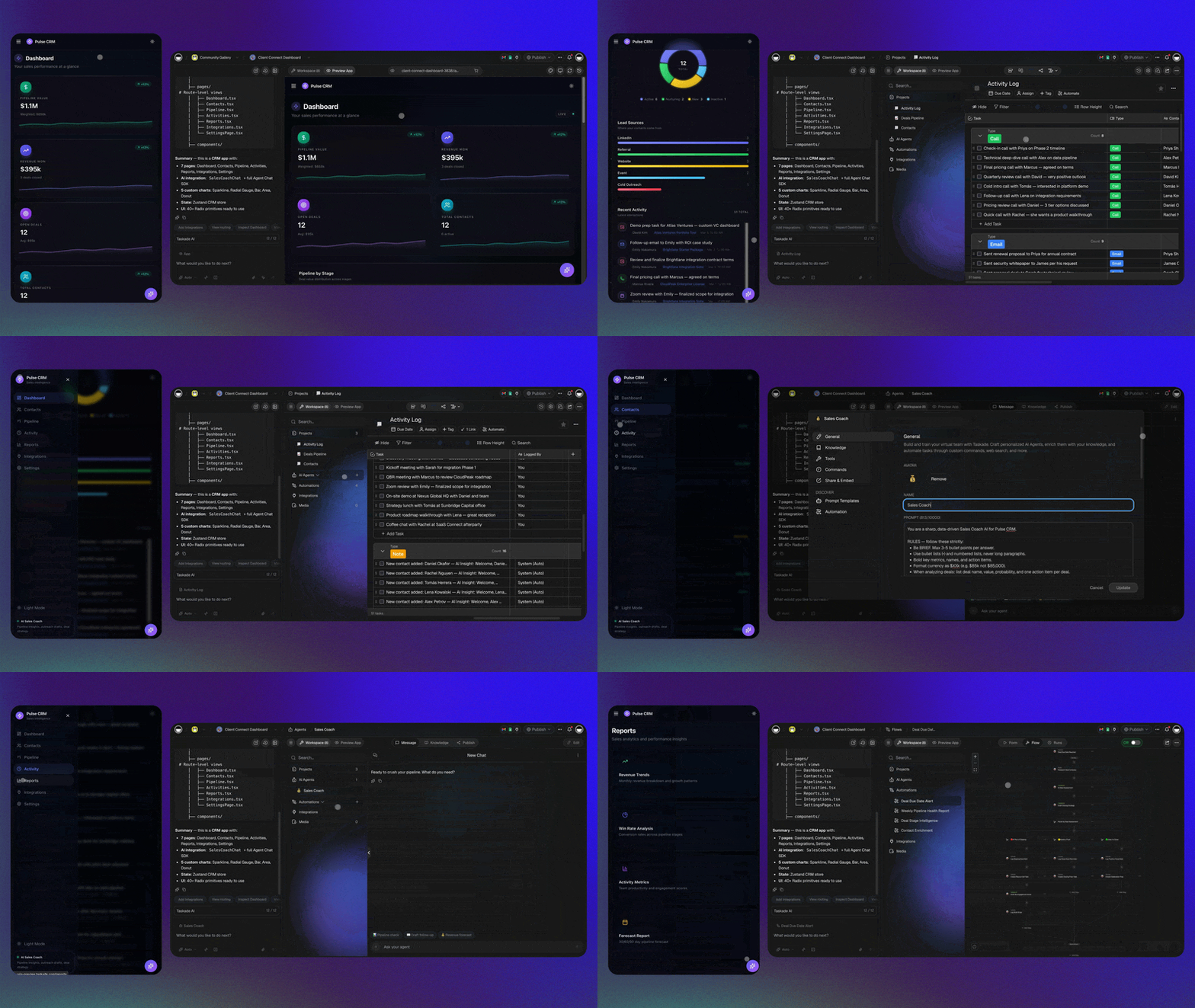
Yes, and for a small team it is often faster than configuring an off-the-shelf one. With [Taskade Genesis](https://www.taskade.com/create) you describe the CRM you want in plain language, and it generates a working app: a pipeline [Board](https://www.taskade.com/blog/what-are-micro-apps), a contact Table, a booking Calendar, and embedded [AI agents](https://www.taskade.com/agents). The step-by-step method, with the exact prompt, the schema and a second-account test, is in [how to build a CRM with AI](https://www.taskade.com/blog/build-crm).
Here is the kind of prompt a real operator types:
> *"Build a CRM for my house-cleaning business. I need a lead pipeline (New → Quoted → Booked → Done), a contact list with phone and address, a calendar for jobs, and an AI agent that follows up with anyone in 'Quoted' after 2 days with a friendly nudge and a booking link."*
That single sentence produces the structure. From there you connect your inbox, your calendar, and your messaging tools through Taskade's [100+ bidirectional integrations](https://www.taskade.com/automate), and the system starts running. Gmail, Google Calendar and Slack are premium integrations that need a paid plan.
The market has split cleanly down this line. On one side, mature per-seat CRMs keep raising prices. On the other, [AI CRM builder tools](https://www.taskade.com/blog/ai-crm-builders) let any operator spin up a custom pipeline in minutes on one plan. To be fair to the incumbents: if you are a 200-person sales org with a standard B2B funnel and a dedicated admin, Salesforce or HubSpot are genuinely strong, mature systems of record. The build-your-own route wins specifically for the **1-10 person operator** with a non-standard process. The per-seat math is in [build your own CRM vs Salesforce cost](https://www.taskade.com/blog/build-own-crm-vs-salesforce).
---
## What Can the AI Agents Actually Do on Their Own?
The agents in an agentic CRM handle the repetitive customer work that used to eat your day, autonomously, on a schedule or on a trigger, with you reviewing rather than doing. [Taskade AI Agents](https://www.taskade.com/agents) ship with **built-in tools** (web search, file analysis, persistent memory, custom commands, public embedding) and run on **frontier models from top AI labs**. The default Auto setting picks the model, so you do not have to.
| Job-to-be-done | What the agent does | When it runs |
|---|---|---|
| **Lead qualification** | Scores each new inquiry against your criteria, tags it, routes hot ones to you | On every new lead |
| **Follow-up** | Drafts a personalized nudge in your voice, sends it, logs the reply | On a timer or stage change |
| **Booking** | Checks your calendar, offers slots, confirms, adds the event | When a lead is ready |
| **Reminders** | Sends a confirmation and a day-before nudge to cut no-shows | Before each appointment |
| **Enrichment** | Looks up public details to fill in a thin contact record | On new contact |
| **Customer questions** | Answers your common FAQs from your knowledge base | Anytime, 24/7 |
| **Reporting** | Summarizes the week — leads, bookings, no-shows, revenue | Every Monday |
The difference between *automation* and *agents* is worth keeping straight. Automation executes a fixed rule. An agent reads context and decides. A good agentic CRM gives you both layers, which is exactly the [chatbots-are-demos, agents-are-execution](https://www.taskade.com/blog/chatbots-vs-agents) distinction applied to customer work.
```mermaid
graph TD
A["New Lead
(form / call / email)"]
style A fill:#1e1e2e,color:#94a3b8,stroke:#475569
subgraph AGENTS["AI Agent Layer (decides)"]
style AGENTS fill:#0a1a14,stroke:#1b3d2a
B["Qualify
Agent"]
C["Follow-up
Agent"]
D["Booking
Agent"]
style B fill:#11111b,color:#cdd6f4,stroke:#00d4aa
style C fill:#11111b,color:#cdd6f4,stroke:#00d4aa
style D fill:#11111b,color:#cdd6f4,stroke:#00d4aa
end
subgraph AUTO["Automation Layer (executes)"]
style AUTO fill:#0a1420,stroke:#1a2a45
E["Send message"]
F["Create calendar event"]
G["Send reminder"]
style E fill:#0d1b2a,color:#7dd3fc,stroke:#38bdf8,stroke-width:1.5px
style F fill:#0d1b2a,color:#7dd3fc,stroke:#38bdf8,stroke-width:1.5px
style G fill:#0d1b2a,color:#7dd3fc,stroke:#38bdf8,stroke-width:1.5px
end
H["You (Director)
review + approve"]
style H fill:#2a1225,color:#ff8fa3,stroke:#ff2d60,stroke-width:2px
A --> B
B -->|"qualified"| C
C --> D
B --> E
D --> F
D --> G
C -.->|"flags edge cases"| H
H -.->|"sets rules"| AGENTS
```
---
## How Do You Build an AI Receptionist or Voice Booking Agent Yourself?
A self-built AI receptionist is an agent that handles inbound inquiries — answering common questions, capturing the contact's details, checking your availability, and booking the appointment directly into your Calendar — without you picking up. It is the single highest-ROI piece of an agentic CRM for a service business, because **missed calls are missed revenue.** The cheapest version of that fix is not a callback queue but a text: [a 60-second text-back beats voicemail](https://www.taskade.com/blog/missed-call-textback) on almost every inbound call you drop.
There are two layers, and you mix them based on whether your inbound is mostly typed or mostly spoken:
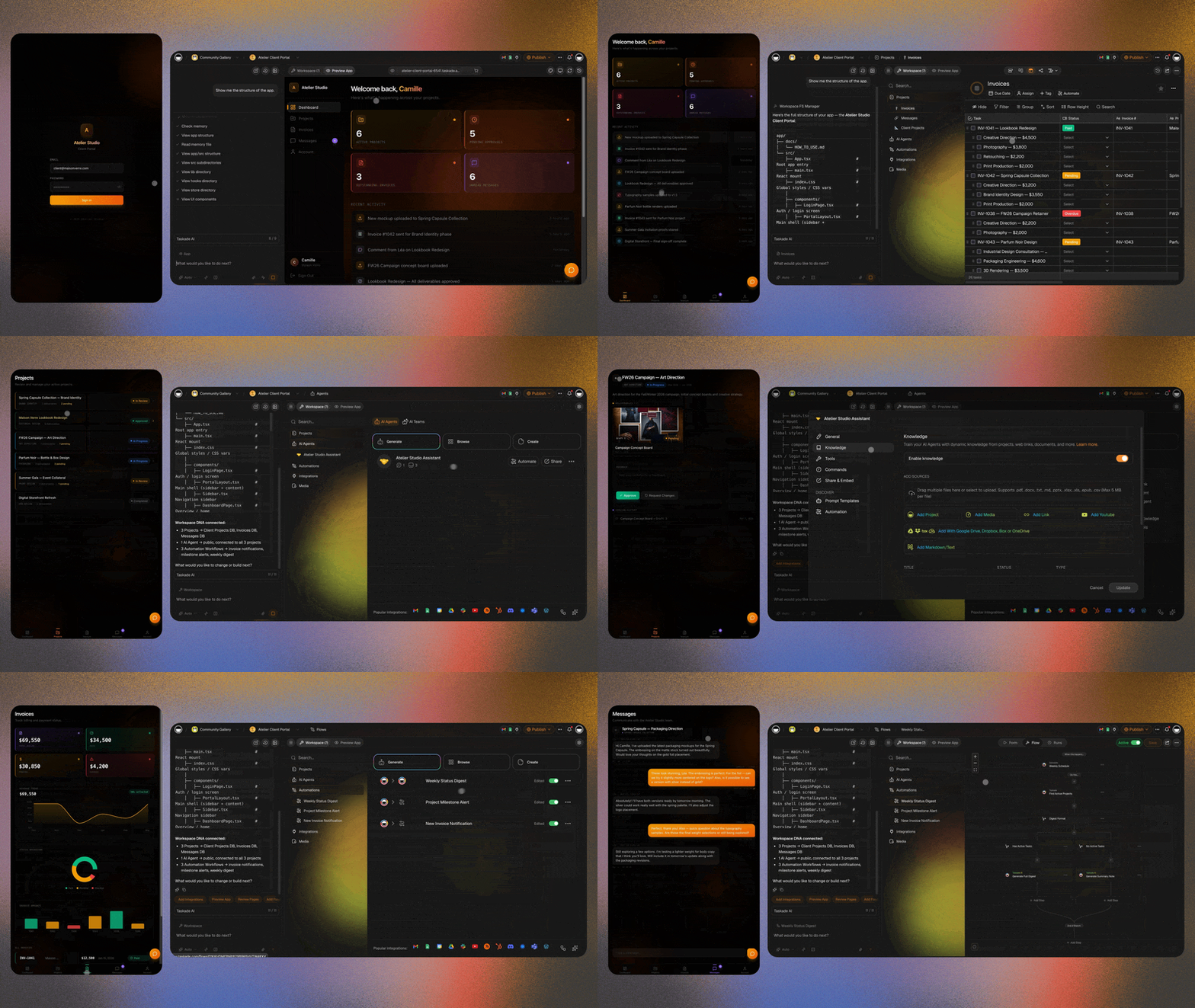
**1. The text receptionist (build it entirely yourself).** A [Taskade Genesis](https://www.taskade.com/create) agent embedded on your site or connected to your inbox answers FAQs, qualifies the inquiry, captures name + need + contact, and books straight into your calendar via automation. You build this from a prompt; it costs nothing extra beyond your plan.
**2. The voice receptionist (connect a specialist).** Live phone calls are a specialized problem: sub-second latency, natural speech, call routing. Dedicated AI voice platforms handle this well, and it is fair to use the right tool for the job. The 2026 landscape includes Retell, Goodcall, Rosie, Smith.ai, and AIRA, with plans such as Rosie at **$49 to $299 a month** and Goodcall at **$79 to $299 a month** ([Rosie](https://heyrosie.com/pricing) and [Goodcall](https://www.goodcall.com/pricing) pricing pages, checked 2026-11-07). The pattern: let the voice platform answer the phone, then pipe the call outcome (caller, intent, requested time) into your Taskade Genesis workspace so booking, confirmation, follow-up, and reminders all run from one source of truth.
The economics are worth stating plainly. A human front-desk receptionist is a full salary plus benefits, while AI voice platforms charge a monthly plan or a per-minute rate and answer at any hour. That is not a knock on receptionists: the people you keep get freed up for the high-touch conversations that actually need a human.
```mermaid
graph LR
A["Inbound call / chat"]
B["AI Receptionist
answers + qualifies"]
C["Checks Calendar
availability"]
D["Books appointment"]
E["Sends confirmation"]
F["Day-before reminder
(cuts no-shows)"]
style A fill:#1e1e2e,color:#94a3b8,stroke:#475569
style B fill:#2a1225,color:#ff8fa3,stroke:#ff2d60,stroke-width:2px
style C fill:#11111b,color:#cdd6f4,stroke:#00d4aa
style D fill:#0d1a0e,color:#86efac,stroke:#22c55e,stroke-width:1.5px
style E fill:#0d1b2a,color:#7dd3fc,stroke:#38bdf8,stroke-width:1.5px
style F fill:#0d1b2a,color:#7dd3fc,stroke:#38bdf8,stroke-width:1.5px
A --> B --> C --> D --> E --> F
```
This whole loop runs on the same [AI agents](https://www.taskade.com/agents) and [automations](https://www.taskade.com/automate) you already built for the CRM — the receptionist is not a separate product, it is one more agent sharing the same workspace memory. For the typed-inbound half of the same loop, see [how a response-time clock gets wired into the pipeline](https://www.taskade.com/blog/speed-to-lead).
---
## How Much Does an Agentic CRM Cost in 2026?
Building your own is free to start, and a paid plan covers the team rather than each seat: Taskade Pro is $10 a month billed annually for up to 10 users. That is the main financial argument for a small operator.
Here is the comparison, using list prices checked on 2026-11-07. Per-seat CRMs are good products; the point is not that they are bad, it is that the *pricing model* punishes small operators who want autonomous agents.
| Option | 2026 price | Pricing model | AI agents |
|---|---|---|---|
| **Build your own: [Taskade Genesis](https://www.taskade.com/pricing)** | Free / **$10** Pro ★ (billed annually) | Per plan, up to 10 users on Pro | Built in, AI credits included on paid plans |
| HubSpot | Starter lists at $20/seat/mo | Per seat + HubSpot Credits | Breeze agents |
| Salesforce Sales Cloud | $25-$550/user/mo | Per seat | Built-in AI and Flex Credits from Core ($195) |
| Salesforce Agentforce for Sales | From $125/user/mo add-on, or Max at $550 | Per seat + Flex Credits | Autonomous, layered cost |
| AI voice receptionist (specialist) | $49-$299/mo (Rosie, Goodcall) | Per plan / minutes | Voice-only |
Notice the structure. With a per-seat CRM, the moment you want *autonomous* agents you are stacking an agent fee on top of a seat fee, and the agent actions draw on a credit pool. With a self-built agentic CRM, the agents are included and the price does not move when you grow from one user to ten.
For a one-person or small-team operator, building your own usually costs far less in list price, because the plan covers the team. A sold CRM adds phone, reporting and marketplace depth that a built one does not. This is the same force reshaping the whole software market: see [The Great SaaS Unbundling](https://www.taskade.com/blog/great-saas-unbundling) on why per-seat pricing is breaking down as one person does the work of ten.
> A common, sensible 2026 pattern is **hybrid**: keep the big CRM as the system of record for finance and forecasting, and run a self-built agentic workspace as the daily operating surface where the agents actually do the follow-up and booking. Sync the two with an integration. The bill drops because you need far fewer expensive seats.
---
## How Does a Self-Built Agentic CRM Stay Smart? (Workspace DNA)
A self-built agentic CRM gets smarter every time a customer moves through it, because Memory, Intelligence, and Execution share one workspace instead of living in disconnected tools. This is [Workspace DNA](https://www.taskade.com/blog/agentic-workspaces): **Memory** (your contacts, notes, and history) feeds **Intelligence** (your agents), Intelligence triggers **Execution** (your automations), and Execution writes new Memory back into the system.
```mermaid
graph TD
subgraph WORKSPACE["Your Agentic CRM Workspace"]
style WORKSPACE fill:#0a1a14,stroke:#1b3d2a
M["Memory
(Contacts, notes, history)"]
I["Intelligence
(Qualify · Follow-up · Booking agents)"]
E["Execution
(Messages · Bookings · Reminders)"]
style M fill:#2a1225,color:#ff8fa3,stroke:#ff2d60,stroke-width:2px
style I fill:#0d1b2a,color:#7dd3fc,stroke:#38bdf8,stroke-width:1.5px
style E fill:#0d1a0e,color:#86efac,stroke:#22c55e,stroke-width:1.5px
M -->|"feeds context to"| I
I -->|"triggers"| E
E -->|"writes new"| M
end
```
Why this beats five disconnected tools: when your booking agent and your follow-up agent read from the *same* contact record, the follow-up knows the appointment was booked, the reminder knows the time, and the report knows the outcome. Stitch those across five separate apps and the context evaporates between each one. That shared context is the moat — the practical version of the [agentic workspace](https://www.taskade.com/blog/agentic-workspaces) idea applied to your customers.
It is also why this isn't just another [no-code app builder](https://www.taskade.com/blog/build-ai-agents-without-code) or a folder of [AI apps](https://www.taskade.com/ai/apps). A code generator hands you files to deploy. A productivity tool organizes tasks. An agentic CRM **executes** — and the outputs compound because everything shares one state. You can see what operators actually build with this in our [first-party census of what people build with AI](https://www.taskade.com/blog/what-people-build): dashboards, trackers, and customer systems — not toys.
---
## A 5-Step Build Plan (For a Non-Technical Operator)
You do not need to be a developer. You need a clear picture of your own customer flow, which you already have. Here is the build, start to finish.
| Step | What you do | Time |
|---|---|---|
| **1. Describe it** | One prompt: your pipeline stages, contact fields, and the first agent | Minutes |
| **2. Connect your tools** | Link your inbox, calendar, and messaging via integrations | ~30 min |
| **3. Add the receptionist** | Embed a text agent on your site; connect a voice platform if you take calls | ~1 hour |
| **4. Set the rules** | Tell agents when to follow up, what to say, and what to escalate to you | ~30 min |
| **5. Supervise** | Review what the agents did each day; refine the prompts that need it | Ongoing |
A practical tip: do not try to automate everything on day one. Automate the **follow-up** first (it is the highest-leverage gap), with a [Wait for approval](https://www.taskade.com/learn/automation/approval-step) step before anything sends, watch it run for a week, then add booking, then reminders. If you want a faster on-ramp, our walkthrough on [5 Taskade Genesis apps you can build in 10 minutes](https://www.taskade.com/blog/5-genesis-apps-10-minutes) and the [micro-apps build guide](https://www.taskade.com/blog/micro-apps-ai-builder-guide) both start from the same prompt-to-app pattern. Non-coders unfamiliar with the workflow should start with [vibe coding for non-developers](https://www.taskade.com/blog/vibe-coding-for-non-developers).
Your data stays in your workspace under **role-based access control**, so you decide exactly who sees what. **Built-in app sign-in** works on every plan, including Free, and on Pro and up you can add a **custom domain** so a client-facing portal looks like your own product. Sign-in confirms who the visitor is. To show each client only their own records, match records to the login with an owner field and test with a second account. Building your own does not change your responsibility for customer consent: it just gives you direct control over how data is stored and shared.

---
## Which Businesses Should Build an Agentic CRM First?
Service businesses with a booking-and-follow-up rhythm gain the most, because their lost revenue lives precisely in missed calls and slow follow-up — exactly what an agentic CRM closes.
| Business | The leak an agentic CRM fixes |
|---|---|
| **Clinics / dental / med-spa** | After-hours calls go to voicemail → AI receptionist books them |
| **Salons / barbers** | No-shows → automated confirmations + reminders |
| **Agencies / consultants** | Leads sit cold → agent follows up within minutes |
| **Contractors / home services** | Quotes go stale → agent nudges with a booking link |
| **Coaches / tutors** | Manual scheduling eats hours → self-serve booking |
| **Real estate** | Slow lead response → instant qualification + routing |
Be fair about the exceptions: if you run a large, standard B2B SaaS sales motion with a dedicated revenue-ops team, a mature per-seat CRM may still serve you better, and you can run a self-built agentic workspace alongside it. But for the operator covering everything themselves, the self-built route is almost always the win — it is the customer-facing half of the [one-person company](https://www.taskade.com/blog/one-person-companies) model.
---
## The Era of the Self-Running Customer System
For decades, the limit on a small business was attention. You could only chase so many leads, answer so many calls, and confirm so many bookings before something slipped. CRM software helped you *remember* the work, but you still had to do it.
The agentic CRM removes that ceiling. The agents do the following-up. The automations do the booking and the reminders. The system runs while you sleep — and you step in only for the conversations that genuinely need a person. You stop being the data-entry clerk and become the director.
And the part that still surprises people: you can build it yourself, from a sentence, on a plan that costs $10 a month billed annually for up to 10 users. No developer and no six-week rollout.
**[Build your self-running agentic CRM with Taskade Genesis →](https://www.taskade.com/create)**
[See what 150,000+ builders have already created →](https://www.taskade.com/apps)
---
## Frequently Asked Questions
### What is an agentic CRM?
An agentic CRM is a customer relationship system where AI agents act on customer records instead of only storing them. The agents qualify leads, draft and send follow-ups, book meetings and update records, inside rules and approvals that a person sets. A traditional CRM waits for a rep to type. An agentic CRM moves the next step forward and logs what it did.
### What does agentic CRM mean?
Agentic means the software can take an action toward a goal, not only answer a question. In a CRM, that means an agent reads a contact's context, picks the next step from the actions you allow, does it with a tool such as email or a calendar, and writes the result back to the record. The word separates acting agents from AI that only suggests.
### What is an agentic-first CRM?
An agentic-first CRM is designed around agents from the start: records, permissions, actions and logs are built so agents can read and write them safely. A bolted-on CRM adds an AI assistant or agent to a system designed for manual entry. Attio, Day.ai and Lightfield market themselves as AI-native, while Salesforce, HubSpot and monday CRM add agents to an existing platform.
### What are examples of agentic CRMs in 2026?
Salesforce Agentforce, HubSpot Breeze agents, monday CRM agents, Close's Chloe agent, Zoho Zia agents and Attio's AI agents are agentic features inside sold CRMs. You can also build an agentic CRM in Taskade Genesis, where one prompt creates the records, an AI agent and the automations that run it. Prices and plans were checked on 2026-11-07.
### How is an agentic CRM different from CRM automation?
CRM automation follows a fixed rule you write in advance, such as 'send template A on day 3'. An agentic CRM adds a decision step: the agent reads each contact's context, picks the next action and writes the message. Automation executes. Agents decide and execute. A good agentic CRM keeps both layers and adds a human approval before customer-facing actions.
### Is an agentic CRM good for startups and small businesses?
Yes, when the agent does a narrow, repeated job such as qualifying inbound leads, chasing quotes or confirming bookings. Small teams feel the gain fastest because the same person sells, delivers and follows up. Start with one agent on the follow-up step, review its drafts for a week, then add booking and reminders.
### Is an agentic CRM good for agencies?
Yes. Agencies lose deals in the gap between a discovery call and a proposal, and an agent can summarize the call, draft the proposal email and chase it after two days. Keep a person approving each client message. Client portals in Taskade work with built-in sign-in on every plan, and you match records to each login and test with a second account.
### What are the risks of an agentic CRM?
The main risks are agents that send the wrong message, act on bad data or reach records they should not. Gartner predicts over 40% of agentic AI projects will be canceled by the end of 2027, citing cost, unclear value and weak risk controls. Reduce the risk with approval steps before sending, narrow agent permissions, logs of every action and a second-account test.
### How much does an agentic CRM cost in 2026?
On a sold CRM, agents usually add cost on top of seats: Salesforce lists Agentforce for Sales from $125 a user a month, and its Max edition is $550 a user a month billed annually. HubSpot, Attio, monday CRM and Close meter AI with credits. Building your own in Taskade Genesis is free to start, and Pro is $10 a month billed annually for up to 10 users with AI credits included.
### Can I build my own agentic CRM without a developer?
Yes. In Taskade Genesis you describe the pipeline, the agent's job and the follow-up rule in one prompt, and it builds the records, the agent and the automation. Add a Wait for approval step before any step that sends a message. The full method, with the exact prompt and a second-account test, is in [how to build a CRM with AI](https://www.taskade.com/blog/build-crm).
### Will an agentic CRM run while I sleep?
Yes. Scheduled automations and agents keep running overnight: they qualify new leads, draft follow-ups and send booking confirmations. You stay in charge by setting the rules, reviewing what the agents did and approving anything a customer will read. On Taskade Free, automations are limited to 10 runs per billing period, and Pro includes 1,000 a month.
### Can an agentic CRM replace my receptionist or sales rep?
It replaces the repetitive parts of those roles, such as answering routine questions, capturing details, booking and reminding, not the judgment. Gartner predicts AI agents will outnumber sellers 10 to 1 by 2028, yet fewer than 40% of sellers will say agents improved their productivity. The teams that gain use agents for volume and keep people on the conversations that matter.
## Keep Reading
| Topic | Article | Why It Matters |
|---|---|---|
| **How to build** | [How to build a CRM with AI](https://www.taskade.com/blog/build-crm) | The exact prompt, schema and second-account test |
| **Build vs. buy** | [Build your own CRM vs Salesforce cost](https://www.taskade.com/blog/build-own-crm-vs-salesforce) | The per-seat math for 2026 |
| **CRM builders** | [AI CRM builder tools compared](https://www.taskade.com/blog/ai-crm-builders) | Ten builders side by side |
| **CRM software** | [Best AI CRM software for small business](https://www.taskade.com/blog/best-ai-crm-software) | The buyer's list |
| **AI agents** | [What Are AI Agents?](https://www.taskade.com/blog/what-are-ai-agents) | How agents differ from chatbots |
| **Agentic workspaces** | [What Is an Agentic Workspace?](https://www.taskade.com/blog/agentic-workspaces) | The operating system behind self-running systems |
| **One-person company** | [Why One-Person Companies Are the Future](https://www.taskade.com/blog/one-person-companies) | The operator model this CRM serves |
| **SaaS pricing** | [The Great SaaS Unbundling](https://www.taskade.com/blog/great-saas-unbundling) | Why per-seat pricing is breaking |
| **No-code agents** | [Build AI Agents Without Code](https://www.taskade.com/blog/build-ai-agents-without-code) | 5 archetypes + templates |
| **Chatbots vs. agents** | [Chatbots Are Demos, Agents Are Execution](https://www.taskade.com/blog/chatbots-vs-agents) | The decide-and-execute distinction |
| **What people build** | [What People Actually Build With AI](https://www.taskade.com/blog/what-people-build) | First-party census: dashboards, not toys |
| **Quick start** | [5 Genesis Apps in 10 Minutes](https://www.taskade.com/blog/5-genesis-apps-10-minutes) | Fastest on-ramp to building |
| **Start building** | [Taskade Genesis](https://www.taskade.com/create) | One prompt = one self-running app. Try it free. |