# 5 Genesis Apps You Can Build in Under 10 Minutes (2026)
> See how fast you can build with Taskade Genesis. Five practical apps with full customization guides, prompt templates, and feature tables. Client portal, booking system, dashboard, knowledge base, and lead capture, each in under 10 minutes.
- Source: https://www.taskade.com/blog/5-genesis-apps-10-minutes
- Published: 2026-01-20
- Updated: 2026-04-08
- Author: John Xie
Talk is cheap. Let us build.
Here are five practical apps you can create with [Taskade Genesis](https://www.taskade.com/ai/apps), each in under 10 minutes. No code, no configuration, no waiting for developers.
> **TL;DR:** Five production-ready apps (client portal, booking system, dashboard, knowledge base, lead capture) built from natural language prompts. Each section includes the exact prompt, what you get, customization options, and agent configuration. All apps run on Workspace DNA (Memory + Intelligence + Execution) with 100+ integrations. [Build your first app free ->](https://www.taskade.com/ai/apps)
---
## App 1: Client Portal
**The problem:** Clients email asking for status updates. You waste time with back-and-forth instead of doing the work.
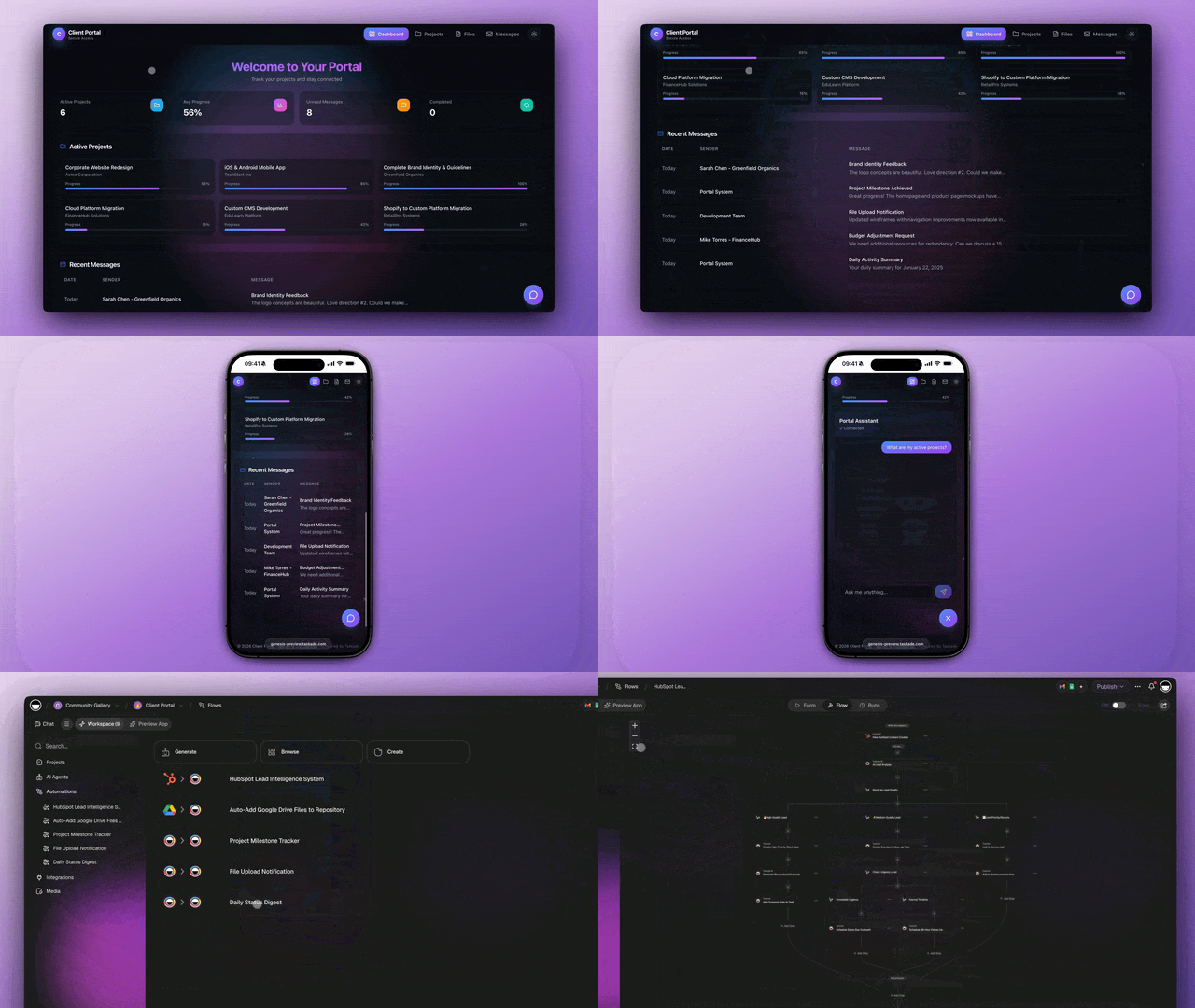
**The prompt:**
```
Build a client portal where my clients can log in to see their project status,
uploaded files, and upcoming milestones. Include a section for comments and questions.
```
**What you get:**
- Login page for each client
- Dashboard showing their project status
- File upload and download area
- Milestone tracker with dates
- Comment section for communication
**Time:** ~5 minutes
### Client Portal Customization Guide
| Customization | How to Add It | Prompt to Use |
|---------------|---------------|---------------|
| Branding | Chat with Genesis | "Add my company logo and change the primary color to [hex code]" |
| Additional fields | Chat with Genesis | "Add a budget tracker showing hours used vs. allocated" |
| Client notifications | Add automation | "When a milestone status changes, email the client automatically" |
| File categories | Modify project | "Organize files into folders: Deliverables, Briefs, Contracts" |
| Access levels | Configure roles | Use RBAC: Owner to Viewer |
| Custom domain | Publishing settings | Deploy on youragency.com with automatic SSL |
| AI assistant | Add agent | "Add an AI agent that answers client questions based on project data" |
**Agent configuration for client portal:**
| Agent | Role | Trigger | Tools Used |
|-------|------|---------|------------|
| Client Success Agent | Answers client questions from project data | Client submits a question in the comment section | Read project data, generate response, notify team |
| Status Update Agent | Writes weekly progress summaries | Scheduled (every Friday at 5 PM) | Read task completions, generate summary, email client |
| File Organizer Agent | Categorizes uploaded files | New file uploaded | Read file metadata, move to correct folder, update log |
-> [Clone a Client Portal Template](https://www.taskade.com/generate/client-portals)
---
## App 2: Booking System
**The problem:** Scheduling calls involves 10 emails to find a time that works.
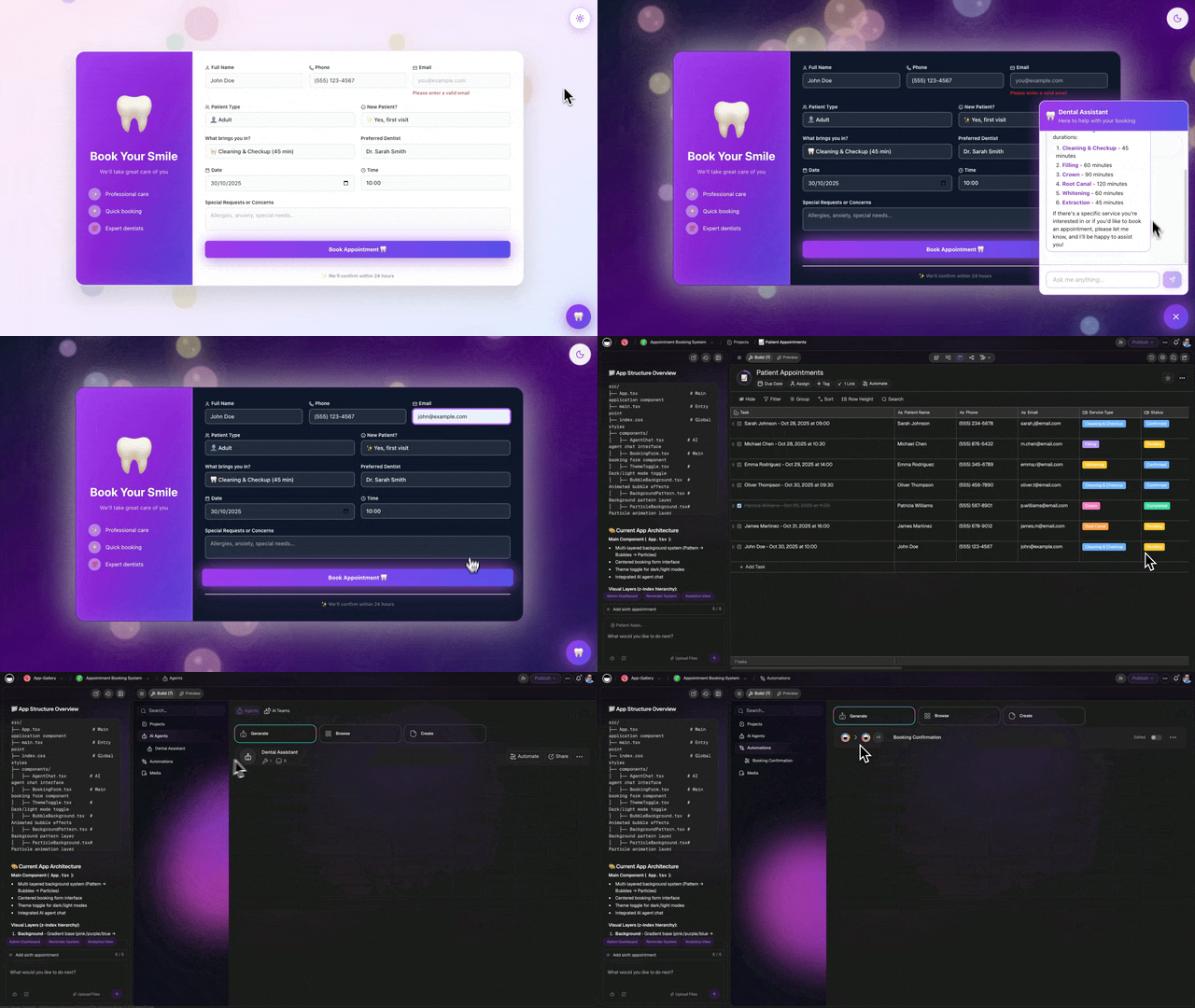
**The prompt:**
```
Create a booking system for 30-minute discovery calls. Show my available slots,
let clients select a time, and send confirmation emails. Integrate with my calendar.
```
**What you get:**
- Calendar view with available slots
- Booking form with client details
- Automatic confirmation emails
- Integration with Google Calendar or Outlook
- Reminder notifications before calls
**Time:** ~7 minutes
### Booking System Customization Guide
| Customization | How to Add It | Prompt to Use |
|---------------|---------------|---------------|
| Multiple call types | Chat with Genesis | "Add options for 15-min intro, 30-min discovery, and 60-min deep dive" |
| Buffer time | Chat with Genesis | "Add 15 minutes buffer between all meetings" |
| Intake questions | Modify form | "Ask clients: company size, budget range, main challenge" |
| Timezone handling | Built-in | Automatically detects and converts client timezone |
| Team scheduling | Add members | "Allow clients to book with any available team member" |
| Payment collection | Add integration | Connect Stripe to collect consultation fees at booking |
| Follow-up sequence | Add automation | "Send a prep email 24 hours before and a summary email after the call" |
**Agent configuration for booking system:**
| Agent | Role | Trigger | Tools Used |
|-------|------|---------|------------|
| Scheduling Agent | Manages availability and prevents double-booking | New booking request | Read calendar, check conflicts, confirm or suggest alternatives |
| Pre-Call Prep Agent | Researches the client before the call | Booking confirmed | Read intake form, search workspace for prior interactions, generate brief |
| Follow-Up Agent | Sends personalized recap after the call | Call completed (manual trigger or calendar event end) | Generate summary from notes, email client, create follow-up tasks |
-> [Clone a Booking Template](https://www.taskade.com/generate/calendars)
---
## App 3: Analytics Dashboard
**The problem:** Key metrics are scattered across tools. You spend time gathering data instead of making decisions.
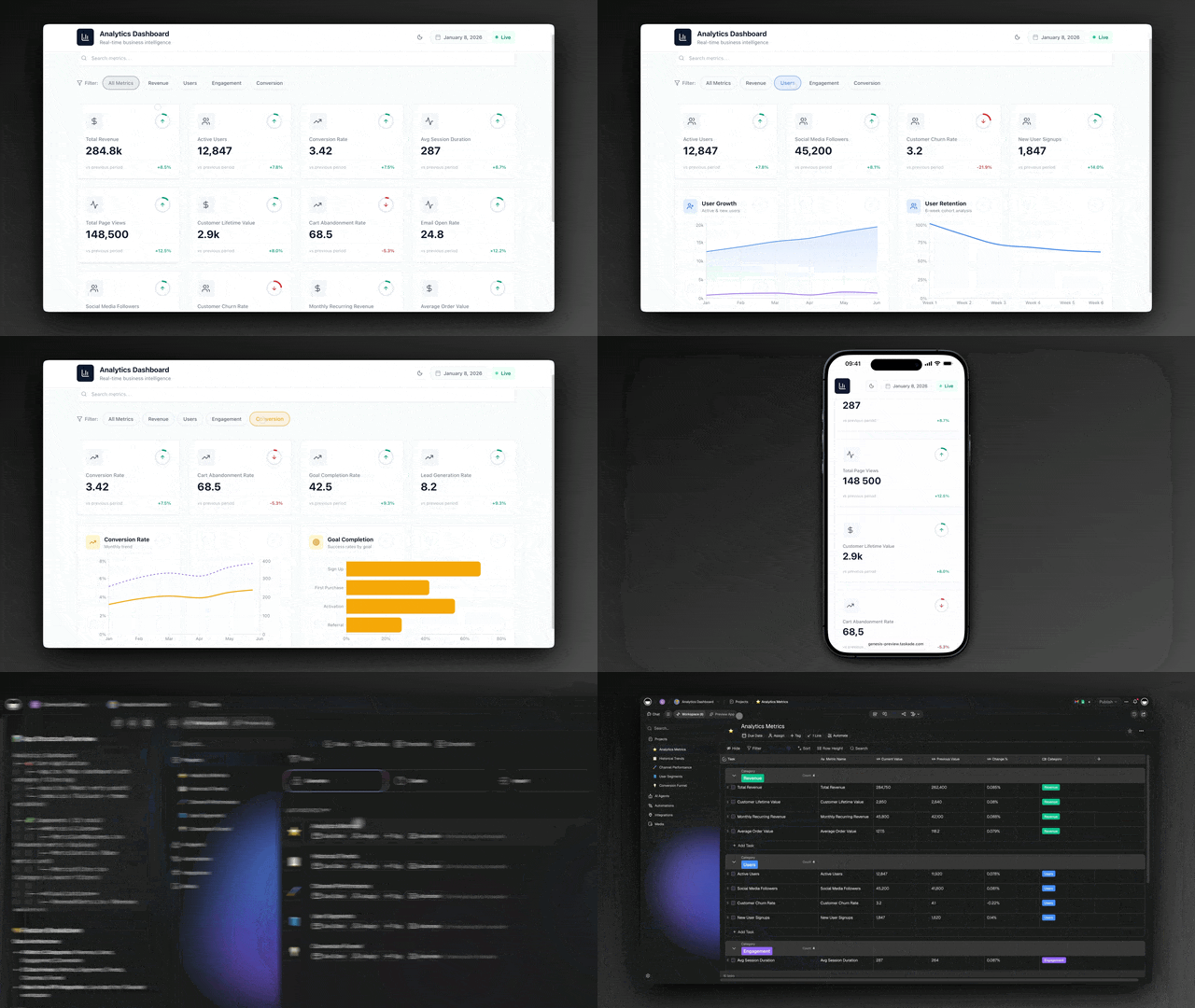
**The prompt:**
```
Build a dashboard showing my key business metrics: MRR, churn rate, active users,
and support tickets. Pull data from my workspace and display with charts.
Highlight anything that needs attention.
```
**What you get:**
- Visual dashboard with key metrics
- Charts and graphs for trends
- Alerts for metrics outside normal range
- Drill-down to underlying data
- AI insights on what the numbers mean
**Time:** ~8 minutes
### Dashboard Customization Guide
| Customization | How to Add It | Prompt to Use |
|---------------|---------------|---------------|
| Custom metrics | Chat with Genesis | "Add CAC, LTV, and LTV:CAC ratio as tracked metrics" |
| Data sources | Add integrations | Connect Google Sheets, Stripe, or HubSpot for live data |
| Alert thresholds | Configure agent | "Alert me when churn exceeds 5% or MRR drops more than 10% week-over-week" |
| Time ranges | Chat with Genesis | "Add toggle for daily, weekly, monthly, and quarterly views" |
| Team dashboards | Duplicate and customize | "Create a sales-specific view and a product-specific view" |
| Export reports | Add automation | "Generate a PDF report every Monday morning and email it to the leadership team" |
| Comparison mode | Chat with Genesis | "Add period-over-period comparison (this month vs. last month)" |
**Agent configuration for dashboard:**
| Agent | Role | Trigger | Tools Used |
|-------|------|---------|------------|
| Data Analyst Agent | Interprets trends and generates insights | Dashboard refresh or manual request | Read metrics, calculate trends, generate narrative insights |
| Alert Agent | Monitors thresholds and notifies team | Continuous (background, Pro+) | Read metrics, compare to thresholds, send Slack/email alerts |
| Report Generator Agent | Creates weekly/monthly summaries | Scheduled (configurable) | Aggregate data, generate charts, compile PDF, email distribution |
-> [Clone a Dashboard Template](https://www.taskade.com/generate/dashboards)
---
## App 4: Knowledge Base
**The problem:** Your team keeps asking the same questions. Answers exist, but nobody can find them.
**The prompt:**
```
Create a knowledge base for my team. Organize by category (HR, Engineering, Sales).
Include search, and let an AI agent answer questions based on the content.
Make it easy to add and update articles.
```
**What you get:**
- Organized article structure by category
- Full-text search across all content
- AI chatbot trained on your documentation
- Easy editing with version history
- Access controls by team
**Time:** ~6 minutes
### Knowledge Base Customization Guide
| Customization | How to Add It | Prompt to Use |
|---------------|---------------|---------------|
| Additional categories | Chat with Genesis | "Add categories: Legal, Finance, Customer Support, Onboarding" |
| Article templates | Create template projects | "Create a standard article template with sections: Overview, Steps, FAQ, Related" |
| Import existing docs | Upload to workspace | Drag and drop existing documents; the agent indexes them automatically |
| Suggested articles | Configure agent | "When someone searches and gets no results, suggest the 3 closest articles" |
| Feedback system | Add form component | "Add a Was this helpful? button to every article with a comment field" |
| Auto-update reminders | Add automation | "Flag articles that haven't been updated in 90 days for review" |
| Public vs. internal | Configure access | Use RBAC to set categories as public (Viewer) or internal (Editor+) |
**Agent configuration for knowledge base:**
| Agent | Role | Trigger | Tools Used |
|-------|------|---------|------------|
| Q&A Agent | Answers questions from documentation | User asks a question in the chatbot | Search knowledge base, synthesize answer, cite source article |
| Content Gap Agent | Identifies topics with no documentation | Weekly schedule | Analyze search queries with no results, generate topic suggestions |
| Freshness Agent | Flags outdated content | Monthly schedule | Check article update dates, compare to changelog, flag stale content |
-> [Start with a Knowledge Base](https://www.taskade.com/generate/apps)
---
## App 5: Lead Capture System
**The problem:** Leads come from multiple sources. Some fall through the cracks. Follow-up is inconsistent.
**The prompt:**
```
Build a lead capture system. Create a form that collects name, email, company,
and what they're interested in. Have an AI agent score leads and send
personalized follow-up emails. Track everything in a pipeline view.
```
**What you get:**
- Customizable intake form
- AI lead scoring based on your criteria
- Automated follow-up email sequences
- Kanban pipeline for lead management
- Integration with your CRM or email
**Time:** ~9 minutes
### Lead Capture Customization Guide
| Customization | How to Add It | Prompt to Use |
|---------------|---------------|---------------|
| Custom fields | Chat with Genesis | "Add fields: annual revenue, team size, timeline, and current tools" |
| Scoring criteria | Configure agent | "Score higher for companies with 50+ employees, annual revenue over 1M, and timeline under 3 months" |
| Pipeline stages | Modify board view | "Create stages: New, Contacted, Qualified, Proposal, Negotiation, Closed Won, Closed Lost" |
| Multi-channel capture | Add embed/webhook | Embed the form on your website or connect a webhook from ads |
| Follow-up cadence | Configure automation | "Send first email immediately, second at 3 days, third at 7 days, fourth at 14 days" |
| CRM sync | Add integration | Connect HubSpot or Salesforce to sync leads bidirectionally |
| Reporting | Add dashboard view | "Show weekly lead volume, conversion rate by source, and average time to close" |
**Agent configuration for lead capture:**
| Agent | Role | Trigger | Tools Used |
|-------|------|---------|------------|
| Scoring Agent | Evaluates lead fit and assigns score (1-100) | New form submission | Read submission, compare to ideal customer profile, assign score |
| Follow-Up Agent | Sends personalized email sequences | Lead scored and routed to pipeline | Generate personalized email, schedule sequence, track opens |
| Re-Engagement Agent | Follows up on stale leads | Lead inactive for 14+ days | Check pipeline activity, generate new value proposition, send email |
| Reporting Agent | Generates pipeline analytics | Weekly schedule | Aggregate lead data, calculate conversion rates, generate summary |
-> [Clone a Lead Capture Template](https://www.taskade.com/generate/forms)
---
## The Pattern
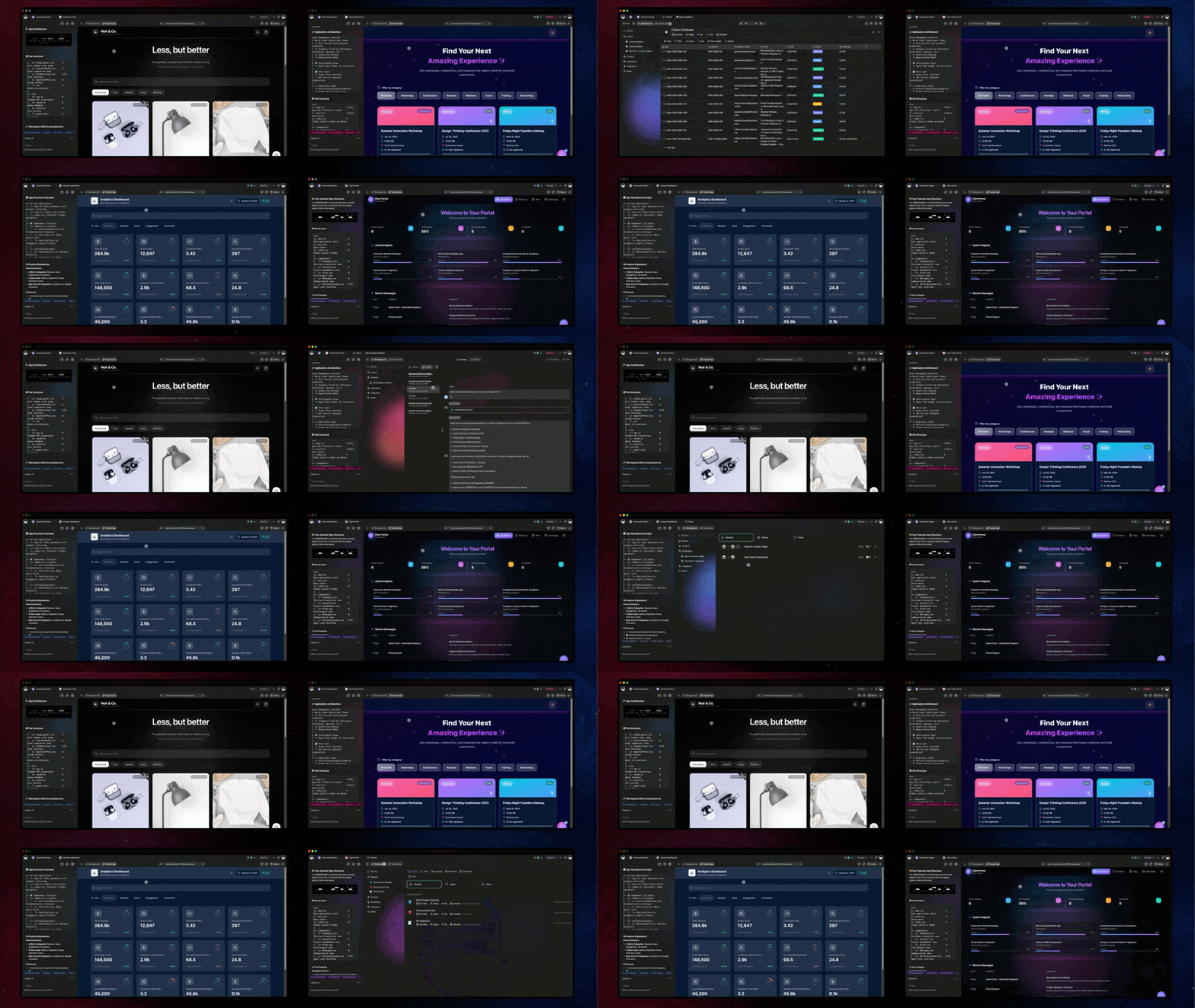
Notice what is consistent across all five apps:
1. **One prompt** -- You describe what you need in plain English
2. **Workspace backend** -- Data lives in your existing Taskade workspace
3. **AI agents included** -- Intelligent automation, not just forms
4. **Instant deployment** -- Share with a link, no hosting setup
5. **Easy customization** -- Adjust anything through conversation, no code
This is what we mean by **"one prompt, one app."**
```mermaid
graph TD
subgraph DNA["Workspace DNA"]
M["Memory
Projects & Databases
multiple views"]
I["Intelligence
AI Agents
built-in tools"]
E["Execution
Automations
100+ integrations"]
end
M -->|"feeds"| I
I -->|"triggers"| E
E -->|"creates"| M
subgraph Apps["Your Apps"]
A1["Client Portal"]
A2["Booking System"]
A3["Dashboard"]
A4["Knowledge Base"]
A5["Lead Capture"]
end
DNA --> A1
DNA --> A2
DNA --> A3
DNA --> A4
DNA --> A5
style M fill:#2a1225,color:#ff8fa3,stroke:#ff2d60,stroke-width:2px
style I fill:#0d1b2a,color:#7dd3fc,stroke:#38bdf8,stroke-width:1.5px
style E fill:#0d1a0e,color:#86efac,stroke:#22c55e,stroke-width:1.5px
style A1 fill:#11111b,color:#cdd6f4,stroke:#00d4aa
style A2 fill:#11111b,color:#cdd6f4,stroke:#00d4aa
style A3 fill:#11111b,color:#cdd6f4,stroke:#00d4aa
style A4 fill:#11111b,color:#cdd6f4,stroke:#00d4aa
style A5 fill:#11111b,color:#cdd6f4,stroke:#00d4aa
style DNA fill:#0a1420,stroke:#1a2a45
style Apps fill:#0a1a14,stroke:#1b3d2a
```
---
## Why Taskade Genesis Builds This Fast: Living Systems vs Code Generators
You might wonder: "How can Taskade Genesis build complete apps in under 10 minutes when tools like Bolt, Lovable, V0, and Cursor take hours?"
The answer lies in a fundamental architectural difference.
### Code Generators (Bolt.new, Lovable, V0, Cursor)
**What they give you**: React/Next.js code files that you need to deploy yourself
**What you still need to do**:
- Set up database (Supabase, Firebase)
- Deploy to hosting (configure environment variables, CI/CD)
- Integrate AI capabilities (OpenAI API, prompt engineering)
- Add automation workflows (Zapier, Make, webhook configuration)
- Wire everything together manually
**Time to production**: 10-20 hours after code generation
**Cost**: $100-1,000+ in tokens for complex apps
**Result**: Static code files you need to manage and deploy
### Living System Orchestrators (Taskade Genesis Apps)
**What you get**: Fully deployed intelligent system with four connected layers
**Taskade Workspace DNA Architecture**:
1. **Memory (Projects)**: Auto-generated database with custom fields, [multiple views](https://www.taskade.com/learn/projects/project-views) (List, Board, Calendar, Table, Mind Map, Gantt, Org Chart)
2. **Intelligence (AI Agents)**: Workspace-aware agents with [built-in tools](https://www.taskade.com/learn/agents/custom-agents) that read your data and learn from your business
3. **Execution (Automations)**: [100+ integrations](https://www.taskade.com/learn/automation/triggers) with autonomous workflows built-in
4. **Interface (Custom UI)**: Professional interface orchestrating all three layers
**Time to production**: 2-15 minutes, fully deployed with shareable link
**Cost**: Starting at $10/month (Pro, annual billing) for unlimited apps
**Result**: Living system that thinks, learns, and acts autonomously
### Full Comparison: Building the Client Portal
| What You Get | Code Generators | Taskade Genesis |
|--------------|----------------|-----------------|
| **UI Components** | Login page, dashboard layout | Login page + multiple view types + responsive design |
| **Database** | You add Supabase (4-8 hours) | Projects database auto-created (instant) |
| **AI Intelligence** | You integrate OpenAI (6-12 hours) | AI Client Success Agent reads client data (instant) |
| **Automation** | You setup Zapier (3-6 hours) | Workflows: status updates to email notifications (instant) |
| **Deployment** | You configure Vercel (2-4 hours) | One-click publish with shareable link (instant) |
| **File Storage** | You add S3/Cloudinary (2-4 hours) | Built-in file storage in workspace (instant) |
| **Access Control** | You build auth (4-8 hours) | RBAC: Owner through Viewer (instant) |
| **Total Time** | 15-30 hours | 5 minutes |
| **Total Cost** | $100-500+ tokens + $40-200/mo infrastructure | Starting at $10/mo unlimited apps |
**The Difference**: Code generators give you a replica of a client portal. Taskade Genesis gives you a living client portal with memory (project data), intelligence (AI agent), and execution (automation) that evolves with your business.
```mermaid
graph LR
subgraph CodeGen["Code Generator Path"]
C1["Generate Code
~30 min"] --> C2["Setup DB
4-8 hrs"]
C2 --> C3["Add AI APIs
6-12 hrs"]
C3 --> C4["Wire Automations
3-6 hrs"]
C4 --> C5["Deploy + Test
2-4 hrs"]
end
subgraph Genesis["Taskade Genesis Path"]
G1["Describe App
~2 min"] --> G2["App Generated
~1 min"]
G2 --> G3["Customize + Share
~2 min"]
end
style C1 fill:#1e1e2e,color:#94a3b8,stroke:#475569
style C2 fill:#1e1e2e,color:#94a3b8,stroke:#475569
style C3 fill:#1e1e2e,color:#94a3b8,stroke:#475569
style C4 fill:#1e1e2e,color:#94a3b8,stroke:#475569
style C5 fill:#1e1e2e,color:#94a3b8,stroke:#475569
style G1 fill:#2a1225,color:#ff8fa3,stroke:#ff2d60,stroke-width:2px
style G2 fill:#11111b,color:#cdd6f4,stroke:#00d4aa
style G3 fill:#0d1a0e,color:#86efac,stroke:#22c55e,stroke-width:1.5px
style CodeGen fill:#1a140a,stroke:#3a2a1a
style Genesis fill:#0a1a14,stroke:#1b3d2a
```
---
## Try It Yourself
The best way to understand Taskade Genesis is to build something.
**Start here:**
1. [Open Taskade Genesis](https://www.taskade.com/ai/apps)
2. Describe an app you actually need
3. Watch it generate
4. Customize and share
**Or clone from the community:**
- [Browse Community Apps](https://www.taskade.com/apps) -- 150,000+ ready-to-use apps
- [Dashboard Examples](https://www.taskade.com/blog/ai-dashboard-examples) -- Business intelligence templates
- [Beginner Examples](https://www.taskade.com/blog/ai-app-beginner-examples) -- Start simple
- [AI Tools Examples](https://www.taskade.com/blog/ai-tools-examples) -- See what others have built
---
## Beyond the First 10 Minutes
These five apps are starting points. Real power comes from connecting them:
**Example workflow:**
- Lead capture form creates a new lead
- AI agent scores and qualifies
- If qualified, creates a task in your project
- Sends personalized follow-up email
- Books a call through your booking system
- Updates the client portal when work begins
- Dashboard shows conversion metrics
All running on one workspace. All connected. All powered by AI agents.
That is the [Taskade Genesis architecture](https://www.taskade.com/blog/how-workspace-dna-works): Memory (your data), Intelligence (AI agents with [built-in tools](https://www.taskade.com/learn/agents/custom-agents)), and Execution ([100+ automations](https://www.taskade.com/learn/automation/triggers)) working together as living software.
| Connected App | Feeds Into | Via |
|---------------|-----------|-----|
| Lead Capture Form | Scoring Agent | Form submission trigger |
| Scoring Agent | Project Pipeline | Task creation automation |
| Project Pipeline | Follow-Up Agent | Pipeline stage change trigger |
| Follow-Up Agent | Booking System | Email with booking link |
| Booking System | Client Portal | Booking confirmed trigger |
| Client Portal | Analytics Dashboard | Status update events |
| Analytics Dashboard | Re-Engagement Agent | Stale lead alert |
---
## Frequently Asked Questions
**What types of apps can you build with AI in under 10 minutes?**
Practical business apps including client portals, booking systems, dashboards, knowledge bases, and lead capture forms. Each starts from a natural language description and produces a working app with UI, database, and AI agents. Browse 150,000+ examples in the [Taskade App Factory](https://www.taskade.com/apps).
**How do you write an effective prompt for AI app generation?**
Be specific about structure and functionality. Include the purpose, key screens, data fields, and desired automations. Instead of "Build me a CRM," describe exact screens, fields, and workflows. See the prompt examples for each app above.
**Can AI-generated apps handle real business data?**
Yes. These are working applications with functional databases, persistent data, and [100+ integrations](https://www.taskade.com/learn/automation/triggers), not mockups. Publish with custom domains, embed in websites, and connect to external services.
**How much does it cost?**
Free to start. [Pro at $10/month](https://www.taskade.com/pricing) (annual billing) includes unlimited apps, AI agents, and automations. Compare to $5,000-50,000 per custom-developed app plus ongoing hosting costs.
**Can I customize after generation?**
Yes. Chat with Genesis to add features, change layout, modify data fields, or adjust agent behavior. Every change is tracked in version history. See the customization tables for each app above.
**How do AI agents work inside generated apps?**
Agents have access to your workspace data and [built-in tools](https://www.taskade.com/learn/agents/custom-agents). They read project context, generate content, make decisions, and trigger automations. See the agent configuration tables for each app above.
**Can I connect to existing tools?**
Yes. [100+ integrations](https://www.taskade.com/integrations) across 10 categories: Slack, Gmail, Google Sheets, HubSpot, Salesforce, Stripe, GitHub, Notion, and more.
**How do generated apps differ from code-generated apps?**
Code generators produce source files needing separate deployment and infrastructure. Taskade Genesis produces fully deployed living systems with built-in memory, agents, and automations. No hosting or DevOps required.
---
## Learn More
- [How Taskade Workspace DNA Works](https://www.taskade.com/blog/how-workspace-dna-works) -- The architecture
- [What Are AI Agents?](https://www.taskade.com/blog/what-are-ai-agents) -- The intelligence pillar
- [Build Without Permission](https://www.taskade.com/blog/build-without-permission) -- The philosophy
- [The End of the App Store](https://www.taskade.com/blog/end-of-app-store) -- Why this matters
- [Taskade Reviews](https://www.taskade.com/blog/taskade-reviews) -- What users say
- [AI App Beginner Examples](https://www.taskade.com/blog/ai-app-beginner-examples) -- 12 starter apps
- [Chatbots Are Demos, Agents Are Execution](https://www.taskade.com/blog/chatbots-vs-agents) -- Why agents win
- [The Origin of Living Software](https://www.taskade.com/blog/origin-of-living-software) -- How we got here
- [Custom AI Agents Guide](https://www.taskade.com/learn/agents/custom-agents) -- built-in tools
- [Automation Triggers Guide](https://www.taskade.com/learn/automation/triggers) -- 100+ integrations
---
## Compare Taskade Genesis to Code-Based Alternatives
**AI App Builders:**
- [Taskade vs V0](https://www.taskade.com/compare/free-v0-alternative) -- [Full Review](https://www.taskade.com/blog/v0-review)
- [Taskade vs Lovable](https://www.taskade.com/compare/free-lovable-alternative) -- [Full Review](https://www.taskade.com/blog/lovable-review)
- [Taskade vs Bolt](https://www.taskade.com/compare/free-bolt-alternative) -- [Full Review](https://www.taskade.com/blog/bolt-review)
- [Taskade vs Replit](https://www.taskade.com/compare/free-replit-alternative) -- [Full Review](https://www.taskade.com/blog/replit-review)
**AI Code Editors:**
- [Taskade vs Cursor](https://www.taskade.com/compare/free-cursor-alternative) -- [Full Review](https://www.taskade.com/blog/cursor-review)
- [Taskade vs Windsurf](https://www.taskade.com/compare/free-windsurf-alternative) -- [Full Review](https://www.taskade.com/blog/windsurf-review)
**Workspace Tools:**
- [Taskade vs Notion](https://www.taskade.com/compare/free-notion-alternative) -- [Full Review](https://www.taskade.com/blog/notion-review)
- [Taskade vs Webflow](https://www.taskade.com/compare/free-webflow-alternative) -- [Full Review](https://www.taskade.com/blog/webflow-review)
- [Taskade vs Monday](https://www.taskade.com/compare/free-mondaycom-alternative) -- [Full Review](https://www.taskade.com/blog/monday-com-history)
---
## Get Started
**No credit card. No setup. Just build.**
-> [Try Taskade Genesis Free](https://www.taskade.com/ai/apps)